
BTMETER BT-570CAPP
BTMETER Digital Clamp Multimeter BT-570S-APP User Manual
Model: BT-570CAPP | Brand: BTMETER
1. บทนำ
This manual provides instructions for the safe and effective operation of the BTMETER Digital Clamp Multimeter, model BT-570S-APP. This True-RMS clamp meter is designed for professional and home use, offering a wide range of measurement capabilities including AC/DC voltage, AC/DC current, resistance, capacitance, frequency, temperature, diode, and continuity tests. It also features Non-Contact Voltage (NCV) detection and Bluetooth connectivity for app-based data monitoring and logging.
2. ข้อมูลด้านความปลอดภัย
Always adhere to basic safety precautions when using this product to reduce the risk of fire, electric shock, or personal injury. Read all instructions before use.
- ห้ามป้อนค่าเกินค่าสูงสุดที่กำหนดไว้สำหรับแต่ละช่วงการวัด
- Ensure the test leads are properly connected and the function switch is set to the correct range before making measurements.
- ใช้ความระมัดระวังอย่างยิ่งเมื่อทำงานกับ voltages สูงกว่า 30V AC RMS, 42V peak หรือ 60V DC ปริมาตรเหล่านี้tagอาจทำให้เกิดอันตรายจากการช็อตได้
- Before measuring current, ensure the circuit is de-energized and the clamp jaws are properly closed around a single conductor.
- ห้ามใช้งานมิเตอร์หากพบว่าเครื่องวัดได้รับความเสียหายหรือสายวัดได้รับความเสียหาย
- ควรเปลี่ยนแบตเตอรี่ทันทีเมื่อไฟแสดงสถานะแบตเตอรี่ต่ำปรากฏขึ้น เพื่อให้ได้ค่าการวัดที่แม่นยำ
3. เนื้อหาบรรจุภัณฑ์
Verify that all items listed below are included in your package. If any items are missing or damaged, contact BTMETER customer support.

The image displays the complete package contents for the BTMETER BT-570S-APP. This includes the main clamp multimeter unit, a pair of red and black test leads, a yellow temperature probe, a 9V battery, a small screwdriver for battery compartment access, a black zippered carrying case, and the user manual.
- 1 x BTMETER BT-570S-APP Digital Clamp มัลติมิเตอร์
- สายทดสอบ 1 คู่ (สีแดงและสีดำ)
- 1 x K-Type Temperature Probe
- 1 x 9V Battery (6F22)
- ไขควงขนาดเล็ก 1 อัน
- 1 x กระเป๋าใส่ของ
- 1 x คู่มือผู้ใช้
4. สินค้าหมดview
The BTMETER BT-570S-APP is a versatile clamp multimeter designed for various electrical measurements. Familiarize yourself with its components and features.

This image provides a detailed breakdown of the multimeter's physical features. It shows the large LCD display capable of 6000 counts, the 26mm opening clamp jaws for non-contact current measurement, the central rotary switch for function selection, and the double insulation design for enhanced safety. The overall dimensions of the device are also indicated: 225mm (8.8in) length, 77mm (3.0in) width, and 45mm (1.7in) height.
คุณสมบัติหลัก:
- จอแสดงผล LCD: 6000 counts digital display with full function symbol indication.
- Clamp ขากรรไกร: Opens up to 26mm to enclose conductors for current measurement.
- สวิตช์โรตารี่: Used to select desired measurement functions and ranges.
- Double Insulation Design: Provides enhanced protection during operation.
- พอร์ตทดสอบสายนำ: COM, VΩHzT+ for connecting test leads and temperature probe.
- ปุ่มฟังก์ชั่น: SELECT, MAX/MIN, REL, Hz/Duty, HOLD.
- เซ็นเซอร์ NCV: สำหรับปริมาตรที่ไม่สัมผัสtagการตรวจจับอี

This graphic illustrates 15 distinct features of the BT-570S-APP. These include Continuity testing, Bluetooth connectivity, AC/DC Current measurement, Auto Ranging, Diode testing, AC/DC Voltage measurement, True RMS capability, Capacitance measurement, Resistance measurement, Frequency measurement, Duty Cycle measurement, Temperature testing, Relative Value (REL) function for auto zero, Data Hold, and Backlight for the display.
5. การตั้งค่า
5.1 การติดตั้งแบตเตอรี่
- ค้นหาฝาครอบช่องใส่แบตเตอรี่ที่ด้านหลังของมัลติมิเตอร์
- Use the provided screwdriver to loosen the screw securing the cover.
- Remove the cover and insert the 9V battery, observing the correct polarity (+/-).
- ใส่ฝาปิดช่องใส่แบตเตอรี่และขันสกรูให้แน่น
5.2 การดาวน์โหลดแอปและการเชื่อมต่อบลูทูธ
The BT-570S-APP features Bluetooth connectivity for remote monitoring and data logging via a dedicated mobile application.
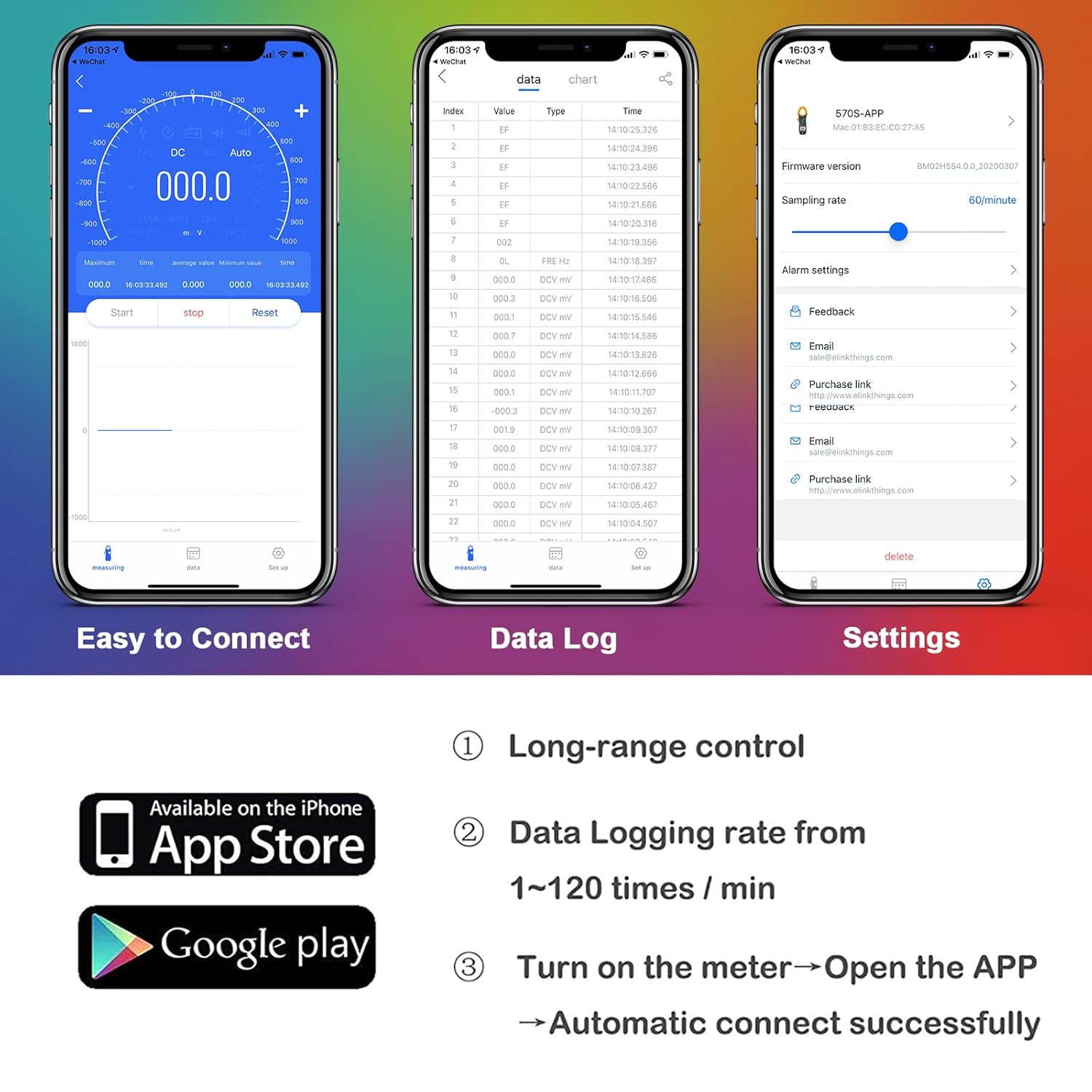
This image illustrates the mobile application's interface, highlighting its ease of connection, data logging capabilities, and settings menu. It also shows icons for downloading the app from the Apple App Store and Google Play Store, indicating cross-platform compatibility. The app allows for long-range control, data logging rates from 1-120 times/min, and automatic connection upon opening the app with the meter turned on.
- Download the customized BTMETER app from the Google Play Store (for Android) or the Apple App Store (for iOS). ค้นหา "BTMETER" or refer to the QR code in the physical manual.
- ตรวจสอบให้แน่ใจว่าได้เปิดใช้งาน Bluetooth บนสมาร์ทโฟนของคุณแล้ว
- Turn on the BT-570S-APP multimeter by rotating the switch from OFF to any measurement function.
- Open the BTMETER app on your phone. The app should automatically detect and connect to the multimeter.
- Once connected, you can monitor live readings, view maximum/minimum/average values, graph data, record, save, and export measurements directly from the app.

This image highlights the Smart Mobile APP Connection feature, showing the BT-570S-APP multimeter wirelessly connected to a smartphone. The phone's screen displays real-time measurement data, demonstrating the app's capability to display and record maximum/minimum/average values, as well as save and export data for further analysis. The connection range is indicated as 0-15 meters.
6. คู่มือการใช้งาน
6.1. การดำเนินการทั่วไป
- หมุนสวิตช์แบบหมุนไปยังฟังก์ชันการวัดที่ต้องการ
- The meter features auto-ranging, automatically selecting the appropriate range for the measurement.
- Connect the test leads or position the clamp jaws as required for the specific measurement.
- อ่านค่าการวัดจากหน้าจอ LCD
- To turn off the meter, rotate the switch to the "OFF" position.
6.2 ฟังก์ชันการวัด

This banner image titled 'Multimeter Functions' visually represents the diverse measurement capabilities of the device. It includes small illustrative images for DC Voltage, AC ฉบับที่tage, DC Current, AC Current, Resistance, Capacitance, Frequency, and Continuity, demonstrating the meter's comprehensive functionality.
- กระแสสลับ/กระแสตรง โวลtage (V∼ / V—): Insert test leads into COM and VΩHzT+ ports. Select V∼ or V— on the rotary switch. Connect leads in parallel to the circuit.
- AC/DC Current (A∼ / A—): Rotate the switch to A∼ or A—. Open the clamp jaws and enclose a single conductor. Ensure the jaws are fully closed. Do not use test leads for current measurement via clamp.
- ความต้านทาน (โอห์ม): Insert test leads into COM and VΩHzT+ ports. Select Ω on the rotary switch. Connect leads across the component to be measured. Ensure the circuit is de-energized.
- ความจุ (F): Insert test leads into COM and VΩHzT+ ports. Select F on the rotary switch. Connect leads across the capacitor. Ensure the capacitor is discharged before measurement.
- ความถี่ (เฮิร์ตซ์) / รอบการทำงาน (%): Insert test leads into COM and VΩHzT+ ports. Select Hz on the rotary switch. Connect leads to the signal source. Press the Hz/Duty button to toggle between frequency and duty cycle.
- อุณหภูมิ (℃/℉): Insert the K-type temperature probe into the COM and VΩHzT+ ports, observing polarity. Select ℃/℉ on the rotary switch. The display will show the ambient temperature. Place the probe tip on or in the object to measure its temperature.
- การทดสอบไดโอด (→|): Insert test leads into COM and VΩHzT+ ports. Select Diode on the rotary switch. Connect the red lead to the anode and the black lead to the cathode of the diode.
- การทดสอบความต่อเนื่อง (): Insert test leads into COM and VΩHzT+ ports. Select Continuity on the rotary switch. If the resistance is below approximately 50Ω, the buzzer will sound.
- แบบไม่สัมผัส Voltagอี (NCV): Rotate the switch to NCV. Move the NCV sensor area of the meter close to the conductor. If AC voltage is detected, the LED indicator will flash, and the buzzer will sound. The intensity of the alarm increases with voltagความแข็งแกร่ง

This image shows the BT-570S-APP multimeter actively measuring temperature. A K-type temperature probe is immersed in a blue liquid within a beaker, and the multimeter's display shows a reading of -02.72 ℃. This demonstrates the device's capability for precise temperature measurement.

This image demonstrates the Non-Contact Voltage (NCV) detection feature. The BT-570S-APP multimeter is shown with its NCV detection area near an electrical outlet. Visual cues (flashing 'bi' text) and an audible alarm (represented by sound waves) indicate the presence of AC voltage without direct contact. The 45mm jaws support measuring AC voltage from 90 to 1000V without contacting the wires.
6.3 ฟังก์ชั่นพิเศษ
- การเก็บข้อมูล (HOLD): กดปุ่ม "HOLD" เพื่อหยุดการอ่านค่าปัจจุบันบนหน้าจอ กดอีกครั้งเพื่อปล่อย
- แสงไฟด้านหลัง: Press and hold the "HOLD" button for more than 2 seconds to turn on the LCD backlight. Press and hold again to turn it off.
- มูลค่าสัมพัทธ์ (REL): Press the "REL" button to zero out the current reading, allowing subsequent measurements to be displayed as a relative difference from that reference point. Press again to exit relative mode.
- ค่าสูงสุด/ค่าต่ำสุด (MAX/MIN): Press the "MAX/MIN" button to enter MAX/MIN recording mode. The meter will display the maximum value measured. Press again to cycle through minimum value and exit.

This image highlights the 'Backlight & Data Hold' features. Pressing the "HOLD" key briefly freezes the reading on the display for easy recording. Pressing the "HOLD" key for more than 2 seconds activates the LCD backlight, improving visibility in low-light conditions.

This image illustrates the 'Auto Zero & MAX/MIN Mode' functions. The "REL" (relative value) key allows users to zero out a reading before measurement. The "MAX/MIN" key records and displays the maximum or minimum measured values, aiding in diagnosing problems and improving troubleshooting efficiency.
7. การบำรุงรักษา
7.1 การทำความสะอาด
เช็ดมิเตอร์ด้วยโฆษณาamp ผ้าและผงซักฟอกอ่อนๆ ห้ามใช้สารกัดกร่อนหรือตัวทำละลาย เก็บมิเตอร์ให้แห้ง
7.2 การเปลี่ยนแบตเตอรี่
When the low battery indicator appears on the display, replace the 9V battery as described in the "Battery Installation" section (5.1). Remove the battery if the meter is not used for an extended period.
8 การแก้ไขปัญหา
- ไม่มีการแสดงผลหรือการอ่านค่าผิดปกติ: Check battery level and replace if necessary. Ensure test leads are properly connected.
- ปัญหาการเชื่อมต่อบลูทูธ: Ensure the meter is turned on and within range of your smartphone. Restart the app and the meter. Check phone's Bluetooth settings.
- การอ่านค่าที่ไม่ถูกต้อง: Verify the correct function and range are selected. Check for damaged test leads. Ensure proper contact with the circuit.
- NCV ตรวจไม่พบปริมาตรtage: Ensure the NCV sensor area is close to the live conductor. The NCV function is designed for AC voltagอีเท่านั้น
9. ข้อมูลจำเพาะ
| พารามิเตอร์ | ค่า |
|---|---|
| หมายเลขรุ่น | BT-570CAPP |
| แสดง | 6000 นับ |
| DC ฉบับที่tagอี เรนจ์ | 0.1mV~1000V |
| ฉบับ ACtagอี เรนจ์ | 1mV~750V |
| DC & AC Current Range | 100mA ~ 1000A |
| ช่วงความต้านทาน | 0.1Ω ~ 60MΩ |
| ช่วงความจุ | 1pF ~ 60mF |
| ช่วงความถี่ | 0.001 ~ 9.999MHz |
| ช่วงอุณหภูมิ | -4 ~ 1832℉ (℃/℉ Optional) |
| การเปิดขากรรไกร | 45มม. |
| แหล่งพลังงาน | แบตเตอรี่ 9V |
| น้ำหนักสินค้า | 45 กรัม |
| ขนาดแพ็คเกจ | 10.16 x 4.96 x 2.24 นิ้ว |
| การเชื่อมต่อ | Bluetooth (App for Android/iOS) |
| คุณสมบัติพิเศษ | True-RMS, Auto Ranging, NCV, Data Hold, Backlight, REL, MAX/MIN |
10. การรับประกันและการสนับสนุน
BTMETER provides a 12-month quality warranty for the BT-570S-APP Digital Clamp Multimeter. Life-time technical support is also available.
For technical assistance, warranty claims, or any product-related inquiries, please contact BTMETER customer service through the contact information provided in your product packaging or on the official BTMETER webเว็บไซต์.
Ask a question about this manual
Ask about setup, troubleshooting, compatibility, parts, safety, or missing instructions. Manuals+ will review the question and use this page’s manual context to help answer it.