
1. บทนำ
This manual provides detailed instructions for the installation, operation, and maintenance of your FASTCABLiNG 4-Port PoE Passthrough Switch. This device is designed to expand your existing network infrastructure by providing additional Power over Ethernet (PoE) ports without requiring a separate AC power adapter. It supports IEEE802.3at/bt standards, offering a 65 Watt power budget for connected devices.

Image: FASTCABLiNG PoE Passthrough Switch with its retail packaging.
คุณสมบัติหลัก:
- 65 Watt power budget with PoE++ passthrough capability.
- Expands existing network to connect up to 4 additional IP devices (both PoE and non-PoE compatible).
- No additional AC adapter required; powered by an existing PoE switch or injector.
- Managed switch features including VLAN, QoS, MAC address management, and static routing for enhanced security and convenience.
- Compact, fanless design for flexible placement and silent operation, avoiding overheating.
- Supports PoE and PoE+ for various applications such as IP cameras, VoIP phones, and Wireless Access Points (WAPs).
2. ข้อมูลด้านความปลอดภัย
โปรดอ่านและปฏิบัติตามคำแนะนำด้านความปลอดภัยเหล่านี้เพื่อป้องกันความเสียหายต่ออุปกรณ์หรือการบาดเจ็บต่อตัวคุณเอง
- Ensure proper grounding of the device to prevent electrical hazards.
- อย่าให้สวิตช์โดนน้ำหรือความชื้นสูงเกินไป
- หลีกเลี่ยงการวางอุปกรณ์ใกล้แหล่งความร้อนหรือแสงแดดโดยตรง
- Use only compatible Ethernet cables (Cat5e/Cat6 or higher) for optimal performance and safety.
- อย่าพยายามเปิดหรือซ่อมแซมอุปกรณ์ด้วยตนเอง แนะนำให้ส่งช่างผู้ชำนาญเข้ารับบริการทั้งหมด

Image: Illustration of the grounding terminal on the switch, indicating the importance of linking ground for safety.
3. สินค้าหมดview
The FASTCABLiNG PoE Passthrough Switch features multiple ports for network connectivity and power delivery.

ภาพ: แผงด้านหน้า view of the switch, highlighting 4 PoE ports and 1 Uplink/PD port.
คำอธิบายพอร์ต:
- พอร์ต PoE (1-4): Four 10/100/1000Mbps Ethernet ports that provide both data and Power over Ethernet (PoE) to connected devices.
- Uplink/PD Port (5/6): This port serves as the Power Device (PD) input, receiving both data and power from a PoE injector or PoE switch. It also functions as an uplink port for data transmission.
ไฟ LED แสดงสถานะ:
- LED PoE: Indicates PoE status for the respective port.
- DATA LED (LNK/ACT): Indicates network link status and data activity for the respective port.
- ไฟ LED PWR: Indicates the overall power status of the switch.
4. การตั้งค่าและการติดตั้ง
Follow these steps to set up your PoE Passthrough Switch.
- เชื่อมต่อกำลังไฟเข้า: Connect an Ethernet cable from a PoE injector or a PoE switch (supporting IEEE802.3at/bt) to the Uplink/PD port (Port 5/6) on the FASTCABLiNG switch. This port will receive both data and power, eliminating the need for an external AC adapter.

Image: Diagram illustrating the switch being powered by a PoE injector, eliminating the need for an AC adapter.
- เชื่อมต่ออุปกรณ์เครือข่าย: Connect your IP devices (e.g., IP cameras, VoIP phones, WAPs) to the PoE Ports (1-4) using standard Ethernet cables. The switch will provide both data connectivity and power to these devices. Non-PoE devices can also be connected to these ports for data only.
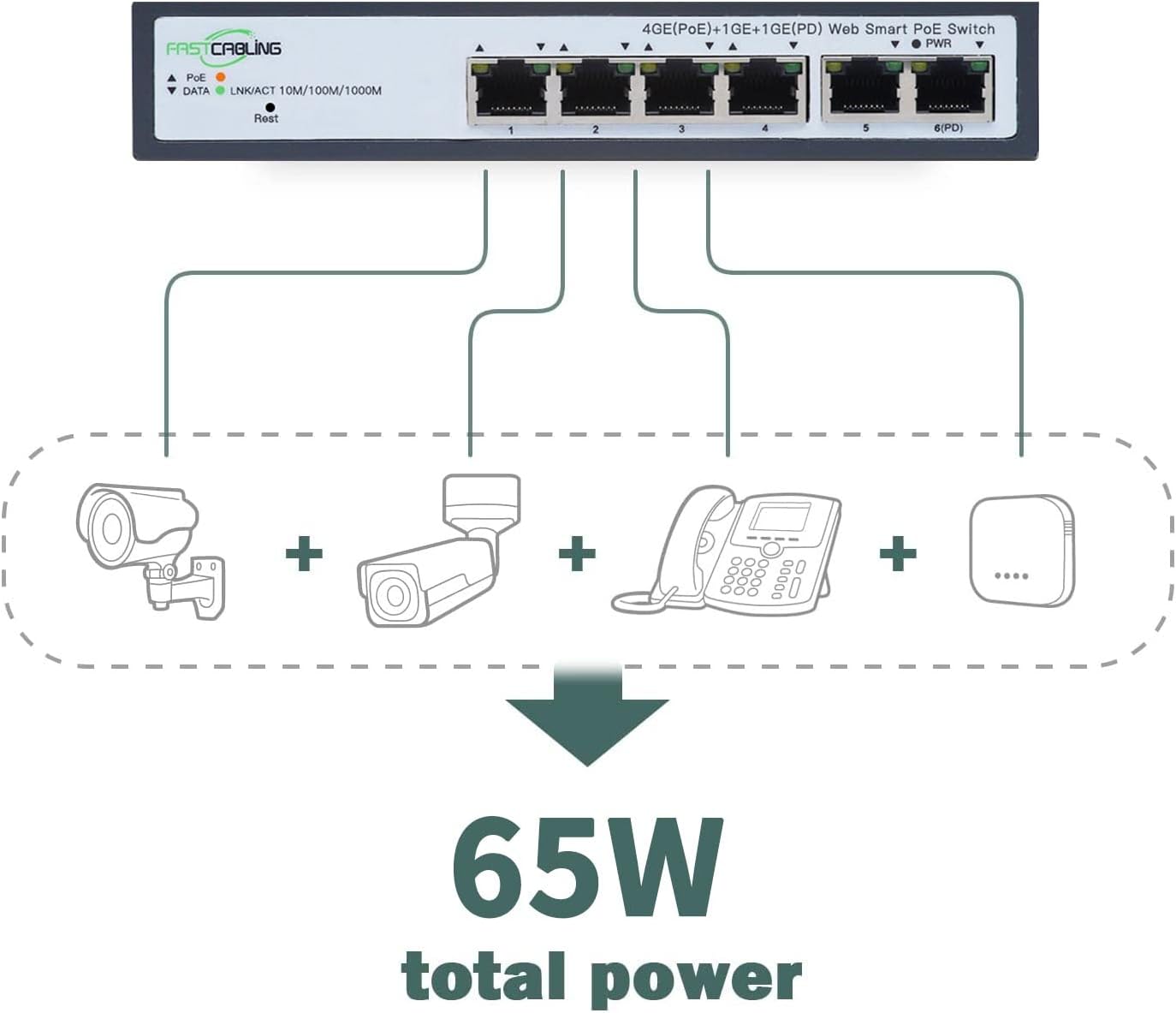
Image: Illustration of various IP devices (cameras, phones) connected to the switch, utilizing its 65W total power budget.
- ตรวจสอบการเชื่อมต่อ: Check the LED indicators on the front panel. The PWR LED should be lit, and the LNK/ACT LEDs for connected ports should indicate active links and data transmission.
- การติดตั้ง (ทางเลือก): The compact size allows for flexible placement. While some units may support DIN rail mounting, this specific model features slotted holes on the back for screw-head mounting on a wall or backplate. Ensure secure mounting in a well-ventilated area.

Image: Diagram illustrating how the PoE Powered Switch expands 4 network ports to connect IP devices, and how multiple switches can be applied for further expansion.
5. คู่มือการใช้งาน
Once installed, the FASTCABLiNG PoE Passthrough Switch operates automatically. As a managed switch, it offers advanced configuration options for network optimization.
การใช้งานพื้นฐาน:
- The switch automatically detects and provides power to connected PoE-compatible devices.
- Data transmission occurs at speeds up to 1000Mbps (Gigabit Ethernet) for all ports.
- The fanless design ensures silent operation, suitable for various environments.
Managed Features:
This switch includes managed features accessible via a web interface (refer to the separate management guide for detailed instructions on accessing and configuring these features).
- VLAN (เครือข่ายพื้นที่เสมือน): Segment your network to improve security and performance by isolating traffic between different groups of devices.
- QoS (คุณภาพการบริการ): Prioritize network traffic for critical applications (e.g., VoIP, video streaming) to ensure consistent performance.
- MAC Address Management: Control network access based on MAC addresses for enhanced security.
- การกำหนดเส้นทางแบบคงที่: Configure fixed routes for network traffic, useful in complex network topologies.
6. การบำรุงรักษา
การบำรุงรักษาตามปกติจะช่วยให้สวิตช์ของคุณมีอายุการใช้งานยาวนานและมีประสิทธิภาพเหมาะสมที่สุด
- การทำความสะอาด: ใช้ผ้านุ่มและแห้งเช็ดทำความสะอาดภายนอกสวิตช์ ห้ามใช้น้ำยาทำความสะอาดชนิดน้ำหรือสเปรย์
- การระบายอากาศ : Ensure that the ventilation holes on the sides of the switch are not obstructed to prevent overheating.
- อัพเดตเฟิร์มแวร์: Periodically check the FASTCABLiNG official webเว็บไซต์สำหรับการอัปเดตเฟิร์มแวร์ที่มีอยู่ การอัปเดตเฟิร์มแวร์สามารถปรับปรุงประสิทธิภาพ เพิ่มคุณสมบัติใหม่ หรือแก้ไขข้อบกพร่องได้
- การจัดการสายเคเบิล: Keep network cables organized and free from kinks or excessive bends to maintain signal integrity.
7 การแก้ไขปัญหา
If you encounter issues with your FASTCABLiNG PoE Passthrough Switch, refer to the following common troubleshooting steps.
- ไม่มีไฟ (ไฟ LED แสดงสถานะ PWR ดับ):
- Ensure the upstream PoE injector or switch is powered on and functioning correctly.
- Verify the Ethernet cable connecting the upstream PoE source to the switch's Uplink/PD port is securely connected and not damaged.
- Confirm the upstream PoE source supports IEEE802.3at/bt and provides sufficient power.
- Device Not Receiving Power (PoE LED Off):
- Check if the connected device is PoE-compatible.
- Ensure the Ethernet cable between the switch and the device is securely connected and functional.
- Verify the total power consumption of all connected PoE devices does not exceed the switch's 65W power budget.
- No Network Connectivity (LNK/ACT LED Off or Flashing Incorrectly):
- ตรวจสอบสายอีเธอร์เน็ตว่าเชื่อมต่อแน่นดีหรือไม่ และมีรอยชำรุดเสียหายหรือไม่
- Ensure the connected device is powered on and its network interface is active.
- If using managed features, verify VLAN or other configurations are not inadvertently blocking traffic.
- DHCP Issues:
- If experiencing issues with DHCP, consider assigning static IP addresses to devices or consult your network administrator for DHCP server configuration.
If problems persist, contact FASTCABLiNG customer support for further assistance.
8. ข้อมูลจำเพาะ
| คุณสมบัติ | ข้อมูลจำเพาะ |
|---|---|
| ยี่ห้อ | การเดินสายเร็ว |
| แบบอย่าง | 4 port|65W |
| จำนวนพอร์ต | 4 (PoE) + 1 (Uplink/PD) |
| ประเภทอินเทอร์เฟซ | PoE (พลังงานผ่านอีเทอร์เน็ต) |
| Maximum Power Budget | 65 Watts (PoE++ Passthrough) |
| มาตรฐาน PoE | IEEE802.3at/bt |
| ความสามารถในการสลับ | 10 กิกะบิตต่อวินาที |
| การเชื่อมต่อเครือข่าย | 10/100/1000 เมกะบิตต่อวินาที |
| อุปกรณ์ที่รองรับ | IP Cameras, VoIP Phones, WAPs, etc. |
| วัสดุตัวเรือน | โลหะ |
| สี | สีเทา |
| ขนาดสินค้า | 6.61 x 3.66 x 1.26 นิ้ว (168 x 93 x 32 มม.) |
| น้ำหนักสินค้า | 1.27 ปอนด์ |
| คะแนนอุณหภูมิบน | 70 องศาเซลเซียส |

Image: Technical drawing with dimensions of the FASTCABLiNG PoE Passthrough Switch.
9. การรับประกันและการสนับสนุน
FASTCABLiNG products are designed for reliability and performance. For warranty information and technical support, please refer to the official FASTCABLiNG webเว็บไซต์หรือติดต่อฝ่ายบริการลูกค้าของพวกเขา
- การสนับสนุนทางออนไลน์: เยี่ยมชม FASTCABLiNG Store on Amazon สำหรับข้อมูลผลิตภัณฑ์และทรัพยากรสนับสนุน
- ติดต่อฝ่ายบริการลูกค้า: For specific inquiries or troubleshooting assistance, please reach out to FASTCABLiNG customer support through their official channels.