
1. บทนำ
The D-Link DGS-1100-05PDV2 is a 5-Port Gigabit Smart Managed PoE Powered Switch/Extender designed for small, medium, and enterprise network environments. This switch is unique as it receives its power via Power over Ethernet (PoE) from an upstream PoE switch or injector, eliminating the need for a local AC power source. It also features PoE Pass-through capabilities, allowing it to supply power to one or two downstream PoE-enabled devices. The DGS-1100-05PDV2 incorporates energy-saving technologies like IEEE 802.3az Energy Efficient Ethernet and D-Link Green, ensuring efficient operation. Management is facilitated through an intuitive web-based interface, providing comprehensive control over network settings and features.
2. คุณสมบัติหลัก
- PoE Powered Operation: Receives power from an upstream PoE Switch or PoE injector, eliminating the need for a dedicated AC power supply.
- PoE Pass-through: Provides PoE power to one or two downstream devices, extending network and power reach.
- พอร์ต 5 กิกะบิต: Offers high-speed network connectivity for various devices.
- ความสามารถในการจัดการอัจฉริยะ: Features include 802.1Q VLAN support, Quality of Service (QoS), and Bandwidth Limiting for optimized network performance.
- คุณสมบัติความปลอดภัยขั้นสูง: Includes Static MAC, Storm Control, and IGMP Snooping to enhance network security and stability.
- ประหยัดพลังงาน: Compliant with IEEE 802.3az Energy Efficient Ethernet (EEE) and D-Link Green technology for reduced power consumption.
- การจัดการที่ง่าย: Configurable via an intuitive web-based management interface for simplified network administration.
- เครื่องมือวินิจฉัย: Features Loopback Detection and Cable Diagnostics to assist in quickly identifying and resolving network issues.
- การออกแบบที่ไม่มีพัดลม: Ensures silent operation and contributes to a longer product lifespan.
- การติดตั้งที่ยืดหยุ่น: Supports both desktop and wall mount placement.
- รับประกันตลอดอายุการใช้งาน: Backed by a D-Link Lifetime Warranty for long-term reliability.
3. เนื้อหาบรรจุภัณฑ์
ตรวจสอบว่าแพ็คเกจของคุณมีรายการต่อไปนี้:
- DGS-1100-05PDV2 Gigabit Switch
- ขาเป็นยาง
- สกรูยึด
- คู่มือการติดตั้งแบบด่วน
- บัตรรับประกัน
Note: A PoE injector or an upstream PoE switch is required to power the DGS-1100-05PDV2 and is not included in the package.
4. คำแนะนำในการตั้งค่า
4.1 การติดตั้งทางกายภาพ
The DGS-1100-05PDV2 switch is designed for flexible placement, supporting both desktop and wall mounting. Ensure the installation location provides adequate ventilation and is free from excessive heat or moisture.

รูปที่ 4.1 : ด้านหน้า view of the D-Link DGS-1100-05PDV2 switch, showing five Gigabit Ethernet ports and LED indicators.
4.2 การเปิดใช้งานสวิตช์
This switch is PoE-powered. It receives power from an upstream PoE switch or a PoE injector. Connect an Ethernet cable from a PoE-enabled port on your upstream device to any of the five ports on the DGS-1100-05PDV2. The switch will draw power through this connection.
The switch also features a grounding screw for enhanced safety. If required by your installation environment, connect a grounding wire to the "SWITCH GND" terminal on the rear panel of the device.

รูปที่ 4.2: อดีตample network diagram illustrating PoE power input and connections to various devices.
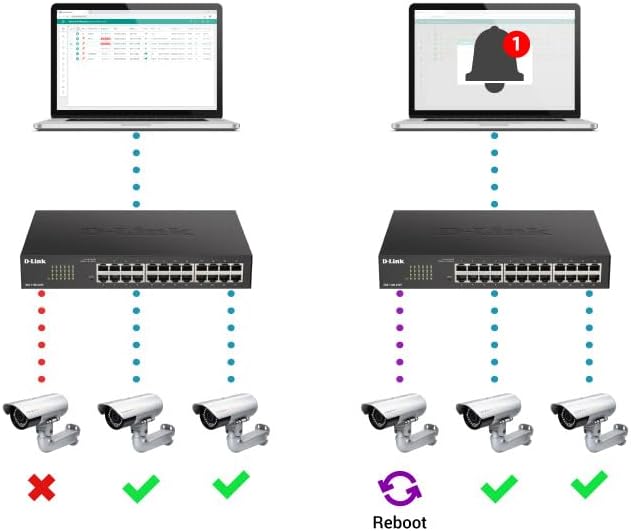
Figure 4.3: Rear panel of the switch, highlighting the "SWITCH GND" terminal for grounding.
4.3 การกำหนดค่าเริ่มต้น (Web-Based Management)
The DGS-1100-05PDV2 can be managed via a web-based interface. By default, the switch may have a static IP address (e.g., 10.90.90.90) or obtain one via DHCP. To access the web อินเทอร์เฟซ:
- Connect a computer directly to one of the switch's Ethernet ports.
- Configure your computer's IP address to be in the same subnet as the switch's default IP (e.g., if the switch is 10.90.90.90, set your computer to 10.90.90.x with a subnet mask of 255.255.255.0).
- เปิด web browser and enter the switch's default IP address (e.g., http://10.90.90.90).
- Log in using the default credentials (typically username: แอดมิน, รหัสผ่าน: แอดมิน or blank). Refer to the Quick Installation Guide for specific default credentials.
- Once logged in, you can configure network settings, including changing the IP address to DHCP or a different static IP, and enable desired features. Remember to save your configuration changes to ensure they persist after a reboot.
5. การใช้งานสวิตช์
The DGS-1100-05PDV2 is a Smart Managed switch, offering various functionalities to optimize your network. After initial setup, you can utilize the web-based management interface to configure and monitor the switch.
5.1 PoE Pass-through Functionality
The switch supports PoE Pass-through on ports 1 and 2. This means that if the switch itself is powered by PoE (e.g., from an 802.3at source), it can then provide power to up to two downstream PoE-enabled devices connected to ports 1 and 2. The maximum PoE budget available for downstream devices depends on the input power received by the switch.
5.2 คุณสมบัติการจัดการเครือข่าย
ผ่านทาง web interface, you can configure advanced Layer 2 features:
- VLAN (เครือข่ายพื้นที่เสมือน): Segment your network for improved security and performance (e.g., 802.1Q VLAN support, Voice VLAN, Surveillance VLAN).
- คุณภาพการบริการ (QoS): Prioritize network traffic for critical applications like VoIP and video streaming.
- การควบคุมแบนด์วิดท์: Manage bandwidth allocation per port to prevent network congestion.
- Static MAC: Manually assign MAC addresses to ports for enhanced security.
- การควบคุมพายุ: Prevent network disruptions caused by broadcast, multicast, or unknown unicast storms.
- การสอดแนม IGMP: Optimize multicast traffic delivery, useful for IPTV and other multicast applications.
- มิเรอร์พอร์ต: ตรวจสอบปริมาณการรับส่งข้อมูลเครือข่ายโดยการส่งสำเนาแพ็กเก็ตจากพอร์ตหนึ่งไปยังอีกพอร์ตหนึ่ง
- Spanning Tree Protocol (STP/RSTP): Prevent network loops in complex topologies.
6. การบำรุงรักษา
The DGS-1100-05PDV2 is designed for minimal maintenance due to its fanless operation, which reduces moving parts and potential points of failure. However, regular checks and best practices are recommended:
- อัพเดตเฟิร์มแวร์: Periodically check the D-Link support webเว็บไซต์นี้เป็นแหล่งอัปเดตเฟิร์มแวร์เพื่อให้มั่นใจได้ถึงประสิทธิภาพสูงสุด ความปลอดภัย และการเข้าถึงคุณสมบัติใหม่ๆ
- การตรวจร่างกาย: Ensure the switch is placed in a well-ventilated area, free from dust and obstructions that could impede airflow. Keep the device clean using a soft, dry cloth.
- การจัดการสายเคเบิล: Ensure all Ethernet cables are securely connected and properly routed to prevent accidental disconnections or damage.
- การสำรองข้อมูลการกำหนดค่า: Regularly back up your switch configuration settings through the web อินเทอร์เฟซ ช่วยให้สามารถกู้คืนได้อย่างรวดเร็วในกรณีที่มีการเปลี่ยนแปลงโดยไม่ได้ตั้งใจหรือเปลี่ยนอุปกรณ์
7 การแก้ไขปัญหา
This section provides solutions to common issues you might encounter with your DGS-1100-05PDV2 switch.
7.1 No Power / Switch Not Turning On
- Verify that the switch is connected to a functioning PoE source (e.g., a PoE switch or PoE injector).
- Ensure the PoE source is active and providing sufficient power (e.g., 802.3at for full functionality, or 802.3af for basic operation).
- Check the Ethernet cable connecting the switch to the PoE source for damage or improper connection.
7.2 ไม่สามารถเข้าถึงได้ Web อินเตอร์เฟซการจัดการ
- ที่อยู่ IP ไม่ตรงกัน: Ensure your computer's IP address is in the same subnet as the switch's IP address. If the switch is at its default static IP (10.90.90.90), configure your computer with a static IP like 10.90.90.x (where x is not 90) and a subnet mask of 255.255.255.0.
- DHCP Issue: If the switch is configured for DHCP, use an IP scanner tool or check your router's DHCP client list to find the IP address assigned to the switch.
- Incorrect Credentials: Double-check the username and password. Default credentials are often แอดมิน สำหรับทั้งสอง
- ความเข้ากันได้ของเบราว์เซอร์: Try accessing the interface with a different web เบราว์เซอร์
- รีเซ็ตเป็นค่าเริ่มต้นจากโรงงาน: If all else fails, perform a factory reset. Locate the 'Reset' button on the front panel (often recessed, requiring a paperclip to press) and hold it for approximately 5-10 seconds until the LEDs indicate a reset. คำเตือน: การดำเนินการนี้จะลบการตั้งค่าที่กำหนดเองทั้งหมด
7.3 ปัญหาการเชื่อมต่อเครือข่าย
- การวินิจฉัยสายเคเบิล: Utilize the built-in Cable Diagnostics feature via the web interface to test the integrity of connected Ethernet cables.
- การตรวจจับลูปแบ็ค: If enabled, this feature can detect and prevent network loops. Check the switch logs for loopback events.
- ไฟ LED แสดงสถานะ: Observe the Link/Act LEDs on the switch ports. A solid green or amber light indicates a valid link, while a blinking light indicates activity. No light suggests a cable issue or a problem with the connected device.
- การกำหนดค่า VLAN: Ensure devices are assigned to the correct VLANs if VLANs are configured on the switch.
8. ข้อมูลจำเพาะทางเทคนิค
| คุณลักษณะ | รายละเอียด |
|---|---|
| หมายเลขรุ่น | DGS-1100-05PDV2 |
| จำนวนพอร์ต | พอร์ตอีเทอร์เน็ตกิกะบิต 5 พอร์ต |
| การรองรับ PoE | PoE Powered (Input), PoE Pass-through on ports 1 & 2 (Output) |
| อัตราการถ่ายโอนข้อมูล | 10/100/1000 Mbps (กิกะบิต) |
| ประเภทอินเทอร์เฟซ | RJ45 |
| วัสดุตัวเรือน | โลหะ |
| ขนาดสินค้า (กxยxส) | 10.16" x 8.26" x 2.79" (25.8 ซม. x 21 ซม. x 7.1 ซม.) |
| น้ำหนักสินค้า | 0.5 ปอนด์ (ประมาณ 227 กรัม) |
| อุณหภูมิในการทำงาน | 32°F ถึง 104°F (0°C ถึง 40°C) |
| ประสิทธิภาพการใช้พลังงาน | IEEE 802.3az อีเทอร์เน็ตประหยัดพลังงาน (EEE) |
| การจัดการ | Web-based GUI, D-Link Network Assistant |
| การรองรับ VLAN | 802.1Q VLAN, Voice VLAN, Surveillance VLAN |
| การรับประกัน | รับประกันตลอดอายุการใช้งาน |

Figure 8.1: Dimensions of the DGS-1100-05PDV2 switch.
9. การรับประกันและการสนับสนุนทางเทคนิค
9.1 การรับประกันตลอดอายุการใช้งาน
The D-Link DGS-1100-05PDV2 is backed by a รับประกันตลอดอายุการใช้งาน, which includes Next Business Day (NBD) hardware replacement. This warranty provides long-term confidence in the product's reliability. Please refer to the included warranty card or the D-Link official webเว็บไซต์สำหรับข้อกำหนดและเงื่อนไขฉบับเต็ม
9.2 การสนับสนุนด้านเทคนิค
For technical assistance, product documentation, and firmware updates, please visit the official D-Link support webเว็บไซต์:
- USA Support: http://support.dlink.com
- Canada Support: http://support.dlink.ca
D-Link Systems, Inc. is located at 14420 Myford Road, Suite 100, Irvine, CA 92606, USA.