
1. บทนำ
The WinAPEX ET8104 is a portable, auto-ranging digital multimeter designed for accurate measurement of various electrical parameters. It features a clear LCD color screen, True RMS measurement, and a built-in flashlight, making it suitable for both professional and DIY electrical tasks. This manual provides essential information for safe and effective use of your multimeter.
2. ข้อมูลด้านความปลอดภัย
Always read and understand all safety warnings and operating instructions before using this instrument.
- ห้ามใช้ค่าป้อนเข้าเกินค่าสูงสุดสำหรับฟังก์ชันใดๆ
- ห้ามใช้เครื่องวัดหากชำรุดหรือสายวัดชำรุด
- ใช้ความระมัดระวังอย่างยิ่งเมื่อทำงานกับ voltages สูงกว่า 30V AC RMS, 42V peak หรือ 60V DC ปริมาตรเหล่านี้tagอาจทำให้เกิดอันตรายจากการช็อตได้
- ควรตัดกระแสไฟออกจากวงจรและปล่อยประจุไฟฟ้าแรงดันสูงทั้งหมดtagตัวเก็บประจุก่อนการวัดความต้านทาน ความต่อเนื่อง ไดโอด หรือความจุ
- ตรวจสอบให้แน่ใจว่าได้เลือกฟังก์ชันและช่วงที่ถูกต้องก่อนทำการวัด
- Keep fingers behind the probe barriers during measurement.
- ควรเปลี่ยนแบตเตอรี่ทันทีที่ไฟแสดงสถานะแบตเตอรี่ต่ำปรากฏขึ้น เพื่อให้ได้ค่าการวัดที่แม่นยำ
3. เนื้อหาบรรจุภัณฑ์
ตรวจสอบว่ารายการทั้งหมดที่ระบุไว้ด้านล่างนี้รวมอยู่ในแพ็คเกจของคุณ:
- 1 x WinAPEX ET8104 Digital Multimeter
- 1 x K-type Thermocouple (TP01)
- สายทดสอบ 1 คู่
- 1 x คู่มือผู้ใช้
4. สินค้าหมดview
The WinAPEX ET8104 features a compact design with a clear LCD display and intuitive controls. The protective casing enhances durability and provides dust resistance.
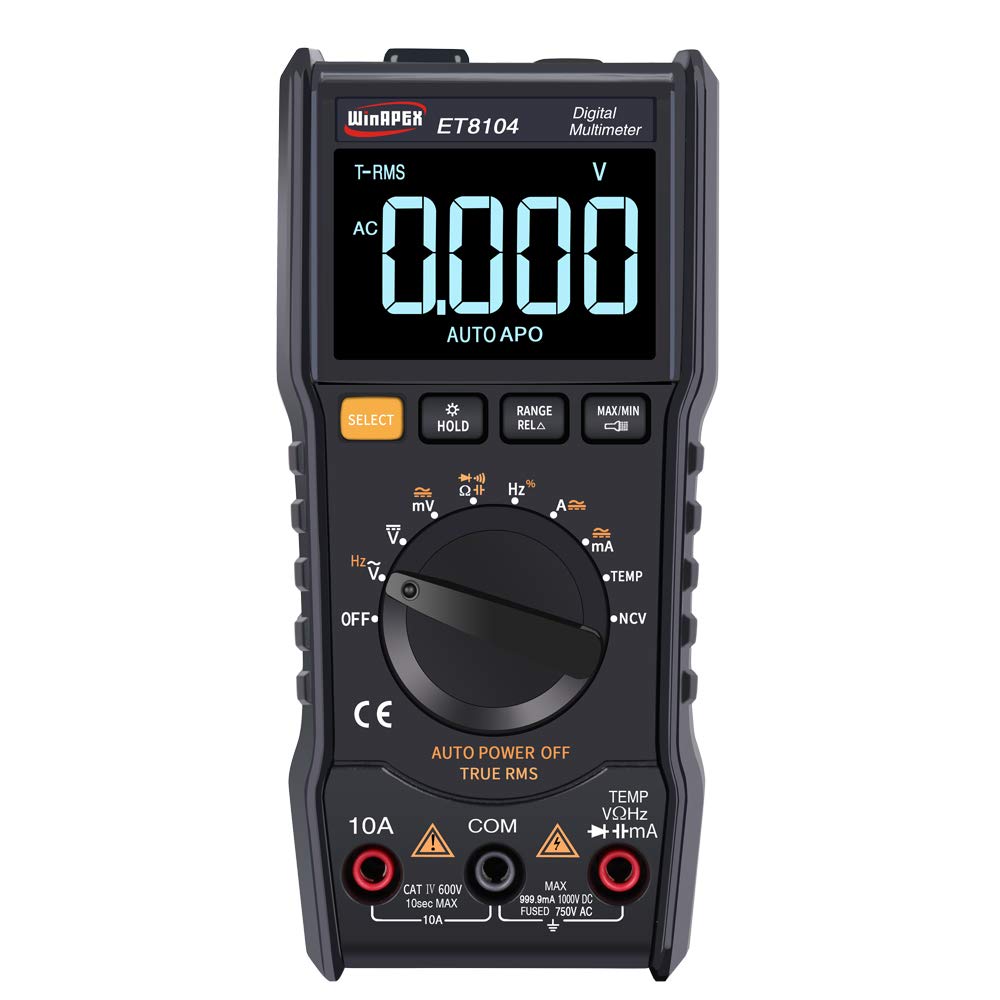
รูปที่ 4.1 : ด้านหน้า view of the WinAPEX ET8104 Digital Multimeter, showing the display, rotary dial, and function buttons.

รูปที่ 4.2: ด้านหน้าและด้านหลัง view of the WinAPEX ET8104 Digital Multimeter, highlighting its robust protective casing.

Figure 4.3: The WinAPEX ET8104 Multimeter displaying a summary of its measurement capabilities.
4.1 การแสดงผลและการควบคุม
- จอแสดงผล LCD: Shows measurement readings, unit symbols, and function indicators. Features a backlight for low-light conditions.
- แป้นหมุน: Used to select the desired measurement function (e.g., V~, V-, Ω, A~, A-, Hz, Temp, NCV, OFF).
- ปุ่มเลือก: Toggles between AC/DC modes or different sub-functions within a rotary dial setting (e.g., AC Voltagอี/ดีซีโวลtagจ).
- ปุ่มถือ: ฟังก์ชันนี้จะหยุดการแสดงค่าปัจจุบันบนหน้าจอ กดอีกครั้งเพื่อปล่อย
- RANGE/RELA Button: Manually selects measurement range or activates relative measurement mode.
- ปุ่มสูงสุด/นาที: แสดงค่าสูงสุดหรือต่ำสุดที่วัดได้
- แจ็คอินพุต: Terminals for connecting test leads (COM, VΩHz, 10A, mA).
- ไฟฉาย: Integrated flashlight for illuminating work areas.
- เซ็นเซอร์ NCV: แบบไม่สัมผัส Voltagพื้นที่ตรวจจับ
5. การตั้งค่า
5.1 การติดตั้งแบตเตอรี่
- ตรวจสอบให้แน่ใจว่ามัลติมิเตอร์ปิดอยู่
- ค้นหาช่องใส่แบตเตอรี่ที่ด้านหลังของอุปกรณ์
- ใช้ไขควงเปิดฝาครอบแบตเตอรี่
- Insert the required batteries (typically AAA or 9V, refer to the battery compartment label) observing correct polarity.
- ใส่ฝาครอบแบตเตอรี่และขันให้แน่นด้วยสกรู
5.2 การเชื่อมต่อสายทดสอบ
เชื่อมต่อสายทดสอบสีดำเข้ากับ... เสมอ คอม (Common) jack. Connect the red test lead to the appropriate input jack based on the measurement function:
- สำหรับฉบับที่tage, Resistance, Capacitance, Frequency, Diode, Continuity, and Temperature measurements: Connect the red lead to the VΩเฮิร์ตซ์ แจ็ค.
- For Current measurements up to 10A: Connect the red lead to the 10เอ แจ็ค.
- For Current measurements in milliampere range: Connect the red lead to the mA แจ็ค.
6. คู่มือการใช้งาน
The ET8104 features auto-ranging, simplifying operation by automatically selecting the correct measurement range. For specific functions, use the rotary dial and the SELECT button.
6.1 การวัดปริมาณไฟฟ้ากระแสสลับ/กระแสตรงtage (V~ / V-)
- หมุนปุ่มหมุนไปที่ V~ or V-. The meter will automatically detect AC or DC voltage.
- เชื่อมต่อสายทดสอบสีดำเข้ากับ คอม แจ็คและการทดสอบสีแดงนำไปสู่ VΩเฮิร์ตซ์ แจ็ค.
- เชื่อมต่อโพรบทดสอบแบบขนานเข้ากับวงจรหรือชิ้นส่วนที่ต้องการทดสอบ
- อ่านเล่มที่tagค่า e บนจอแสดงผล
6.2 การวัดค่าความต้านทาน (โอห์ม)
- หมุนปุ่มหมุนไปที่ Ω.
- เชื่อมต่อสายทดสอบสีดำเข้ากับ คอม และการทดสอบสีแดงนำไปสู่ VΩเฮิร์ตซ์.
- Ensure the circuit is de-energized before connecting the probes across the component.
- อ่านค่าความต้านทานบนจอแสดงผล
6.3 การวัดความจุไฟฟ้า
- Turn the rotary dial to the capacitance symbol (typically || or F).
- เชื่อมต่อสายทดสอบสีดำเข้ากับ คอม และการทดสอบสีแดงนำไปสู่ VΩเฮิร์ตซ์.
- ตรวจสอบให้แน่ใจว่าตัวเก็บประจุคายประจุจนหมดก่อนเชื่อมต่อโพรบ
- Connect the probes across the capacitor terminals.
- อ่านค่าความจุบนจอแสดงผล
6.4 ไม่สัมผัส Voltagการตรวจจับ e (NCV)
ฟังก์ชัน NCV ช่วยให้สามารถตรวจจับแรงดันไฟฟ้ากระแสสลับได้tagโดยไม่ต้องสัมผัสกับสายไฟโดยตรง
- หมุนปุ่มหมุนไปที่ เอ็นซีวี.
- Place the NCV sensor (located at the top of the meter) near the wire or outlet.
- The meter will emit an audible beep and the LED indicator will flash if AC voltagตรวจพบสัญญาณ e ความถี่ของเสียงบี๊บและแสงวาบจะเพิ่มขึ้นตามระดับเสียงที่ดังขึ้นtage.

Figure 6.1: Demonstrating the NCV function and integrated flashlight.
6.5 การวัดอุณหภูมิ
- หมุนปุ่มหมุนไปที่ อุณหภูมิ.
- Connect the K-type thermocouple to the VΩเฮิร์ตซ์ และ คอม แจ็คสังเกตขั้ว
- วางหัววัดเทอร์โมคัปเปิลไว้บนหรือใกล้กับวัตถุที่ต้องการวัดอุณหภูมิ
- Read the temperature value on the display. Use the SELECT button to switch between Celsius (°C) and Fahrenheit (°F).
6.6 ฟังก์ชั่นอื่น ๆ
- ไฟฉาย: Press the flashlight button (if available, or a dedicated button) to turn on/off the integrated flashlight.
- การเก็บข้อมูล: กดปุ่ม ถือ ปุ่มสำหรับหยุดการแสดงค่าปัจจุบันบนหน้าจอ
- สูงสุด/นาที: กดปุ่ม สูงสุด/ต่ำสุด button to cycle through maximum, minimum, and current readings.
- ปิดเครื่องอัตโนมัติ: มิเตอร์จะปิดตัวเองโดยอัตโนมัติหลังจากไม่มีการใช้งานเป็นระยะเวลาหนึ่ง เพื่อประหยัดพลังงานแบตเตอรี่
7. การบำรุงรักษา
7.1 การทำความสะอาด
เช็ดเคสด้วยโฆษณาamp ผ้าและผงซักฟอกอ่อนๆ ห้ามใช้สารกัดกร่อนหรือตัวทำละลาย ควรทำความสะอาดขั้วอินพุตให้ปราศจากสิ่งสกปรกและความชื้น
7.2 การเปลี่ยนแบตเตอรี่
When the low battery indicator appears on the display, replace the batteries immediately to ensure accurate measurements. Follow the battery installation steps in Section 5.1.
7.3 การเปลี่ยนฟิวส์
หากฟังก์ชันการวัดกระแสไฟฟ้าหยุดทำงาน อาจจำเป็นต้องเปลี่ยนฟิวส์ โปรดดูรายละเอียดในข้อกำหนดเพื่อเลือกประเภทและพิกัดของฟิวส์ที่ถูกต้อง การเปลี่ยนฟิวส์ควรดำเนินการโดยบุคลากรที่มีคุณสมบัติเท่านั้น
8 การแก้ไขปัญหา
| ปัญหา | สาเหตุที่เป็นไปได้ | สารละลาย |
|---|---|---|
| มิเตอร์ไม่เปิดใช้งาน | แบตเตอรี่หมดหรือติดตั้งแบตเตอรี่ไม่ถูกต้อง | ตรวจสอบขั้วแบตเตอรี่หรือเปลี่ยนแบตเตอรี่ |
| ไม่มีการแสดงข้อความหรือ 'OL' | Incorrect function/range selected, open circuit, or over-range input | Verify function selection, check circuit connections, or ensure input is within range. |
| การอ่านที่ไม่ถูกต้อง | แบตเตอรี่อ่อน สายทดสอบชำรุด หรือมีสัญญาณรบกวนจากภายนอก | Replace batteries, check/replace test leads, move away from strong electromagnetic fields. |
| การวัดกระแสไฟฟ้าไม่ทำงาน | ฟิวส์ขาด | เปลี่ยนฟิวส์ (ดูหัวข้อ 7.3) |
9. ข้อมูลจำเพาะ
| พารามิเตอร์ | ค่า |
|---|---|
| ยี่ห้อ | วินเอเพ็กซ์ |
| แบบอย่าง | อีที8104 |
| จำนวนการแสดงผล | 9999 |
| แหล่งพลังงาน | ใช้แบตเตอรี่ |
| สี | สีดำ |
| วิธีการวัด | การแปลง A/D อินทิกรัลสองเท่า |
| Sampลิงอัตรา | ประมาณ 3 ครั้ง/วินาที |
| Over-range Display | "0L" |
| สภาพแวดล้อมการทำงาน | 0~40°C, Relative humidity <80% |
| ขนาดจอ LCD | 49 x 32 มม. (1.9 x 1.3 นิ้ว) |
| ขนาดสินค้า | 142 x 70 มม. (5.6 x 2.8 นิ้ว) |
| น้ำหนักแพ็คเกจ | 305 กรัม (10.8 ออนซ์) |
| DC ฉบับที่tagอี ความแม่นยำ | ±(1.2%+10) |
| ฉบับ ACtagอี ความแม่นยำ | ±(1.2%+10) |
| ช่วงกระแสไฟตรง | 60mA / 600mA / 10A |
| ความแม่นยำของกระแสไฟฟ้ากระแสตรง | ±(2.0%+30) for 10A, Resolution: 0.01A |
| ช่วงกระแสไฟ AC | 60mA / 600mA / 10A |
| ความแม่นยำของกระแสไฟฟ้าสลับ | ±(2.0%+30) for 10A, Resolution: 0.01A |
| ช่วงความต้านทาน | 1000Ω / 10kΩ / 100kΩ / 1MΩ / 10MΩ / 100MΩ |
| ความต้านทานความแม่นยำ | 1000Ω: ±(0.8%+5); 10kΩ-10MΩ: ±(0.8%+3); 100MΩ: ±(2.5%+3) |
| ช่วงความจุ | 100nF/1000nF/10µF/100µF/1000µF/100mF |
| ความแม่นยำของความจุ | 100nF-1000µF: ±(3.5%+20); 100mF: ±(5%+3) |
| ช่วงความถี่ | 10Hz/100Hz/1KHz/10KHz/100KHz/1MHz/10MHz |
| ความแม่นยำความถี่ | ±(0.1%+3) |
| ช่วงอุณหภูมิ | (-20-1000)°C / (0-1832)°F |
| ความแม่นยำของอุณหภูมิ | °C: ±(1.0%+5) <400°C, ±(1.5%+15) ≥400°C; °F: ±(0.75%+5) <750°F, ±(1.5%+15) ≥750°F |
| เอ็นซีวี | ใช่ |
| ค่า RMS ที่แท้จริง | ใช่ |
| ปิดเครื่องอัตโนมัติ | ใช่ |
| การเก็บข้อมูล | ใช่ |
| แสงไฟแบ็คไลท์ | ใช่ |
| ไฟฉาย | ใช่ |
10. การรับประกันและการสนับสนุน
WinAPEX products are designed for reliability and performance. For warranty information or technical support, please refer to the warranty card included with your product or contact your local distributor. Keep your purchase receipt as proof of purchase.