
การแนะนำ
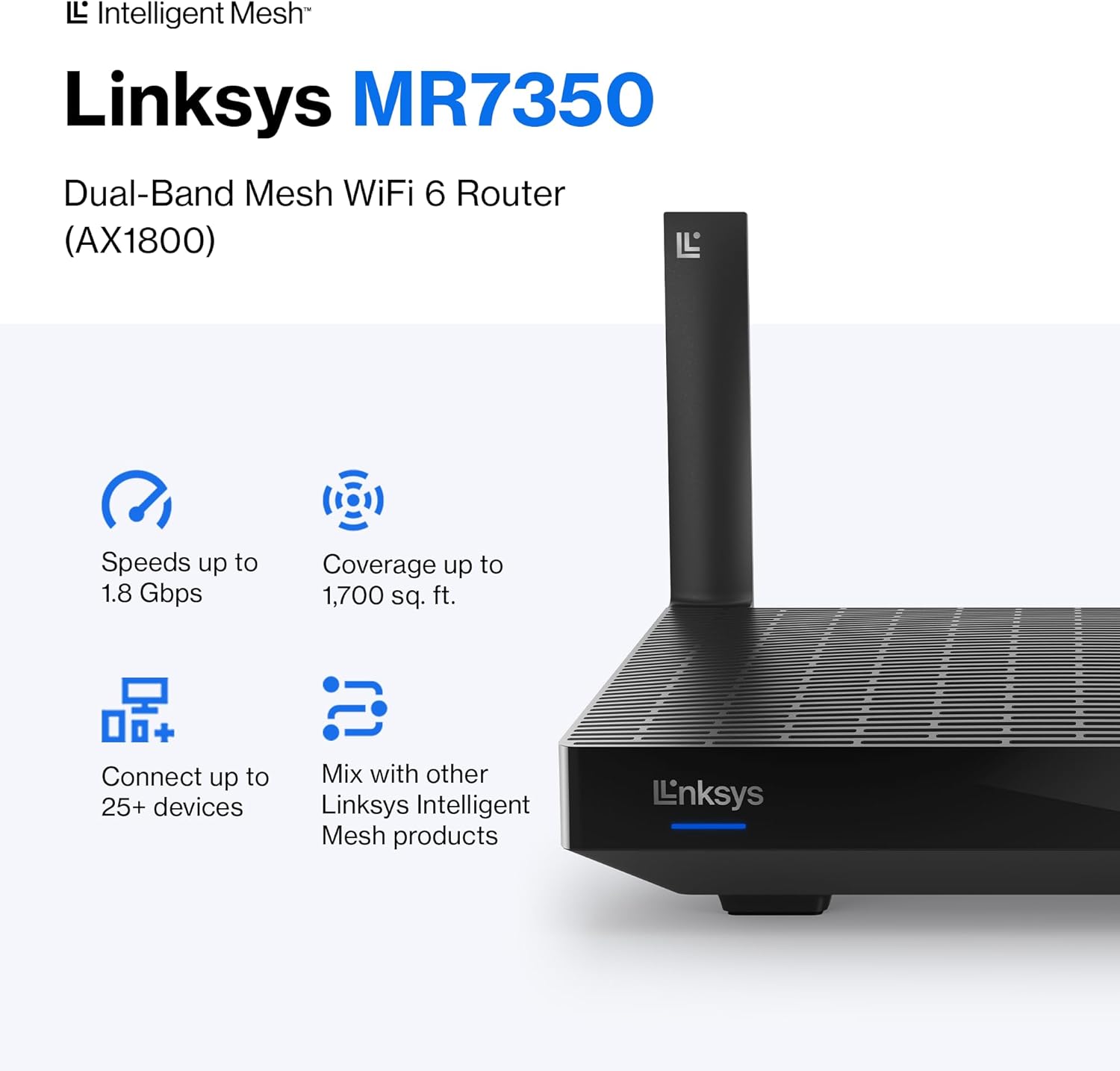
The Linksys MR7350 Dual-Band Mesh WiFi 6 Router is designed to provide robust and reliable wireless connectivity throughout your home. Featuring Intelligent Mesh Technology and WiFi 6 (802.11ax) standard, this router delivers high speeds and extended coverage for multiple devices simultaneously. It is ideal for streaming, gaming, and managing a connected smart home environment.

Figure 1: Linksys MR7350 Dual-Band Mesh WiFi 6 Router
มีอะไรอยู่ในกล่อง
ตรวจสอบว่ามีรายการทั้งหมดอยู่ในแพ็คเกจ:
- Linksys Dual-Band Mesh WiFi 6 Router (MR7350)
- คู่มือเริ่มต้นอย่างรวดเร็ว
- สายเคเบิลอีเทอร์เน็ต
- อะแดปเตอร์แปลงไฟ
- เอกสารการรับประกันและข้อกำหนดทางกฎหมาย
การตั้งค่า
Setting up your Linksys MR7350 router is designed to be quick and straightforward using the Linksys App. Follow these steps for initial installation:
- เชื่อมต่อเราเตอร์: Plug the power adapter into the router and an electrical outlet. Connect one end of the provided Ethernet cable to the yellow 'Internet' port on the back of the MR7350 router and the other end to your modem.
- เปิดเครื่อง: Turn on your modem and then the Linksys MR7350 router. Wait for the router's LED indicator to show a solid blue light, indicating it's ready for setup.
- ดาวน์โหลดแอป Linksys: Download and install the free Linksys App on your iOS or Android smartphone.
- เริ่มการตั้งค่า: Open the Linksys App and follow the on-screen instructions to begin the setup process. The app will guide you through creating your Wi-Fi network name (SSID) and password.
- Add to Mesh Network (Optional): If you are expanding an existing Linksys Intelligent Mesh network, log in to the Linksys App, find "Set Up a New Product" from the menu, and select "Add Another Node."

Figure 2: Easy Setup via the Linksys App
คำแนะนำการใช้งาน
Once your Linksys MR7350 router is set up, you can manage and optimize your network using the Linksys App or through a web อินเทอร์เฟซเบราว์เซอร์
Network Management via Linksys App
- View อุปกรณ์ที่เชื่อมต่อ: ดูอุปกรณ์ทั้งหมดที่เชื่อมต่อกับเครือข่ายของคุณ
- การจัดลำดับความสำคัญของอุปกรณ์: Prioritize specific devices for optimal performance during high-bandwidth activities like gaming or streaming.
- การเข้าถึงของแขก: สร้างเครือข่าย Wi-Fi แยกต่างหากที่มีการป้องกันด้วยรหัสผ่านสำหรับแขก
- การควบคุมโดยผู้ปกครอง: Manage internet access for specific devices, set schedules, and block webเว็บไซต์
- การอัปเดตเฟิร์มแวร์อัตโนมัติ: Ensure your network is always secure and up-to-date with automatic updates.
การเชื่อมต่อทางกายภาพ
The back of the router features several ports for wired connections:
- พอร์ตอินเทอร์เน็ต (สีเหลือง): เชื่อมต่อกับโมเด็มของคุณเพื่อเข้าถึงอินเทอร์เน็ต
- พอร์ตอีเทอร์เน็ต (1-4): Four Gigabit Ethernet ports for wired devices such as computers, gaming consoles, or smart TVs.
- พอร์ต USB 3.0: Connect a storage device to share fileทั่วทั้งเครือข่ายของคุณ
- ปุ่ม WPS: For easy, secure connection of WPS-compatible devices.
- ปุ่มรีเซ็ต: ใช้เพื่อคืนค่าเราเตอร์เป็นการตั้งค่าเริ่มต้นจากโรงงาน
- สวิตช์เปิด/ปิด: To manually turn the router on or off.
รูปที่ 3: ด้านหลัง view of the Linksys MR7350 with ports
คุณสมบัติ
The Linksys MR7350 is packed with features to enhance your home network experience:
- เทคโนโลยีเครือข่ายอัจฉริยะ: Dynamically maximizes speed and eliminates dead zones, adapting to your Wi-Fi needs for full-strength signal throughout your entire home.
- มาตรฐาน WiFi 6 (802.11ax): Delivers faster speeds (up to 1.8 Gbps AX1800), increased capacity (25+ devices), and improved efficiency for a seamless experience.
- การเชื่อมต่อแบบดูอัลแบนด์: Operates on both 2.4 GHz and 5 GHz bands for optimal performance and device compatibility.
- ซีพียูแบบควอดคอร์: A powerful processor for extremely fast data transfer and multiple simultaneous data streams.
- เทคโนโลยี Beamforming: Optimizes performance and reduces interference by focusing wireless signals directly to connected devices.
- การรักษาความปลอดภัยขั้นสูง: Safeguards your network with wireless WPA3 encryption and an SPI firewall.
- ระบบที่ขยายได้: Easily expand your Wi-Fi coverage by adding any Linksys Mesh compatible products.

Figure 4: Full House Coverage with Intelligent Mesh Technology

Figure 5: WiFi Standards Evolution
ข้อมูลจำเพาะ
| คุณลักษณะ | ค่า |
|---|---|
| ยี่ห้อ | ลิงค์ซิส |
| หมายเลขรุ่น | MR7350 |
| การสร้าง Wi-Fi | ไวไฟ 6 (802.11ax) |
| ระดับย่านความถี่ | ดูอัลแบนด์ (2.4 GHz, 5 GHz) |
| อัตราการถ่ายโอนข้อมูล | ความเร็วสูงสุด 1.8 กิกะบิตต่อวินาที (AX1800) |
| ความครอบคลุม | สูงสุด 1700 ตารางฟุต |
| จำนวนอุปกรณ์ที่รองรับ | 25+ Devices |
| จำนวนพอร์ตอีเธอร์เน็ต | 5 (1 Internet, 4 LAN) |
| แบนด์วิดท์พอร์ต LAN | 1 กิกะบิตต่อวินาที |
| พอร์ต USB | ยูเอสบี 3.0 |
| โปรโตคอลความปลอดภัย | WPA3-PSK |
| วิธีการควบคุม | แอป Linksys |
| ประเภทเสาอากาศ | Retractable (2 Antennas) |
| ขนาดรายการ (ยาว x กว้าง x สูง) | ยาว 5.9 นิ้ว x กว้าง 8.07 นิ้ว x สูง 5.4 นิ้ว |
| น้ำหนักสินค้า | 2 ปอนด์ |
| สี | สีขาว |
การซ่อมบำรุง
To ensure optimal performance and longevity of your Linksys MR7350 router, consider the following maintenance tips:
- ตำแหน่งที่เหมาะสมที่สุด: Place the router in a central location in your home, away from obstructions and devices that may cause interference (e.g., microwaves, cordless phones).
- อัพเดตเฟิร์มแวร์: Enable automatic firmware updates via the Linksys App to ensure your router has the latest security patches and performance enhancements.
- รีบูตปกติ: Periodically reboot your router (unplug from power for 10 seconds, then plug back in) to clear its memory and refresh the network connection.
- การทำความสะอาด: Keep the router clean and free of dust to prevent overheating. Use a soft, dry cloth to wipe the exterior.
- การตรวจสอบเครือข่าย: Use the Linksys App to monitor network activity and identify any unusual behavior or connected devices.
การแก้ไขปัญหา
If you encounter issues with your Linksys MR7350 router, try the following troubleshooting steps:
- ไม่มีการเชื่อมต่ออินเทอร์เน็ต: Check the cable connections between your modem and router. Ensure the 'Internet' port LED on the router is solid blue. Reboot both your modem and router.
- ความเร็วช้า: Ensure your devices are connected to the appropriate Wi-Fi band (5 GHz for faster speeds, 2.4 GHz for longer range). Check for interference from other electronic devices. Use the Linksys App to prioritize devices.
- การเชื่อมต่อที่หลุด: Update device drivers for your wireless adapters. Ensure your router's firmware is up-to-date. Adjust antenna orientation for better signal.
- ไม่สามารถเข้าถึงการตั้งค่าเราเตอร์ได้: Ensure your device is connected to the router's Wi-Fi network. Try accessing the Linksys App or the web interface (usually 192.168.1.1) after a router reboot.
- รีเซ็ตเป็นค่าเริ่มต้นจากโรงงาน: If all else fails, press and hold the 'Reset' button on the back of the router for 10-15 seconds until the LED blinks. This will restore factory default settings, and you will need to re-run the setup process.
การรับประกันและการสนับสนุน
The Linksys MR7350 Dual-Band Mesh WiFi 6 Router comes with an 18-Month Warranty. For technical assistance, product information, or warranty claims, please refer to the Warranty and Regulatory Documentation included in your package.
Linksys also offers 24/7 customer support. You can find contact information and additional resources on the official Linksys website or through the Linksys App.
หากต้องการความช่วยเหลือเพิ่มเติม โปรดไปที่ Linksys Store.