
1. บทนำ
Thank you for choosing the JISULIFE Portable Neck Fan FA14. This innovative, hands-free, bladeless fan is designed to provide personal cooling comfort wherever you go. Its lightweight and ergonomic design makes it ideal for various activities, from outdoor sports to indoor work. This manual provides essential information for the safe and efficient use of your new neck fan.
2. สินค้าหมดview & คุณสมบัติที่สำคัญ
The JISULIFE Portable Neck Fan FA14 is engineered for comfort and performance. Below are its primary features:
- การออกแบบแบบไร้ใบมีด: Ensures safety for all users, including children and the elderly, by eliminating exposed blades.
- 78 Air Outlets: Provides comprehensive 360-degree airflow around the entire face and neck area.
- แฮนด์ฟรีและสวมใส่ได้: Designed like a headphone for convenient, hands-free operation.
- ปรับความเร็วได้ 5 ระดับ: Customize your cooling experience with five distinct fan speed settings.
- แบตเตอรี่ใช้งานได้ยาวนาน: Equipped with a 4000mAh battery, offering 4-16 hours of operation depending on the speed setting.
- การทำงานที่มีเสียงรบกวนต่ำ: Modified motor design generates noise levels as low as 25 dB for quiet use.
- Comfortable & Durable: Made from anti-greasy ABS and silicone for a soft, comfortable, and robust build.
- ขนาดกะทัดรัดและน้ำหนักเบา: Weighs approximately 9.1 ounces, reducing strain on the neck.
- ยืดหยุ่นและปรับได้: Can be twisted and adjusted to fit various neck sizes and preferences.
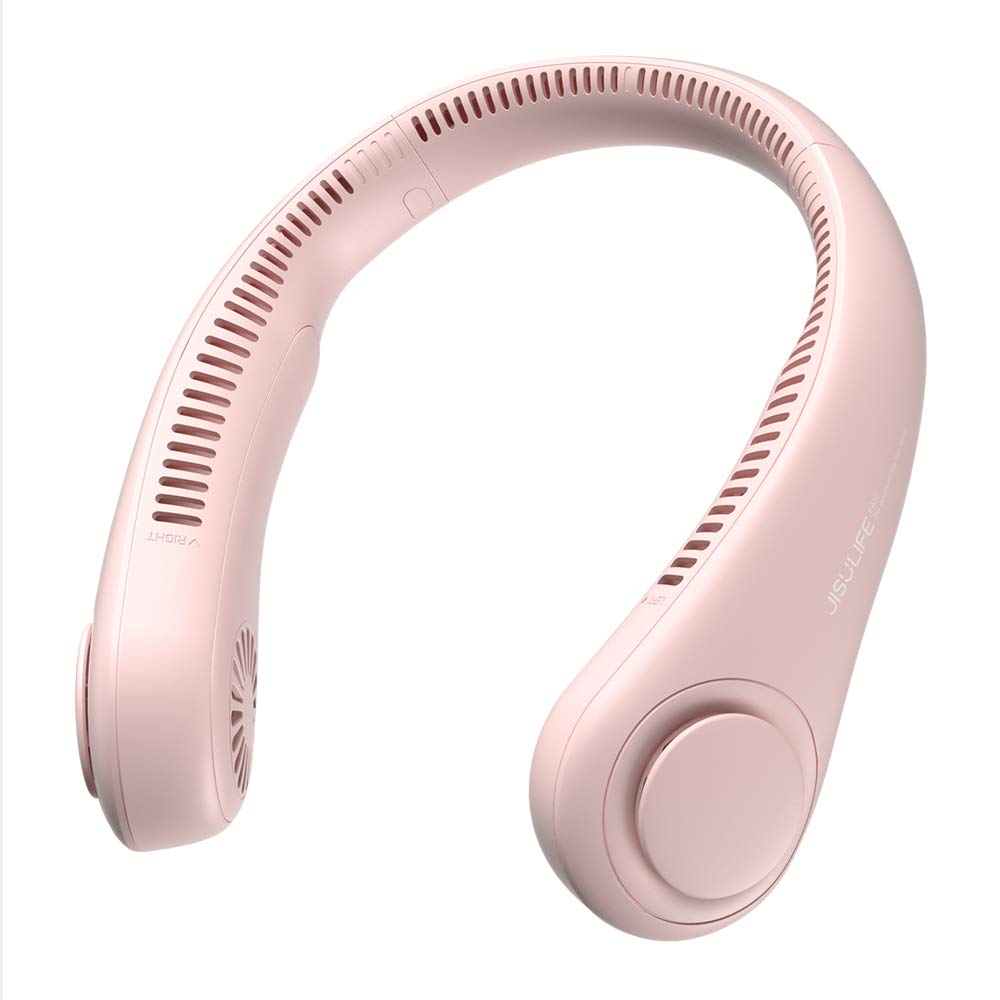
Figure 1: The JISULIFE Portable Neck Fan FA14 in Pink, showcasing its ergonomic, wearable design.

Figure 2: Illustrates the lightweight and comfortable design of the JISULIFE Neck Fan Life3, comparing its dimensions and weight to standard headphones.

Figure 3: Visual representation of the upgraded 5-gear speed settings, highlighting the fan's powerful brushless motor for 360-degree cooling.
3. คำแนะนำด้านความปลอดภัย
โปรดอ่านและปฏิบัติตามคำแนะนำด้านความปลอดภัยต่อไปนี้เพื่อป้องกันการบาดเจ็บหรือความเสียหายต่อผลิตภัณฑ์:
- Do not insert fingers or foreign objects into the fan outlets.
- หลีกเลี่ยงน้ำและความชื้นที่มากเกินไป
- ห้ามถอดประกอบ ซ่อมแซม หรือดัดแปลงอุปกรณ์ หากต้องการรับบริการ โปรดติดต่อฝ่ายบริการลูกค้า
- Avoid exposing the fan to extreme temperatures or direct sunlight for prolonged periods.
- ใช้สาย USB-C ที่ให้มาเท่านั้นสำหรับการชาร์จ
- เก็บให้พ้นมือเด็กเล็กเมื่อไม่ได้ใช้งาน
- Do not use if the device is damaged or malfunctioning.
4. การตั้งค่า
Before first use, ensure your JISULIFE Portable Neck Fan is fully charged.
- แกะ: Carefully remove the neck fan and the USB-C charging cable from its packaging.
- ค่าใช้จ่ายเริ่มต้น: Connect the USB-C cable to the charging port on the fan and the other end to a compatible USB power source (e.g., wall adapter, computer USB port, power bank).
- ไฟแสดงสถานะการชาร์จ: The indicator light will show the charging status. Refer to the 'Charging' section for details on light indications.
- ชาร์จเต็ม: Allow the fan to charge completely before its first use to optimize battery life.

Figure 4: Illustrates the 4000mAh long-lasting battery and the USB-C charging port for convenient power replenishment.
5. คู่มือการใช้งาน
Using your JISULIFE Portable Neck Fan is simple and intuitive:
- Wear the Fan: Place the neck fan around your neck, ensuring the air outlets are positioned comfortably towards your face and neck. The flexible design allows for easy adjustment.
- เปิด/ปิดเครื่อง: Locate the power button (usually a single button on one side of the fan). Press and hold the button for a few seconds to turn the fan ON or OFF.
- ปรับความเร็ว: Once the fan is ON, short press the power button repeatedly to cycle through the 5 available speed settings (Speed 1 to Speed 5). Each press will increase the fan speed.
- ตำแหน่งที่เหมาะสมที่สุด: Adjust the flexible arms of the fan to direct airflow precisely where you need it most.

Figure 5: Highlights the multiple air outlets for comprehensive cooling and the simple one-button control for effortless operation.

Figure 6: Shows the fan's flexible and adjustable design, allowing it to be twisted for a customized fit and optimal airflow direction.
6. การชาร์จไฟ
To charge your neck fan:
- Connect the provided USB-C cable to the charging port on the fan.
- Plug the other end of the USB-C cable into a 5V/1A or 5V/2A USB power adapter.
- The indicator light will typically show red while charging and turn off or change color (e.g., blue/green) when fully charged.
- การชาร์จเต็มโดยปกติจะใช้เวลาประมาณ 3-4 ชั่วโมง
- Battery life ranges from 4 hours (on highest speed) to 16 hours (on lowest speed).
7. การบำรุงรักษา
Proper maintenance ensures the longevity and performance of your fan:
- การทำความสะอาด: Use a soft, dry cloth to wipe the surface of the fan. Do not use harsh chemicals or abrasive materials. Ensure the fan is OFF before cleaning.
- ช่องระบายอากาศ: Gently clean any dust or debris from the air outlets using a soft brush or compressed air.
- พื้นที่จัดเก็บ: Store the fan in a cool, dry place away from direct sunlight and extreme temperatures when not in use.
- การดูแลแบตเตอรี่ To maintain battery health, charge the fan at least once every three months if not used regularly.
8 การแก้ไขปัญหา
หากพบปัญหาใด ๆ โปรดดูวิธีแก้ไขทั่วไปต่อไปนี้:
| ปัญหา | สาเหตุที่เป็นไปได้ | สารละลาย |
|---|---|---|
| พัดลมไม่เปิด | แบตเตอรี่อ่อนหรือไม่มีการชาร์จ | ชาร์จพัดลมให้เต็มโดยใช้สาย USB-C ที่ให้มา |
| การไหลเวียนของอากาศอ่อน | Low speed setting or obstructed air outlets. | Increase the fan speed. Check and clean air outlets for any blockages. |
| พัดลมหยุดทำงานโดยไม่คาดคิด | แบตเตอรี่หมด | ชาร์จพัดลม |
| ไฟแสดงสถานะการชาร์จไม่ทำงาน | สายเคเบิลหรืออะแดปเตอร์ไฟฟ้าชำรุด | ลองใช้สาย USB-C หรืออะแดปเตอร์แปลงไฟอันอื่นดู ตรวจสอบให้แน่ใจว่าเสียบสายแน่นดีแล้ว |
If the problem persists, please contact JISULIFE customer support.
9. ข้อมูลจำเพาะ
| คุณสมบัติ | รายละเอียด |
|---|---|
| ยี่ห้อ | จีซูไลฟ์ |
| ชื่อรุ่น | พัดลมคอ Life3 |
| หมายเลขรุ่น | FA14 |
| สี | สีชมพู |
| การออกแบบพัดลมไฟฟ้า | พัดลมสวมใส่ |
| แหล่งพลังงาน | ใช้พลังงานจากแบตเตอรี่ |
| ความจุของแบตเตอรี่ | 4000 มิลลิแอมป์ |
| ชั่วโมงการทำงาน | 4-16 ชั่วโมง (ขึ้นอยู่กับความเร็ว) |
| จำนวนความเร็ว | 5 |
| ระดับเสียง | 40 Decibels (as low as 25 dB) |
| ขนาดสินค้า (ลึก x กว้าง x สูง) | ลึก 7.7 นิ้ว x กว้าง 7.7 นิ้ว x สูง 2.3 นิ้ว |
| น้ำหนักสินค้า | 0.56 Pounds (approx. 9.1 oz) |
| วัสดุ | อะคริโลไนไตรล์ บิวทาไดอีน สไตรีน (ABS), ซิลิโคน |
| วัสดุใบมีด | พลาสติก (ดีไซน์ไร้ใบมีด) |
| ประเภทขั้วต่อ | USB ประเภท C |
| ส่วนประกอบที่รวมอยู่ | สาย USB C |
10. การรับประกันและการสนับสนุน
JISULIFE products are designed for quality and reliability. For specific warranty information, please refer to the warranty card included with your product or visit the official JISULIFE website. If you have any questions, require technical assistance, or need to report an issue, please contact JISULIFE customer support through their official channels.

Figure 7: Demonstrates the versatility of the JISULIFE neck fan, suitable for diverse activities and environments.