
FLINQ 8720168680396
FlinQ Mobile Air Conditioner User Manual
รุ่น : 8720168680396
1. คำแนะนำด้านความปลอดภัยที่สำคัญ
โปรดอ่านคำแนะนำทั้งหมดอย่างละเอียดก่อนใช้งานเครื่องใช้ไฟฟ้านี้ และเก็บรักษาไว้เพื่อใช้อ้างอิงในอนาคต การไม่ปฏิบัติตามคำแนะนำเหล่านี้อาจทำให้เกิดไฟฟ้าช็อต ไฟไหม้ หรือการบาดเจ็บร้ายแรงได้
- ควรเสียบอุปกรณ์เข้ากับเต้ารับไฟฟ้าที่มีสายดินเสมอ
- อย่าใช้งานเครื่องด้วยสายไฟหรือปลั๊กที่ชำรุด
- เก็บเครื่องให้ห่างจากวัสดุไวไฟและเปลวไฟ
- ตรวจสอบให้แน่ใจว่ามีการระบายอากาศที่เหมาะสมรอบๆ เครื่องในระหว่างการทำงาน
- ห้ามสอดวัตถุเข้าไปในช่องลมเข้าหรือช่องลมออก
- ถอดปลั๊กเครื่องก่อนทำความสะอาดหรือดำเนินการบำรุงรักษาใดๆ
- เครื่องใช้ไฟฟ้าตัวนี้ไม่ได้มีวัตถุประสงค์เพื่อให้บุคคล (รวมทั้งเด็ก) ที่มีความบกพร่องทางร่างกาย ทางประสาทสัมผัส หรือทางจิตใจ หรือขาดประสบการณ์และความรู้ ใช้งาน เว้นแต่จะมีการดูแลหรือคำแนะนำเกี่ยวกับการใช้เครื่องใช้ไฟฟ้าโดยบุคคลที่รับผิดชอบด้านความปลอดภัยของบุคคลดังกล่าว
2. สินค้าหมดview
The FlinQ Mobile Air Conditioner is a versatile unit designed to provide cooling, dehumidification, and fan functions for your living space. It is equipped with an energy-efficient design and comes with a window kit for easy installation.

รูปที่ 2.1 : ด้านหน้า view of the FlinQ Mobile Air Conditioner, showing the main air outlet and control panel area.

Figure 2.2: The mobile air conditioner unit, displaying its energy efficiency label (Class A) and the included remote control for convenient operation.
3. ส่วนประกอบและชิ้นส่วน
Familiarize yourself with the main components of your mobile air conditioner:
- ตัวเครื่องหลัก (พร้อมแผงควบคุม)
- ท่อไอเสีย
- Window Sealing Kit (adjustable window slider/plate)
- รีโมทคอนโทรล
- Drain Hose (for continuous drainage in dehumidification mode)
- Air Filters (located on the back/side)
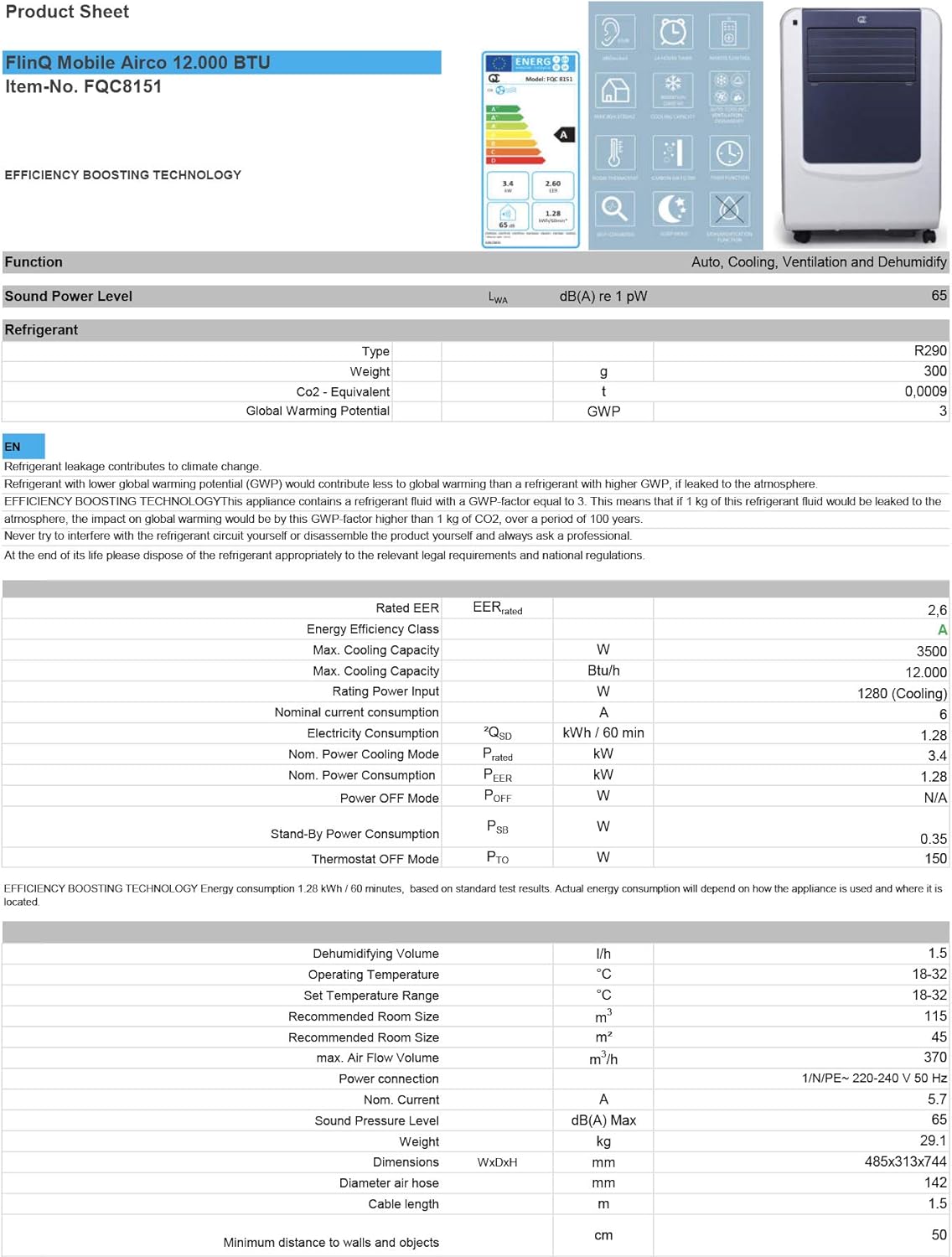
Figure 3.1: The remote control and a visual representation of the unit's key features, including noise level (65dB), 24-hour timer, cooling capacity (12000 BTU/h), room thermostat, carbon air filter, self-diagnosis, sleep mode, remote control function, timer function, auto cooling/fan/dehumidification, and dehumidification function.
4. การตั้งค่าและการติดตั้ง
4.1 การแกะกล่อง
Carefully remove the air conditioner and all accessories from the packaging. Inspect for any damage during transit. Keep the original packaging for future storage or transport.
4.2 การจัดวาง
Place the unit on a flat, stable surface. Ensure there is at least 30 cm (12 inches) of clear space around the unit for proper airflow. Do not place it near heat sources or in direct sunlight.
4.3 การติดตั้งชุดหน้าต่าง
To ensure efficient cooling, the hot air extracted by the unit must be vented outside. Use the provided window sealing kit for this purpose.
- ติดตั้งตัวเชื่อมต่อท่อไอเสียเข้ากับช่องระบายอากาศที่ด้านหลังของเครื่อง
- ต่อท่อไอเสียให้ยาวออก แล้วติดอะแดปเตอร์สำหรับหน้าต่างเข้ากับปลายอีกด้านหนึ่ง
- Adjust the window slider/plate to fit your window opening.
- Insert the window adapter into the opening of the window slider/plate.
- Close the window as much as possible to seal the opening around the kit, minimizing air leakage.

รูปที่ 4.1: ด้านข้าง view of the mobile air conditioner, illustrating the connection point for the exhaust hose, which expels hot air from the room.
5. คู่มือการใช้งาน
5.1 แผงควบคุม
The control panel is located on the top of the unit and features various buttons and an LED display for setting modes, temperature, and timer functions.
5.2 การควบคุมระยะไกล
The remote control allows you to operate all functions of the air conditioner from a distance. Ensure the remote control batteries are inserted correctly.
5.3 โหมดการทำงาน
กดปุ่ม 'โหมด' เพื่อเลือกโหมดการทำงานต่างๆ ที่มีให้เลือก:
- โหมดทำความเย็น: For cooling the room. Set your desired temperature using the temperature adjustment buttons.
- โหมดลดความชื้น: Removes excess moisture from the air. The fan speed is typically fixed in this mode. Consider connecting a drain hose for continuous drainage.
- โหมดพัดลม: Circulates air without cooling. You can adjust the fan speed (Low, Medium, High).

รูปที่ 5.1: ระยะใกล้ view of the adjustable louvers on the air conditioner's front panel, which direct the airflow.
6. การบำรุงรักษา
การบำรุงรักษาตามปกติจะช่วยให้เครื่องปรับอากาศของคุณทำงานได้อย่างเหมาะสมที่สุดและยืดอายุการใช้งานของเครื่องปรับอากาศของคุณ
6.1 การทำความสะอาดตัวกรองอากาศ
The air filters should be cleaned every two weeks or more frequently depending on usage and air quality. Dirty filters reduce efficiency and can damage the unit.
- ถอดปลั๊กเครื่องปรับอากาศออกจากเต้าเสียบไฟฟ้า
- Locate and remove the air filters (usually on the back or side of the unit).
- Wash the filters under running water (warm, not hot) or use a vacuum cleaner to remove dust.
- Allow the filters to air dry completely before reinserting them. Do not expose them to direct sunlight.

Figure 6.1: Illustration of how to remove the air filter from the mobile air conditioner for cleaning, highlighting the accessible filter panel.
6.2 การระบายน้ำ
The unit collects condensed water during cooling and dehumidification. The internal tank will fill up, and the unit may stop operating when full. Drain the water regularly.
- วางถาดหรือภาชนะตื้นๆ ไว้ใต้ช่องระบายน้ำ (โดยปกติจะอยู่ด้านล่างด้านหลังของเครื่อง)
- ถอดปลั๊กท่อระบายน้ำออกเพื่อให้น้ำไหลออกได้
- For continuous drainage in dehumidification mode, attach the provided drain hose to the drain port.
6.3 พื้นที่จัดเก็บ
เมื่อจัดเก็บเครื่องไว้เป็นเวลานาน:
- ระบายน้ำทั้งหมดออกจากเครื่อง
- ทำความสะอาดตัวกรองอากาศ
- ถอดปลั๊กสายไฟและม้วนให้เรียบร้อย
- เก็บอุปกรณ์ไว้ในสถานที่แห้งและเย็น โดยควรอยู่ในบรรจุภัณฑ์เดิม
7 การแก้ไขปัญหา
ก่อนติดต่อฝ่ายบริการลูกค้า โปรดดูตารางต่อไปนี้สำหรับปัญหาที่พบบ่อยและวิธีแก้ไข:
| ปัญหา | สาเหตุที่เป็นไปได้ | สารละลาย |
|---|---|---|
| เครื่องไม่เปิด | ไม่มีไฟฟ้า; สายไฟไม่ได้เสียบปลั๊ก; ถังน้ำเต็ม | ตรวจสอบเต้ารับไฟฟ้า เสียบสายไฟ ระบายน้ำในถัง |
| หน่วยทำความเย็นไม่เพียงพอ | Dirty air filters; Exhaust hose blocked/leaking; Room too large; Doors/windows open | Clean filters; Check hose for blockages/proper sealing; Ensure room size is within capacity; Close doors/windows |
| หน่วยมีเสียงดัง | Unit not on a flat surface; Air filters dirty | Place on flat surface; Clean air filters |
| มีน้ำรั่วออกจากตัวเครื่อง | จุกระบายน้ำปิดไม่สนิท; เครื่องเอียง | ตรวจสอบให้แน่ใจว่าจุกระบายน้ำแน่นสนิท วางเครื่องบนพื้นผิวเรียบ |
8. ข้อมูลจำเพาะ
Technical details for the FlinQ Mobile Air Conditioner:
| คุณสมบัติ | ค่า |
|---|---|
| หมายเลขรุ่น | 8720168680396 |
| ขนาดสินค้า | 74 x 48 x 31 ซม. |
| น้ำหนักสินค้า | 29 g (Note: This weight seems unusually low for an AC unit, please refer to product packaging for accurate weight) |
| ระดับเสียง | 65 เดซิเบล |
| ความสามารถในการทำความเย็น | 12000 บีทียู/ชม. |
| ขนาดห้องที่แนะนำ | มากถึง 45 m² |
| คุณสมบัติพิเศษ | รีโมทคอนโทรล |
| ชั้นพลังงาน | A |

Figure 8.1: Official product sheet detailing technical specifications, energy consumption, cooling capacity, and dimensions of the FlinQ Mobile Air Conditioner.
9. การรับประกันและการสนับสนุน
This FlinQ Mobile Air Conditioner comes with a limited warranty. Please refer to the warranty card included with your purchase for specific terms and conditions.
For technical support, service, or warranty claims, please contact your retailer or the manufacturer directly. Keep your proof of purchase for warranty validation.
ข้อมูลติดต่อ:
- ยี่ห้อ: ฟลินค์
- Webเว็บไซต์: www.flinq.nl (อดีตample, please refer to actual product documentation for correct webงาน)
- อีเมล: support@flinq.nl (อดีตample, please refer to actual product documentation for correct email)
Ask a question about this manual
Ask about setup, troubleshooting, compatibility, parts, safety, or missing instructions. Manuals+ will review the question and use this page’s manual context to help answer it.