
Walfront TM610C
Walfront TM610C Intelligent DIN Rail Timing Switch User Manual
Model: TM610C
1. บทนำ
The Walfront TM610C Intelligent DIN Rail Timing Switch is a high-performance, programmable time relay designed for precise control of electrical circuits. This device allows you to automate the switching ON and OFF of various electrical appliances and systems, such as street lights, factory equipment, advertising signs, and more, based on a pre-set 24-hour schedule. Its robust design and easy DIN rail installation make it suitable for a wide range of industrial and domestic applications.
2. ข้อมูลด้านความปลอดภัย
โปรดอ่านและทำความเข้าใจคำแนะนำด้านความปลอดภัยทั้งหมดก่อนติดตั้งหรือใช้งานอุปกรณ์นี้ การไม่ปฏิบัติตามคำแนะนำเหล่านี้อาจส่งผลให้เกิดไฟฟ้าช็อต ไฟไหม้ หรือการบาดเจ็บร้ายแรงได้
- อันตรายจากไฟฟ้า: Installation and wiring should only be performed by a qualified electrician.
- การตัดการเชื่อมต่อไฟฟ้า: Always disconnect power at the main circuit breaker before performing any installation, wiring, or maintenance.
- เล่มที่tagความเข้ากันได้: ตรวจสอบปริมาณอุปทานtage matches the device's specifications (220V AC).
- ความจุในการรับน้ำหนัก: Do not exceed the maximum resistive load of 16 Ampเอเรส
- การต่อสายดินที่ถูกต้อง: ตรวจสอบให้แน่ใจว่าอุปกรณ์ได้รับการต่อสายดินอย่างถูกต้องตามข้อกำหนดด้านไฟฟ้าของท้องถิ่น
- สำหรับใช้ภายในอาคารเท่านั้น: อุปกรณ์นี้ออกแบบมาสำหรับใช้ภายในอาคารในสภาพแวดล้อมที่แห้ง
3. คุณสมบัติของผลิตภัณฑ์
- ประสิทธิภาพสูง: Provides stable and reliable timing control.
- สามารถตั้งโปรแกรมได้: 24-hour programmable cycle with a minimum setting interval of 15 minutes.
- การแทนที่ด้วยตนเอง: Features a convenient ON-AUTOMATIC switch for manual control.
- ติดตั้งง่าย: Designed for standard DIN rail mounting.
- พลังงานสำรอง: Built-in battery provides up to 100 hours of power backup to maintain time settings during power outagใช่
- การประยุกต์ใช้ที่กว้าง: Suitable for various electrical equipment requiring scheduled operation.
4. เนื้อหาบรรจุภัณฑ์
- 1 x Walfront TM610C Intelligent DIN Rail Timing Switch
- 1 x คู่มือผู้ใช้ (เอกสารนี้)
5. สินค้าหมดview และส่วนประกอบ
Familiarize yourself with the components of the TM610C timing switch.

รูปที่ 5.1: ด้านหน้า view of the Walfront TM610C timing switch, showing the transparent cover and terminal screws.

รูปที่ 5.2: จากบนลงล่าง view of the TM610C with the protective cover open, revealing the 24-hour dial and the manual ON-AUTOMATIC switch.

รูปที่ 5.3: ด้านหน้าโดยตรง view of the TM610C, highlighting the time dial and indicator arrow.

รูปที่ 5.4: กลับ view of the TM610C, displaying the electrical specifications and wiring diagram for connection.
6. ข้อมูลจำเพาะ
| พารามิเตอร์ | ค่า |
|---|---|
| หมายเลขรุ่น | TM610C |
| ยี่ห้อ | Walfront |
| คอยล์ Voltage | กระแสสลับ 220 โวลต์ |
| ความถี่ | 45-60เฮิรตซ์ |
| โหลดตัวต้านทาน | ไฟ AC250V 16A |
| วัสดุติดต่อ | ทองแดง |
| ประเภทการติดต่อ | เปิดปกติ |
| โหมดการทำงาน | อัตโนมัติ |
| ประเภทการติดตั้ง | การติดตั้งราง DIN |
| Minimum Setting Interval | 15 นาทีต่อวัน |
| สำรองไฟ | 100 ชั่วโมง |
| ประเภทขั้วต่อ | สกรู |
| ASIN | B0873DHK41 |
| GTIN | 03512730907995 |
7. การตั้งค่าและการติดตั้ง
7.1 การติดตั้งราง DIN
The TM610C is designed for quick and easy installation on a standard 35mm DIN rail. Simply align the device with the DIN rail and press firmly until it clicks into place.
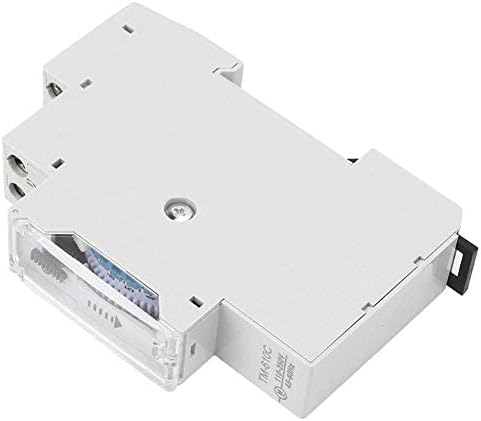
รูปที่ 7.1: ด้านข้าง view ภาพประกอบแสดงกลไกการติดตั้งบนราง DIN
7.2 คำแนะนำในการเดินสายไฟ
คำเตือน: Ensure all power is disconnected before wiring. Incorrect wiring can cause damage to the device or connected equipment, and poses a risk of electric shock.
Refer to the wiring diagram on the back of the unit (Figure 5.4) and the instructions below:
- กำลังไฟเข้า (L, N): Connect the 220V AC live (L) and neutral (N) wires to the corresponding input terminals.
- Load Output (1, 2): Connect the load (e.g., light fixture, motor) to the output terminals. Terminal '1' is typically the switched live output, and '2' is the common neutral or return path for the load.
- ตรวจสอบให้แน่ใจว่าได้ขันขั้วต่อสกรูทั้งหมดให้แน่นสนิทเพื่อป้องกันการหลวมของสายไฟ
รูปที่ 7.2: Detailed wiring diagram on the back of the unit. L and N are input terminals for 110-250VAC. Terminals 1 and 2 are the output contacts for the load (AC250V 16A).
8. คู่มือการใช้งาน
8.1 การตั้งเวลาปัจจุบัน
Rotate the dial clockwise until the current time aligns with the arrow indicator on the front of the unit. The dial represents a 24-hour cycle.
รูปที่ 8.1: ด้านหน้า view showing the 24-hour dial and the time indicator arrow.
8.2 การตั้งโปรแกรมรอบการเปิด/ปิด
The dial has segments, each representing 15 minutes. To program an ON period, push the corresponding segments outwards. To program an OFF period, leave the segments pushed inwards.
- Each segment corresponds to 15 minutes.
- Pushing a segment outwards will turn the connected device ON during that 15-minute interval.
- Leaving a segment inwards will keep the connected device ปิด during that 15-minute interval.
- You can set multiple ON/OFF periods throughout the 24-hour cycle.
รูปที่ 8.2: View of the programmable segments on the dial. Segments pushed outwards activate the timer.
8.3 สวิตช์ควบคุมด้วยตนเอง
The TM610C features a manual override switch with two positions:
- "ON" (I): The connected device will remain continuously ON, overriding the programmed schedule.
- "AUTOMATIC" (Clock Symbol): The device will operate according to the programmed ON/OFF schedule.
Ensure the switch is set to the "AUTOMATIC" position for scheduled operation.
รูปที่ 8.3: The manual override switch located near the time dial. Set to 'I' for permanent ON, or the clock symbol for automatic operation.
8.4 Power Backup Function
The TM610C includes an internal battery that provides up to 100 hours of power backup. This feature ensures that the internal clock continues to run and maintains your programmed settings even during power outages, preventing the need for reprogramming after a power interruption.
9. การบำรุงรักษา
- การทำความสะอาด: ใช้ผ้าแห้งเนื้อนุ่มเช็ดทำความสะอาดภายนอกของอุปกรณ์ ห้ามใช้น้ำยาทำความสะอาดหรือสารละลายใดๆ
- การเชื่อมต่อ: ตรวจสอบการเชื่อมต่อสายไฟเป็นระยะเพื่อให้แน่ใจว่ามีความปลอดภัย
- สิ่งแวดล้อม: Ensure the device is kept in a dry, dust-free environment within its specified operating temperature range.
10 การแก้ไขปัญหา
| ปัญหา | สาเหตุที่เป็นไปได้ | สารละลาย |
|---|---|---|
| Device not turning ON/OFF as programmed. |
|
|
| Clock dial not moving. |
|
|
| Connected device not receiving power. |
|
|
11. การรับประกันและการสนับสนุน
11.1 ข้อมูลการรับประกัน
Walfront products are manufactured to high-quality standards. For specific warranty details, please refer to the warranty policy provided by your retailer or the official Walfront webไซต์ โปรดเก็บใบเสร็จรับเงินของคุณไว้เป็นหลักฐานการซื้อสำหรับการเรียกร้องการรับประกันใดๆ
11.2 การสนับสนุนลูกค้า
If you encounter any issues or have questions regarding your Walfront TM610C Intelligent DIN Rail Timing Switch that are not covered in this manual, please contact Walfront customer service or your local distributor for assistance. You can often find contact information on the Walfront brand store page or their official webเว็บไซต์.
หากต้องการข้อมูลเพิ่มเติม โปรดเยี่ยมชม Walfront Store on Amazon.
เอกสารที่เกี่ยวข้อง - TM610C
 |
Pressure Threshold Switch Circuit Guide - WALFRONT S40 Technical guide for the WALFRONT S40 pressure threshold switch, explaining the Wheatstone bridge and voltage comparator circuit operation. |
 |
Product Manual: WALFRONT Electronic Transformer ESDB332.11 User manual and compliance information for the WALFRONT Electronic Transformer model ESDB332.11, including manufacturer details and usage instructions. |
 |
User Manual: 12V/24V/36V 15A PWM DC Motor Speed Controller (GS00574) Operational guide and safety instructions for the GS00574 PWM DC Motor Speed Controller, featuring specifications and usage guidelines. |
 |
User Manual: Mini Cordless Rotating Tool Kit (Model 10112402562) User manual for the WALFRONT Mini Cordless Rotating Tool Kit, featuring 5-speed settings, USB charging, and usage instructions for engraving, sanding, and grinding. |
 |
WALFRONT DC Motor Speed Regulator User Manual (10102500106) User manual for the WALFRONT DC Motor Speed Regulator (Model 10102500106), featuring wireless remote control, 6V-28V PWM stepless speed regulation, and 5A capacity. |
 |
User Manual for WALFRONT 7.5KV 30mA Neon Light Electronic Transformer (NP-7500-30) User manual and safety instructions for the WALFRONT 7.5KV 30mA NP-7500-30 Neon Light Electronic Transformer. Includes manufacturer and compliance details. |
Ask a question about this manual
Ask about setup, troubleshooting, compatibility, parts, safety, or missing instructions. Manuals+ will review the question and use this page’s manual context to help answer it.