
การแนะนำ
This manual provides detailed instructions for the assembly, operation, and maintenance of your RFIVER TF3001 TV Floor Stand. Please read these instructions carefully before installation to ensure safe and correct usage. This stand is designed for televisions ranging from 32 to 65 inches, with a maximum VESA pattern of 400x400mm and a weight capacity of up to 35 kg (77 lbs).
ข้อมูลด้านความปลอดภัย
- ห้ามเกินขีดจำกัดการรับน้ำหนักสูงสุดที่ 35 กก. (77 ปอนด์)
- ตรวจสอบให้แน่ใจว่ารูปแบบ VESA ของทีวีของคุณเข้ากันได้ (100x100 มม. ถึง 400x400 มม.)
- Always assemble the stand on a soft, clean surface to prevent scratches.
- Verify all screws and bolts are securely tightened before placing the TV on the stand.
- ให้เด็กและสัตว์เลี้ยงออกห่างจากการชุมนุม
- ห้ามดัดแปลงขาตั้งในลักษณะใดๆ ทั้งสิ้น
เนื้อหาแพ็คเกจ
โปรดตรวจสอบให้แน่ใจว่าชิ้นส่วนทั้งหมดครบถ้วนและไม่เสียหายก่อนเริ่มประกอบ หากมีชิ้นส่วนใดขาดหายหรือเสียหาย โปรดติดต่อฝ่ายบริการลูกค้า
- เสาค้ำหลัก
- ฐานกระจกนิรภัย
- ขายึดทีวี
- VESA Adapter Plates (if applicable)
- Hardware Kit (screws, washers, spacers, nuts)
- คลิปการจัดการสายเคเบิล
- เครื่องมือประกอบ (เช่น ประแจอัลเลน)
- คู่มือการใช้งาน
คำแนะนำการตั้งค่า
Follow these steps carefully for proper assembly.
Step 1: Assemble the Base and Support Pole
Attach the main support pole to the tempered glass base using the provided hardware. Ensure the pole is securely fastened to the base for stability.

Image: The assembled RFIVER TF3001 TV Floor Stand, ready for TV mounting.
Step 2: Determine VESA Pattern and Attach Brackets to TV
Identify your TV's VESA mounting pattern (the distance between the mounting holes on the back of your TV). Select the appropriate screws, washers, and spacers from the hardware kit. Attach the TV mounting brackets to the back of your television. Ensure the brackets are level and securely tightened.

ภาพ: อดีตample of VESA mounting holes on a TV back panel.

Image: VESA compatibility chart and stand dimensions.
ขั้นตอนที่ 3: ติดตั้งทีวีเข้ากับขาตั้ง
Carefully lift the TV (with assistance if necessary) and hook the attached brackets onto the mounting plate of the stand. Ensure the TV is centered and level. Secure the TV using the safety lock mechanism to prevent accidental dislodgement.

Image: Detail of the safety lock for securing the TV.
คำแนะนำการใช้งาน
การปรับความสูง
The TV stand allows for height adjustment between 1000mm and 1300mm. To adjust the height, loosen the securing bolts on the main support pole, carefully raise or lower the TV to the desired position, and then securely tighten the bolts. Always ensure the TV is stable after adjustment.

Image: Illustration of the height adjustment mechanism.
ฟังก์ชั่นการหมุน
The TV mounting bracket can swivel 60 degrees (30 degrees left and 30 degrees right) to provide optimal viewing angles. Gently rotate the TV to your preferred position. No tools are required for this adjustment.
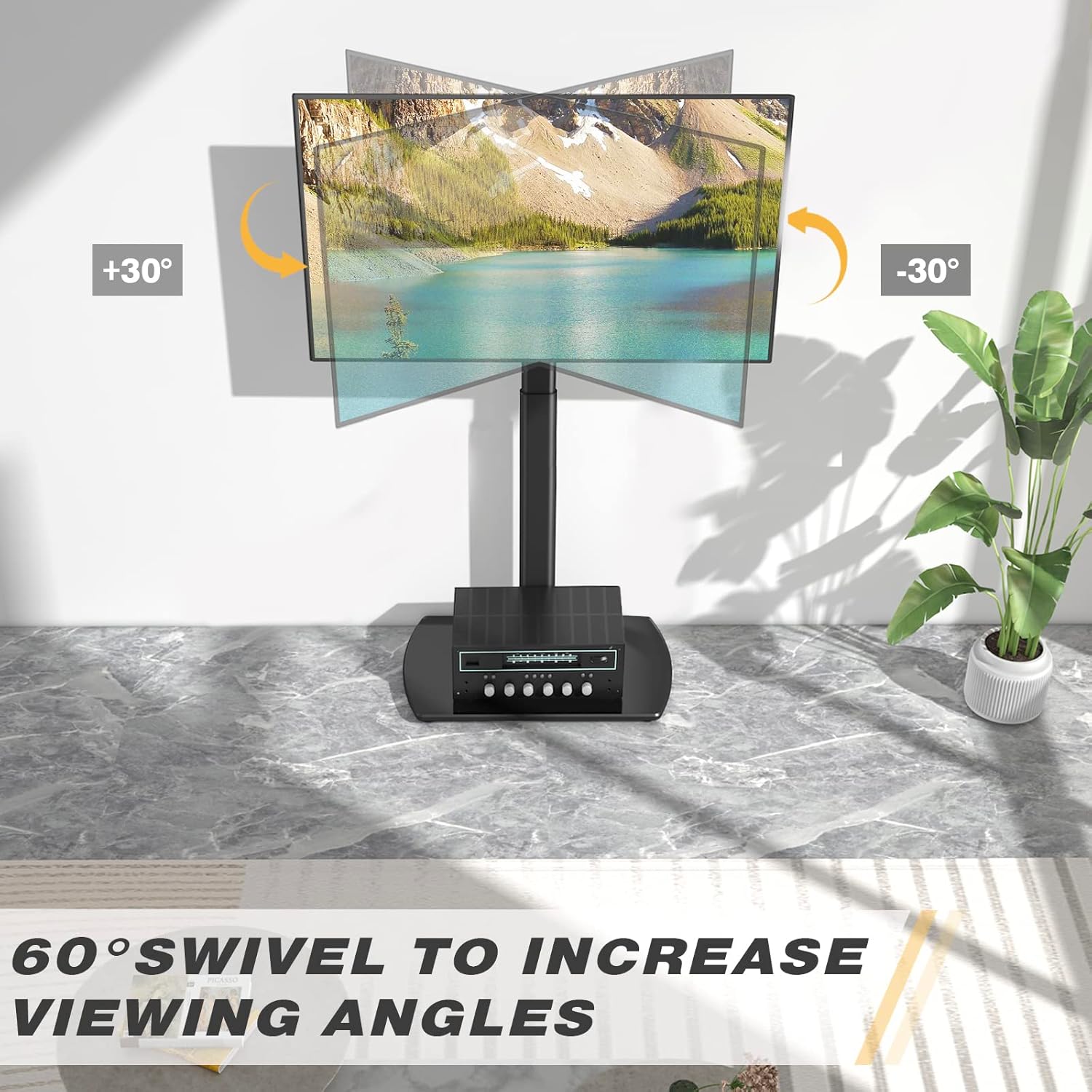
Image: Visual representation of the 60-degree swivel range.

Image: Close-up of the swivel joint.
การจัดการสายเคเบิล
Utilize the integrated cable management clips on the rear of the main support pole to organize and conceal TV cables. This helps maintain a tidy appearance and prevents cable clutter.

Image: Cable management clips on the stand's pole.
การซ่อมบำรุง
- การทำความสะอาด: เช็ดขาตั้งด้วยผ้านุ่มๆamp ผ้า หลีกเลี่ยงน้ำยาทำความสะอาดที่มีฤทธิ์กัดกร่อนหรือตัวทำละลายที่อาจทำลายพื้นผิว
- การตรวจสอบตามระยะเวลา: ตรวจสอบสกรูและโบลต์ทั้งหมดเป็นระยะเพื่อให้แน่ใจว่าขันแน่นดี ขันให้แน่นอีกครั้งหากจำเป็น
- Glass Base Care: The tempered glass base is durable but can be scratched. Use coasters for items placed on it and avoid dropping heavy objects.
การแก้ไขปัญหา
| ปัญหา | สาเหตุที่เป็นไปได้ | สารละลาย |
|---|---|---|
| ทีวีไม่อยู่ในระดับ | Mounting brackets are not aligned or tightened unevenly. | Re-check the alignment of the TV mounting brackets and ensure all screws are tightened evenly. |
| ขาตั้งดูไม่มั่นคง | การเชื่อมต่อหลวมหรือพื้นไม่เรียบ | Verify all assembly bolts are securely tightened. Ensure the stand is placed on a flat, stable surface. Check non-slip feet. |
| TV cannot be mounted. | รูปแบบ VESA ไม่ถูกต้อง หรือขนาด/น้ำหนักทีวีไม่ตรงตามที่ต้องการ | Confirm your TV's VESA pattern and weight are within the stand's specifications (Max VESA 400x400mm, Max 35kg/77lbs). |
ข้อมูลจำเพาะ
| ยี่ห้อ: | RFIVER |
| แบบอย่าง: | ทีเอฟ3001 |
| ขนาดทีวีที่รองรับ: | 32 - 65 นิ้ว |
| Max VESA Compatibility: | 400x400mm (also supports 100x100, 100x200, 200x100, 200x200, 300x200, 200x300, 300x300, 400x200, 400x300) |
| ความจุน้ำหนักสูงสุด: | 35 กก. (77 ปอนด์) |
| ช่วงการปรับความสูง: | 1000มม. - 1300มม. |
| มุมหมุน: | ±30 องศา (รวมทั้งหมด 60 องศา) |
| วัสดุ: | เหล็กอัลลอย, กระจกนิรภัย |
| สี: | สีดำ |
| ขนาดสินค้า (กว้าง x ยาว x สูง) : | 55 x 38 x 130 cm (approximate, at max height) |
| น้ำหนักผลิตภัณฑ์: | 8.8 กก. |
การรับประกันและการสนับสนุน
RFIVER products are designed for durability and performance. For any questions, missing parts, or support needs, please contact RFIVER customer service. Please retain your proof of purchase for warranty claims.
For further assistance, please visit the official RFIVER webเว็บไซต์หรือติดต่อช่องทางสนับสนุนลูกค้าของพวกเขา