
1. บทนำ
The ScopeAround MS450 Digital Otoscope Ear Camera is designed to provide a clear and detailed view of the ear canal and eardrum. This device features a 4.5-inch IPS screen, a high-definition camera with adjustable LED lights, and an intelligent gyroscope for image stabilization. It is intended for personal ear inspection and can assist in monitoring ear health. This manual provides essential information for the safe and effective use of your otoscope.
2. ข้อมูลด้านความปลอดภัย
- Do not insert the otoscope too deeply into the ear canal. Excessive insertion can cause injury to the eardrum or inner ear structures.
- Always use the provided ear specula to prevent over-insertion and protect the ear canal.
- Clean the camera lens and ear specula thoroughly before and after each use with alcohol wipes to prevent infection.
- This device is for observation and minor earwax removal only. For significant earwax impaction or ear infections, consult a medical professional.
- Keep the device out of reach of children. Adult supervision is required if used on children.
- Avoid using the device if you experience pain, discomfort, or bleeding during examination. Seek medical attention immediately.
- ห้ามถอดประกอบหรือดัดแปลงอุปกรณ์ การกระทำดังกล่าวอาจทำให้การรับประกันเป็นโมฆะและก่อให้เกิดความเสี่ยงด้านความปลอดภัย
3. เนื้อหาบรรจุภัณฑ์
ตรวจสอบว่ามีรายการทั้งหมดอยู่ในแพ็คเกจ:
- MS450 Otoscope Camera Unit
- สายชาร์จ (USB Type-C)
- คู่มือการใช้งาน
- 4 x Silicone Ear Spoons (various types)
- 3 x Ear Specula (protective cones)
- 1 Pack of Alcohol Prep Pads
- 32GB MicroSD Memory Card (pre-installed or included separately)

4. สินค้าหมดview
The MS450 otoscope consists of a main display unit and a connected camera probe. Familiarize yourself with the components and controls:

- หน่วยแสดงผล: Features a 4.5-inch IPS screen for real-time viewการไอเอ็นจี
- หัววัดกล้อง: Equipped with an HD camera, 6 adjustable LED lights, and a gyroscope.
- ปุ่มควบคุม: Power, Photo/Video, Light Control, Mode Switch, Navigation (Up/Down), OK, and Settings.
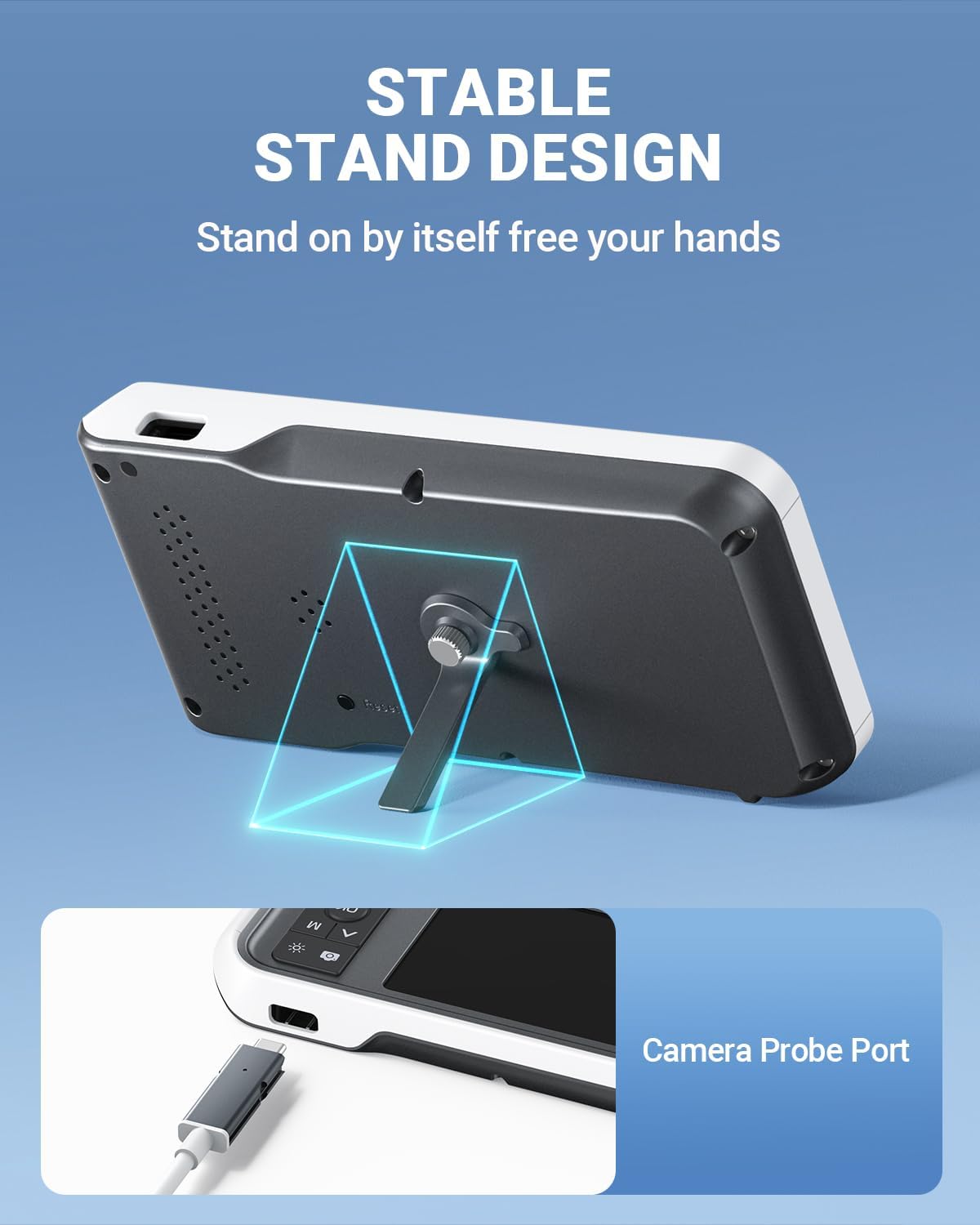
- พอร์ต: USB Type-C Charging Port, TF Card Slot, Camera Probe Connector.
- ขาตั้งแบบรวม: ช่วยให้ใช้งานได้โดยไม่ต้องใช้มือ
5. การตั้งค่า
- ชาร์จอุปกรณ์: Before first use, fully charge the otoscope using the provided USB Type-C cable and a compatible power adapter (not included). The charging port is located on the side of the display unit. A full charge provides over 4 hours of continuous use.
- ใส่การ์ด MicroSD: Ensure the 32GB MicroSD card is properly inserted into the TF Card Slot. This card is used to store photos and videos.
- ติดตั้งหัววัดกล้อง: Connect the camera probe cable securely to the Camera Probe Connector on the display unit.
- Select and Attach Specula/Ear Spoon: Choose an appropriate ear speculum (protective cone) or silicone ear spoon. Gently push it onto the tip of the camera probe until it is secure. Always use a speculum to protect the ear canal.


6. คู่มือการใช้งาน
- เปิดเครื่อง: Press and hold the Power Button (blue button) for a few seconds until the screen turns on.
- ปรับความสว่างของ LED: Use the Light Control Button (sun icon) to cycle through 3 levels of LED brightness to achieve optimal illumination for your ear canal.
- การวางตำแหน่ง: Gently insert the camera probe into the ear canal. The 4.5-inch IPS screen will display a real-time view. The intelligent directional gyroscope helps stabilize the image, preventing disorientation.
- การทำงานแบบแฮนด์ฟรี: Utilize the integrated stand on the back of the display unit to position the device on a flat surface, allowing for hands-free viewing and easier manipulation of the probe.
- ถ่ายภาพ/วิดีโอ:
- Press the Mode Switch Button (M) to switch between photo and video modes.
- In photo mode, press the Photo/Video Button (camera icon) once to take a picture.
- In video mode, press the Photo/Video Button once to start recording, and press again to stop.
- Review สื่อ: Use the navigation buttons (Up/Down) to browse captured photos and videos. Press the OK button to view รายการที่เลือก
- ถ่ายโอนข้อมูล: Connect the device to a computer using the USB Type-C cable to transfer photos and videos from the MicroSD card. Alternatively, remove the MicroSD card and insert it into a card reader.
- หมดแรง: กดปุ่มเปิด/ปิดค้างไว้จนกว่าหน้าจอจะดับลง

7. การบำรุงรักษา
- การทำความสะอาดเลนส์กล้อง: After each use, gently wipe the camera lens with an alcohol prep pad or a soft, dry cloth. Ensure no residue remains.
- Cleaning Ear Spoons/Specula: Wash reusable ear spoons and specula with soap and water, then sterilize with alcohol prep pads. Replace disposable specula after each use.
- การทำความสะอาดอุปกรณ์: Wipe the main unit with a soft, dry cloth. Do not immerse the main unit in water. The camera probe is waterproof and can be cleaned with water and alcohol.
- พื้นที่จัดเก็บ: Store the otoscope in a clean, dry place at room temperature, away from direct sunlight and extreme temperatures.
- การดูแลแบตเตอรี่ เพื่อยืดอายุการใช้งานแบตเตอรี่ ควรหลีกเลี่ยงการปล่อยประจุแบตเตอรี่จนหมดบ่อยๆ ควรชาร์จอุปกรณ์เป็นประจำ แม้จะไม่ได้ใช้งานเป็นเวลานานก็ตาม

8 การแก้ไขปัญหา
| ปัญหา | สาเหตุที่เป็นไปได้ | สารละลาย |
|---|---|---|
| อุปกรณ์ไม่เปิดเครื่อง | แบตเตอรี่อ่อน อุปกรณ์ค้าง | Charge the device fully. If unresponsive, press the Reset button with a pin. |
| ไม่มีภาพปรากฏบนหน้าจอ | Camera probe not connected; faulty probe. | Ensure camera probe is securely connected. If problem persists, contact support. |
| ภาพเบลอ | Dirty lens; incorrect focal distance. | Clean the camera lens. Ensure the probe is within the optimal focal distance (approx. 1 inch / 2.5 cm). |
| ไม่สามารถถ่ายภาพ/วิดีโอได้ | MicroSD card full or not inserted; incorrect mode. | Check MicroSD card status and ensure it is inserted. Verify device is in photo or video mode. |
| ไฟ LED ไม่ทำงาน | ปิดไฟหรือปรับความสว่างไว้ที่ระดับต่ำสุด | Press the Light Control Button to adjust brightness levels. |
9. ข้อมูลจำเพาะ
- แบบอย่าง: MS450
- แสดง: หน้าจอ IPS ขนาด 4.5 นิ้ว
- ความละเอียดกล้อง: Full HD (1080P for images, 720P for video)
- แหล่งกำเนิดแสง: 6 adjustable LED lights (3 brightness levels)
- แบตเตอรี่: ลิเธียมโพลิเมอร์ 2500mAh (ชาร์จไฟได้)
- อายุการใช้งานแบตเตอรี่: ใช้งานต่อเนื่องได้ประมาณ 4 ชั่วโมง
- พื้นที่จัดเก็บ: การ์ด MicroSD ขนาด 32GB (มีให้ในชุด)
- ระยะโฟกัส: Approximately 1 inch (2.5 cm)
- ไจโรสโคป: Intelligent directional gyroscope for image stabilization
- การเชื่อมต่อ: USB Type-C for charging and data transfer
- ขนาดสินค้า : 5.9 x 2.9 x 0.79 นิ้ว
- น้ำหนักสินค้า: 12 ออนซ์
- วัสดุ: Glass (lens), other components as specified by manufacturer
10. การรับประกัน
ScopeAround products are covered by a limited manufacturer's warranty against defects in materials and workmanship. Please refer to the warranty card included in your package or visit the official ScopeAround webดูรายละเอียดข้อกำหนดและเงื่อนไขการรับประกันได้ที่เว็บไซต์ เก็บหลักฐานการซื้อไว้เพื่อใช้ในการเรียกร้องการรับประกัน
11. การสนับสนุน
For technical assistance, troubleshooting, or product inquiries, please contact ScopeAround customer support:
- Webเว็บไซต์: Visit the official ScopeAround webไซต์สำหรับคำถามที่พบบ่อยและทรัพยากรสนับสนุน
- อีเมล: ดูที่บรรจุภัณฑ์ผลิตภัณฑ์ของคุณหรือที่ทางการ webเว็บไซต์สำหรับอีเมล์บริการลูกค้า
- โทรศัพท์: ดูที่บรรจุภัณฑ์ผลิตภัณฑ์ของคุณหรือที่ทางการ webเว็บไซต์สำหรับเบอร์โทรศัพท์ฝ่ายบริการลูกค้า
Our US-based after-sales support team is available to assist you.