
1. บทนำ
The DORHEA ESP32-S NodeMCU Development Board is a versatile 2.4GHz dual-mode WiFi and Bluetooth microcontroller, featuring the ESP-WROOM-32 module. This board integrates a dual-core processor and the CP2102 USB-to-serial chip, enabling stable and fast data transmission via a micro USB interface. It is designed for a wide range of applications, including home automation, wireless industrial control, and wireless positioning systems.
The ESP32-S supports Lua programming, LWIP protocol, and FreeRTOS, offering flexibility for development. It operates in three modes: Access Point (AP), Station (STA), and a combination of both (AP + STA). Its low-power coprocessor allows for continuous monitoring of peripherals while the main CPU is powered down, optimizing energy consumption.

รูปที่ 1: ด้านหน้า view of the DORHEA ESP32-S NodeMCU Development Board, showing the ESP-WROOM-32 module, micro USB port, and pin headers.
2. คู่มือการติดตั้ง
2.1 การเชื่อมต่อบอร์ด
Connect the ESP32-S development board to your computer using a micro USB cable. The CP2102 chip facilitates the serial communication required for programming and debugging.
2.2 การติดตั้งไดรเวอร์
The CP2102 USB-to-serial chip may require specific drivers for your operating system. These drivers are typically available from the Silicon Labs website. Install them before attempting to program the board.
2.3 การตั้งค่าสภาพแวดล้อมการพัฒนา
The ESP32-S board is compatible with various development environments, including the Arduino IDE and PlatformIO (within Visual Studio Code). Follow the respective environment's instructions to add ESP32 board support.
- อาร์ดูอิโน IDE: Install the ESP32 board package through the Boards Manager.
- แพลตฟอร์มไอโอ: Configure your project to use the ESP32 framework.
2.4 โหมดการเขียนโปรแกรม
To upload code to the board, it typically needs to be in programming mode. This is usually achieved by holding down the บู๊ท button while initiating the upload process in your IDE, then releasing it once the upload begins. Some environments or board configurations may not require manual button pressing.

รูปที่ 2: มุม view of the ESP32-S development board, showing the ESP-WROOM-32 module and micro USB port.
3. คู่มือการใช้งาน
3.1 การทำงานพื้นฐาน
Once programmed, the ESP32-S board will execute the uploaded code. The board features two touch buttons: one for รีเซ็ต (labeled EN) and another to enable the module to enter program mode (labeled BOOT).
3.2 WiFi and Bluetooth Modes
The ESP32-S supports three operational modes for wireless communication:
- โหมด AP (Access Point): The ESP32-S acts as a Wi-Fi hotspot, allowing other devices to connect to it.
- โหมด STA (สถานี): The ESP32-S connects to an existing Wi-Fi network.
- AP + STA Mode: The ESP32-S simultaneously functions as both an Access Point and a Station.
3.3 แผนภาพการเชื่อมต่อขา (Pinout Diagram)
Refer to the pinout diagram for proper connection of external components and sensors. Understanding the GPIO assignments, power pins, and special functions (ADC, DAC, Touch) is crucial for project development.

รูปที่ 3: Detailed pinout diagram of the ESP32-S NodeMCU board.
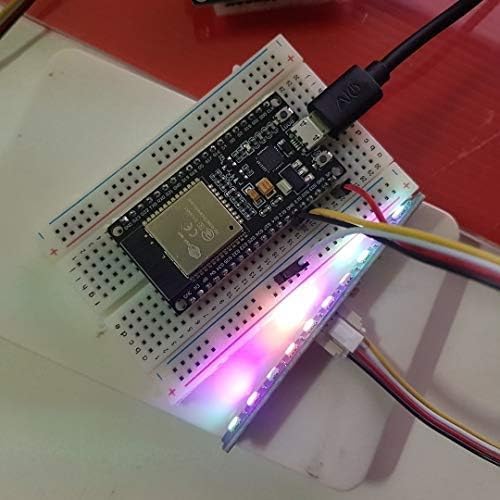
รูปที่ 4: The ESP32-S development board connected to a breadboard with an LED strip, demonstrating a typical application setup.
4. การบำรุงรักษา
To ensure the longevity and reliable operation of your ESP32-S development board, follow these general maintenance guidelines:
- จัดการด้วยความระมัดระวัง: หลีกเลี่ยงการทำกระดานตกหรือทำให้กระดานต้องรับแรงกดดันทางกายภาพมากเกินไป
- การปล่อยไฟฟ้าสถิต: Always handle the board in an environment free of static electricity to prevent damage to sensitive components.
- ความสะอาด : รักษาพื้นผิวกระดานให้ปราศจากฝุ่น สิ่งสกปรก และความชื้น ใช้แปรงขนนุ่มแห้งหรือลมเป่าทำความสะอาด
- แหล่งจ่ายไฟ: Ensure a stable and appropriate power supply. The board can draw between 500-600mA instantaneously when connecting to Wi-Fi. Using an inadequate power supply (e.g., some computer USB ports or hubs) may lead to reboots or connectivity issues.
- เล่มที่tage ระเบียบข้อบังคับ: While the board can handle input voltages up to 20V, the onboard LDO regulator has limited heat dissipation. If using a higher voltage power supply, consider stepping down the voltage to 5V with a switching regulator before connecting to the VIN pin to prevent overheating and potential failure.
5 การแก้ไขปัญหา
This section addresses common issues encountered during the use of the ESP32-S development board.
5.1 ปัญหาการเชื่อมต่อ Wi-Fi
- Frequent Disconnections/Reboots: If the board reboots or disconnects from Wi-Fi frequently, especially during connection attempts, check your power supply. The board requires significant current (500-600mA) during Wi-Fi initialization. Ensure your USB port or external power supply can provide sufficient, stable current.
- ไม่มีการเชื่อมต่อ Wi-Fi: Verify your Wi-Fi credentials in the code. Ensure the antenna is not obstructed.
5.2 Programming and Flashing Problems
- Failed Uploads: Ensure the correct COM port is selected in your IDE. If using Arduino IDE, ensure the correct board type (ESP32 Dev Module) is selected. For some setups, you may need to manually hold the บู๊ท button during the upload process.
- ปัญหาไดร์เวอร์: Confirm that the CP2102 drivers are correctly installed and recognized by your operating system.
- "Could not connect to an Espressif device": This error often indicates a communication problem. Check USB cable, drivers, and ensure the board is in programming mode.
- Memory Loss/Bricking: In rare cases, the flash memory may become corrupted. Attempting to reflash the board with a known working program is the first step. If persistent issues occur, the board may be damaged.
5.3 ฟังก์ชันบลูทูธ
- บลูทูธใช้งานไม่ได้: Verify that your code correctly initializes and uses the Bluetooth module. Ensure there are no hardware conflicts with other components connected to the board.
5.4 Silkscreen Error
- Incorrect Pin Label: Be aware that the GPIO pin G33, located between G25 and G32, may be incorrectly marked as G23 on the silkscreen. This is a labeling error only and does not affect the physical pin's functionality.
6. ข้อมูลจำเพาะ

รูปที่ 5: จากบนลงล่าง view of the ESP32-S development board with key features labeled.
| คุณสมบัติ | รายละเอียด |
|---|---|
| โปรเซสเซอร์ | Dual-core 2.4 GHz Espressif |
| การเชื่อมต่อแบบไร้สาย | Wi-Fi (2.4GHz 802.11 b/g/n), Bluetooth |
| USB-to-Serial Chip | ซีพี2102 |
| การรองรับระบบปฏิบัติการ | ฟรีRTOS |
| ความจุของหน่วยความจำ | 4MB |
| ขนาดสินค้า (กxยxส) | 1.96 x 1.10 x 0.59 นิ้ว |
| น้ำหนักสินค้า | 1.58 ออนซ์ |
| หมายเลขรุ่น | 13051-1 |
| สี | 30pin micro |

รูปที่ 6: ด้านข้าง view of the ESP32-S development board with dimensions labeled.
7. การรับประกันและการสนับสนุน
7.1 ข้อมูลการรับประกัน
Specific warranty details for the DORHEA ESP32-S NodeMCU Development Board are not explicitly provided in the product information. For warranty inquiries, please contact the manufacturer or your point of purchase.
7.2 การสนับสนุนด้านเทคนิค
For technical assistance, troubleshooting beyond this manual, or further product information, please refer to the DORHEA brand store or contact their customer support channels. You can often find additional resources and community forums online for ESP32 development boards.