
Sophos Central Intercept X Adv EDR
Sophos Central Intercept X Advanced with EDR Instruction Manual
ยี่ห้อ: Sophos | แบบอย่าง: Central Intercept X Adv EDR
สินค้าเกินview
Sophos Central Intercept X Advanced with EDR is a comprehensive cybersecurity solution designed to provide advanced endpoint protection. It combines next-generation anti-exploit, anti-ransomware, and root cause analysis capabilities to defend against a wide range of modern cyber threats. This manual provides essential information for setting up, operating, maintaining, and troubleshooting your Sophos Intercept X Advanced with EDR license.

Image: Sophos Intercept X Advanced with EDR product packaging, illustrating the software license box.
การติดตั้งและการตั้งค่า
This product is a 1-year license for Sophos Central Intercept X Advanced with EDR for 1 user. Installation typically involves activating the license through the Sophos Central platform and deploying the endpoint agent to your device.
- License Acquisition: Ensure you have received your digital license key or activation instructions. This is typically provided via email or a physical card within the product packaging.
- Access Sophos Central: Navigate to the Sophos Central administration console. If you do not have an account, you will need to create one using the provided instructions.
- เปิดใช้งานใบอนุญาต: Within Sophos Central, locate the section for license activation or subscription management. Enter your license key as prompted.
- Download Endpoint Agent: After successful license activation, download the appropriate Sophos Intercept X endpoint agent for your operating system (e.g., Windows, macOS).
- Install Agent: Run the downloaded installer on the device you wish to protect. Follow the on-screen prompts to complete the installation. An internet connection is required during installation.
- ตรวจสอบการติดตั้ง: Once installed, the endpoint agent will connect to Sophos Central. Verify that the device appears in your Sophos Central dashboard and is reporting its status correctly.

Image: Sophos Intercept X product box, highlighting the "Activation Key" component, which is essential for setup.
การใช้งานซอฟต์แวร์
Sophos Central Intercept X Advanced with EDR operates primarily in the background, providing continuous protection. Management and configuration are performed through the Sophos Central cloud-based console.
คุณสมบัติหลักและความสามารถ
Sophos Intercept X Advanced with EDR offers a robust set of features for endpoint security, including exploit prevention, anti-ransomware, deep learning malware detection, and extended detection and response (EDR) capabilities.
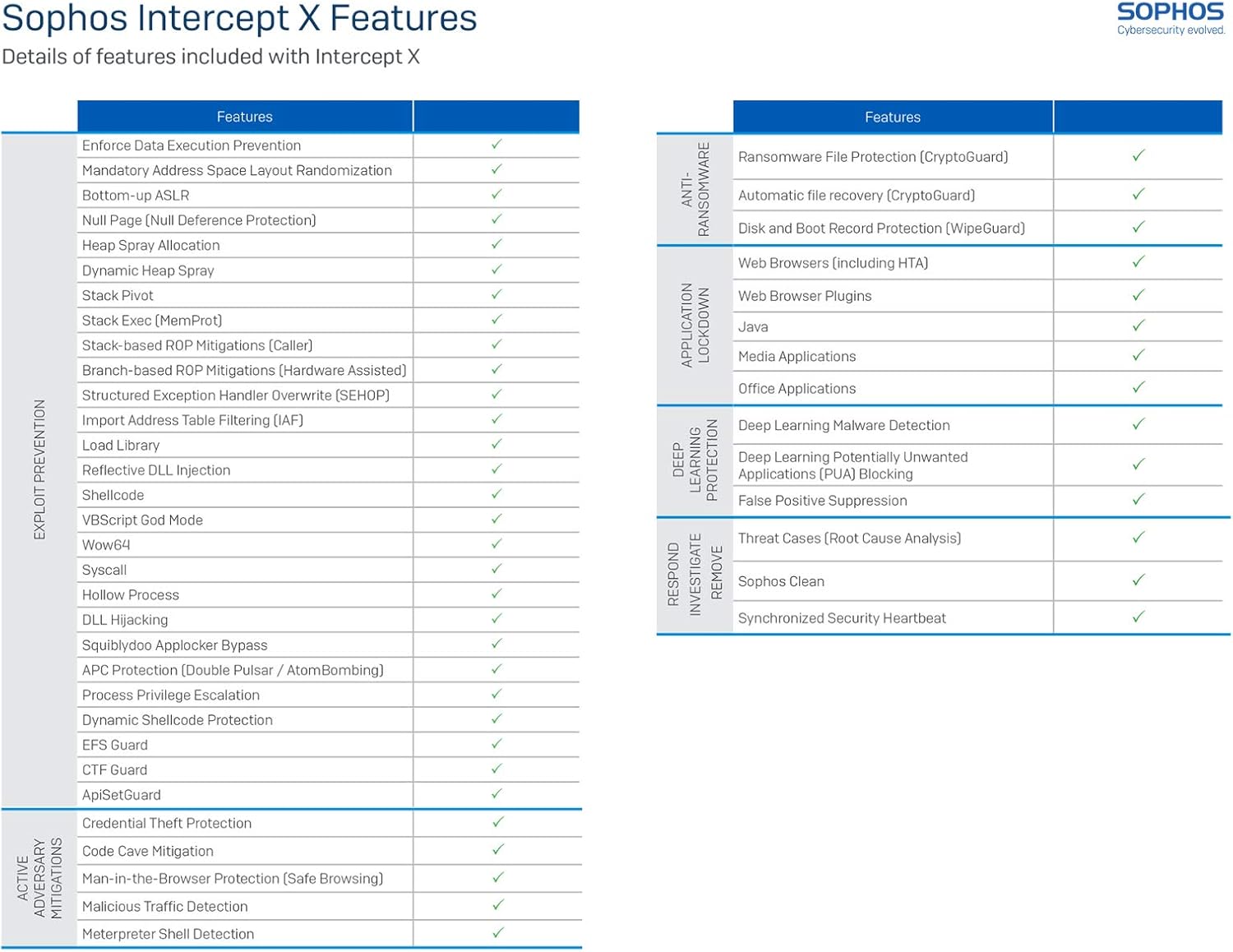
Image: Detailed table outlining Sophos Intercept X features, categorized by Exploit Prevention, Application Lockdown, Anti-Ransomware, Deep Learning Protection, and Respond/Investigate/Remediate capabilities.
- Exploit Prevention: Protects against exploit techniques used in malware attacks, including memory protection, code injection prevention, and API call protection.
- Anti-Ransomware (CryptoGuard): Detects and blocks ransomware attacks by monitoring file encryption behavior and automatically recovering affected files.
- Deep Learning Malware Detection: Utilizes artificial intelligence to identify both known and unknown malware without relying on signatures.
- Application Lockdown: Controls which applications can run and how they interact with system resources.
- Root Cause Analysis: Provides detailed insights into security incidents, showing the attack chain and helping to understand how threats entered and spread.
Intercept X, EDR, and MTR Overview
The Sophos Central platform provides a unified management interface for various security features, including those found in Intercept X Advanced with EDR. The following tables illustrate the comprehensive coverage provided by this solution across different stages of threat protection.

Image: Part 1 of a comparative table detailing features across Intercept X Advanced, Intercept X Advanced with EDR, and MTR versions, covering Attack Surface Reduction, Before It Runs On Device, Prevent, and Stop Running Threat categories.

Image: Part 2 of a comparative table detailing features across Intercept X Advanced, Intercept X Advanced with EDR, and MTR versions, covering Detect and Investigate, Respond/Remediate, and Managed Service categories.
- Attack Surface Reduction: รวมถึง web security, download reputation, web control, peripheral control, and application control.
- Pre-execution Prevention: Features like deep learning malware detection, anti-malware scanning, live protection, and intrusion prevention systems.
- Runtime Threat Stopping: Incorporates data loss prevention, runtime behavior analysis, anti-malware scan interface (AMSI), malicious traffic detection, and exploit prevention.
- Detection and Investigation (EDR): Provides live discover capabilities for threat hunting, suspicious events detection, threat cases (root cause analysis), deep learning malware analysis, and forensic data export.
- Response and Remediation: Offers automated malware removal, synchronized security heartbeat, Sophos Clean, remote terminal access, on-demand endpoint isolation, and single-click "Clean and Block" actions.
Why Choose Intercept X
Sophos Intercept X is designed to address modern cybersecurity challenges with its comprehensive approach to endpoint protection.

ภาพ: โอเวอร์view slide highlighting the benefits and reasons to choose Sophos Intercept X, including its comprehensive nature, unique malware detection, and robust protection against cyberattacks.
- Next-Gen Endpoint Protection: Combines signature-less exploit prevention, machine learning for malware detection, and advanced ransomware protection.
- Unique Malware Detection: Intercept X stops unknown malware and zero-day attacks, unlike traditional antivirus.
- Anti-Ransomware: CryptoGuard technology stops malicious encryption attempts on hard drives, USB devices, and network shares.
- Defense Against Attackers: Blocks exploits and techniques attackers use to distribute malware, steal credentials, and escape detection.
- Indisputable Root Cause Analysis: Provides a visual attack chain, showing how threats entered and what actions were taken.
- Fast Cleanup: Sophos Clean pulverizes malware and hunts down nasty remnant files and registry keys.
การซ่อมบำรุง
Regular maintenance ensures optimal performance and protection from your Sophos Intercept X Advanced with EDR software.
- การอัปเดตอัตโนมัติ: Ensure that automatic updates are enabled within Sophos Central. This ensures your endpoint agent always has the latest threat definitions and software enhancements.
- Regular Scans: While real-time protection is active, consider scheduling full system scans periodically to catch any dormant or deeply embedded threats.
- Monitor Alerts: Regularly check the Sophos Central dashboard for any alerts, warnings, or detected threats. Address any reported issues promptly.
- ข้อกำหนดของระบบ: Ensure your operating system and hardware continue to meet the minimum system requirements for the Sophos endpoint agent.
การแก้ไขปัญหา
If you encounter issues with your Sophos Intercept X Advanced with EDR, consider the following troubleshooting steps:
- ปัญหาการเชื่อมต่อ: If the endpoint agent is not reporting to Sophos Central, check your internet connection and firewall settings to ensure Sophos communication is not blocked.
- การเสื่อมประสิทธิภาพ: If your system experiences slowdowns, ensure your device meets the recommended system requirements. You can also temporarily disable specific Sophos features (e.g., deep learning) for testing, but re-enable them promptly.
- False Positives: If legitimate applications or files are being blocked, you can add them to exclusions within the Sophos Central policy. Exercise caution when creating exclusions.
- Installation Failures: Ensure no other antivirus software is installed on the system, as this can cause conflicts. Restart your computer and try the installation again.
- License Expiry: If your license is nearing expiry or has expired, you will receive notifications. Renew your license through Sophos or your reseller to maintain protection.
- ติดต่อฝ่ายสนับสนุน: For persistent or complex issues, refer to the Sophos support resources or contact Sophos technical support directly.
ข้อมูลจำเพาะ
| คุณสมบัติ | รายละเอียด |
|---|---|
| ชื่อสินค้า | Sophos Central Intercept X Advanced with EDR |
| หมายเลขรุ่น | Central Intercept X Adv EDR |
| ระยะเวลาของใบอนุญาต | 1 ปี |
| จำนวนผู้ใช้ | 1 ผู้ใช้ |
| ส่วนประกอบที่รวมอยู่ | 1-year license for Sophos Central Intercept X Advanced with EDR for 1 user |
| ข้อแนะนำการใช้ | Security for Laptops and Endpoints |
| คุณสมบัติหลัก | Anti-Exploit, Anti-Ransomware, Deep Learning Malware Detection, EDR (Endpoint Detection and Response), Root Cause Analysis |
การรับประกันและการสนับสนุน
This product is a software license. The terms of service and support are governed by Sophos's end-user license agreement (EULA) and support policies.
- License Validity: The license is valid for 1 year from the date of activation. Ensure timely renewal to maintain continuous protection.
- การสนับสนุนด้านเทคนิค: For technical assistance, product inquiries, or to report issues, please visit the official Sophos support website or contact their customer service. Support options may vary based on your license agreement.
- แหล่งข้อมูลออนไลน์: Sophos provides extensive online documentation, knowledge bases, and community forums that can assist with common questions and advanced configurations.
For the most up-to-date information on warranty, support, and terms of service, please refer to the official Sophos webเว็บไซต์: www.sophos.com