
1. สินค้าหมดview
The Alecto WS-1560 is a wireless weather station designed to provide accurate indoor and outdoor environmental data. Featuring a clear color display and a remote outdoor sensor, it offers comprehensive weather information and additional useful functions for your home.
คุณสมบัติหลัก:
- วัดอุณหภูมิและความชื้นภายในและภายนอกอาคาร
- Long-range wireless outdoor sensor (up to 100 meters).
- 5.7-inch well-lit color display with animated weather forecast icons.
- Temperature and ice alarm functions.
- นาฬิกาปลุก พร้อมฟังก์ชั่นเลื่อนการปลุก
- Memory function for latest and highest readings.
- Moon phase indicator, date, day, and time display.
- Battery-operated main unit and outdoor sensor with backup batteries.

Figure 1.1: Alecto WS-1560 Main Unit and Wireless Outdoor Sensor.
2. เนื้อหาบรรจุภัณฑ์
Ensure all components are present and in good condition upon unpacking:
- Alecto WS-1560 Main Unit (Indoor Display)
- เซ็นเซอร์ไร้สายกลางแจ้ง
- คู่มือการใช้งาน
- (Power adapter and batteries may be included depending on package)
Video 2.1: Illustrative video showing typical weather station components and basic setup. (Note: This video is for a related product and may not show the exact Alecto WS-1560 model.)
3. การตั้งค่าและการติดตั้ง
3.1. การติดตั้งแบตเตอรี่
Both the main unit and the outdoor sensor require batteries for operation. Ensure you use the correct type and polarity.
- เซ็นเซอร์กลางแจ้ง:
- เปิดช่องใส่แบตเตอรี่ด้านหลังของเซ็นเซอร์ไร้สายสำหรับใช้งานภายนอกอาคาร
- ใส่แบตเตอรี่ AA 2 ก้อน (ไม่รวมอยู่ในชุด) โดยให้ตรงกับเครื่องหมายขั้ว (+/-)
- ปิดช่องใส่แบตเตอรี่ให้แน่น
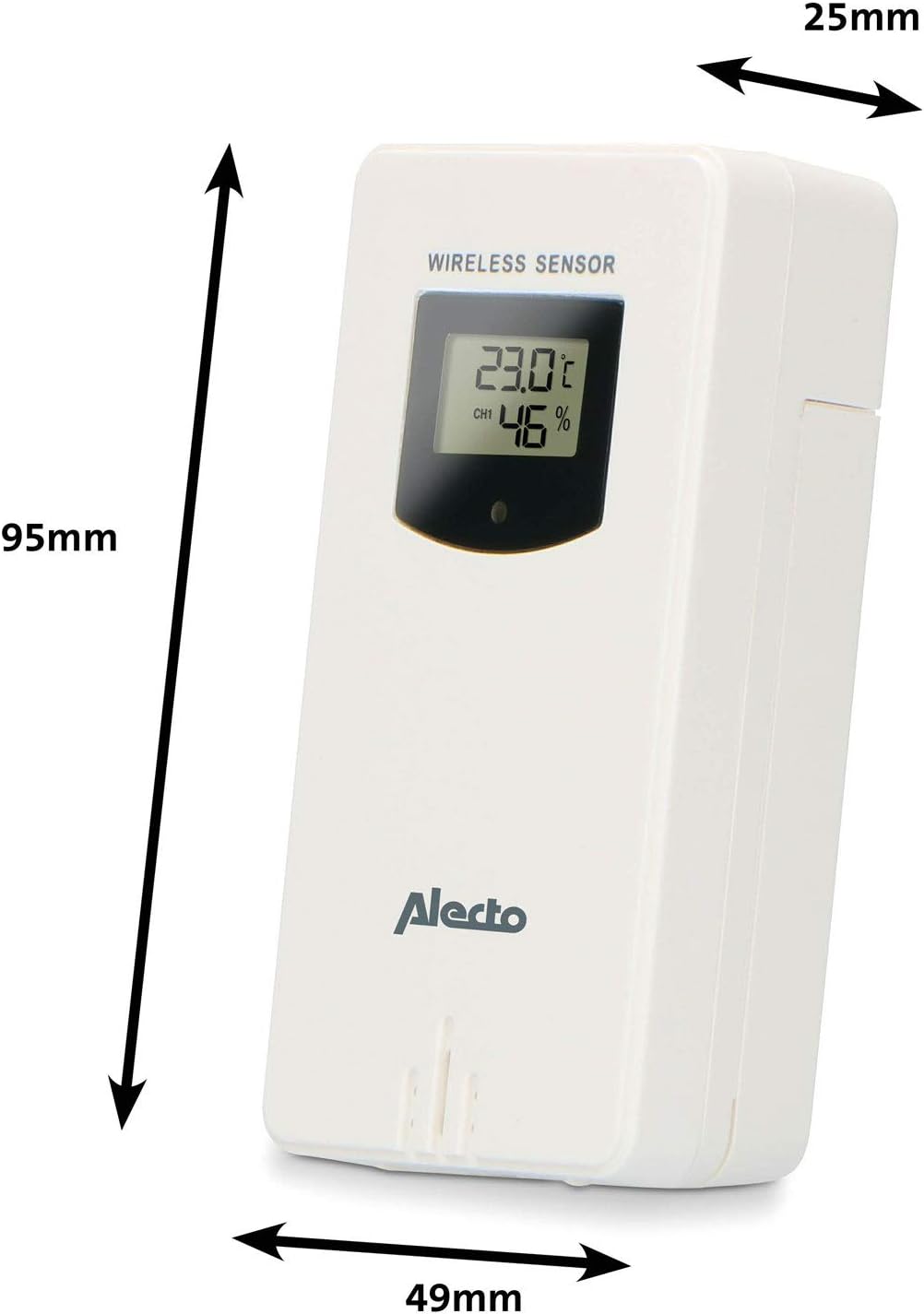
Figure 3.1: Wireless Outdoor Sensor dimensions and battery compartment location.
- หน่วยหลัก:
- เปิดช่องใส่แบตเตอรี่ที่ด้านหลังของตัวเครื่องหลัก
- Insert 2x AA batteries (not included) according to the polarity markings (+/-). These serve as backup batteries.
- ปิดช่องใส่แบตเตอรี่ให้แน่น
- Connect the main unit to a power outlet using the provided power adapter (if included).

Figure 3.2: Main Unit dimensions and power input.
3.2. การวางตำแหน่งเซนเซอร์
For accurate outdoor readings, proper placement of the wireless sensor is crucial:
- Place the sensor in a shaded area, away from direct sunlight, to prevent inaccurate temperature readings.
- ตรวจสอบให้แน่ใจว่ามีการระบายอากาศที่ดีรอบๆ เซ็นเซอร์
- Mount the sensor vertically, approximately 1.5 to 2.5 meters (5 to 8 feet) above the ground.
- Avoid placing the sensor near heat sources (e.g., vents, windows) or moisture sources.
- The maximum transmission range is 100 meters (328 feet) in open air. Walls and other obstacles will reduce this range.

รูปที่ 3.3: อดีตample of outdoor sensor placement on a wall.
3.3. การจับคู่เซ็นเซอร์กับตัวเครื่องหลัก
The main unit and sensor should automatically pair once both are powered on. If pairing does not occur:
- Ensure both units have fresh batteries and are within range.
- Press the "TX" button inside the outdoor sensor's battery compartment to manually send a signal.
- On the main unit, you may need to initiate a search for the outdoor sensor (refer to the "Operation" section for specific button functions).
4. การดำเนินการ
4.1. เค้าโครงการแสดงผล
จอแสดงผลสีขนาด 5.7 นิ้ว ให้ภาพที่คมชัดview of all measured data. Key areas include:
- อุณหภูมิและความชื้นภายนอก: Displays current outdoor conditions.
- อุณหภูมิและความชื้นภายในอาคาร: Displays current indoor conditions.
- Animated Weather Forecast: Icons predict upcoming weather (sunny, partly cloudy, cloudy, rainy, snowy).
- เวลาและวันที่: เวลาปัจจุบัน วัน และวันที่
- ความดันบรรยากาศ: ความดันบรรยากาศปัจจุบัน
- ข้างขึ้นข้างแรม: กราฟิกแสดงข้างขึ้นข้างแรมในปัจจุบัน
- Temperature/Ice Alarm Indicators: Alerts for specific temperature thresholds or potential ice conditions.

รูปที่ 4.1: รายละเอียด view of the main unit's color display.
4.2. ปุ่มฟังก์ชัน
The main unit features several buttons for setting and adjusting functions. Common buttons include:
- SET: Enters setup mode for time, date, and other settings.
- เส้นทาง: Switches between display modes or confirms settings.
- ขึ้น/ลง (หรือ +/-): Adjusts values during setup or cycles through channels.
- เตือน: ตั้งค่าหรือเปิดใช้งานฟังก์ชันเตือนภัย
- ข้อความ: Displays maximum/minimum temperature and humidity records. Long press to clear records.
- งีบหลับ/แสง: Activates snooze during an alarm or adjusts backlight brightness.
Video 4.2: Illustrative video demonstrating various features and settings of a weather station. (Note: This video is for a related product and may not show the exact Alecto WS-1560 model.)
4.3. การตั้งเวลาและวันที่
- Press and hold the "SET" button until the time display starts flashing.
- Use the "UP" or "DOWN" buttons to adjust the hour, then press "SET" to confirm and move to minutes.
- ทำซ้ำขั้นตอนนี้สำหรับนาที ปี เดือน และวัน
- Press "SET" again to exit the setting mode.
4.4. การตั้งค่านาฬิกาปลุก
- Press the "ALARM" button once to view เวลาปลุก
- Press and hold the "ALARM" button until the alarm time starts flashing.
- Use the "UP" or "DOWN" buttons to set the desired alarm hour and minute.
- Press "ALARM" to confirm.
- To activate/deactivate the alarm, press the "ALARM" button briefly when the alarm time is displayed. An alarm icon will appear/disappear.
4.5. บันทึกสูงสุด/ต่ำสุด
The weather station automatically records the maximum and minimum temperature and humidity values over a 24-hour period.
- Press the "MEM" button briefly to view the maximum recorded values.
- Press "MEM" again to view the minimum recorded values.
- Press "MEM" a third time to return to current readings.
- To clear the records, press and hold the "MEM" button for a few seconds.
5. การบำรุงรักษา
- การทำความสะอาด: เช็ดทำความสะอาดหน้าจอและพื้นผิวตัวเครื่องด้วยผ้าเนื้อนุ่มและแห้งamp ผ้า ห้ามใช้สารทำความสะอาดที่มีฤทธิ์กัดกร่อนหรือตัวทำละลาย
- การเปลี่ยนแบตเตอรี่: เมื่อไฟแสดงสถานะแบตเตอรี่ต่ำปรากฏขึ้นบนหน้าจอแสดงผล ให้เปลี่ยนแบตเตอรี่ทั้งในตัวเครื่องหลักและเซ็นเซอร์ภายนอกอาคาร ควรเปลี่ยนแบตเตอรี่ทั้งหมดพร้อมกันด้วยแบตเตอรี่ใหม่ชนิดเดียวกันเสมอ
- การดูแลเซ็นเซอร์: Periodically check the outdoor sensor for debris or obstructions that might affect its readings. Ensure it remains in a shaded, well-ventilated area.
6 การแก้ไขปัญหา
| ปัญหา | สาเหตุที่เป็นไปได้ | สารละลาย |
|---|---|---|
| No outdoor temperature/humidity reading (or "---" displayed) |
|
|
| การวัดอุณหภูมิ/ความชื้นที่ไม่ถูกต้อง |
|
|
| จอแสดงผลสลัวหรือว่างเปล่า |
|
|
7. ข้อมูลจำเพาะ
| หมายเลขรุ่น | WS-1560 |
| ยี่ห้อ | อาเล็กโต |
| แหล่งพลังงาน (ตัวเครื่องหลัก) | Power Adapter (if included) + 2x AA batteries (backup) |
| แหล่งพลังงาน (เซ็นเซอร์ภายนอก) | แบตเตอรี่ AA 2 ก้อน |
| ขนาดผลิตภัณฑ์ (หน่วยหลัก) | 5.1 x 16.5 x 12.3 ซม. |
| น้ำหนักผลิตภัณฑ์ | 440 กรัม |
| ระยะเซ็นเซอร์ไร้สาย | สูงสุด 100 เมตร (กลางแจ้ง) |
| ขนาดจอแสดงผล | 5.7 นิ้ว / 14.5 ซม. |
| ต้นทาง | จีน |
8. การรับประกันและการสนับสนุน
สำหรับข้อมูลการรับประกัน การสนับสนุนทางเทคนิค หรือสอบถามเกี่ยวกับบริการ โปรดดูบัตรรับประกันที่แนบมากับผลิตภัณฑ์ของคุณ หรือเยี่ยมชมเว็บไซต์อย่างเป็นทางการของ Alecto webไซต์ โปรดเก็บใบเสร็จรับเงินไว้เป็นหลักฐานการซื้อ
อาเล็กโต Webเว็บไซต์: www.alecto.nl (General Alecto web(รายละเอียดหน้าสนับสนุนเฉพาะของเว็บไซต์อาจแตกต่างกันไป)