
1. สินค้าหมดview
The ProCase Wireless Keyboard (Model PC-08362168) is a compact and portable Bluetooth keyboard designed for multi-device compatibility. It offers a comfortable typing experience with low-profile, quiet keys and an ergonomic design, suitable for use with iOS, Android, and Windows operating systems.

Image: The ProCase Wireless Keyboard, a slim black keyboard with a standard QWERTY layout, designed for portability and multi-device use.
2. เนื้อหาบรรจุภัณฑ์
- ProCase Wireless Keyboard (Model PC-08362168)
- คู่มือการใช้งาน (เอกสารนี้)
หมายเหตุ: ต้องใช้แบตเตอรี่ AAA 2 ก้อนในการใช้งาน ซึ่งไม่ได้รวมอยู่ในแพ็คเกจ
3. คู่มือการติดตั้ง
3.1. การติดตั้งแบตเตอรี่
- Locate the battery compartment on the back of the keyboard.
- เปิดฝาช่องใส่แบตเตอรี่
- ใส่แบตเตอรี่ AAA สอง (2) ก้อน โดยตรวจสอบให้แน่ใจว่าขั้วถูกต้อง (+/-)
- ปิดฝาช่องใส่แบตเตอรี่ให้แน่น

Image: Underside of the keyboard showing the ON/OFF switch, Connect button, and the battery compartment for two AAA batteries.
3.2. การเปิด/ปิดเครื่อง
Slide the ON/OFF switch, located on the back of the keyboard, to the "ON" position to power on the device. Slide it to "OFF" when not in use to conserve battery life.
3.3. การจับคู่บลูทู ธ
- ตรวจสอบให้แน่ใจว่าแป้นพิมพ์เปิดอยู่
- Press the "Connect" button on the back of the keyboard. The Bluetooth indicator light (usually blue) on the keyboard will start blinking, indicating it is in pairing mode.
- On your device (tablet, smartphone, computer), navigate to its Bluetooth settings.
- เปิดใช้งาน Bluetooth และค้นหาอุปกรณ์ที่มีอยู่
- Select "ProCase Keyboard" (or similar name) from the list of found devices.
- Follow any on-screen prompts to complete the pairing process. A successful connection will be indicated by the Bluetooth light on the keyboard turning solid or turning off, depending on the model.

Image: Diagram illustrating wide compatibility with Android, Windows, and iOS devices, including iPads, Android tablets, Microsoft Surface, and smartphones. It also notes that a USB drive is not included and only Bluetooth connection is supported.
4. คู่มือการใช้งาน
4.1. การพิมพ์ขั้นพื้นฐาน
The keyboard features a standard QWERTY layout. Simply begin typing after successful pairing with your device.
4.2. Function Keys (F1-F12) and Hot Keys
The top row of keys serves dual functions: standard F-keys (F1-F12) and special hot keys for media control, volume, and other system functions. To use the F-keys (F1, F2, etc.), you must hold down the Fn key simultaneously with the desired F-key. Pressing the key without holding Fn will activate its associated hot key function.
- Fn+F1: บ้าน
- Fn+F2: ค้นหา
- Fn+F3: เลือกทั้งหมด
- Fn+F4: คัดลอก
- Fn+F5: แปะ
- Fn+F6: ตัด
- Fn+F7: แทร็คก่อนหน้า
- Fn+F8: เล่น/หยุดชั่วคราว
- Fn+F9: แทร็คถัดไป
- Fn+F10: ปิดเสียง
- Fn+F11: ลดเสียงลง
- Fn+F12: ปรับระดับเสียงขึ้น

ภาพ: ระยะใกล้ view of a keyboard key, illustrating the scissor-cross mechanism for comfortable and responsive keystrokes.

Image: A person typing on the ProCase Wireless Keyboard, positioned next to a tablet, highlighting the comfortable and quiet typing experience.
5. การบำรุงรักษา
5.1. การทำความสะอาด
To clean the keyboard, gently wipe the surface with a soft, dry, lint-free cloth. For stubborn dirt, slightly dampen the cloth with water or a mild cleaning solution. Avoid excessive moisture and do not spray cleaners directly onto the keyboard.
5.2. การจัดเก็บ
When not in use for extended periods, power off the keyboard to conserve battery life. Store it in a cool, dry place away from direct sunlight and extreme temperatures.
6 การแก้ไขปัญหา
- แป้นพิมพ์ไม่เชื่อมต่อ:
- ตรวจสอบให้แน่ใจว่าแป้นพิมพ์เปิดใช้งานอยู่และใช้แบตเตอรี่ใหม่
- Press the "Connect" button on the back of the keyboard to enter pairing mode.
- Verify Bluetooth is enabled on your device and try re-pairing.
- ย้ายแป้นพิมพ์เข้าใกล้อุปกรณ์ของคุณมากขึ้น
- รีสตาร์ททั้งคีย์บอร์ด (ปิดแล้วเปิดใหม่) และอุปกรณ์ของคุณ
- คีย์ไม่ตอบสนอง:
- ตรวจสอบระดับแบตเตอรี่และเปลี่ยนหากจำเป็น
- ตรวจสอบให้แน่ใจว่าแป้นพิมพ์เชื่อมต่อผ่านบลูทูธอย่างถูกต้อง
- เช็ดเศษสิ่งสกปรกที่อยู่รอบๆ ปุ่มกดออกให้หมด
- Function (F) keys not working as expected:
- Remember that to activate F1-F12 functions, you must hold down the Fn key simultaneously. Without holding Fn, the keys will activate their assigned hot key functions (e.g., media control). This behavior cannot be changed.
- อายุการใช้งานแบตเตอรี่สั้น:
- Ensure the keyboard is powered off when not in use.
- The keyboard features a sleep mode to conserve power during inactivity.
- ใช้แบตเตอรี่ AAA คุณภาพสูง
7. ข้อมูลจำเพาะ
| คุณสมบัติ | รายละเอียด |
|---|---|
| หมายเลขรุ่น | PC-08362168 |
| ขนาด (กว้าง x ยาว x สูง) | 11.5 x 4.7 x 0.29 นิ้ว (29.2 x 11.9 x 0.74 ซม.) |
| น้ำหนัก | 10 ออนซ์ (283.5 กรัม) |
| การเชื่อมต่อ | บลูทูธไร้สาย |
| แหล่งพลังงาน | 2 x แบตเตอรี่ AAA (ไม่รวม) |
| วัสดุ | อะคริโลไนไตรล์ บิวทาไดอีน สไตรีน (ABS) |
| สี | สีดำ |
| ระบบปฏิบัติการที่รองรับ | iOS, Android, Windows (Note: Does not support Windows 8 Mobile) |
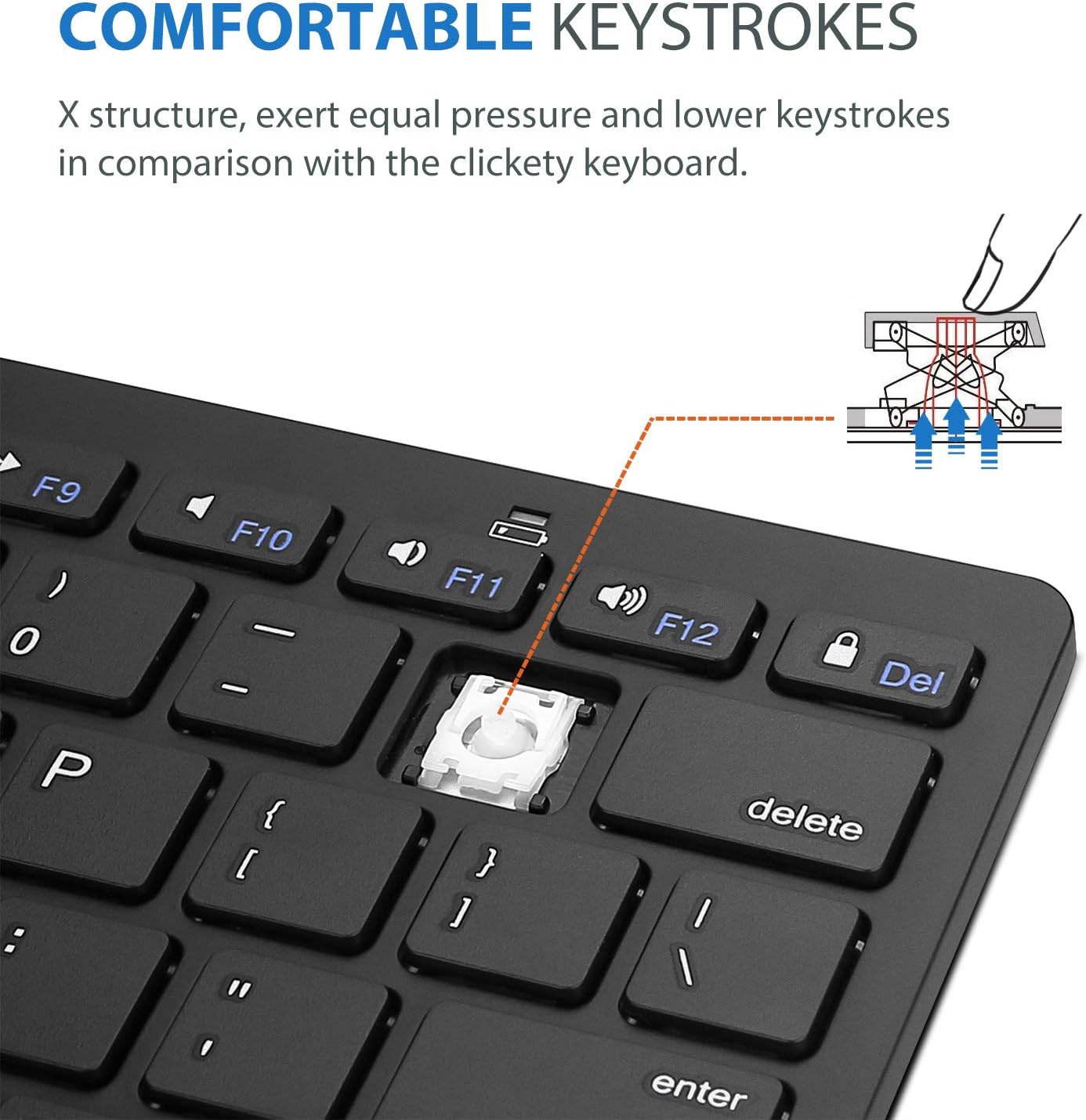
Image: Diagram showing the ultra-slim design and dimensions of the ProCase Wireless Keyboard, measuring 11.2 inches in length, 4.7 inches in width, and 0.19 inches in thickness.
8. การรับประกันและการสนับสนุน
8.1. ข้อมูลการรับประกัน
ProCase products are designed for reliability and performance. For specific warranty details regarding your ProCase Wireless Keyboard, please refer to the warranty card included with your purchase or visit the official ProCase webไซต์นี้ โปรดเก็บหลักฐานการซื้อไว้เพื่อใช้ยืนยันการรับประกัน
8.2. การสนับสนุนลูกค้า
If you encounter any issues or have questions not covered in this manual, please contact ProCase customer support. You can find contact information on the official ProCase webเว็บไซต์หรือผ่านแพลตฟอร์มการซื้อของคุณ
หากต้องการข้อมูลเพิ่มเติม โปรดเยี่ยมชม ProCase Store on Amazon.


