
1. สูงกว่าview
The Samsung Galaxy Buds Plus SM-R175 are advanced wireless earbuds designed to deliver a premium audio experience. Featuring a 2-way speaker system tuned by AKG, an adaptive 3-microphone system for crystal clear calls, and long-lasting battery power, these earbuds are built for extended use and superior sound quality. They offer seamless compatibility with Samsung and other Android devices, ensuring a versatile listening experience.
2. คุณสมบัติหลัก
- 2-way speaker system by AKG: Delivers rich treble and bass for a balanced audio profile.
- Adaptive 3-microphone system: Ensures crystal clear call quality by isolating your voice from background noise.
- แบตเตอรี่ใช้งานได้ยาวนาน: Up to 11 hours of playback on a single charge, with additional charges from the case.
- Qi compatible wireless charging: Conveniently charge the case wirelessly.
- Power sharing: Share power directly from compatible Galaxy phones.
- Battery level monitoring: Check individual bud and case battery levels via your smartphone.
- การควบคุมแบบสัมผัส: Intuitive media and call control directly from the earbuds.
- การแยกเสียงรบกวน: Passive noise isolation for an immersive listening experience.
- ทนน้ำ: ออกแบบมาให้ทนทานต่อการกระเด็นของน้ำและเหงื่อ
3. การตั้งค่า
3.1 การแกะกล่องและการชาร์จครั้งแรก
Upon unboxing, ensure all components are present: the Galaxy Buds Plus earbuds, charging case, USB-C charging cable, and various ear-wing tips and silicone tips. It is recommended to fully charge the case and earbuds before first use.
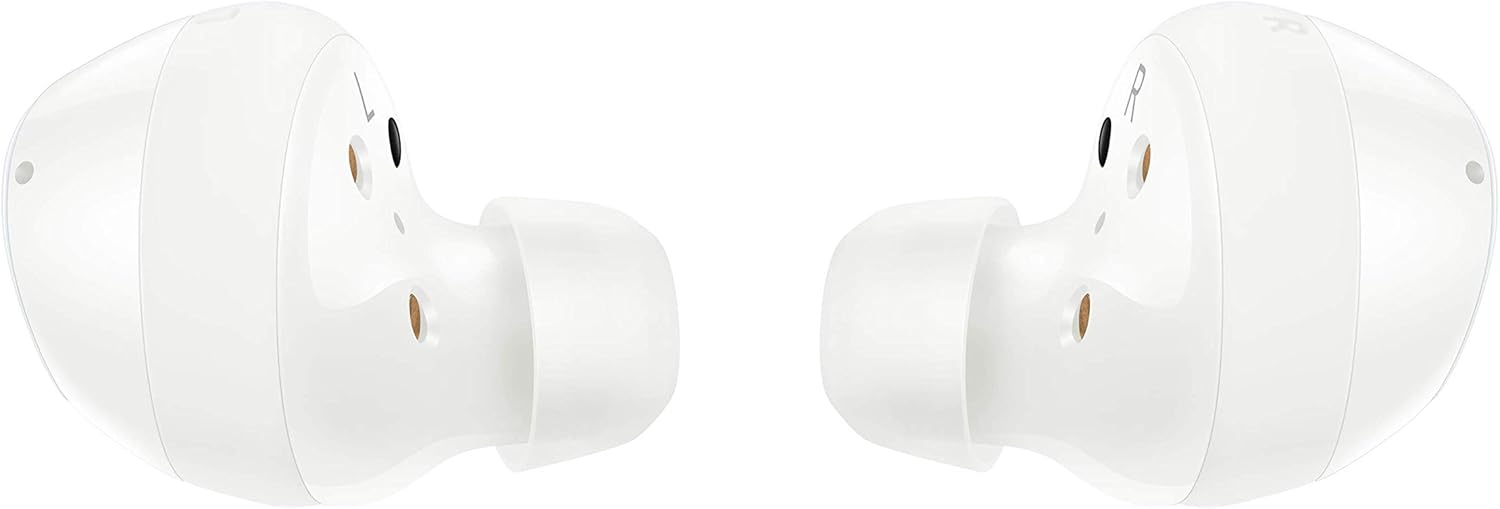
Figure 1: Samsung Galaxy Buds Plus earbuds and charging case, along with included accessories.
3.2 การติดตั้งหูฟัง
Select the ear-wing tips and silicone tips that provide the most comfortable and secure fit for your ears. A proper fit is crucial for optimal sound quality and passive noise isolation. Gently insert each earbud into your ear canal and rotate slightly until it feels snug and stable.

Figure 2: A single white Samsung Galaxy Buds Plus earbud, highlighting its design for a secure fit.
3.3 การจับคู่กับอุปกรณ์
- เปิดกล่องชาร์จที่มีหูฟังอยู่ข้างใน หูฟังจะเข้าสู่โหมดจับคู่โดยอัตโนมัติ
- On your Samsung or Android device (Android 5.0 or higher with 1.5GB RAM minimum), go to Bluetooth settings.
- Select "Galaxy Buds+ (SM-R175)" from the list of available devices.
- ปฏิบัติตามคำแนะนำบนหน้าจอเพื่อดำเนินการจับคู่ให้เสร็จสมบูรณ์
4. คู่มือการใช้งาน
4.1 การควบคุมแบบสัมผัสพื้นฐาน
The Galaxy Buds Plus feature intuitive touch controls on the outer surface of each earbud:
- แตะเพียงครั้งเดียว: เล่น/หยุดเพลง, รับสาย/วางสาย
- แตะสองครั้ง: เล่นเพลงถัดไป, รับสาย/วางสาย
- แตะสามครั้ง: เล่นเพลงก่อนหน้า
- สัมผัสและกดค้างไว้: Activate customizable function (e.g., volume control, voice assistant, Ambient Sound mode).
4.2 การจัดการการโทร
The adaptive 3-microphone system ensures your voice is heard clearly during calls, even in noisy environments. Use the touch controls to answer, end, or reject calls without needing to access your phone.
4.3 การเล่นเสียง
Enjoy high-fidelity audio with the 2-way speaker system by AKG, delivering rich treble and deep bass. Adjust volume and navigate tracks using the touch controls or your connected device.
วิดีโอ 1: วิดีโอแสดงผลิตภัณฑ์อย่างเป็นทางการasing the Samsung Galaxy Buds Plus Wireless Earbuds and their features.
5. การบำรุงรักษา
5.1 การชาร์จ
Place the earbuds back into the charging case to recharge them. The case itself can be charged via the included USB-C cable or wirelessly using a Qi-compatible wireless charger. You can also use PowerShare from a compatible Galaxy phone.

Figure 3: The open charging case of the Samsung Galaxy Buds Plus, illustrating the charging contacts for the earbuds.
5.2 อายุการใช้งานแบตเตอรี่
The earbuds offer up to 11 hours of battery life on a single charge. The charging case provides additional charges, extending total listening time. Monitor battery levels for both earbuds and the case using the Samsung Wearable app on your smartphone.
5.3 การทำความสะอาด
Regularly clean your earbuds and charging case to maintain performance and hygiene. Use a soft, dry cloth to wipe the earbuds and charging contacts. Remove silicone tips and clean them with mild soap and water, ensuring they are completely dry before reattaching.
5.4 ความต้านทานต่อน้ำ
The Galaxy Buds Plus are water resistant, making them suitable for workouts and light splashes. However, they are not waterproof. Avoid submerging them in water or exposing them to high-pressure water streams.
6 การแก้ไขปัญหา
6.1 ปัญหาการเชื่อมต่อ
- หูฟังไม่จับคู่: ตรวจสอบให้แน่ใจว่าหูฟังชาร์จไฟเต็มแล้วและอยู่ในโหมดจับคู่ ตรวจสอบการตั้งค่าบลูทูธของอุปกรณ์ของคุณและลองเชื่อมต่อใหม่อีกครั้ง
- การเชื่อมต่อไม่ต่อเนื่อง: ขยับเข้าใกล้อุปกรณ์ที่เชื่อมต่อมากขึ้น หลีกเลี่ยงสิ่งกีดขวางที่อาจรบกวนสัญญาณบลูทูธ
6.2 ปัญหาด้านเสียง
- ไม่มีเสียง: ตรวจสอบระดับเสียงทั้งบนอุปกรณ์ของคุณและหูฟัง ตรวจสอบให้แน่ใจว่าหูฟังอยู่ในหูอย่างถูกต้อง
- คุณภาพเสียงไม่ดี: Clean the earbud mesh and silicone tips. Try different sized ear-wing and silicone tips for a better seal.
6.3 ปัญหาการชาร์จไฟ
- หูฟังไม่ชาร์จในกรณี: Ensure earbuds are correctly placed in the case and charging contacts are clean.
- เคสไม่ชาร์จ: Verify the USB-C cable and power adapter are working. For wireless charging, ensure the case is correctly positioned on a Qi-compatible charger.
7. ข้อมูลจำเพาะ
| คุณสมบัติ | ข้อมูลจำเพาะ |
|---|---|
| ยี่ห้อ | ซัมซุง |
| ชื่อรุ่น | Galaxy Buds Plus (SM-R175) |
| เทคโนโลยีการเชื่อมต่อ | ไร้สาย (บลูทูธ 5.0, อินฟราเรด) |
| การวางตำแหน่งหู | ในหู |
| ฟอร์มแฟกเตอร์ | ในหู |
| การควบคุมเสียงรบกวน | การแยกเสียง |
| อายุการใช้งานแบตเตอรี่ | 11 ชั่วโมง (หูฟัง) |
| เวลาในการชาร์จ | 3 นาที สำหรับเวลาเล่น 1 ชั่วโมง |
| ระดับความต้านทานต่อน้ำ | ทนน้ำ |
| วิธีการควบคุม | สัมผัส |
| อุปกรณ์ที่รองรับ | Samsung, other Android devices with Android 5.0+ & RAM 1.5GB+ |
| น้ำหนักสินค้า | 4.9 ออนซ์ |
| ขนาดแพ็คเกจ | 4.72 x 3.39 x 1.65 นิ้ว |
8. การรับประกันและการสนับสนุน
For detailed warranty information and customer support, please refer to the documentation included with your product or visit the official Samsung support website. You can find FAQs, troubleshooting guides, and contact information for technical assistance.