
Shot Navi SN-NEO2-HP
Shot Navi NEO2 HP Golf GPS Device
Model: SN-NEO2-HP
แบรนด์: Shot Navi
การแนะนำ
This manual provides detailed instructions for the proper use and maintenance of your Shot Navi NEO2 HP Golf GPS Device. Please read this manual thoroughly before using the device to ensure optimal performance and longevity.
สินค้าเกินview
คุณสมบัติหลัก
- High-precision positioning with Michibiki L1S support.
- Provides low difference and reference distance displays.
- Features voice guidance and a large character display option.
- Includes a competition mode for compliant play.
- Pre-loaded with golf course data for Japan (100%+), Asia, Hawaii, Guam, and Saipan.
เนื้อหาแพ็คเกจ
ตรวจสอบว่ารายการทั้งหมดที่ระบุไว้ด้านล่างนี้รวมอยู่ในแพ็คเกจของคุณ:
- Shot Navi NEO2 HP Main Unit
- สาย microUSB
- อะแดปเตอร์ AC
- Instruction Manual with Warranty Card
- คู่มือแนะนำ

Figure 1: Shot Navi NEO2 HP device and its key features.
การตั้งค่า
1. การชาร์จอุปกรณ์
- Connect the microUSB cable to the device's charging port.
- Connect the other end of the microUSB cable to the AC adapter.
- เสียบอะแดปเตอร์ AC เข้ากับเต้ารับไฟฟ้า
- Allow approximately 3 hours for a full charge. The battery indicator on the screen will show charging status.
การชาร์จเต็มหนึ่งครั้งสามารถใช้งานได้ต่อเนื่องประมาณ 17 ชั่วโมง
2. เปิดเครื่องครั้งแรก
Press and hold the power button (usually located on the side or top) until the Shot Navi logo appears on the screen.
3. การรับข้อมูลจากดาวเทียม
For accurate distance measurement, the device needs to acquire satellite signals. Perform initial setup outdoors with a clear view ของท้องฟ้า
- เปิดอุปกรณ์
- Wait for the GPS signal icon to stabilize, indicating successful satellite acquisition. This may take a few minutes on first use or after a long period of inactivity.

Figure 2: Michibiki L1S satellite signal reception for enhanced accuracy.
คำแนะนำการใช้งาน
1. การนำทางพื้นฐาน
Once satellites are acquired, the device will automatically detect the golf course and display relevant information.

Figure 3: Main display showing distance to the green.
2. โหมดการแสดงผล
The NEO2 HP offers various display modes to suit your needs:
- เรียบง่าย View: Basic distance to the green.
- สีเขียว View: รายละเอียด view of the green, often showing front, center, and back distances.
- อันตราย View: Displays distances to various hazards on the course.
- Large Character View: Tilting the device horizontally will enlarge the distance display for easier readability.
- Low Difference Display: Shows elevation differences and adjusted distances.
ใช้ สวิตช์ button to cycle through different display modes.
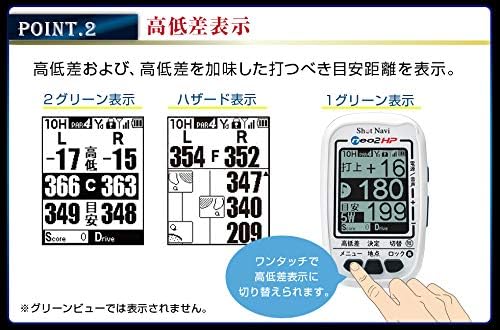
รูปที่ 4: อดีตamples of Low Difference Display, Hazard View,และสีเขียว View.

Figure 5: Large Character View activated by tilting the device.
3. Voice Guidance
The device can provide audible distance information to the green center. This is useful when you prefer not to look at the screen or are using the Hazard View.
- กดปุ่ม Power/Voice button to activate voice guidance.
- The device will announce the distance to the green center.

Figure 6: Voice guidance feature in action.
4. Competition Mode
For official competitions, the device features a competition mode that disables certain functions to comply with rules.
- In competition mode, features like low difference, reference distance, and flight distance are not displayed.
- Refer to the quick guide or full manual for instructions on how to activate/deactivate competition mode.
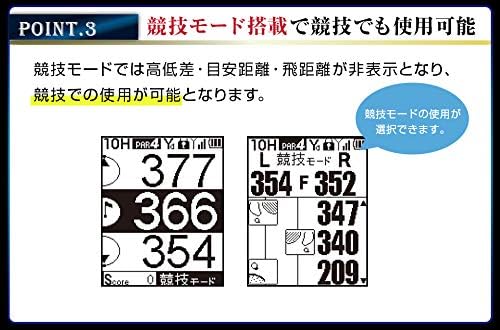
Figure 7: Display in Competition Mode.
5. Data Management Functions
- Point Recording: Mark specific locations on the course.
- การวัดระยะทาง: Measure shot distances.
- SCO Log Support: Log your scores and course data.
- Scorecard Function: ติดตามคะแนนของคุณได้โดยตรงบนอุปกรณ์
- Score Counter Function: A simple counter for strokes.
Access these functions through the device's menu. Consult the quick guide for specific button operations.
การซ่อมบำรุง
1. การทำความสะอาด
- เช็ดอุปกรณ์ด้วยผ้านุ่มแห้ง
- สำหรับสิ่งสกปรกฝังแน่น ให้เช็ดออกเล็กน้อยampชุบผ้าด้วยน้ำ ห้ามใช้สารเคมีรุนแรงหรือน้ำยาทำความสะอาดที่มีฤทธิ์กัดกร่อน
- ตรวจสอบให้แน่ใจว่าฝาปิดพอร์ตชาร์จปิดอย่างแน่นหนาเพื่อรักษาความทนทานต่อน้ำระดับ IPX4
2. Data Updates
Golf course data can be updated via USB storage mode using a Windows or Mac computer. Regularly update your device to ensure the most current course information.
- Connect the device to your computer using the microUSB cable.
- The device should appear as a removable storage drive.
- Visit the Shot Navi official website for the latest update software and instructions.
3. การจัดเก็บ
เก็บอุปกรณ์ไว้ในที่แห้งและเย็น หลีกเลี่ยงแสงแดดโดยตรงและอุณหภูมิที่สูงหรือต่ำเกินไปเมื่อไม่ได้ใช้งาน
การแก้ไขปัญหา
| ปัญหา | สาเหตุที่เป็นไปได้ | สารละลาย |
|---|---|---|
| อุปกรณ์ไม่เปิดเครื่อง | แบตเตอรี่ต่ำหรือหมด | Charge the device for at least 3 hours using the provided AC adapter and microUSB cable. |
| Cannot acquire satellite signals. | ถูกขัดขวาง view of the sky; first-time use; device not updated. | ให้แน่ใจว่าคุณอยู่กลางแจ้งโดยมีความชัดเจน view of the sky. Wait a few minutes. Update the device's course data. |
| การอ่านค่าระยะทางไม่แม่นยำ | Poor satellite signal; outdated course data. | Move to an area with a clearer view of the sky. Update the device's course data. |
| หน้าจอไม่ตอบสนองหรือค้าง | ซอฟต์แวร์มีปัญหา | Perform a soft reset by pressing and holding the power button for 10-15 seconds until the device restarts. |
If you encounter issues not listed here or if the suggested solutions do not resolve the problem, please contact Shot Navi customer support.
ข้อมูลจำเพาะ

รูปที่ 8: ตารางข้อมูลจำเพาะของผลิตภัณฑ์
| ข้อมูลจำเพาะทั่วไป | |
|---|---|
| ยี่ห้อ | ช็อต นาวี |
| หมายเลขรุ่น | SN-NEO2-HP |
| ขนาด (กว้าง x ยาว x สูง) | 49มม. x 18มม. x 80มม. |
| น้ำหนัก | 62 กรัม |
| แสดง | 2-inch Black and White LCD (128x160 dots) |
| ประเภทแบตเตอรี่ | ลิเธียมไอออน |
| เวลาในการชาร์จเต็ม | ประมาณ 3 ชั่วโมง |
| เวลาใช้งานต่อเนื่อง | ประมาณ 17 ชั่วโมง |
| ระดับการกันน้ำ | IPX4 |
| การเชื่อมต่อ | ยูเอสบี |
| ระบบดาวเทียมที่รองรับ | QZSS (Michibiki L1S) |
| ประเภทแผนที่ | Asia (including Japan, Hawaii, Guam, Saipan) |
| Data Update Method | USB Storage Mode (Windows/Mac) |
| ฟังก์ชั่นหลัก | |
|---|---|
| Navi Functions | เรียบง่าย View, สีเขียว View, Hazard View, Large Character View, Low Difference Display |
| การจัดการข้อมูล | Point Recording, Distance Measurement, SCO Log Support, Scorecard Function, Score Counter Function |
| ฟังก์ชั่นอื่น ๆ | Auto Start, Navi Interruption Function, Black/White Reversal Display, Voice Guidance, Competition Mode |
การรับประกันและการสนับสนุน
ข้อมูลการรับประกัน
The Shot Navi NEO2 HP comes with a รับประกันหนึ่งปี from the date of purchase. This warranty is limited to defects arising from normal use. Please retain your proof of purchase and the warranty card included in the package.
การสนับสนุนลูกค้า
For technical assistance, troubleshooting, or warranty claims, please contact Shot Navi customer support. Refer to the contact information provided in your warranty card or visit the official Shot Navi webเว็บไซต์สำหรับรายละเอียดการสนับสนุน
Official Shot Navi Webเว็บไซต์: www.shotnavi.jp
Ask a question about this manual
Ask about setup, troubleshooting, compatibility, parts, safety, or missing instructions. Manuals+ will review the question and use this page’s manual context to help answer it.