
การแนะนำ
ขอบคุณสำหรับการซื้อasing the LEXiBOOK Cyber Arcade Mini Handheld Game Console. This manual provides essential information for the safe and efficient use of your device. Please read it thoroughly before operation and retain it for future reference.

ภาพ: ด้านหน้า view of the LEXiBOOK Cyber Arcade Mini handheld game console, showing the screen, directional pad, and action buttons.
เนื้อหาแพ็คเกจ
- 1 x LEXiBOOK Cyber Arcade Mini Handheld Game Console (Model JL1890)
- 1 x คู่มือผู้ใช้

Image: The LEXiBOOK Cyber Arcade Mini handheld game console in its retail packaging, highlighting the "8-in-1" games and 1.8" LCD screen.
การตั้งค่า
1. การติดตั้งแบตเตอรี่
The LEXiBOOK Cyber Arcade Mini requires 3 x LR03/AAA alkaline batteries (not included) for operation.
- Locate the battery compartment cover on the back of the console.
- Using a small screwdriver, carefully unscrew the battery compartment cover.
- Insert 3 new LR03/AAA alkaline batteries, ensuring correct polarity (+/-).
- ใส่ฝาปิดช่องใส่แบตเตอรี่และขันให้แน่นด้วยสกรู
สำคัญ: Do not mix old and new batteries. Do not mix alkaline, standard (carbon-zinc), or rechargeable (nickel-cadmium) batteries. Remove batteries if the device will not be used for an extended period.
คำแนะนำการใช้งาน
1. เปิด/ปิดเครื่อง
- To power on the console, press the ปุ่มเปิดปิด (usually marked with a circle and a vertical line) located on the top left of the console.
- To power off the console, press and hold the ปุ่มเปิดปิด จนกว่าหน้าจอจะดับลง
2. การเลือกเกม
- Once powered on, the main menu will display a list of available games.
- ใช้ แพ้ดทิศทาง (ดี-แพด) on the left side of the console to navigate through the game list.
- กดปุ่ม ปุ่มเริ่มต้น or a designated action button (e.g., 'A' or 'B') to select and launch a game.
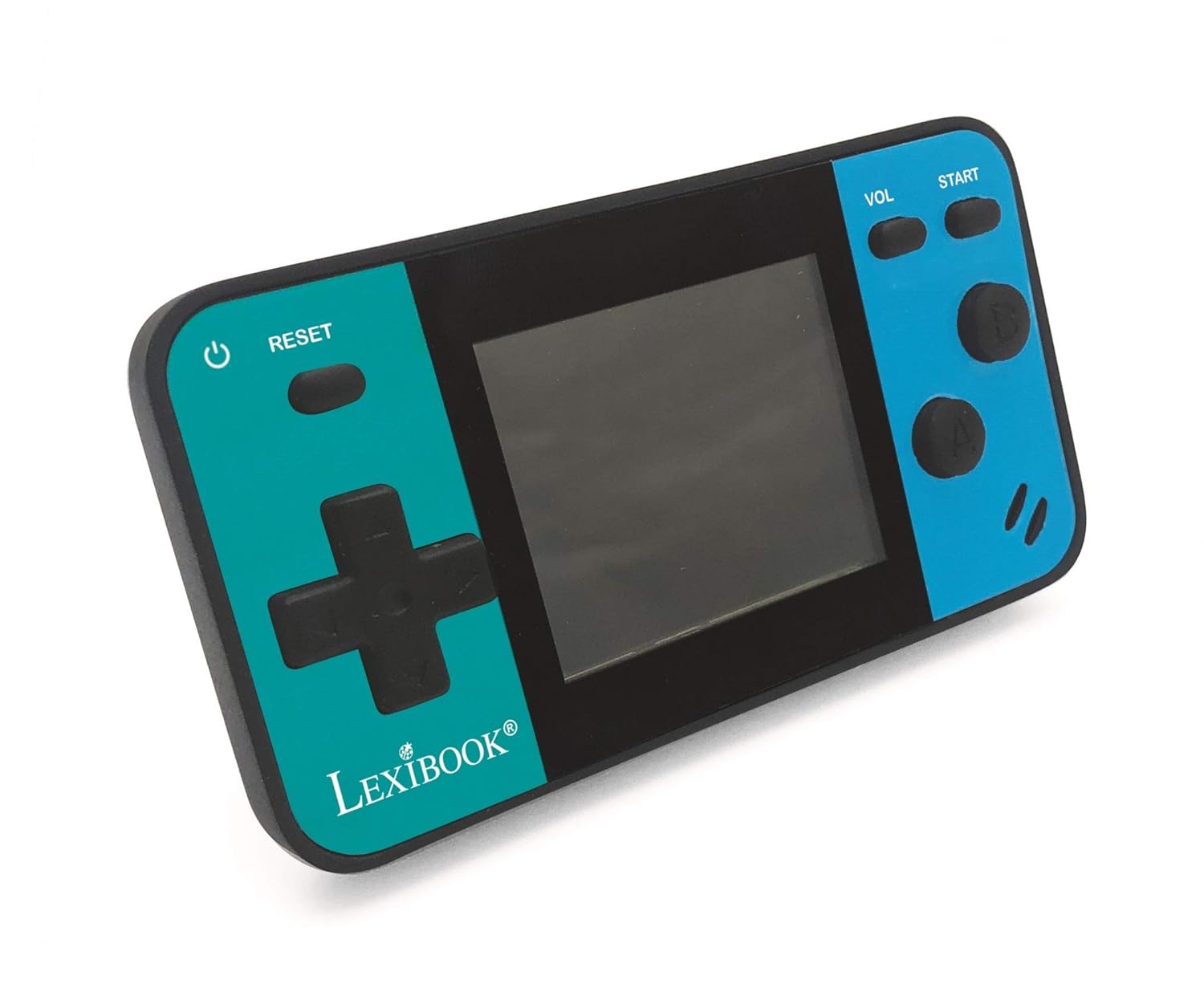
Image: A person holding the LEXiBOOK Cyber Arcade Mini, actively playing one of the built-in games on its 1.8-inch color LCD screen.
3. Gameplay Controls
- แผงทิศทาง (D-Pad): Used for movement and navigation within games.
- Action Buttons (A, B, etc.): Used for jumping, shooting, interacting, and other in-game actions. Specific functions vary by game.
- ปุ่มเริ่มต้น: Typically used to start games, pause, or confirm selections.
- ปุ่ม VOL: ปรับระดับเสียงของลำโพงในตัว
- ปุ่มรีเซ็ต: Resets the current game or returns to the main menu.
4. การปรับระดับเสียง
กดปุ่ม ปุ่ม VOL repeatedly to cycle through different volume levels or mute the sound.
การซ่อมบำรุง
- Keep the console dry. Avoid exposure to moisture or liquids.
- Clean the console with a soft, dry cloth. Do not use abrasive cleaners or solvents.
- เก็บเครื่องเล่นเกมไว้ในที่แห้งและเย็น หลีกเลี่ยงแสงแดดโดยตรงและอุณหภูมิที่สูงหรือต่ำเกินไป
- Do not attempt to disassemble or modify the console, as this will void the warranty and may cause damage.
การแก้ไขปัญหา
| ปัญหา | สาเหตุที่เป็นไปได้ | สารละลาย |
|---|---|---|
| เครื่องเล่นเกมเปิดไม่ติด | แบตเตอรี่หมดหรือติดตั้งไม่ถูกต้อง | Replace batteries with new LR03/AAA alkaline batteries, ensuring correct polarity. |
| หน้าจอว่างเปล่าหรือกะพริบ | Low battery power; internal connection issue. | ลองเปลี่ยนแบตเตอรี่ดู หากปัญหายังคงอยู่ โปรดติดต่อฝ่ายบริการลูกค้า |
| ไม่มีเสียงหรือเสียงเบา | Volume is muted or set too low. | กดปุ่ม ปุ่ม VOL to increase volume or unmute. |
| เกมค้างหรือหยุดทำงาน | ซอฟต์แวร์มีปัญหา | กดปุ่ม ปุ่มรีเซ็ต to restart the game or return to the main menu. If frequent, replace batteries. |
ข้อมูลจำเพาะ
- แบบอย่าง: JL1890
- หน้าจอ: 1.8" (4.5 cm) Color LCD
- เกม: 8 built-in games (8-bit graphics)
- แหล่งจ่ายไฟ: 3 x LR03/AAA batteries (not included)
- ขนาด : ประมาณ 3.7 x 2.01 x 0.91 นิ้ว (9.4 x 5.1 x 2.3 ซม.)
- น้ำหนัก: ประมาณ 0.08 กก. (0.18 ปอนด์)
- วัสดุ: พลาสติก
- อายุที่แนะนำ: 3 ปีขึ้นไป
การรับประกันและการสนับสนุน
สำหรับข้อมูลการรับประกันหรือการสนับสนุนทางเทคนิค โปรดดูรายละเอียดการติดต่อที่ระบุไว้บนบรรจุภัณฑ์ของผลิตภัณฑ์ หรือเยี่ยมชมเว็บไซต์อย่างเป็นทางการของ LEXiBOOK webไซต์ โปรดเก็บใบเสร็จรับเงินไว้เป็นหลักฐานการซื้อ
การสนับสนุนทางออนไลน์: www.lexibook.com