
1. บทนำ
This manual provides essential information for the safe and effective installation, operation, and maintenance of your Walfront AS-10A-220V Automatic Outdoor Photocell Light Switch Sensor. This device is designed to automatically control outdoor lighting based on ambient light levels, offering convenience and energy efficiency. Please read this manual thoroughly before use and retain it for future reference.
2. ข้อมูลด้านความปลอดภัย
คำเตือน: Electrical shock hazard. Improper installation or use can result in serious injury or death. Always follow these safety guidelines:
- การติดตั้งจะต้องดำเนินการโดยช่างไฟฟ้าที่มีคุณสมบัติตามมาตรฐานไฟฟ้าท้องถิ่นและระดับชาติทั้งหมด
- Disconnect power at the circuit breaker or fuse box before installing or servicing the unit.
- ให้แน่ใจว่าปริมาตรtage supply matches the product's specified operating voltagอี (220V AC)
- Do not exceed the maximum load capacity of 2200W (10A).
- This device is designed for outdoor use and is rainproof, but ensure all connections are properly sealed and protected from direct water ingress.
- ห้ามถอดประกอบหรือดัดแปลงตัวเครื่อง ไม่มีชิ้นส่วนใดภายในที่ผู้ใช้สามารถซ่อมแซมได้
3. สินค้าหมดview
The Walfront AS-10A-220V photocell light switch is an automatic control device designed for outdoor lighting applications. It features a photosensitive sensor that detects ambient light, turning connected lights on at dusk and off at dawn.
คุณสมบัติหลัก:
- การควบคุมอัตโนมัติ: Automatically detects ambient light to control connected lighting.
- Sensitive and Reliable Performance: High sensitivity ensures accurate light detection and reliable operation.
- การตรวจจับที่แม่นยำ: Offers a 10-meter detection range for effective light sensing.
- การใช้งานภายนอกอาคาร: Rainproof design suitable for controlling outdoor street lights and other exterior luminaires.
- ความจุพลังงานสูง: Supports a load power of up to 2200W (10A).
- Anti-Interference Delay Circuit: Equipped with a delay circuit to prevent false switching due to momentary light changes.
ส่วนประกอบ:
The unit consists of a compact plastic housing, a photosensitive sensor, and three color-coded wires for electrical connection, along with a metal mounting bracket.

รูปที่ 3.1 : ด้านหน้า view of the Walfront AS-10A-220V photocell light switch with its wiring.

รูปที่ 3.2: ระยะใกล้ view highlighting the rainproof design, automatic photosensitive operation, high sensitivity, and the anti-interference delay circuit of the photocell switch.
4. ข้อมูลจำเพาะ
| ข้อมูลจำเพาะ | ค่า |
|---|---|
| ผู้ผลิต | Walfront |
| หมายเลขรุ่นสินค้า | AS-10A-220V |
| วัสดุ | พลาสติก |
| โหมดการทำงาน | เปิดปิด |
| คะแนนปัจจุบัน | 10 ก |
| ปฏิบัติการฉบับที่tage | AC 220 โวลต์ |
| โหลดพลังงาน | 2200 วัตต์ |
| ระยะการตรวจจับ | 10 เมตร |
| Delayed Shutdown Time | 0.1 วินาที |
| ประเภทการติดต่อ | เปิดปกติ |
| ประเภทขั้วต่อ | ปลั๊กอิน |
| ประเภทเทอร์มินัล | สกรู |
| ประเภทสวิตซ์ | สวิตช์โฟโตอิเล็กทริค |
| ประเทศต้นกำเนิด | จีน |
5. การตั้งค่าและการติดตั้ง
Proper installation is crucial for the optimal performance and safety of the photocell switch. Ensure power is disconnected before proceeding.
แผนผังสายไฟ:
The photocell switch typically has three color-coded wires for connection:
- สายสีแดง: Connects to the LOAD (output to the light fixture).
- สายสีดำ: Connects to the LINE (incoming live/hot wire from power supply).
- ลวดขาว: Connects to NEUTRAL (common neutral wire).
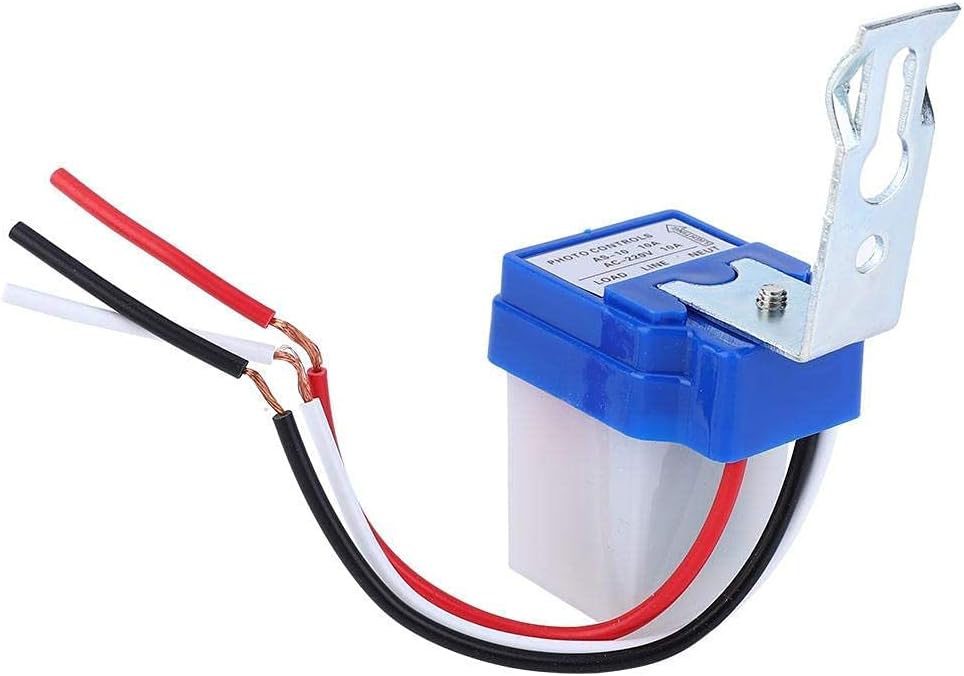
รูปที่ 5.1: รายละเอียด view of the wiring connections on the photocell switch, showing the red, black, and white wires.
ขั้นตอนการติดตั้ง:
- ตัดการเชื่อมต่อไฟฟ้า: Turn off the power supply to the circuit at the main breaker or fuse box. Verify with a voltagอีผู้ทดสอบ
- เมานต์สวิตช์: Choose a suitable outdoor location for mounting. The sensor should be exposed to natural light and not obstructed by eaves, trees, or other objects that could cast shadows or reflect artificial light onto it. Mount the switch using the provided metal bracket and appropriate screws. Ensure the sensor window faces the sky or the direction of natural light.
- การต่อสายไฟ:
- เชื่อมต่อ สายสีดำ from the photocell switch to the incoming live/hot wire จากแหล่งจ่ายไฟของคุณ
- เชื่อมต่อ สายสีขาว from the photocell switch to the สายนิวทรัล of your power supply and the neutral wire of your light fixture.
- เชื่อมต่อ สายสีแดง from the photocell switch to the live/hot wire of your light fixture.
- การเดินสายไฟที่ปลอดภัย: Route and secure all wiring to prevent damage and ensure compliance with local codes.
- คืนค่าพลัง: เมื่อเชื่อมต่อทั้งหมดอย่างปลอดภัยและได้รับการตรวจสอบแล้ว ให้จ่ายไฟให้กับวงจรอีกครั้ง

รูปที่ 5.2: อดีตample of a photocell switch installed in an outdoor environment, controlling a street light.
6. คู่มือการใช้งาน
The Walfront AS-10A-220V photocell light switch operates automatically based on ambient light conditions. There are no manual controls or adjustments required after installation.
- เปิดใช้งานอัตโนมัติ: When the ambient light level drops below a certain threshold (typically at dusk), the photocell sensor will detect the change and automatically turn on the connected light fixture.
- ปิดอัตโนมัติ: When the ambient light level rises above a certain threshold (typically at dawn), the photocell sensor will detect the change and automatically turn off the connected light fixture.
- ฟังก์ชั่นล่าช้า: The integrated 0.1-second delay circuit helps prevent false switching due to momentary light fluctuations (e.g., car headlights, lightning flashes).
For optimal performance, ensure the sensor is not exposed to direct artificial light sources at night, as this could cause it to turn off prematurely.
7. การบำรุงรักษา
The Walfront AS-10A-220V photocell light switch requires minimal maintenance. Regular checks can help ensure its longevity and proper function.
- การทำความสะอาด: Periodically inspect the sensor window for dirt, dust, or debris. Gently clean the sensor surface with a soft, damp ควรใช้ผ้าเช็ดทำความสะอาดเพื่อให้ตรวจจับแสงได้อย่างแม่นยำ ห้ามใช้น้ำยาทำความสะอาดหรือตัวทำละลายที่มีฤทธิ์กัดกร่อน
- การตรวจสอบสิ่งกีดขวาง: Ensure that no new obstructions (e.g., growing foliage, new structures) are blocking the sensor's exposure to natural light.
- การตรวจสอบสายไฟ: Annually, or if issues arise, visually inspect the wiring connections for any signs of wear, corrosion, or damage. Ensure all connections remain secure. Always disconnect power before inspection.
- ปัจจัยด้านสิ่งแวดล้อม: While rainproof, extreme weather conditions can affect any outdoor electrical device. Ensure the unit is not subjected to prolonged submersion or direct high-pressure water jets.
8 การแก้ไขปัญหา
If you experience issues with your photocell light switch, refer to the following troubleshooting guide:
| ปัญหา | สาเหตุที่เป็นไปได้ | สารละลาย |
|---|---|---|
| แสงสว่างจะสว่างตลอดวัน | เซ็นเซอร์ถูกปิดกั้นหรือสกปรก | ทำความสะอาดหน้าต่างเซ็นเซอร์ กำจัดสิ่งกีดขวางใดๆ |
| Sensor is not receiving enough natural light. | Relocate the sensor to an area with better exposure to natural light. | |
| กลางคืนไฟไม่ติด | No power to the switch or light fixture. | Check circuit breaker/fuse. Verify wiring connections (ensure power is off first). |
| Sensor is exposed to artificial light at night. | Ensure no streetlights, porch lights, or other artificial light sources are shining directly onto the sensor. Relocate if necessary. | |
| Faulty light bulb or fixture. | Test the light fixture with a known working power source or bulb. | |
| ไฟกะพริบหรือเปิด/ปิดอย่างรวดเร็ว | Intermittent light source or reflection near sensor. | Identify and eliminate the intermittent light source. Ensure the sensor is not reflecting light from nearby surfaces. |
| การเชื่อมต่อสายไฟหลวม | Disconnect power and check all wiring connections for tightness. | |
| สวิตช์ไม่ตอบสนอง | ความล้มเหลวของหน่วย | If all other troubleshooting steps fail, the unit may be faulty and require replacement. |
If you are unable to resolve the issue after following these steps, consult a qualified electrician.
9. การรับประกันและการสนับสนุน
Walfront products are designed for reliability and performance. While specific warranty details are not provided in this manual, most products come with a standard manufacturer's warranty against defects in materials and workmanship.
For technical support, warranty claims, or further assistance, please refer to the retailer where you purchased the product or visit the official Walfront webเว็บไซต์สำหรับข้อมูลการติดต่อ