
การแนะนำ
This manual provides essential information for the safe and efficient operation of your Domo DO157A Tower Fan. Please read these instructions carefully before use and retain them for future reference.
The Domo DO157A is a versatile appliance combining the functions of an air cooler, fan, and humidifier, designed to enhance your indoor comfort.

ภาพ: ด้านหน้า view of the Domo DO157A Tower Fan.
ข้อมูลด้านความปลอดภัย
ปฏิบัติตามข้อควรระวังด้านความปลอดภัยพื้นฐานเสมอเมื่อใช้เครื่องใช้ไฟฟ้า เพื่อลดความเสี่ยงต่อการเกิดไฟไหม้ ไฟฟ้าช็อต และการบาดเจ็บส่วนบุคคล
- ให้แน่ใจว่าปริมาตรtage ที่ระบุบนเครื่องสอดคล้องกับปริมาณไฟหลักในพื้นที่ของคุณtage ก่อนที่จะเชื่อมต่อ
- ห้ามจุ่มอุปกรณ์ ปลั๊ก หรือสายไฟลงในน้ำหรือของเหลวอื่นๆ
- ถอดปลั๊กออกจากเต้าเสียบเมื่อไม่ใช้งาน ก่อนทำความสะอาด หรือก่อนเคลื่อนย้ายเครื่องใช้ไฟฟ้า
- เก็บอุปกรณ์ให้พ้นจากมือเด็ก
- ห้ามใช้งานเครื่องใช้ไฟฟ้าที่มีสายไฟหรือปลั๊กชำรุด หรือหลังจากที่เครื่องใช้ไฟฟ้าทำงานผิดปกติหรือได้รับความเสียหายในลักษณะใดๆ
- Refer to the official safety document for detailed safety guidelines: ข้อมูลด้านความปลอดภัย (PDF).
ส่วนประกอบของผลิตภัณฑ์
Familiarize yourself with the main parts of your Domo DO157A Tower Fan:
- Main Unit (Tower Fan)
- แท้งค์น้ำ 7 ลิตร
- Washable Filter System (Honeycomb Cooling Membrane)
- รีโมทคอนโทรล
- Coolpack (for enhanced cooling)
- แผงควบคุมพร้อมจอแสดงผล LED
ภาพ: View of the tower fan with the filter system removed, showing the honeycomb cooling membrane.
การตั้งค่า
- การแกะกล่อง: Carefully remove the appliance from its packaging. Retain packaging for storage or disposal.
- การจัดวาง: Place the tower fan on a firm, level surface. Ensure there is adequate space around the unit for proper airflow.
- การเติมถังน้ำ:
- ดึงถังน้ำออกจากด้านหลังด้านล่างของเครื่อง
- Fill the 7-liter water tank with clean, cold water. For enhanced cooling, place the included Coolpack (after freezing) into the water tank.
- Ensure the water level does not exceed the maximum fill line.
- Slide the water tank back into the unit until it clicks into place.
- การเชื่อมต่อไฟฟ้า: เสียบสายไฟเข้ากับเต้ารับไฟฟ้าที่เหมาะสม (230V)
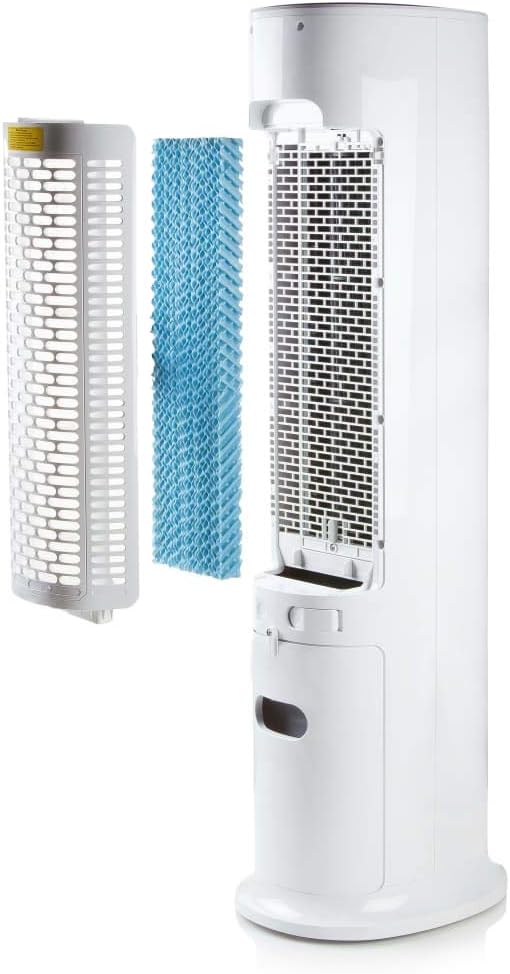
Image: Demonstrating the process of filling the water tank of the tower fan.
คำแนะนำการใช้งาน
The Domo DO157A can be operated using the control panel on top of the unit or the included remote control.
แผงควบคุมและฟังก์ชั่นรีโมทคอนโทรล

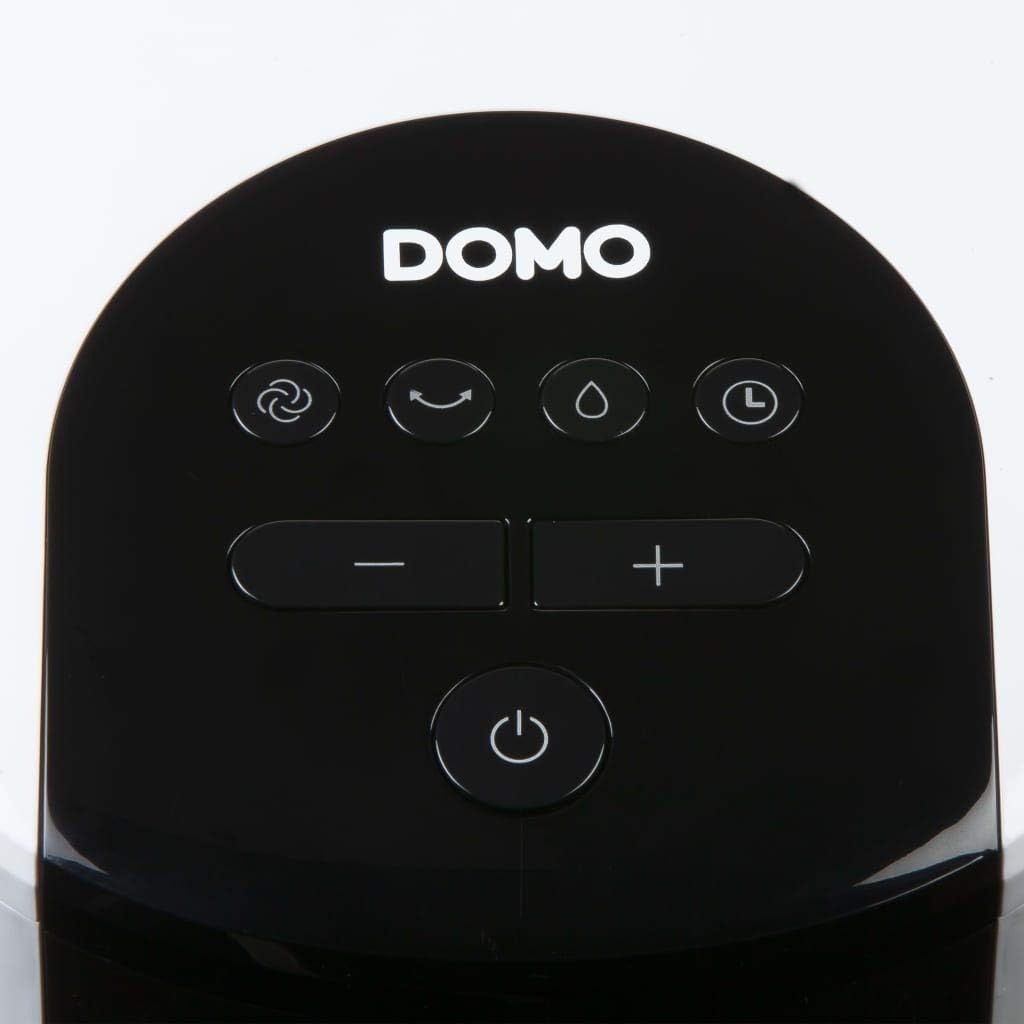
ภาพ: ระยะใกล้ view of the control panel on the top of the tower fan.
- ปุ่มเพาเวอร์ (⏻): เปิดหรือปิดเครื่อง
- ปุ่มโหมด (☺): Cycles through 3 ventilation modes:
- ปกติ: การไหลเวียนของอากาศคงที่ที่ความเร็วที่เลือก
- ธรรมชาติ: จำลองลมธรรมชาติด้วยความเร็วพัดลมที่หลากหลาย
- นอน: Reduces fan speed and noise for quiet operation during sleep.
- Speed Buttons (− / +): Adjusts fan speed (4 levels).
- ปุ่มทำความเย็น/เพิ่มความชื้น (💧): Activates or deactivates the air cooling and humidifying function. This function requires water in the tank.
- ปุ่มตั้งเวลา (⏱): Sets the operating timer for up to 10 hours. Each press adds 1 hour.
- ปุ่มสั่น (↻): Activates or deactivates the oscillation function, allowing the fan to rotate and distribute air over a wider area.
การดำเนินการเบื้องต้น
- Press the Power button to turn on the unit. The default mode is usually Normal.
- Use the Speed buttons to select your desired fan speed (1-4).
- To activate cooling/humidifying, press the Cooling/Humidifier button. Ensure the water tank is filled.
- Select a ventilation mode (Normal, Natural, Sleep) using the Mode button.
- Press the Oscillation button for wider air distribution.
- Set the timer if desired using the Timer button.

Image: The tower fan operating in a living room, illustrating the airflow direction.
การซ่อมบำรุง
การบำรุงรักษาตามปกติจะช่วยให้เครื่องใช้ของคุณมีประสิทธิภาพสูงสุดและยืดอายุการใช้งาน
การทำความสะอาดภายนอก
- ควรถอดปลั๊กเครื่องทุกครั้งก่อนทำความสะอาด
- เช็ดพื้นผิวภายนอกด้วยผ้านุ่ม damp ผ้า ห้ามใช้สารทำความสะอาดที่มีฤทธิ์กัดกร่อนหรือตัวทำละลาย
- ตรวจสอบให้แน่ใจว่าไม่มีน้ำเข้าไปในส่วนประกอบภายใน
การทำความสะอาดถังเก็บน้ำ
- ถอดถังน้ำออกจากเครื่อง
- เทน้ำที่เหลือออกให้หมด
- ทำความสะอาดถังด้วยสบู่เหลวและน้ำ ล้างออกให้สะอาด
- ปล่อยให้ถังแห้งสนิทก่อนใส่กลับเข้าไป
- Clean the water tank regularly, especially if using the humidifying function frequently, to prevent mold or mildew buildup.
การทำความสะอาดระบบกรอง
- The high-quality filter system is washable.
- Carefully remove the filter (honeycomb cooling membrane) from the unit as shown in the "Product Components" section.
- ล้างตัวกรองใต้น้ำไหลเพื่อขจัดฝุ่นและเศษซาก
- ปล่อยให้ตัวกรองแห้งสนิทก่อนใส่กลับเข้าไปในตัวเครื่อง
- Regular cleaning of the filter is recommended, especially for allergy sufferers, to maintain hygiene and efficiency.
การแก้ไขปัญหา
If you encounter issues with your Domo DO157A, refer to the following common problems and solutions:
| ปัญหา | สาเหตุที่เป็นไปได้ | สารละลาย |
|---|---|---|
| เครื่องไม่เปิด | ไม่มีแหล่งจ่ายไฟ | ตรวจสอบว่าสายไฟเสียบเข้ากับเต้ารับที่ใช้งานได้แน่นหนาหรือไม่ |
| ไม่มีผลในการระบายความร้อน | Water tank is empty or cooling function is not activated. | Fill the water tank. Press the Cooling/Humidifier button to activate the function. Ensure Coolpack is frozen and placed in the tank if desired. |
| การไหลเวียนของอากาศอ่อน | Fan speed is too low; air filter is dirty. | Increase the fan speed. Clean the air filter as per maintenance instructions. |
| กลิ่นไม่พึงประสงค์ | Stagnant water in the tank or dirty filter. | Empty and clean the water tank. Clean the filter. Use fresh water. |
ข้อมูลจำเพาะ
| คุณสมบัติ | รายละเอียด |
|---|---|
| ยี่ห้อ | โดโม |
| ชื่อรุ่น / หมายเลข | DO157A |
| พิมพ์ | Tower Fan, Air Cooler, Humidifier |
| วัสดุ | พลาสติก |
| ประเภทการติดตั้ง | อิสระ |
| สี | สีขาว |
| ความจุการไหลเวียนของอากาศ | 294.29 Cubic Feet per Minute (500 m³/h) |
| ประเภทการควบคุม | Remote Control, On-unit Control Panel |
| ความจุถังน้ำ | 7 ลิตร |
| พื้นที่แนะนำ | 25 ตารางเมตร |
| น้ำหนักผลิตภัณฑ์ | 11.2 กิโลกรัม |
| วัดtage | 65 วัตต์ |
| ระดับเสียง | 40 เดซิเบล |
| จำนวนความเร็ว | 4 |
| เล่มที่tage | 230 โวลต์ |
| ขนาด (D x W x H) | 34 ซม. x 26 ซม. x 106.5 ซม. |
| ตัวจับเวลา | นานถึง 10 ชั่วโมง |
| โหมดระบายอากาศ | ปกติ ธรรมชาติ นอนหลับ |
| คุณสมบัติพิเศษ | Sleep mode, Washable filter system, Oscillation, Coolpack included |
การรับประกันและการสนับสนุน
For warranty information, please refer to the documentation provided with your purchase or contact Domo customer support. Keep your proof of purchase for warranty claims.
If you require further assistance or have questions not covered in this manual, please contact Domo customer service through their official webเว็บไซต์หรือข้อมูลติดต่อที่ให้ไว้พร้อมกับผลิตภัณฑ์ของคุณ


