
การแนะนำ
The Power Dynamics PPA30 is a versatile 30W 100V amplifier designed for small to medium-sized public address and background music applications. This amplifier features multiple input options including microphone inputs, stereo line inputs, Bluetooth connectivity for wireless streaming, and a built-in MP3 player with USB and SD card support. A remote control is included for convenient operation.
ข้อมูลด้านความปลอดภัย
Please read these instructions carefully before using the device. Keep this manual for future reference. Always observe the following safety precautions:
- อย่าให้อุปกรณ์โดนฝนหรือความชื้น
- ห้ามเปิดฝาครอบ ไม่มีชิ้นส่วนใดที่ผู้ใช้สามารถซ่อมแซมได้เอง โปรดส่งมอบการซ่อมแซมทั้งหมดให้แก่ช่างผู้ชำนาญการ
- ตรวจสอบแหล่งจ่ายไฟ voltage ตรงกับข้อกำหนดที่ระบุไว้บนอุปกรณ์
- ปกป้องสายไฟจากการถูกเหยียบหรือถูกหนีบ
- Disconnect the device from the mains during lightning storms or when unused for long periods.
- Place the device on a stable, level surface with adequate ventilation.
เนื้อหาแพ็คเกจ
โปรดตรวจสอบว่าสินค้าทั้งหมดมีอยู่และอยู่ในสภาพดีเมื่อเปิดบรรจุภัณฑ์:
- Power Dynamics PPA30 Ampชีวิต
- สายไฟ
- รีโมทคอนโทรล
- คู่มือการใช้งาน
สินค้าเกินview
แผงด้านหน้า
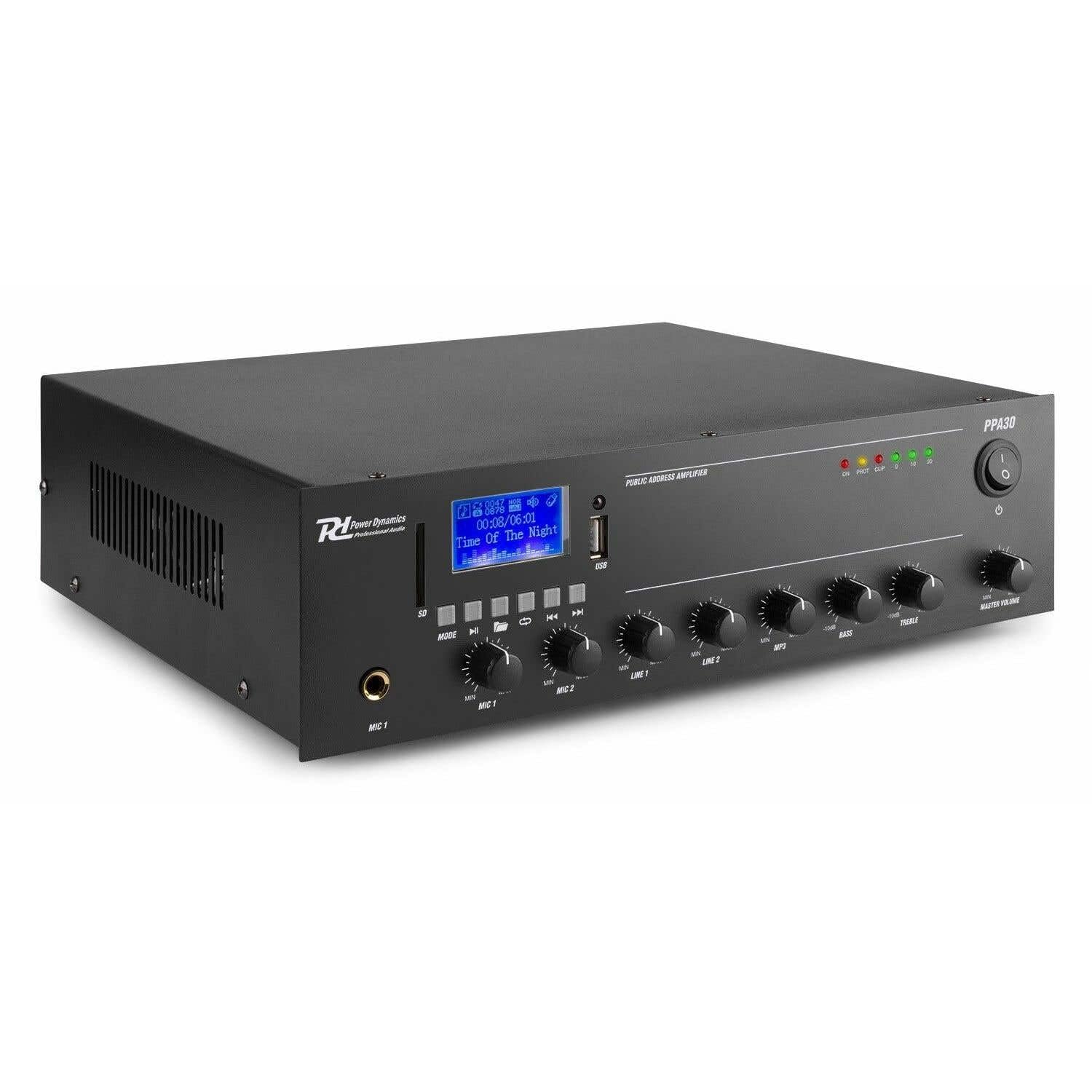
Figure 1: Front Panel Layout of the PPA30 Ampเครื่องขยายเสียง ภาพนี้แสดงให้เห็น amplifier's front face, including the display screen, USB/SD card slots, control buttons for media playback, input volume controls for microphones and line inputs, bass and treble adjustments, and the master volume knob. The power switch and indicator lights are also visible.
The front panel provides access to all primary controls and indicators:
- สวิตช์ไฟ: เปลี่ยนเป็น amplifier เปิดหรือปิด
- หน้าจอแสดงผล: Shows current mode, track information, and other status indicators.
- ช่องเสียบ USB/การ์ด SD: For connecting USB drives or SD cards for MP3 playback.
- ปุ่มโหมด: Switches between input sources (Bluetooth, USB, SD, Line 1, Line 2).
- การควบคุมการเล่นสื่อ: Play/Pause, Previous, Next, Repeat.
- ช่องรับสัญญาณ MIC 1 และ MIC 2: ช่องเสียบแจ็คขนาด 6.3 มม. สำหรับไมโครโฟน
- ปุ่มปรับระดับเสียง MIC 1 และ MIC 2: ปรับระดับเสียงสำหรับอินพุตไมโครโฟนแต่ละตัว
- LINE 1 & LINE 2 Volume Controls: Adjusts the volume for line inputs.
- การควบคุมระดับเสียง MP3: Adjusts the volume for USB/SD/Bluetooth playback.
- ปุ่มปรับระดับเสียงเบสและเสียงแหลม: ปรับความถี่ต่ำและความถี่สูงของสัญญาณเสียงที่ส่งออกมา
- ปริมาณหลัก: ควบคุมปริมาณการส่งออกโดยรวมของ ampชีวิต.
- ไฟแสดงสถานะ: Power (ON), Protection (PROT), Clip, and Output Level (0, 10, 20).
แผงด้านหลัง

Figure 2: Rear Panel Connections of the PPA30 Amplifier. This image illustrates the back of the amplifier, detailing the AC power input, DC input, speaker output terminals (COM, 8Ω, 70V, 100V), and RCA line inputs (LINE OUT, LINE 1, LINE 2, MIC 2). Safety warnings and product information are also visible.
The rear panel houses the power input, speaker outputs, and additional audio inputs:
- อินพุตไฟ AC: เชื่อมต่อกับแหล่งจ่ายไฟหลัก
- อินพุต DC: Optional 12V DC power input.
- ขั้วต่อเอาต์พุตลำโพง: Connections for 100V, 70V, and 8 Ohm speakers. Ensure correct impedance matching.
- สายออก: RCA output for connecting to another amplifier หรืออุปกรณ์บันทึก
- LINE 1 & LINE 2 Inputs: RCA stereo inputs for external audio sources (e.g., CD player, mixer).
- อินพุตไมโครโฟน 2: Additional 6.3mm jack input for a microphone.
รีโมทคอนโทรล

Figure 3: Remote Control for the PPA30 Amplifier. This image shows the handheld remote control with buttons for power, mode selection, volume adjustment, track navigation, EQ settings, and direct number input for track selection.
The remote control allows for convenient operation from a distance. Functions include power on/off, mode selection, volume control, track navigation, and EQ settings.
การตั้งค่า
- การจัดวาง: วางตำแหน่ง amplifier on a flat, stable surface. Ensure adequate ventilation around the unit to prevent overheating.
- การเชื่อมต่อลำโพง: Connect your 100V, 70V, or 8 Ohm speakers to the appropriate terminals on the rear panel. Ensure correct polarity (+ to + and - to - or COM). For 100V/70V systems, ensure your speakers are compatible and correctly wired for constant voltage.
- การเชื่อมต่อแหล่งกำเนิดเสียง:
- ไมโครโฟน: Plug microphones into the MIC 1 or MIC 2 inputs on the front panel.
- Line Devices: Connect external audio sources (e.g., CD player, mixer) to the LINE 1 or LINE 2 RCA inputs on the rear panel.
- ยูเอสบี/การ์ด SD: Insert a USB drive or SD card into the respective slot on the front panel for MP3 playback.
- การเชื่อมต่อไฟฟ้า: Connect the supplied power cable to the AC power input on the rear panel and then to a suitable mains outlet.
- เปิดเครื่องครั้งแรก: เปิดเครื่อง amplifier using the power switch on the front panel. The 'ON' indicator light should illuminate.
คำแนะนำการใช้งาน
การเลือกแหล่งอินพุต
กดปุ่ม โหมด button on the front panel or remote control to cycle through available input sources: Bluetooth, USB, SD, Line 1, Line 2.
การใช้งานบลูทูธ
- เลือกโหมดบลูทูธโดยใช้ โหมด button. The display will indicate Bluetooth mode.
- บนสมาร์ทโฟน แท็บเล็ต หรือคอมพิวเตอร์ของคุณ ให้เปิดใช้งานบลูทูธ แล้วค้นหาอุปกรณ์ที่ใช้งานได้
- Select "PPA30" from the list of devices to pair. Once paired, you can stream audio wirelessly to the ampชีวิต.
- Adjust the MP3 volume control on the front panel or the volume buttons on the remote control.
การเล่นการ์ด USB/SD
- เสียบไดรฟ์ USB หรือการ์ด SD ที่มีไฟล์เสียง MP3 fileลงในช่องที่สอดคล้องกัน
- การ amplifier should automatically switch to USB or SD mode and begin playback. If not, select the correct mode using the โหมด ปุ่ม.
- Use the Play/Pause, Previous, Next, and Repeat buttons on the front panel or remote control to manage playback.
- Adjust the MP3 volume control.
การใช้งานไมโครโฟน
- Connect your microphone(s) to the MIC 1 or MIC 2 inputs.
- Slowly increase the corresponding MIC 1 or MIC 2 volume control until the desired level is reached.
- Avoid setting the volume too high to prevent feedback or clipping (indicated by the 'CLIP' light).
การใช้อินพุตบรรทัด
- Connect your external audio source to the LINE 1 or LINE 2 RCA inputs.
- Select the appropriate line input using the โหมด ปุ่ม.
- Adjust the corresponding LINE 1 or LINE 2 volume control.
การควบคุมโทนเสียง
ใช้ BASS และ เสียงแหลม knobs on the front panel to adjust the low and high frequencies of the overall audio output to suit your preference or room acoustics.
มาสเตอร์ วอลุ่ม
การ ปริมาณหลัก knob controls the overall output level of all active audio sources. Adjust this to achieve the desired listening volume.
การซ่อมบำรุง
- การทำความสะอาด: ใช้ผ้าแห้งเนื้อนุ่มทำความสะอาดด้านนอกของตัวเครื่อง ampห้ามใช้สารทำความสะอาดที่มีฤทธิ์กัดกร่อนหรือตัวทำละลาย
- การระบายอากาศ : ตรวจสอบให้แน่ใจว่าช่องระบายอากาศไม่ถูกปิดกั้นเพื่อป้องกันไม่ให้เกิดความร้อนมากเกินไป
- พื้นที่จัดเก็บ: หากจะจัดเก็บเครื่องเป็นเวลานาน ควรถอดปลั๊กออกและเก็บไว้ในที่แห้งและเย็น
การแก้ไขปัญหา
| ปัญหา | สาเหตุที่เป็นไปได้ | สารละลาย |
|---|---|---|
| ไม่มีไฟฟ้า | สายไฟไม่ได้เชื่อมต่อ สวิตช์ไฟปิด ไม่มีไฟจากเต้าเสียบ | Check power cable connection; Turn power switch on; Test outlet with another device. |
| ไม่มีเสียงออก | Incorrect input selected; Volume too low; Speaker connections loose; Speakers faulty. | Select correct input (MODE button); Increase Master Volume and input specific volume; Check speaker wiring; Test with different speakers. |
| เสียงเพี้ยน | Volume too high (clipping); Incorrect tone settings; Faulty audio source. | Reduce Master Volume or input volume until 'CLIP' light is off; Adjust Bass/Treble controls; Test with a different audio source. |
| บลูทูธไม่เชื่อมต่อ | Bluetooth mode not selected; Device not in pairing mode; Interference. | ทำให้มั่นใจ amplifier is in Bluetooth mode; Make sure your device's Bluetooth is on and searching; Move closer to the ampเครื่องขยายเสียง; รีสตาร์ทอุปกรณ์ทั้งสอง |
| ปัญหาการเล่น USB/SD | ไม่ถูกต้อง file รูปแบบ; เสียหาย files; เสียบ USB/SD การ์ดไม่ถูกต้อง | ทำให้มั่นใจ files are MP3 format; Try a different USB/SD card; Reinsert the card/drive. |
ข้อมูลจำเพาะ
| คุณสมบัติ | ข้อมูลจำเพาะ |
|---|---|
| ยี่ห้อ | พลังไดนามิก |
| แบบอย่าง | พีพีเอ30 |
| กำลังขับ | 30 วัตต์ |
| จำนวนช่องสัญญาณ | 2 |
| เล่มที่tagอี (AC) | 220-230 Volt (AC) |
| ขนาดรายการ (LxWxH) | 27 x 32 x 8.6 ซม. |
| น้ำหนักสินค้า | 3.25 กิโลกรัม |
| ประเภทการติดตั้ง | อิสระ |
| อุณหภูมิในการทำงาน | สูงถึง 40 องศาเซลเซียส |
| การรับรอง | ซีอี, โรเอชเอส |
การรับประกันและการสนับสนุน
This product is covered by a standard manufacturer's warranty. Please refer to the warranty card included in your package for specific terms and conditions. For technical support, service, or warranty claims, please contact your retailer or the Power Dynamics customer service department. Keep your proof of purchase for warranty validation.
For more information, visit the official Power Dynamics webเว็บไซต์: www.power-dynamics.eu