

การแนะนำ
Thank you for choosing the XO B24 Foldable Bluetooth Headphones. This manual provides essential information for the safe and efficient use of your device. Please read it carefully before use and retain it for future reference.
The XO B24 headphones are designed for comfort and portability, featuring high-quality materials and a secure fit for an optimal audio experience.
สินค้าเกินview
The XO B24 headphones offer both wired and wireless connectivity, a built-in microphone for calls, and a foldable design for easy storage and transport.
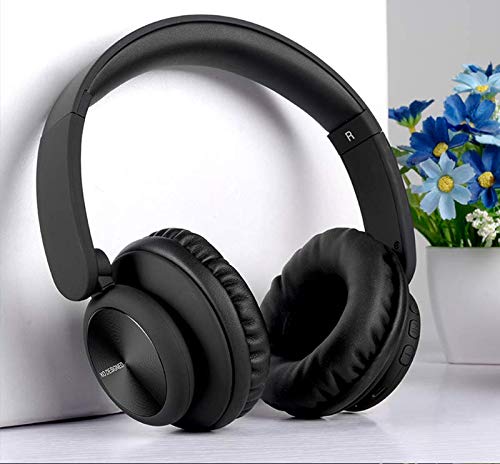
Image: XO B24 Foldable Bluetooth Headphones, showcasing their over-ear design and black color.
ข้อมูลจำเพาะ
| คุณสมบัติ | คำอธิบาย |
|---|---|
| ชื่อยี่ห้อ | XO |
| ชื่อรุ่น | B24 |
| หมายเลขรุ่น | XO-B24 |
| สี | สีดำ |
| ปัจจัยรูปแบบหูฟัง | แบบครอบหู |
| เทคโนโลยีการเชื่อมต่อ | แบบมีสาย, ไร้สาย (บลูทูธ) |
| แจ็คหูฟัง | แจ็ค 3.5 มม. |
| เทคโนโลยีการสื่อสารไร้สาย | บลูทูธ |
| คุณสมบัติพิเศษ | Includes Microphone, Foldable Design |
| ไมโครโฟน | ใช่ |
| ระบบตัดเสียงรบกวน | เลขที่ |
| ประเภทการควบคุม | Volume Control, Touch Control |
| อุปกรณ์ที่รองรับ | อุปกรณ์หลายเครื่อง |
| ต้องใช้แบตเตอรี่ | ใช่ |
การตั้งค่า
1. การชาร์จหูฟัง
- เชื่อมต่อสายชาร์จ USB ที่ให้มากับพอร์ตชาร์จบนหูฟัง
- เสียบปลายอีกด้านของสาย USB เข้ากับแหล่งจ่ายไฟ USB ที่ใช้งานร่วมกันได้ (เช่น คอมพิวเตอร์ อะแดปเตอร์ติดผนัง)
- ไฟ LED จะสว่างขึ้นขณะชาร์จ และจะดับลงหรือเปลี่ยนสีเมื่อชาร์จเต็มแล้ว
2. การจับคู่บลูทู ธ
- ตรวจสอบให้แน่ใจว่าหูฟังชาร์จเต็มแล้ว
- Press and hold the Power button on the headphones until the LED indicator flashes rapidly, indicating pairing mode.
- บนอุปกรณ์ของคุณ (สมาร์ทโฟน แท็บเล็ต คอมพิวเตอร์) เปิดใช้งาน Bluetooth และค้นหาอุปกรณ์ที่มีอยู่
- Select "XO B24" from the list of found devices.
- Once paired, the LED indicator will stop flashing and may show a solid light or flash slowly.
3. การเชื่อมต่อแบบใช้สาย (ไม่บังคับ)
- Insert one end of the 3.5mm audio cable into the headphone jack on the XO B24.
- เสียบปลายอีกด้านหนึ่งของสายสัญญาณเสียงขนาด 3.5 มม. เข้ากับแจ็คเอาต์พุตเสียงของอุปกรณ์ของคุณ
- The headphones will operate in wired mode, conserving battery life.
คำแนะนำการใช้งาน
เปิด/ปิดเครื่อง
- เปิดเครื่อง: กดปุ่มเปิด/ปิดค้างไว้ประมาณ 3 วินาที จนกว่าไฟแสดงสถานะ LED จะสว่างขึ้น
- หมดแรง: กดปุ่มเปิด/ปิดค้างไว้ประมาณ 3-5 วินาที จนกว่าไฟแสดงสถานะ LED จะดับลง
การเล่นเพลง
- เล่น/หยุดชั่วคราว: กดปุ่มมัลติฟังก์ชัน (มักจะเป็นปุ่มเปิด/ปิด) หนึ่งครั้ง
- เพลงถัดไป: Press and hold the Volume Up button or a dedicated 'Next' button.
- แทร็กก่อนหน้า: Press and hold the Volume Down button or a dedicated 'Previous' button.
การควบคุมระดับเสียง
- เพิ่มปริมาณ: กดปุ่มเพิ่มระดับเสียง
- ลดระดับเสียง: กดปุ่มลดระดับเสียง
การจัดการการโทร
- รับ/วางสาย: กดปุ่มมัลติฟังก์ชั่นหนึ่งครั้ง
- ปฏิเสธสาย: กดปุ่มมัลติฟังก์ชันค้างไว้ประมาณ 2 วินาที
กลไกการพับ
- To fold the headphones for storage, gently rotate the earcups inwards towards the headband until they are compact.
- To unfold, reverse the process, ensuring the earcups click securely into place.
การซ่อมบำรุง
- การทำความสะอาด: ใช้ผ้านุ่มและแห้งเช็ดทำความสะอาดหูฟัง ห้ามใช้น้ำยาทำความสะอาดหรือสารละลายที่มีฤทธิ์กัดกร่อน
- พื้นที่จัดเก็บ: เมื่อไม่ใช้งาน ให้เก็บหูฟังไว้ในที่แห้งและเย็น หลีกเลี่ยงแสงแดดโดยตรงและอุณหภูมิที่สูงหรือต่ำเกินไป เลือกใช้ดีไซน์แบบพับได้เพื่อการจัดเก็บที่กะทัดรัด
- การดูแลแบตเตอรี่ เพื่อยืดอายุการใช้งานแบตเตอรี่ ควรหลีกเลี่ยงการใช้หูฟังจนหมดบ่อย ชาร์จหูฟังเป็นประจำ แม้จะไม่ได้ใช้งานบ่อยก็ตาม
- หลีกเลี่ยงความชื้น: เก็บหูฟังให้ห่างจากน้ำและความชื้นที่มากเกินไป
การแก้ไขปัญหา
| ปัญหา | สารละลาย |
|---|---|
| หูฟังไม่สามารถเปิดเครื่องได้ | ตรวจสอบให้แน่ใจว่าหูฟังชาร์จเต็มแล้ว เสียบปลั๊กแล้วลองอีกครั้ง |
| ไม่สามารถจับคู่ผ่านบลูทูธได้ | Make sure the headphones are in pairing mode (LED flashing rapidly). Disable and re-enable Bluetooth on your device. Move closer to the headphones. |
| ไม่มีเสียงหรือเสียงเบา | ตรวจสอบระดับเสียงทั้งบนหูฟังและอุปกรณ์ที่เชื่อมต่อ ตรวจสอบให้แน่ใจว่าหูฟังจับคู่กันอย่างถูกต้อง หรือสาย 3.5 มม. เสียบแน่นดีแล้ว |
| คุณภาพเสียงไม่ดี | Ensure there are no obstructions between the headphones and your device. Try moving closer to your device. Disconnect and reconnect the Bluetooth connection. |
| ไมโครโฟนไม่ทำงาน | ตรวจสอบให้แน่ใจว่าได้เสียบหูฟังอย่างถูกต้องและเลือกหูฟังเป็นอุปกรณ์รับเสียงในระบบของคุณแล้ว ตรวจสอบว่าไมโครโฟนถูกปิดเสียงอยู่บนอุปกรณ์ของคุณหรือไม่ |
การรับประกันและการสนับสนุน
The XO B24 Foldable Bluetooth Headphones come with a standard manufacturer's warranty. Please refer to the warranty card included in your product packaging for specific terms and conditions.
For technical support, troubleshooting assistance, or warranty claims, please contact your retailer or the official XO customer service. Contact information can typically be found on the product packaging or the manufacturer's webเว็บไซต์.