
1. บทนำ
Thank you for choosing the Spacetronik SPE-114 Electric Height Adjustable Desk Frame. This manual provides essential information for the safe and efficient assembly, operation, and maintenance of your new desk frame. Please read these instructions carefully before use and retain them for future reference.
This electric height adjustable desk frame is designed to promote a healthier work environment by allowing seamless transitions between sitting and standing positions. Its advanced features, including memory presets, ensure a personalized and ergonomic workspace.
2. คำแนะนำด้านความปลอดภัย
- ตรวจสอบให้แน่ใจว่าชิ้นส่วนทั้งหมดครบถ้วนและไม่เสียหายก่อนประกอบ ห้ามใช้งานหากชิ้นส่วนใดขาดหายหรือชำรุด
- Keep children and pets away from the desk during operation to prevent injury from moving parts.
- Do not place hands or other body parts near the moving parts of the frame to avoid pinching.
- Ensure the power cord is not damaged or pinched. Only use the provided power adapter.
- อย่าบรรทุกของหนักเกินไปบนโต๊ะ โปรดดูข้อมูลจำเพาะสำหรับน้ำหนักสูงสุดที่รับได้
- Avoid placing liquids directly on the control panel or motor housing.
- If the desk frame makes unusual noises, stops moving, or shows error codes, discontinue use and consult the troubleshooting section or contact customer support.
- ผลิตภัณฑ์นี้มีวัตถุประสงค์สำหรับใช้ภายในอาคารเท่านั้น
3. เนื้อหาบรรจุภัณฑ์
Please verify that all the following components are included in your package. If any parts are missing or damaged, please contact customer support.
- Desk Frame Legs (2)
- คานขวาง/คานรองรับ
- ประกอบมอเตอร์
- แผงควบคุม
- อะแดปเตอร์แปลงไฟและสายเคเบิล
- ชุดอุปกรณ์ฮาร์ดแวร์ (สกรู น็อต เครื่องมือ)
- คู่มือการใช้งาน
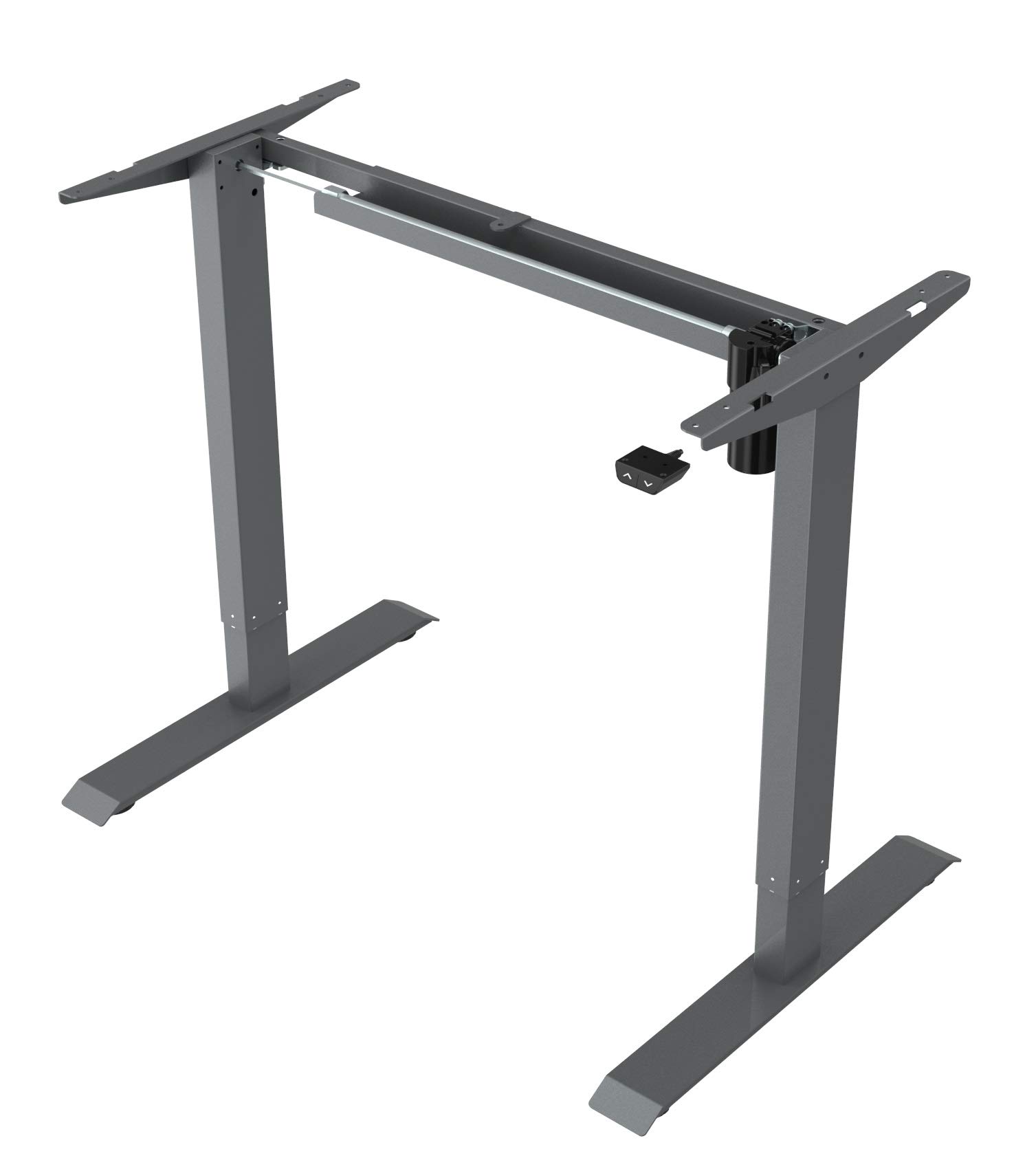
This image displays the main components of the Spacetronik SPE-114 electric height adjustable desk frame, including the legs, crossbar, and motor assembly, ready for assembly.
4. การติดตั้งและการประกอบ
Assembly typically requires two people. Ensure you have enough space and the necessary tools (usually included in the hardware kit).
- แกะส่วนประกอบ: นำชิ้นส่วนทั้งหมดออกจากบรรจุภัณฑ์อย่างระมัดระวัง และวางเรียงบนพื้นผิวที่สะอาดและนุ่ม เพื่อป้องกันรอยขีดข่วน
- ประกอบขาและคาน: Attach the desk legs to the crossbar/support beam using the provided screws and tools. Ensure all connections are secure.
- Install Motor and Control Box: Mount the motor assembly and control box to the designated positions on the frame, following the diagrams in the detailed assembly guide (if provided separately).
- เชื่อมต่อแผงควบคุม: Secure the control panel to the underside of your chosen desktop or to the frame in an easily accessible location.
- เชื่อมต่อสายเคเบิล: Connect the motor cable, control panel cable, and power adapter to the control box. Ensure all connections are firm.
- Mount Desktop (Not Included): Carefully place your desktop onto the assembled frame. Align the desktop with the pre-drilled holes (if applicable) or mark and drill new pilot holes. Secure the desktop to the frame using appropriate screws.
- การเพิ่มพลังเริ่มต้น: Plug the power adapter into a wall outlet. The desk may perform an initial reset or calibration.

มุมเอียง view of the fully assembled Spacetronik SPE-114 desk frame, showcasing its sturdy construction and grey finish.
5. คู่มือการใช้งาน
5.1 แผงควบคุมโอเวอร์view

รายละเอียด view of the control panel for the Spacetronik SPE-114 desk, featuring up/down buttons and memory preset buttons for three height positions.
The control panel typically features:
- ปุ่มขึ้น (▲) / ลง (▼): Press and hold to adjust the desk height. Release to stop.
- ค่าที่ตั้งไว้ล่วงหน้าของหน่วยความจำ (1, 2, 3): Buttons to save and recall preferred height settings.
- แสดง: Shows the current desk height in centimeters or inches.
5.2 การปรับความสูง
ในการปรับความสูงของโต๊ะ ให้กดปุ่มค้างไว้ ขึ้น (▲) or ลง (▼) button until the desk reaches your desired height. Release the button to stop the movement.
5.3 การตั้งค่าหน่วยความจำล่วงหน้า
The desk frame allows you to save up to three preferred height positions:
- ปรับความสูงของโต๊ะตามต้องการโดยใช้ปุ่มขึ้น/ลง
- Press the 'M' or 'SET' button (if available, otherwise proceed to step 3). The display may flash.
- Immediately press one of the memory preset buttons (1, 2, or 3). The current height is now saved to that button.
- Repeat for other desired height positions.
5.4 Recalling Memory Presets
To move the desk to a saved height, simply press the corresponding memory preset button (1, 2, or 3). The desk will automatically move to the saved position.

A person is shown working at a Spacetronik height adjustable desk while using an under-desk exercise bike, illustrating the desk's support for active work styles.
6. การบำรุงรักษา
- การทำความสะอาด: เช็ดกรอบโต๊ะด้วยผ้าเนื้อนุ่มและแห้งamp cloth. Avoid abrasive cleaners or solvents that could damage the finish. Ensure the desk is unplugged before cleaning.
- การจัดการสายเคเบิล: Regularly check all cables for wear or damage. Ensure they are neatly organized to prevent tripping hazards or accidental disconnections.
- การตรวจสอบตัวยึด: ตรวจสอบสกรูและน็อตทั้งหมดเป็นระยะเพื่อให้แน่ใจว่ายังแน่นอยู่ ขันให้แน่นอีกครั้งหากจำเป็น
- การหล่อลื่น: The moving parts of the desk frame are generally maintenance-free and do not require lubrication.
7 การแก้ไขปัญหา
| ปัญหา | สาเหตุที่เป็นไปได้ | สารละลาย |
|---|---|---|
| โต๊ะไม่ขยับ | Power cable disconnected, motor cable loose, overload, or system error. | Check all cable connections. Reduce weight on the desk. Perform a reset (unplug for 30 seconds, then plug back in). |
| โต๊ะขยับไม่สม่ำเสมอ | Uneven weight distribution, loose fasteners, or calibration issue. | Distribute weight evenly. Check and tighten all fasteners. Perform a system reset. |
| แสดงรหัสข้อผิดพลาด | ความผิดปกติเฉพาะของระบบ | Refer to the detailed error code list in a separate technical manual (if available) or contact customer support with the specific code. Often, a power cycle (unplug, wait, plug in) can resolve minor errors. |
| โต๊ะหยุดทำงานกลางคัน | Overheat protection, obstruction, or power interruption. | Allow the motor to cool down for 20 minutes. Check for any obstructions. Ensure stable power supply. |
8. ข้อมูลจำเพาะ
- ขนาดสินค้า (กว้าง x ยาว x สูง) : 65 x 129 x 121 ซม. (25.6 x 50.8 x 47.6 นิ้ว)
- น้ำหนัก: 22.5 กก. (49.6 ปอนด์)
- ผู้ผลิต: สเปซโทรนิค
- ASIN: B084HFPW2N
- หมายเลขรุ่นสินค้า: SPE-243
- หมายเลขชิ้นส่วน: SPE114
- ยี่ห้อ: สเปซโทรนิค
- รูปร่าง: สี่เหลี่ยมผืนผ้า
- สี: สีเทา
- คุณสมบัติพิเศษ: Ergonomic, Electric height adjustment
- จำนวนลิ้นชัก: 1 (Note: This specification might refer to an optional accessory or a complete desk model, as the product is a frame without a worktop.)
- จำเป็นต้องประกอบ: ใช่
9. การรับประกันและการสนับสนุน
Spacetronik products are manufactured to high-quality standards. For information regarding warranty coverage, please refer to the warranty card included with your purchase or visit the official Spacetronik webเว็บไซต์.
If you encounter any issues or have questions not covered in this manual, please contact Spacetronik customer support for assistance. Have your model number (SPE-243) and purchase details ready when contacting support.