
การแนะนำ
Thank you for choosing the Kaidi KD903 Wireless Bluetooth Earphones. This manual provides essential information for the safe and optimal use of your device. Please read it carefully before use and retain it for future reference.
อะไรอยู่ในกล่อง:
- 1 x Kaidi KD903 Wireless Earphones
- 2 x Pairs of Comfortable Ear Tips (different sizes)
- สายชาร์จ USB 1 เส้น
- 1 x คู่มือผู้ใช้

Image: Kaidi KD903 Wireless Earphones with included accessories, such as the charging cable and additional ear tips.
สินค้าเกินview
The Kaidi KD903 earphones are designed for active lifestyles, offering a secure fit and resistance to sweat. They feature Bluetooth 4.1 for stable connectivity and clear audio.
คุณสมบัติหลัก:
- Bluetooth 4.1: รับประกันการเชื่อมต่อไร้สายที่เสถียรและมีประสิทธิภาพ
- ต้านทานเหงื่อ: Ideal for sports and workouts.
- CVC Intelligent Noise Reduction: Minimizes wind noise for clearer calls.
- การเชื่อมต่อแบบหลายจุด: สามารถเชื่อมต่อกับอุปกรณ์สองเครื่องพร้อมกันได้
- การแจ้งเตือนด้วยเสียง: Provides audio prompts for status updates.
- IOS Power Display: Shows battery level on iOS devices.
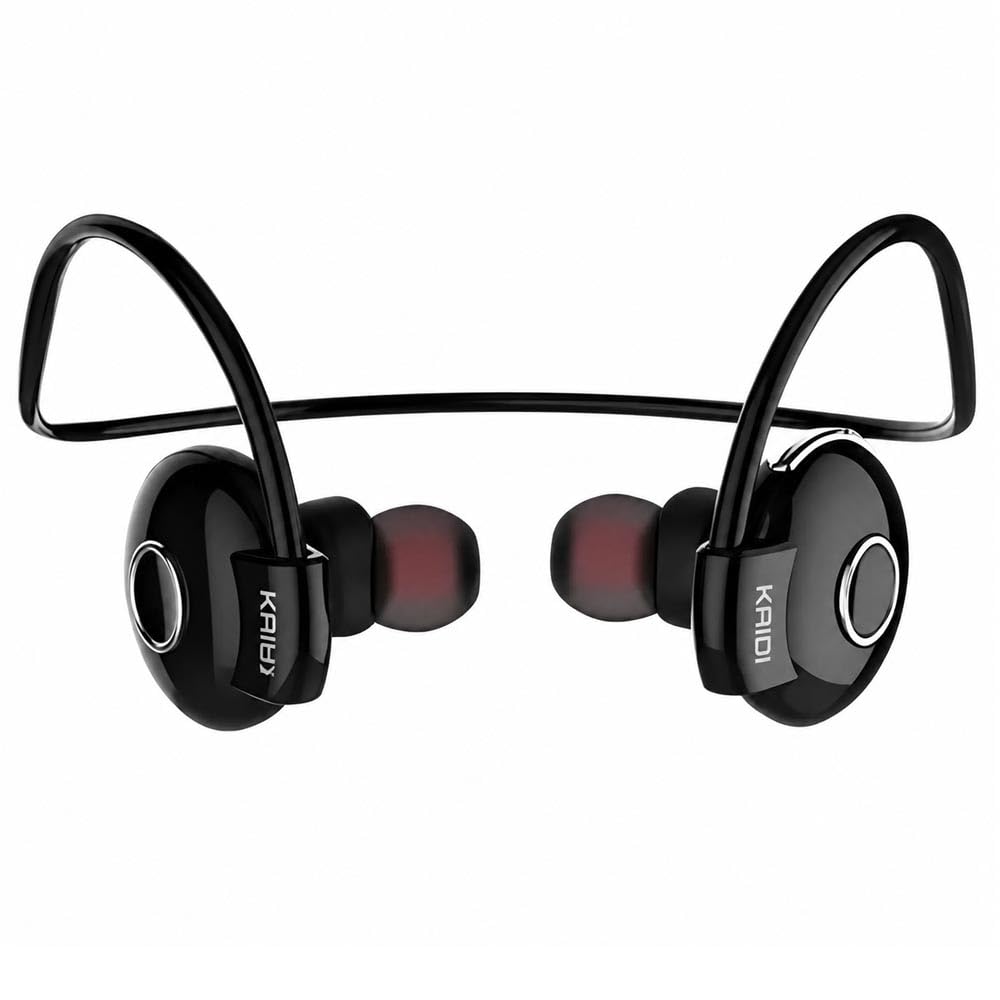
ภาพ: ระเบิด view illustrating the internal components and design of the Kaidi KD903 earphone.
การตั้งค่า
1. การชาร์จหูฟัง
- เสียบสายชาร์จ USB เข้ากับพอร์ตชาร์จบนหูฟัง
- เสียบปลายอีกด้านของสาย USB เข้ากับแหล่งจ่ายไฟ USB ที่ใช้งานร่วมกันได้ (เช่น คอมพิวเตอร์ อะแดปเตอร์ติดผนัง)
- The indicator light will illuminate to show charging status. A full charge typically takes approximately 2.5 hours.
- เมื่อชาร์จเต็มแล้ว ไฟแสดงสถานะจะเปลี่ยนสีหรือดับลง ถอดสายชาร์จออก
2. การจับคู่กับอุปกรณ์บลูทูธ
- ตรวจสอบให้แน่ใจว่าหูฟังปิดอยู่
- Press and hold the multi-function button (usually the main button on the earphone) for approximately 5-7 seconds until the indicator light flashes red and blue alternately. This indicates the earphones are in pairing mode.
- บนสมาร์ทโฟนหรืออุปกรณ์ที่รองรับบลูทูธ ให้เปิดใช้งานบลูทูธและค้นหาอุปกรณ์ที่ใช้งานได้
- Select 'KD903' from the list of found devices.
- Once connected, a voice prompt will confirm successful pairing, and the indicator light will typically flash blue slowly.

Image: A person wearing the Kaidi KD903 wireless earphones, highlighting their suitability for sports and active use.
คำแนะนำการใช้งาน
เปิด/ปิดเครื่อง
- เปิดเครื่อง: Press and hold the multi-function button for approximately 3 seconds until the blue indicator light flashes and a voice prompt says "Power On".
- หมดแรง: Press and hold the multi-function button for approximately 3 seconds until the red indicator light flashes and a voice prompt says "Power Off".
การเล่นเพลง
- เล่น/หยุดชั่วคราว: กดปุ่มมัลติฟังก์ชั่นหนึ่งครั้ง
- เพลงถัดไป: กดปุ่มปรับระดับเสียง + ค้างไว้
- แทร็กก่อนหน้า: กดปุ่มปรับระดับเสียง - ค้างไว้
- ปรับระดับเสียงขึ้น: กดปุ่มเพิ่มระดับเสียงสั้นๆ
- ลดเสียงลง: กดปุ่มปรับระดับเสียง - สั้นๆ
การจัดการการโทร
- รับ/วางสาย: กดปุ่มมัลติฟังก์ชั่นหนึ่งครั้ง
- ปฏิเสธสาย: กดปุ่มมัลติฟังก์ชันค้างไว้ประมาณ 2 วินาที
- โทรซ้ำหมายเลขล่าสุด: กดปุ่มมัลติฟังก์ชันสองครั้ง
Multipoint Connection (Connecting to Two Devices)
- Pair the earphones with the first device as described in the "Pairing" section.
- After successful pairing, disable Bluetooth on the first device.
- Put the earphones back into pairing mode (red and blue flashing light).
- เชื่อมต่อหูฟังกับอุปกรณ์เครื่องที่สอง
- Once the second device is paired, re-enable Bluetooth on the first device. The earphones should now be connected to both devices simultaneously.
การซ่อมบำรุง
Proper maintenance ensures the longevity and performance of your Kaidi KD903 earphones.
- การทำความสะอาด: Regularly clean the earphones with a soft, dry, lint-free cloth. Do not use abrasive cleaners, solvents, or harsh chemicals.
- ต้านทานเหงื่อ: While the earphones are sweat-resistant, avoid submerging them in water or exposing them to heavy rain. After intense workouts, wipe them dry.
- พื้นที่จัดเก็บ: เมื่อไม่ใช้งาน ควรเก็บหูฟังไว้ในที่แห้งและเย็น หลีกเลี่ยงแสงแดดโดยตรงและอุณหภูมิที่สูงหรือต่ำเกินไป
- การชาร์จ: Charge the earphones using only the provided USB cable or a certified equivalent. Avoid overcharging.
การแก้ไขปัญหา
หากคุณพบปัญหาเกี่ยวกับหูฟังของคุณ โปรดดูปัญหาทั่วไปและวิธีแก้ไขต่อไปนี้:
- หูฟังไม่เปิดใช้งาน:
ตรวจสอบให้แน่ใจว่าหูฟังชาร์จเต็มแล้ว เสียบหูฟังเข้ากับแหล่งจ่ายไฟและปล่อยให้ชาร์จอย่างน้อย 30 นาที ก่อนที่จะลองเปิดใช้งานอีกครั้ง - ไม่มีเสียงหรือระดับเสียงต่ำ:
Check the volume levels on both the earphones and your connected device. Ensure the earphones are properly paired and connected to your device. Try re-pairing the earphones. - ไม่สามารถจับคู่กับอุปกรณ์ได้:
Ensure the earphones are in pairing mode (red and blue indicator light flashing). Make sure Bluetooth is enabled on your device and it is within the 8-meter transmission range. Try restarting both the earphones and your device. - Connection is unstable or drops frequently:
Ensure there are no obstacles between the earphones and your device. Move closer to your device. Avoid environments with strong Wi-Fi or other wireless interference. - ปัญหาการชาร์จ:
Verify that the charging cable is securely connected to both the earphones and the power source. Try using a different USB port or charging adapter.
ข้อมูลจำเพาะ
| คุณสมบัติ | ข้อมูลจำเพาะ |
|---|---|
| เวอร์ชันบลูทูธ | 4.1 |
| โปรfile สนับสนุน | เอชเอสพี/เอชเอฟพี/เอทูดีพี/เอวีอาร์ซีพี |
| เวลาสแตนด์บาย | 200 ชั่วโมง |
| เวลาสนทนา | 10 ชั่วโมง |
| เวลาเล่นเพลง | 6 ชั่วโมง |
| เวลาในการชาร์จ | 2.5 ชั่วโมง |
| ช่วงความถี่ | RF 2.40 GHz (2.402 G – 2.480 G) |
| อุณหภูมิโดยรอบ | -20°C ถึง +60°C |
| ระยะการส่งข้อมูล | สูงสุด 8 เมตร |
| ความจุของแบตเตอรี่ | ชาร์จได้ 100mAh |
| ขนาด (กว้าง x ยาว x สูง) | 12.2 x 10.3 x 4.4 ซม. |
| ประเภทขั้วต่อ | ยูเอสบี ไทป์ ซี |
| สี | สีดำ |
การรับประกันและการสนับสนุน
ข้อมูลการรับประกัน
This Kaidi KD903 product comes with a รับประกัน 30 วัน from the date of purchase. This warranty covers manufacturing defects. Please retain your proof of purchase (receipt or invoice) as it is required for any warranty claims.
การรับประกันไม่ครอบคลุมความเสียหายที่เกิดจากการใช้งานผิดวิธี อุบัติเหตุ การดัดแปลงที่ไม่ได้รับอนุญาต หรือการสึกหรอตามปกติ
การสนับสนุนลูกค้า
For technical assistance, troubleshooting not covered in this manual, or warranty inquiries, please contact the retailer from whom you purchased the product. You may also visit the official Kaidi webเว็บไซต์สำหรับทรัพยากรสนับสนุนเพิ่มเติม