
การแนะนำ
Thank you for choosing the HONOR Magic Watch 2. This smartwatch is designed to enhance your daily life with advanced fitness tracking, communication features, and a long-lasting battery. It features a vibrant 1.39-inch AMOLED display, a durable metal and plastic body, and a range of sensors to monitor your health and activities. This manual provides essential information for setting up, operating, maintaining, and troubleshooting your device.
การตั้งค่า
1. การแกะกล่องและการชาร์จครั้งแรก
Upon unboxing, ensure all standard components are present. It is recommended to fully charge your HONOR Magic Watch 2 before first use. The watch is equipped with a 455 mAh battery, providing up to 14 days of typical usage on a single charge.

ภาพ: ด้านหน้า view of the HONOR Magic Watch 2, showcasing its round AMOLED display and black strap.
2. การจับคู่กับสมาร์ทโฟนของคุณ
- Download the official HONOR Health or Huawei Health app from your smartphone's app store (compatible with iOS and Android devices).
- เปิดแอปและทำตามคำแนะนำบนหน้าจอเพื่อสร้างบัญชีหรือเข้าสู่ระบบ
- ตรวจสอบให้แน่ใจว่าได้เปิดใช้งาน Bluetooth บนสมาร์ทโฟนของคุณแล้ว
- In the app, navigate to 'Devices' and select 'Add device'. Choose your HONOR Magic Watch 2 from the list of available devices.
- ยืนยันคำขอจับคู่บนนาฬิกาและสมาร์ทโฟนของคุณทั้งสอง
3. การกำหนดค่าเริ่มต้น
After successful pairing, the app will guide you through initial settings such as personal information, notification preferences, and watch face selection.
การใช้งานสมาร์ทวอทช์ของคุณ
1. การนำทางพื้นฐาน
- หน้าจอสัมผัส: ปัดขึ้น ลง ซ้าย หรือขวา เพื่อนำทางผ่านเมนูและการแจ้งเตือน แตะเพื่อเลือกรายการ
- ปุ่ม: The watch features push buttons for various functions, typically a power/home button and a function button. Refer to the on-screen prompts for specific button actions.
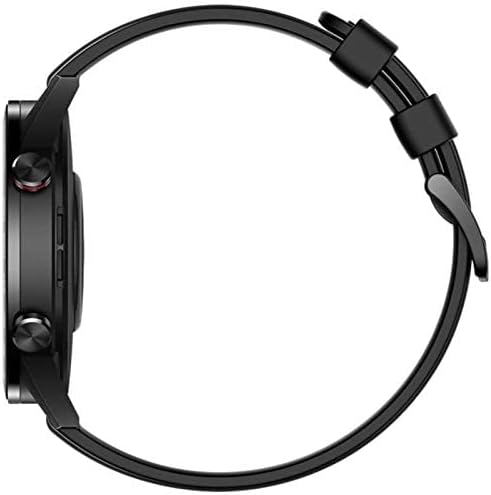
ภาพ: ด้านข้าง view of the HONOR Magic Watch 2, showing the two physical buttons on the right side of the watch case.
2. คุณสมบัติการสื่อสาร
- การโทรผ่านบลูทูธ: Make and receive calls directly from your watch when connected to your smartphone via Bluetooth. The watch includes a microphone for hands-free communication.
- การแจ้งเตือน: Receive alerts for incoming calls, text messages, and app notifications directly on your watch display.
3. การติดตามการออกกำลังกายและสุขภาพ
The HONOR Magic Watch 2 offers comprehensive tracking capabilities:
- 15 Fitness Modes: Track various sports activities including climbing, running, walking, long-distance walking, and cycling.
- เครื่องวัดอัตราการเต้นของหัวใจ: An optical heart rate sensor continuously monitors your heart rate.
- เครื่องตรวจวัด SpO2: วัดระดับความอิ่มตัวของออกซิเจนในเลือด
- การติดตามการนอนหลับ: Monitors your sleep patterns and provides insights for improvement.
- การติดตามความเครียด: Helps you manage stress levels throughout the day.
- จีพีเอส: Integrated GPS provides accurate route tracking for outdoor activities.
- ตัวติดตามระยะทาง: Records distances covered during your workouts.
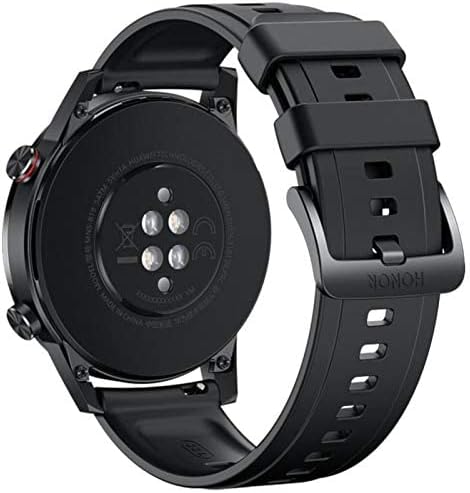
ภาพ: ด้านหลัง view of the HONOR Magic Watch 2, showing the heart rate sensors and charging contacts.
4. การเล่นเพลง
Store and play music directly from your watch (4GB storage capacity) or control music playback on your connected smartphone.
การซ่อมบำรุง
1. การทำความสะอาดนาฬิกาของคุณ
- เช็ดหน้าจอและตัวเรือนนาฬิกาด้วยผ้าที่ไม่เป็นขุยและนุ่ม
- สำหรับคราบฝังแน่นdampชุบผ้าให้เปียกหมาดๆ หลีกเลี่ยงการใช้สารเคมีรุนแรงหรือวัสดุที่มีฤทธิ์กัดกร่อน
- ทำความสะอาดจุดเชื่อมต่อการชาร์จเป็นประจำเพื่อให้แน่ใจว่าการชาร์จเป็นไปอย่างถูกต้อง
2. ความทนทานต่อน้ำ
The HONOR Magic Watch 2 is water-resistant up to 50 meters. This means it can be used for shallow-water activities like swimming in a pool or ocean. It is not suitable for diving, waterskiing, or other activities involving high-velocity water or submersion below shallow depth.
- ล้างนาฬิกาด้วยน้ำจืดหลังจากสัมผัสกับน้ำทะเลหรือน้ำที่มีคลอรีน
- ห้ามกดปุ่มใดๆ ใต้น้ำ
- Ensure the watch is dry before charging to prevent damage to the charging contacts.
3. การดูแลแบตเตอรี่
- หลีกเลี่ยงการนำนาฬิกาไปสัมผัสกับอุณหภูมิที่สูงหรือต่ำเกินไป ซึ่งอาจทำให้แบตเตอรี่หมดเร็วได้
- For long-term storage, charge the watch to approximately 50% and store it in a cool, dry place.
การแก้ไขปัญหา
ปัญหาทั่วไปและแนวทางแก้ไข
| ปัญหา | วิธีแก้ปัญหาที่เป็นไปได้ |
|---|---|
| นาฬิกาเปิดไม่ติด | ตรวจสอบให้แน่ใจว่านาฬิกาชาร์จเต็มแล้ว เสียบนาฬิกาเข้ากับเครื่องชาร์จอย่างน้อย 30 นาที |
| ไม่สามารถจับคู่กับสมาร์ทโฟนได้ | Check if Bluetooth is enabled on both devices. Restart both the watch and smartphone. Ensure the app is updated to the latest version. |
| ข้อมูลอัตราการเต้นของหัวใจ/กิจกรรมไม่ถูกต้อง | ตรวจสอบให้แน่ใจว่าสวมนาฬิกาให้กระชับพอดีข้อมือ ไม่แน่นหรือหลวมเกินไป ทำความสะอาดเซ็นเซอร์ที่ด้านหลังนาฬิกา |
| อายุการใช้งานแบตเตอรี่สั้น | ลดความสว่างหน้าจอ ปิดใช้งานการแสดงผลตลอดเวลา จำกัดการรีเฟรชแอปในพื้นหลัง และปิดการแจ้งเตือนที่ไม่จำเป็น |
| นาฬิกาไม่ชาร์จ | Ensure the charging cable and adapter are working correctly. Clean the charging contacts on both the watch and the charger. |
If you encounter issues not listed here, try restarting your watch and smartphone. For persistent problems, refer to the support section.
ข้อมูลจำเพาะ
| คุณสมบัติ | รายละเอียด |
|---|---|
| ชื่อรุ่น | นาฬิกาเมจิก 2 |
| หมายเลขรุ่น | Minos-B19S |
| ขนาดจอแสดงผล | 1.39 นิ้ว |
| ประเภทจอภาพ | อโมเลด |
| ปณิธาน | 454 x 454 พิกเซล |
| Max Screen Brightness | 600 นิต |
| ระบบปฏิบัติการ | Android Wear (Compatible with iOS and Android) |
| ความจุในการเก็บข้อมูล | 4GB |
| ความจุของแบตเตอรี่ | 455 มิลลิแอมป์ |
| อายุการใช้งานแบตเตอรี่ | สูงสุด 336 ชั่วโมง (14 วัน) |
| การเชื่อมต่อ | บลูทูธ |
| จีพีเอส | Yes (Global Positioning System) |
| ความต้านทานต่อน้ำ | 50 เมตร |
| ขนาดรายการ | 46 x 46 x 11 มม. |
| วัสดุตัวเรือน | โลหะ |
| วัสดุของวงดนตรี | Silicone (standard), Stainless Steel (variant dependent) |
| เซ็นเซอร์ | Accelerometer, Optical Heart Rate Sensor |
| อินพุตอินเทอร์เฟซมนุษย์ | Buttons, Microphone |
| คุณสมบัติพิเศษ | Phone calls, Notifications, SMS, Music Player, Calendar Mode |
ข้อมูลการรับประกัน
This product comes with a manufacturer's warranty of 18 months from the date of purchase. For service or further details, you may contact the manufacturer or its authorized service agent. Alternatively, you may contact Amazon for assistance.
สนับสนุน
For additional support, frequently asked questions, or to download the latest version of the user manual, please visit the official HONOR support website. You can also find troubleshooting tips and community forums online.
- แหล่งข้อมูลออนไลน์: Visit the HONOR official webเว็บไซต์สำหรับการสนับสนุนผลิตภัณฑ์
- บริการลูกค้า: Contact HONOR customer service for direct assistance.