
1. บทนำ
Thank you for choosing the SUNSHINE P-1503T Analog Power Supply. This manual provides essential information for the safe and efficient operation, setup, maintenance, and troubleshooting of your device. Please read this manual thoroughly before using the product and keep it for future reference.
The SUNSHINE P-1503T is a versatile 15-volt, 3-amp analog power supply designed primarily for mobile phone maintenance. It features touch-sensitive controls and includes two USB ports for convenient mobile testing and charging.
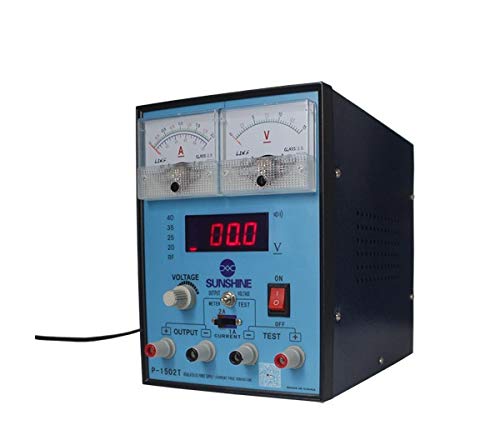
รูปที่ 1 : ด้านหน้า view of the SUNSHINE P-1503T Analog Power Supply. This image shows the device's display, control knobs, and output terminals, including the two USB ports.
2. ข้อมูลด้านความปลอดภัย
คำเตือน: การไม่ปฏิบัติตามคำแนะนำด้านความปลอดภัยเหล่านี้อาจทำให้เกิดไฟฟ้าช็อต ไฟไหม้ หรือบาดเจ็บสาหัสได้
- ควรต่อสายไฟเข้ากับเต้ารับไฟฟ้าที่มีสายดินเสมอ
- ห้ามใช้งานอุปกรณ์ในสภาพเปียกหรืองamp เงื่อนไข.
- ต้องแน่ใจว่ามีการระบายอากาศที่เหมาะสมเพื่อป้องกันความร้อนสูงเกินไป อย่าปิดกั้นช่องระบายอากาศ
- อย่าเปิดcasinของแหล่งจ่ายไฟ ไม่มีชิ้นส่วนใดที่ผู้ใช้สามารถซ่อมบำรุงเองได้ภายใน แนะนำให้ช่างผู้ชำนาญเข้ารับบริการซ่อมบำรุงทั้งหมด
- ห้ามสัมผัสขั้วต่อเอาต์พุตขณะที่อุปกรณ์เปิดใช้งานอยู่
- Disconnect the power cord from the outlet before cleaning or if the device will not be used for an extended period.
- ใช้เฉพาะปริมาตรอินพุตที่ระบุเท่านั้นtage (15 Volts) as indicated on the device.
3. การตั้งค่า
3.1 การแกะกล่อง
- นำอุปกรณ์จ่ายไฟออกจากบรรจุภัณฑ์อย่างระมัดระวัง
- Inspect the device for any signs of damage during transit. If damaged, do not use and contact your supplier.
- Ensure all accessories are present (e.g., power cord, test leads if included).
3.2 การเชื่อมต่อกับแหล่งจ่ายไฟ
- Place the power supply on a stable, level surface with adequate ventilation.
- Connect the provided power cord to the power input socket on the rear of the device.
- เสียบปลายอีกด้านของสายไฟเข้ากับเต้ารับไฟฟ้าที่มีสายดินที่เหมาะสม
4. คู่มือการใช้งาน
4.1 การเปิด/ปิดเครื่อง
- To power on the device, press the power switch located on the front panel. The display will illuminate.
- หากต้องการปิดเครื่อง ให้กดสวิตช์เปิด/ปิดอีกครั้ง
4.2 Adjusting Output
The P-1503T is an analog power supply, typically meaning voltage and current are set via rotary knobs.
- ใช้ เล่มที่tage ปุ่มปรับ เพื่อตั้งค่าระดับเสียงเอาต์พุตที่ต้องการtage. Monitor the voltagอี แสดงผล
- ใช้ ปุ่มปรับปัจจุบัน to set the desired current limit. Monitor the current display.
- The device emits a sound upon touch, indicating interaction with its controls.
4.3 การใช้พอร์ต USB
The power supply features two USB ports on the front panel:
- USB Port 1 (Mobile Testing): Connect a mobile device here for diagnostic purposes. This port is designed to provide stable power for testing mobile phone circuits.
- USB Port 2 (Mobile Charging): Connect a mobile device here for charging. This port delivers power suitable for recharging mobile phone batteries.
Note: Always ensure the output voltage and current settings are appropriate for the device being connected to prevent damage.
5. การบำรุงรักษา
5.1 การทำความสะอาด
- Ensure the power supply is turned off and disconnected from the main power outlet before cleaning.
- ใช้ผ้าแห้งนุ่มเช็ดบริเวณภายนอกของอุปกรณ์
- Do not use liquid cleaners, aerosols, or solvents, as these may damage the casing หรือส่วนประกอบภายใน
- รักษาช่องระบายอากาศให้สะอาดปราศจากฝุ่นและเศษขยะ
5.2 พื้นที่จัดเก็บ
When not in use, store the power supply in a cool, dry place, away from direct sunlight and extreme temperatures.
6 การแก้ไขปัญหา
| ปัญหา | สาเหตุที่เป็นไปได้ | สารละลาย |
|---|---|---|
| อุปกรณ์ไม่เปิดเครื่อง |
|
|
| ไม่มีเอาต์พุต voltagอี/กระแส |
|
|
| พอร์ต USB ใช้งานไม่ได้ |
|
|
7. ข้อมูลจำเพาะ
| คุณสมบัติ | รายละเอียด |
|---|---|
| ยี่ห้อ | แสงอาทิตย์ |
| แบบอย่าง | พี-1503ที |
| อุปกรณ์ที่รองรับ | โทรศัพท์มือถือ |
| ประเภทขั้วต่อ | เอทีเอ็กซ์ |
| ฟอร์มแฟกเตอร์ | เอทีเอ็กซ์ |
| วิธีการทำความเย็น | อากาศ |
| ปริมาณอินพุตสูงสุดtage | 15 โวลต์ |
| ปริมาณอินพุตขั้นต่ำtage | 15 โวลต์ |
| ผู้ผลิต | แสงอาทิตย์ |
| System Bus Connector Type | Connector 2 |
| แหล่งพลังงาน | ภายนอก |
| ASIN | B0847QS2FX |
8. การรับประกันและการสนับสนุน
This product is covered by a standard manufacturer's warranty. Please refer to the warranty card included with your purchase for specific terms and conditions. For technical support, service, or warranty claims, please contact your retailer or the manufacturer directly.
For the latest information and support, please visit the official SUNSHINE webเว็บไซต์ (ถ้ามี)