
1. บทนำและเรื่องอื่นๆview
The Hercules DJControl Inpulse 500 is a 2-deck USB DJ controller designed for aspiring and performing DJs. It features a built-in audio interface and hardware input mixer, offering comprehensive control for mixing audio. The controller is compatible with Serato DJ and DJUCED software.
Key features include high-definition jog wheels with touch detection, 16 backlit RGB pads for performance, and a dedicated Filter/FX area for smooth transitions. The unit is also designed with retractable feet for improved ergonomics and protection.
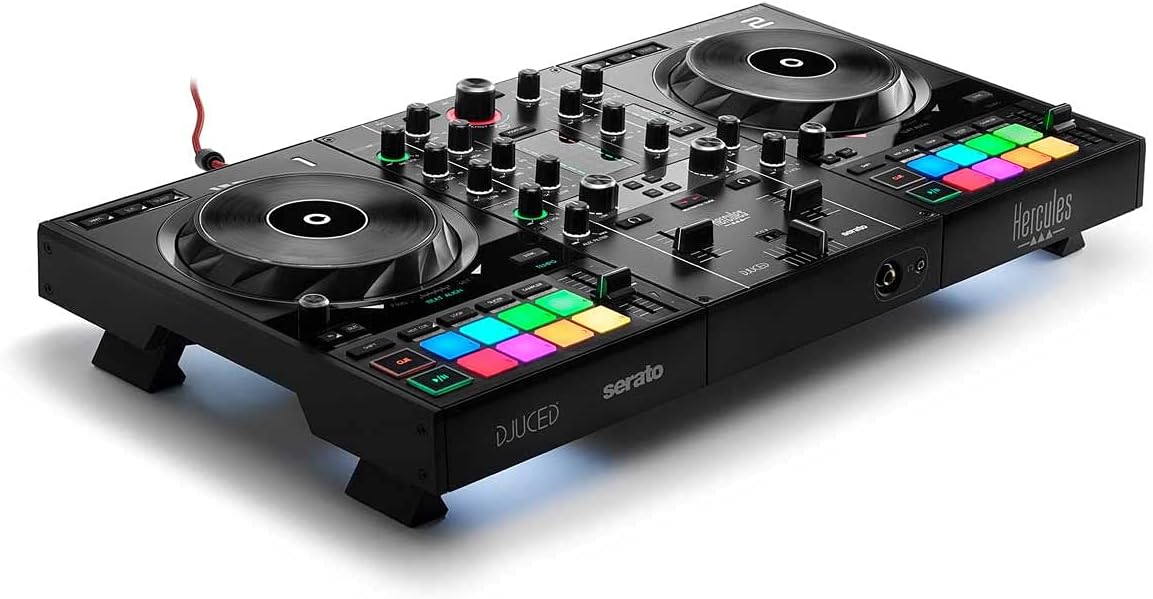
Figure 1: Hercules DJControl Inpulse 500 DJ Controller
This image displays the overall design of the Hercules DJControl Inpulse 500, highlighting its two decks, central mixer, and performance pads.
2. อะไรอยู่ในกล่อง
Upon unboxing your Hercules DJControl Inpulse 500, please ensure all the following items are present:
- DJ Deck (Hercules DJControl Inpulse 500)
- สาย USB
- คู่มือของเจ้าของ
3. การตั้งค่า
3.1. การเชื่อมต่อคอนโทรลเลอร์
To begin using your DJControl Inpulse 500, connect it to your computer and audio system as follows:
- Connect the supplied USB cable from the controller's USB port to an available USB port on your computer.
- Connect your speakers to the MASTER output (RCA) on the rear of the controller.
- For monitoring, plug your headphones into the headphone jack on the front of the controller.
- (Optional) Connect a microphone to the unbalanced MIC input on the rear panel.

รูปที่ 2: การเชื่อมต่อแผงด้านหลัง
This image illustrates the rear panel of the DJControl Inpulse 500, showing the USB, Master (RCA), and Microphone input connections.
3.2. การติดตั้งซอฟต์แวร์
The Hercules DJControl Inpulse 500 is designed for use with Serato DJ and DJUCED software. Please download and install the latest versions of your preferred DJ software from the official webเว็บไซต์

รูปที่ 3: ความเข้ากันได้ของซอฟต์แวร์
This image highlights the compatibility of the DJControl Inpulse 500 with DJUCED and Serato DJ Lite software.
4. คู่มือการใช้งาน
4.1. สูงกว่าview ของการควบคุม
The DJControl Inpulse 500 features a standard 2-deck layout with a central mixer section. Familiarize yourself with the main components:
- ล้อหมุน: Large, touch-sensitive jog wheels for scratching and track navigation.
- แผ่นประสิทธิภาพ: 16 backlit RGB pads for triggering hot cues, loops, samples, and effects.
- ส่วนเครื่องผสม: Includes gain, EQ (High, Mid, Low), filter, and volume faders for each deck, along with a crossfader.
- Filter/FX Area: Dedicated controls for applying filters and effects to your mix.
- Beatmatch Guide: Visual guides to assist with manual beatmatching.

รูปที่ 4: เค้าโครงแผงด้านบน
ภาพนี้แสดงให้เห็นภาพจากบนลงล่างอย่างชัดเจน view of the controller, showing the layout of all buttons, knobs, and jog wheels.
4.2. การผสมพื้นฐาน
- กำลังโหลดแทร็ก: Use the Browse knob to navigate your music library in Serato DJ or DJUCED. Press the LOAD buttons (1 or 2) to assign tracks to the respective decks.
- Playing and Pausing: Use the Play/Pause buttons located below each jog wheel.
- Beatmatching: Adjust the tempo faders and use the jog wheels to align the beats of two tracks. The Beatmatch Guide LEDs will assist you in achieving perfect synchronization.
- EQ and Filter: Use the EQ knobs (High, Mid, Low) to adjust the frequency balance of each track. The Filter knob allows for creative frequency sweeps.
- ครอสเฟเดอร์: Blend between Deck 1 and Deck 2 using the central crossfader.

Figure 5: Beatmatch Guide on Jog Wheel
This close-up shows the jog wheel and the Beat Align guide, which illuminates to indicate when tracks are synchronized.
4.3. คุณสมบัติด้านประสิทธิภาพ
- ตัวชี้นำที่ร้อนแรง: Use the performance pads to set and trigger cue points within your tracks.
- ลูป: Create instant loops using the dedicated loop buttons (Loop In/Loop Out).
- Sampเลอร์: ทริกเกอร์โหลดล่วงหน้าamples using the performance pads in sampโหมดเลอร์
- ผลกระทบ: Apply various effects using the FX paddles and buttons in the Filter/FX area.

Figure 6: Performance Pads and Filter/FX
This image details the multi-colored performance pads and the intuitive Filter/FX controls.
5. คุณสมบัติหลัก
- Integrated Audio Interface: Provides high-quality audio output directly from the controller, eliminating the need for external sound cards.
- Hardware Input Mixer: Allows for direct connection of external audio sources, such as a microphone, independent of the computer.
- High-Definition Jog Wheels: Large, touch-sensitive jog wheels offer precise control for scratching and track manipulation.
- RGB Performance Pads: 16 backlit pads provide tactile feedback and visual cues for triggering various performance modes.
- Retractable Feet: Unique design feature that elevates the controller, improving ergonomics and protecting it from spills.
Figure 7: Retractable Feet
This image shows the DJControl Inpulse 500 with its retractable feet extended, demonstrating how it can be elevated.
6. การบำรุงรักษา
- การทำความสะอาด: Use a soft, dry cloth to clean the surface of the controller. Avoid abrasive cleaners or solvents.
- พื้นที่จัดเก็บ: Store the controller in a dry, dust-free environment. If transporting, use a protective case.
- การดูแลสายเคเบิล: Handle USB and audio cables carefully to prevent damage. Avoid sharp bends or excessive pulling.
7 การแก้ไขปัญหา
- ไม่มีพลังงาน/การเชื่อมต่อ: ตรวจสอบให้แน่ใจว่าได้เสียบสาย USB เข้ากับตัวควบคุมและคอมพิวเตอร์อย่างแน่นหนาแล้ว ลองใช้พอร์ต USB หรือสายอื่นดู
- ไม่มีเสียง: Check all audio connections (Master output to speakers, headphones). Verify that the volume levels on the controller and in your software are not muted or too low. Ensure the correct audio device is selected in your DJ software settings.
- ซอฟต์แวร์ไม่รู้จักตัวควบคุม: Restart your computer and DJ software. Ensure the latest drivers (if required) and software updates are installed.
8. ข้อมูลจำเพาะ
| คุณสมบัติ | รายละเอียด |
|---|---|
| ยี่ห้อ | เฮอร์คิวลีส |
| หมายเลขรุ่น | 4780909 |
| น้ำหนักสินค้า | 10.44 ปอนด์ |
| ขนาดสินค้า | 10.54 x 20.26 x 5.12 นิ้ว |
| ฮาร์ดแวร์อินเตอร์เฟซ | ยูเอสบี |
| ประเภทวัสดุ | โลหะ, พลาสติก |
| แหล่งพลังงาน | สายไฟ |
| จำนวนช่องสัญญาณ | 2 |
| เทคโนโลยีการเชื่อมต่อ | ยูเอสบี |
9. วิดีโอผลิตภัณฑ์อย่างเป็นทางการ
Hercules DJ Lifestyle Video
This video showcases the Hercules DJControl Inpulse 500 in various lifestyle settings, demonstrating its portability and ease of use for different DJ scenarios.
Hercules DJControl Inpulse 500 Overview
วิดีโอนี้ให้รายละเอียดมากกว่าview of the Hercules DJControl Inpulse 500, highlighting its features and functionalities for effective DJ performance.
10. การรับประกันและการสนับสนุน
For detailed warranty information and technical support, please refer to the official Hercules webหรือติดต่อฝ่ายบริการลูกค้า เก็บใบเสร็จรับเงินไว้เป็นหลักฐานการซื้อ