
1. บทนำและเรื่องอื่นๆview
The TROTEC PWLS 06-10 Cordless LED Work Light is designed to provide bright, portable illumination for various indoor and outdoor applications. It features a powerful LED light source and an integrated USB power bank function, allowing you to charge compatible devices.
คุณสมบัติที่สำคัญ ได้แก่:
- Powerful 3.7 V lithium-ion battery (4.4 Ah) for extended operation.
- Bright LED work light with shock-resistant edges for durability.
- High-power COB-LEDs delivering uniform, extra-bright light (800 lumens).
- Flexible handle and stand, adjustable up to 180 degrees in 6 positions.
- Three lighting modes: bright, reduced, and strobe.
- Strong magnetic holder for secure attachment to metal surfaces.
- Integrated USB power bank function (5 V / 1 A) for charging external devices.
- IP44 protection rating, safeguarding against splashing water from all directions.
- 4 วินาทีtage battery capacity indicator.
- Up to 8 hours of constant illumination.
- Daylight white color temperature (6,000 K).
- การออกแบบกะทัดรัดและพับเก็บได้เพื่อการจัดเก็บที่ง่ายดาย

Image 1.1: The TROTEC PWLS 06-10 Cordless LED Work Light, showcasing its compact design and key features like USB charging and battery power.
2. คำแนะนำด้านความปลอดภัย
Please read these safety instructions carefully before using the device. Failure to follow these instructions may result in electric shock, fire, or serious injury.
- ความปลอดภัยทั่วไป: Keep the device away from children. Do not disassemble, modify, or attempt to repair the device yourself. Refer all servicing to qualified personnel.
- ความปลอดภัยของแบตเตอรี่: The device contains a lithium-ion battery. Do not expose the battery to extreme temperatures, direct sunlight, or fire. Do not short-circuit the battery. Dispose of batteries according to local regulations.
- สภาพแวดล้อมการใช้งาน: The device has an IP44 protection rating, making it resistant to splashing water. However, do not immerse it in water. Avoid using the device in highly flammable or explosive environments.
- ความปลอดภัยของดวงตา: Do not look directly into the LED light when it is on, as it can cause eye strain or temporary vision impairment.
- การชาร์จ: Use only the provided USB cable or a certified equivalent for charging. Ensure the charging port is dry before connecting the cable.
3. เนื้อหาบรรจุภัณฑ์
ตรวจสอบว่าสินค้าทั้งหมดมีอยู่และอยู่ในสภาพดีเมื่อแกะกล่อง:
- 1 x TROTEC PWLS 06-10 Cordless LED Work Light
- 1 x USB Charging Cable (USB-A to Micro-USB, 80 cm)
- 1 x คู่มือผู้ใช้
4. สินค้าหมดview และส่วนประกอบ
Familiarize yourself with the different parts of your TROTEC PWLS 06-10 work light:

ภาพที่ 4.1: จบแล้วview of the TROTEC PWLS 06-10 highlighting its key features and specifications.
- แผงไฟ LED: The main light source, featuring COB-LED technology.
- Adjustable Handle/Stand: Allows for flexible positioning and serves as a carrying handle.
- ปุ่มเปิด/ปิด: Used to turn the device on/off and cycle through lighting modes.
- USB Output Port (Type A): สำหรับชาร์จอุปกรณ์ภายนอก (ฟังก์ชั่นพาวเวอร์แบงค์)
- Micro-USB Input Port (Type B): For charging the work light's internal battery.
- ไฟแสดงสถานะแบตเตอรี่: แสดงระดับการชาร์จปัจจุบันของแบตเตอรี่ภายใน
- ฐานแม่เหล็ก: Integrated magnets in the stand for attaching to metal surfaces.
5. การตั้งค่า
5.1 การชาร์จเริ่มต้น
Before first use, fully charge the work light's internal battery.
- Connect the small end of the provided USB charging cable to the Micro-USB input port on the work light.
- Connect the larger end of the USB cable to a suitable USB power adapter (not included) or a computer's USB port.
- The battery indicator lights will illuminate, showing the charging progress. All four lights will be solid when fully charged.
5.2 การปรับขาตั้ง
The flexible handle/stand can be adjusted up to 180 degrees to direct the light as needed.

Image 5.1: The adjustable stand allows for 180-degree rotation to position the light.
Gently pivot the stand to one of the six available positions until it clicks into place.
5.3 Using the Magnetic Holder
The integrated magnetic base allows for hands-free operation by attaching the work light to metal surfaces.
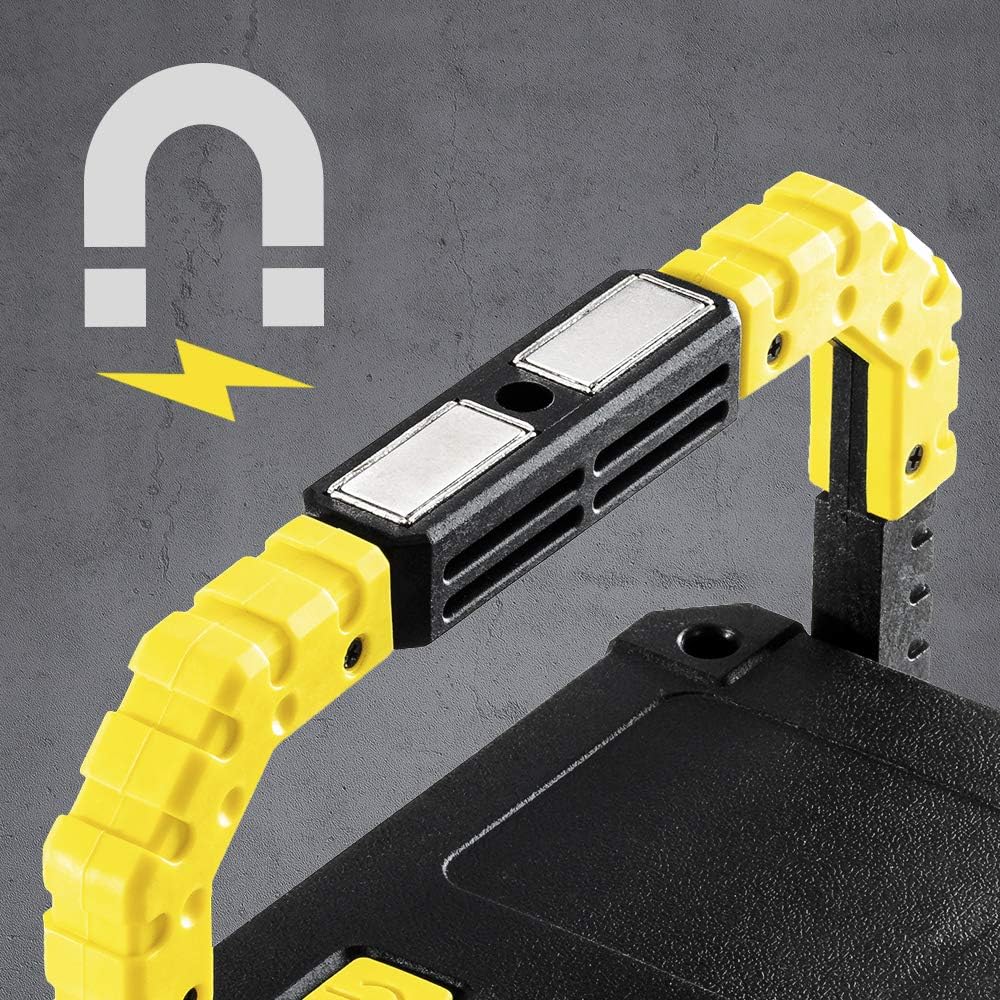
Image 5.2: The powerful magnetic base provides secure attachment to metallic objects.
Ensure the metal surface is clean and strong enough to support the weight of the work light.
6. คู่มือการใช้งาน
6.1 Powering On/Off and Changing Lighting Modes
The power button controls the light's functions:
- เปิด: Press the power button once. The light will turn on in bright mode.
- วิธีเปลี่ยนโหมด: Press the power button repeatedly to cycle through the modes: Bright → Reduced → Strobe → Off.
- วิธีปิด: Continue pressing the power button until the light turns off, or press and hold the button for 2 seconds in any mode.
6.2 การใช้งานฟังก์ชันพาวเวอร์แบงค์
The work light can charge other USB-powered devices:

Image 6.1: The back panel features the USB output port (covered by a flap), Micro-USB input, power button, and battery indicator.
- Open the protective flap covering the USB output port.
- Connect your device's charging cable to the USB Type-A output port (5 V / 1 A) on the work light.
- The work light will begin charging your device. The battery indicator will show the remaining power.
- Disconnect your device once charged and close the protective flap to maintain IP44 rating.
6.3 ตัวแสดงระดับแบตเตอรี่
4-stage LED indicator shows the approximate battery charge level:
- ไฟ LED 4 ดวง: แสดงระดับการชาร์จ 75-100%
- ไฟ LED 3 ดวง: แสดงระดับการชาร์จ 50-75%
- ไฟ LED 2 ดวง: แสดงระดับการชาร์จ 25-50%
- 1. ไฟ LED แสดงสถานะ: แบตเตอรี่เหลือน้อยกว่า 25% (โปรดชาร์จเร็ว)
7. การบำรุงรักษา
7.1 การทำความสะอาด
ในการทำความสะอาดไฟส่องสว่าง ให้เช็ดด้วยผ้าเนื้อนุ่มและแห้งamp cloth. Do not use abrasive cleaners, solvents, or harsh chemicals, as these can damage the surface or internal components. Ensure the charging ports are dry before cleaning.
7.2 พื้นที่จัดเก็บ
When not in use for extended periods, store the work light in a cool, dry place, away from direct sunlight and extreme temperatures. It is recommended to charge the battery at least once every three months to maintain its lifespan.
8 การแก้ไขปัญหา
If you encounter issues with your TROTEC PWLS 06-10, refer to the following table:
| ปัญหา | สาเหตุที่เป็นไปได้ | สารละลาย |
|---|---|---|
| ไฟส่องสว่างขณะทำงานไม่ติด | แบตเตอรี่หมด | ชาร์จแบตเตอรี่ไฟทำงานให้เต็ม |
| แสงสลัวหรือกระพริบ | ชาร์จแบตเตอรี่ต่ำ | ชาร์จแบตเตอรี่ |
| ฟังก์ชั่นพาวเวอร์แบงค์ไม่ทำงาน | Device not compatible or cable faulty. Battery too low. | Ensure your device is compatible (5V/1A). Try a different USB cable. Check work light battery level. |
| ไฟทำงานไม่ชาร์จไฟ | Charging cable or adapter faulty. Port is dirty. | Try a different USB cable and power adapter. Ensure Micro-USB port is clean and dry. |
หากปัญหายังคงมีอยู่หลังจากพยายามแก้ไขปัญหาเหล่านี้แล้ว โปรดติดต่อฝ่ายสนับสนุนลูกค้า
9. ข้อมูลจำเพาะ
| คุณสมบัติ | ข้อมูลจำเพาะ |
|---|---|
| แบบอย่าง | พ.ล.ส. 06-10 |
| ผู้ผลิต | TROTEC |
| ขนาดสินค้า | 4 x 16 x 12.5 ซม. |
| น้ำหนัก | 500 กรัม |
| แหล่งกำเนิดแสง | ซัง-LED |
| ฟลักซ์ส่องสว่าง | 800 ลูเมน |
| การใช้พลังงาน | 10 วัตต์ |
| อุณหภูมิสี | 6,000 K (เดย์ไลท์ไวท์) |
| ประเภทแบตเตอรี่ | 3.7 V Lithium-ion (4.4 Ah) |
| เวลาดำเนินการ | Up to 8 hours (constant strength) |
| เอาท์พุต USB | 5 โวลต์ / 1 แอมป์ |
| ระดับการป้องกัน | IP44 (กันน้ำกระเซ็น) |
| วัสดุ | โลหะ, พีวีซี |
10. การรับประกันและการสนับสนุน
TROTEC products are manufactured with high-quality standards. This product includes a warranty as per local regulations. Information regarding the availability of spare parts in the EU is typically for a period of 2 years.
For technical support, warranty claims, or service inquiries, please contact your retailer or the official TROTEC customer service. Please have your model number (PWLS 06-10) and proof of purchase ready when contacting support.


