
Pymeter 10A 1200W
Pymeter Digital Temperature Controller User Manual
Model: 10A 1200W
การแนะนำ
This user manual provides detailed instructions for the operation, setup, and maintenance of your Pymeter Digital Temperature Controller. Designed for precise temperature management, this dual-probe thermostat is ideal for various applications including terrariums, heat mats, heating pads, cooling fans, freezers, and refrigerators. Please read this manual thoroughly before use to ensure safe and optimal performance.
ข้อควรระวังเพื่อความปลอดภัย
- ตรวจสอบให้แน่ใจเสมอว่าอุปกรณ์ต่อสายดินอย่างถูกต้อง
- Do not immerse the main unit in water or expose it to excessive moisture. The probes are waterproof, but the main unit is not.
- ตรวจสอบให้แน่ใจว่าวัตต์รวมtage of connected devices does not exceed 1200W (10A).
- เก็บให้พ้นจากมือเด็กและสัตว์เลี้ยง
- ตัดการเชื่อมต่อไฟฟ้าก่อนทำความสะอาดหรือดำเนินการบำรุงรักษาใดๆ
- อย่าพยายามถอดประกอบหรือซ่อมแซมอุปกรณ์ด้วยตนเอง โปรดติดต่อเจ้าหน้าที่ผู้เชี่ยวชาญเพื่อขอรับบริการ
- Different measurement methods and contact status can lead to varied results. Do not compare with common inaccurate thermometers. Calibrate with an ice-water mixture (0℃/32℉) if necessary for verification.
เนื้อหาแพ็คเกจ
ตรวจสอบว่ามีรายการทั้งหมดอยู่ในแพ็คเกจของคุณ:
- 1 x Pymeter Digital Temperature Controller (10A 1200W)
- 2 x Waterproof Temperature Probes
- 1 x คู่มือผู้ใช้ (เอกสารนี้)

Image: Contents of the Pymeter Digital Temperature Controller package, showing the main unit, two temperature probes, and the instruction manual.
คุณสมบัติและส่วนประกอบของผลิตภัณฑ์
The Pymeter Digital Temperature Controller is designed for versatile temperature management with its dual-zone control capabilities.
- Dual Zones Control: Two independent outlets, each capable of controlling heating or cooling devices.
- Dual Waterproof Sensors: Allows for monitoring and control of two separate areas simultaneously.
- คุณสมบัติด้านความปลอดภัย: High and low temperature alarms, and temperature difference alarm for enhanced security.
- การป้องกันคอมเพรสเซอร์: Features a Power-On delay to protect compressors from frequent on/off cycles, suitable for converting freezers to refrigerators.
- การประยุกต์ใช้ที่กว้าง: Suitable for reptile terrariums, heat mats, aquariums, greenhouses, grow tents, and more.

Image: The Pymeter Digital Temperature Controller, displaying its digital screen, control buttons (SET, SAV, Up, Down), and two distinct power outlets labeled OUT 1 and OUT 2.
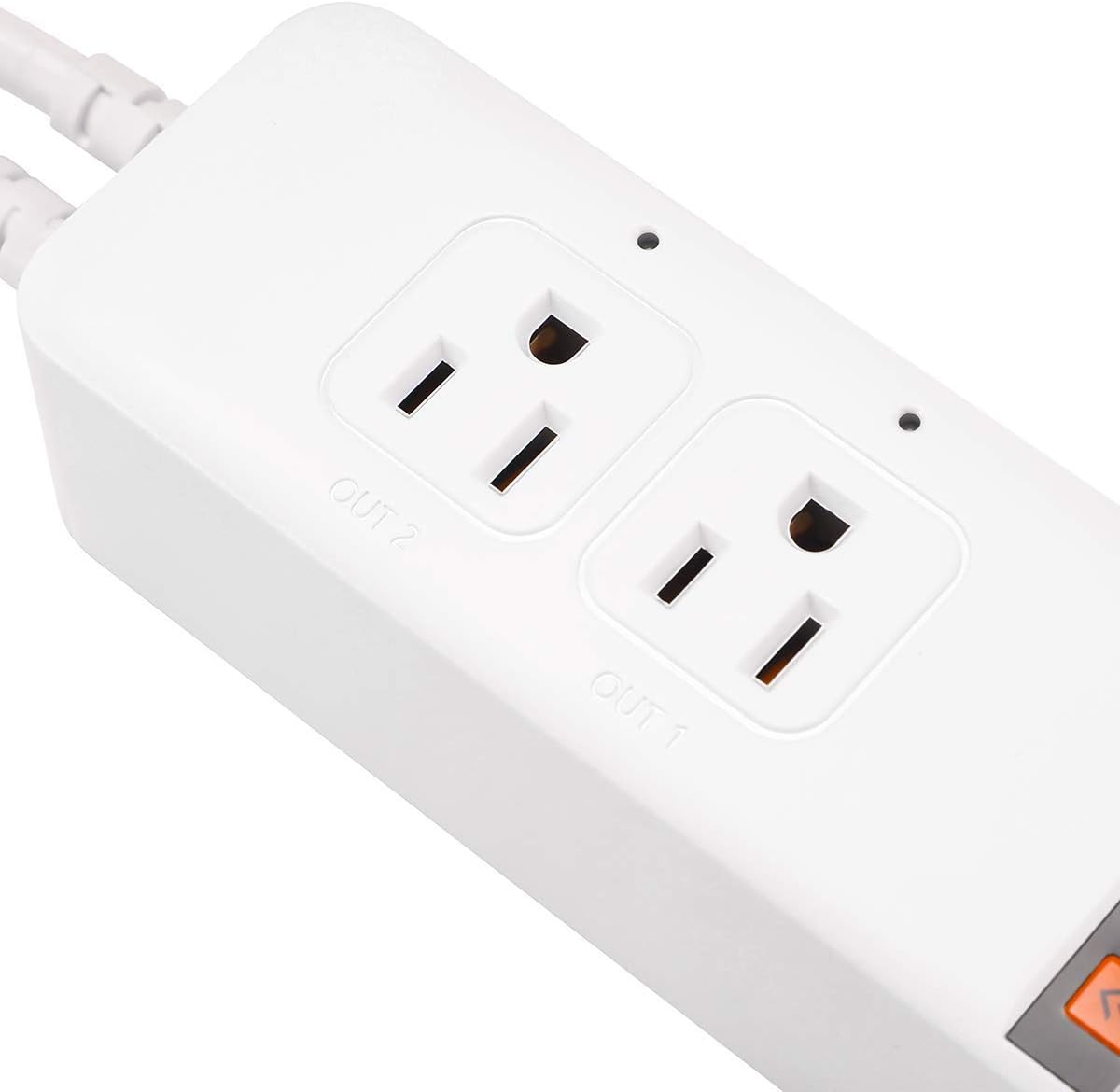
ภาพ: รายละเอียด view of the two controlled outlets on the Pymeter thermostat, showing their individual indicator lights and labels.

Image: An illustration demonstrating the Pymeter controller's use with a terrarium, showing how it can manage both a heat lamp and a heat mat for optimal heating.
การติดตั้งและการตั้งค่า
- การติดตั้ง: The unit can be wall-mounted or placed on a flat surface. Ensure it is in a location with good ventilation and away from direct heat or moisture.
- เชื่อมต่อหัววัด: Insert the two waterproof temperature probes into the designated ports at the bottom of the unit. Place the probe tips in the areas where temperature monitoring and control are required.
- เชื่อมต่ออุปกรณ์: Plug your heating or cooling devices (e.g., heat mat, fan, lamp) into the "OUT 1" and "OUT 2" controlled outlets.
- เปิดเครื่อง: Plug the Pymeter controller into a standard 120V AC power outlet. The display will light up, showing the current temperature readings.

Image: The Pymeter controller installed on a wall, illustrating its compact design and how it can be integrated into a setup.
คำแนะนำการใช้งาน
ทำความเข้าใจเกี่ยวกับจอแสดงผล
The display shows two main temperature values:
- PV (มูลค่ากระบวนการ): The current temperature measured by the probe.
- SV (ค่าที่ตั้งไว้): The target temperature or setting value.
Basic Navigation and Settings
- กดปุ่ม ชุด button to cycle through the settings for each outlet (1oN, 1oF, 2oN, 2oF, AL, AH, d7, P0-P8).
- ใช้ Up และ ลง arrows to adjust values.
- กด เซฟ to save your changes and exit the setting mode. If no button is pressed for a few seconds, the unit will automatically save and exit.
Temperature Control Logic
The Pymeter controller operates by setting ON-Temp and OFF-Temp for each outlet.
Heating Mode (1oN & 1oF for Outlet 1, 2oN & 2oF for Outlet 2)
- Heating starts when the temperature drops to the ON-Temp (1oN/2oN).
- Heating stops when the temperature rises to the OFF-Temp (1oF/2oF).
- For heating, you MUST SET ON-Temp LESS than OFF-Temp.
- In heating mode, ON-Temp is the minimum temperature you allow, and OFF-Temp is the maximum temperature you allow.
Cooling Mode (1oN & 1oF for Outlet 1, 2oN & 2oF for Outlet 2)
- Cooling starts when the temperature rises to the ON-Temp (1oN/2oN).
- Cooling stops when the temperature drops to the OFF-Temp (1oF/2oF).
- For cooling, you MUST SET ON-Temp GREATER than OFF-Temp.
- In cooling mode, ON-Temp is the maximum temperature you allow, and OFF-Temp is the minimum temperature you allow.
Advanced Settings (P0-P8)
กดปุ่มค้างไว้ ชุด button for 3 seconds to enter the advanced settings menu (P0-P8).
| พารามิเตอร์ | คำอธิบาย | ค่าเริ่มต้น |
|---|---|---|
| P0 | Temperature Unit (℃/℉) | ℉ |
| P1 | Power-On Delay (0-10 minutes) | 0 |
| P2 | Temperature Calibration (Sensor 1) | 0.0 |
| P3 | Temperature Calibration (Sensor 2) | 0.0 |
| AL | สัญญาณเตือนอุณหภูมิต่ำ | Default (usually very low) |
| AH | สัญญาณเตือนอุณหภูมิสูง | Default (usually very high) |
| d7 | Temperature Difference Alarm (between Sensor 1 and Sensor 2) | Default (usually high) |
บันทึก: To factory reset settings, change the temperature unit (P0) from Fahrenheit to Celsius or vice versa. This will revert all alarm settings (AL, AH, d7) to their default values.
การซ่อมบำรุง
- การทำความสะอาด: เช็ดทำความสะอาดตัวเครื่องด้วยผ้าแห้งเนื้อนุ่ม ห้ามใช้สารทำความสะอาดที่มีฤทธิ์กัดกร่อนหรือแช่ในน้ำ
- การดูแลโพรบ: Ensure probes are clean and free of debris for accurate readings. Avoid bending or damaging the probe cables.
- พื้นที่จัดเก็บ: When not in use, store the controller in a cool, dry place away from direct sunlight.
การแก้ไขปัญหา
Issue: Reading temperature is inaccurate.
สารละลาย: Every Pymeter controller is calibrated at the factory. Do not compare its readings to common inaccurate thermostats or temperature guns. If you suspect inaccuracy, calibrate the device using an ice-water mixture (which is 32℉ / 0℃ when ice is melting). You can also use the P2 and P3 parameters in the advanced settings to fine-tune the calibration if needed, comparing it to a known accurate thermometer.
Issue: Beeper keeps sounding.
สารละลาย: This is likely due to the alarm settings (AL, AH, d7) being triggered.
- AL (Low Temperature Alarm): Sounds when the current temperature is at or below the AL setting.
- AH (High Temperature Alarm): Sounds when the current temperature is at or above the AH setting.
- d7 (Temperature Difference Alarm): Sounds when the temperature deviation between Sensor 1 and Sensor 2 exceeds the d7 setting.
ข้อมูลจำเพาะทางเทคนิค
| ข้อมูลจำเพาะ | ค่า |
|---|---|
| ยี่ห้อ | ไพมิเตอร์ |
| หมายเลขรุ่น | 10A 1200 วัตต์ |
| ขนาดสินค้า | ลึก 8.26 นิ้ว x กว้าง 2.16 นิ้ว x สูง 1.57 นิ้ว |
| ประเภทตัวควบคุม | ปุ่มกด |
| คุณสมบัติพิเศษ | Dual Zones Control, Each outlet works for Heating or Cooling |
| สี | สีขาว |
| การใช้งานเฉพาะของผลิตภัณฑ์ | Heat Pump, Refrigerator |
| ประเภทการควบคุมอุณหภูมิ | เครื่องทำความร้อน,ความเย็น |
| ส่วนประกอบที่รวมอยู่ | เซ็นเซอร์คู่ |
| แหล่งพลังงาน | AC |
| น้ำหนักสินค้า | 1.04 ปอนด์ |
| เล่มที่tage | 120 โวลต์ |
| วัสดุ | โพลีคาร์บอเนต (พีซี) |
| รูปร่าง | สี่เหลี่ยมผืนผ้า |
| ประเภทจอภาพ | นำ |
| ประเภทการควบคุม | ปุ่มควบคุม |
| วิธีการควบคุม | ระยะไกล |
| ประเภทการติดตั้ง | ติดผนัง |
| สไตล์ | ทันสมัย |
| แสงไฟแบ็คไลท์ | ใช่ |
| วัดtage | 1200 วัตต์ |
| ยูพีซี | 791386439637 |
| ผู้ผลิต | ไพมิเตอร์ |
| ต้องใช้แบตเตอรี่ | เลขที่ |

Image: Dimensional drawing of the Pymeter controller, indicating its length, width, and height.

Image: The back of the Pymeter controller, displaying its electrical specifications and regulatory compliance markings.
การรับประกันและการสนับสนุน
For warranty information and technical support, please refer to the contact details provided on the product packaging or visit the official Pymeter webไซต์นี้ โปรดเก็บใบเสร็จรับเงินที่ซื้อไว้เพื่อใช้เรียกร้องการรับประกัน
Ask a question about this manual
Ask about setup, troubleshooting, compatibility, parts, safety, or missing instructions. Manuals+ will review the question and use this page’s manual context to help answer it.