
1. บทนำ
Thank you for choosing the KONKA Robot Vacuum Cleaner and Mop. This device is designed to provide efficient and convenient cleaning for various floor types, including hard floors and carpets. Featuring strong suction, remote control operation, and automatic charging, it simplifies your cleaning routine. Please read this manual thoroughly before use to ensure proper operation and maintenance.
2. อะไรอยู่ในกล่อง
เมื่อแกะกล่องแล้ว โปรดตรวจสอบให้แน่ใจว่าสินค้าทั้งหมดที่ระบุไว้ด้านล่างนี้มีอยู่และอยู่ในสภาพดี:
- 1 x KONKA Robot Vacuum Cleaner
- 2 x แปรงด้านข้าง
- 1 x รีโมทคอนโทรล (ไม่รวมแบตเตอรี่)
- 1 x Cleaning Mop Pad
- แท่นชาร์จ 1 อัน
- อะแดปเตอร์ไฟฟ้า 1 ตัว
- 1 x คู่มือผู้ใช้ (เอกสารนี้)

ภาพ: ส่วนประกอบทั้งหมดที่รวมอยู่ในแพ็คเกจผลิตภัณฑ์
3. คุณสมบัติของผลิตภัณฑ์
The KONKA Robot Vacuum Cleaner and Mop is equipped with several advanced features to enhance your cleaning experience:
- พลังดูดอันทรงพลัง: 1800Pa suction power effectively cleans dust, pet hair, and debris from various surfaces including wooden floors, tiles, marble, and carpets.
- ดีไซน์บางเฉียบ: Its thin body allows it to easily clean under beds, sofas, and other low-clearance furniture.
- เพิ่มการเคลื่อนที่: Large diameter wheels facilitate climbing over obstacles and navigating different floor levels.
- Large Capacity Dust Box: Features a 650ml dust box with a built-in HEPA filter for double filtration and high dust interception.
- อายุการใช้งานแบตเตอรี่ยาวนาน: A 4400mAh high-performance lithium battery provides up to 90 minutes of cleaning time.
- Automatic Route Planning: The robot intelligently plans its cleaning path for comprehensive coverage.
- Auto-Recharge Function: The robot automatically returns to its charging dock when cleaning is complete or the battery is low.
- Anti-Impact and Fall Prevention: Equipped with sensors to detect obstacles and prevent falls from stairs or elevated surfaces.
- การกวาดและถูพื้น: Combines sweeping and mopping functionalities for a thorough clean.

Image: The KONKA Robot Vacuum Cleaner and Mop on a hard floor, demonstrating its compact design.

Image: The robot vacuum demonstrating its 1800Pa strong suction, capable of cleaning hair, particles, dust, and bacteria.

Image: Visual representation of the robot's automatic route planning, anti-fall sensors, and ability to navigate around obstacles.
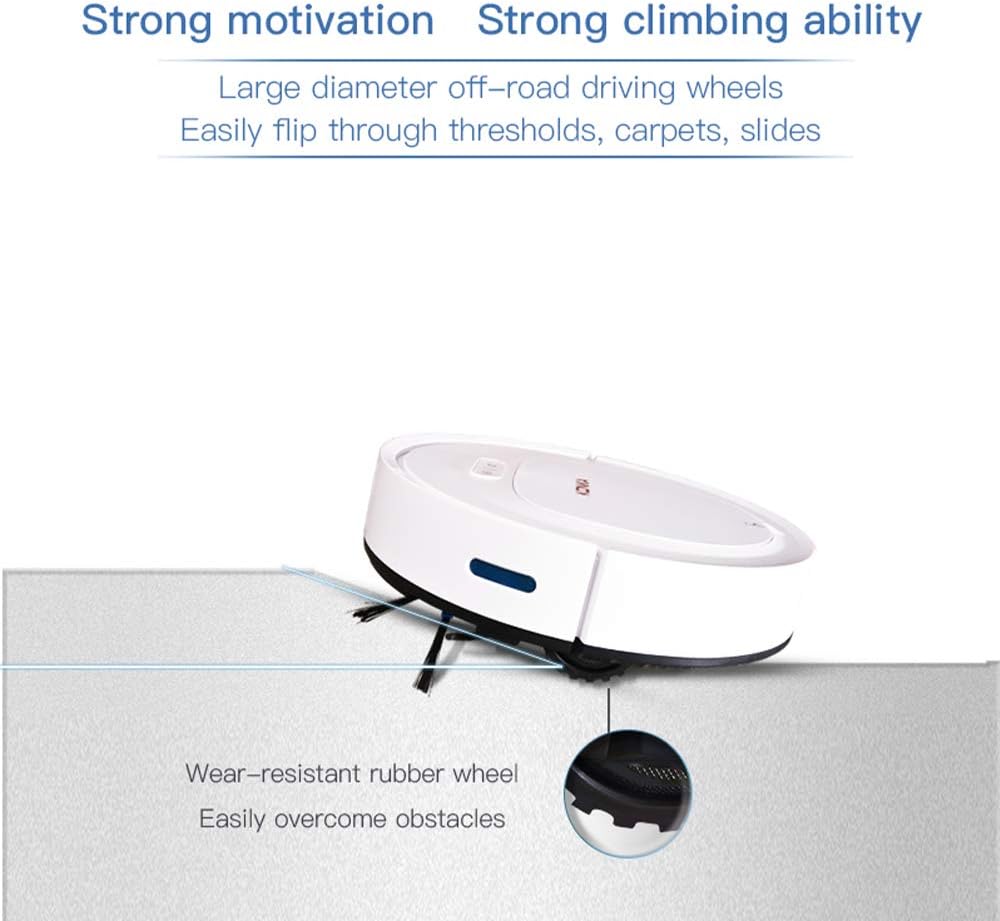
Image: The robot vacuum showcasing its strong climbing ability over thresholds and carpets, supported by wear-resistant rubber wheels.

Image: Illustration of the robot's large 4400mAh high-performance lithium battery, providing approximately 90 minutes of working time and covering about 100m².

Image: The robot vacuum's anti-impact sensors preventing collisions with furniture.

Image: The robot vacuum's fall prevention sensors detecting edges and avoiding drops.
Video: An official demonstration of the KONKA Robot Vacuum Cleaner and Mop's various cleaning modes, obstacle navigation, and mopping function.
4. การตั้งค่า
- แกะกล่องหุ่นยนต์: นำหุ่นยนต์ดูดฝุ่นและอุปกรณ์เสริมทั้งหมดออกจากบรรจุภัณฑ์อย่างระมัดระวัง ลอกฟิล์มป้องกันหรือวัสดุบรรจุภัณฑ์ออก
- ติดตั้งแปรงด้านข้าง: Attach the two side brushes to the designated posts on the bottom of the robot until they click into place.
- Position the Charging Dock: Place the charging dock against a wall in an open, uncluttered area. Ensure there is at least 1 meter (3 feet) of clear space on both sides and 2 meters (6 feet) in front of the dock for the robot to easily return and charge. Connect the power adapter to the charging dock and plug it into a power outlet.
- ค่าใช้จ่ายเริ่มต้น: Place the robot onto the charging dock, ensuring the charging contacts on the robot align with those on the dock. The indicator light on the robot will show charging status. For first-time use, charge the robot for at least 6 hours to ensure the battery is fully conditioned.
- Prepare for Mopping (Optional): If using the mopping function, dampen the cleaning mop pad and attach it to the bottom of the robot.

Image: The robot vacuum automatically docking for charging.
5. คู่มือการใช้งาน
- เปิด/ปิดเครื่อง: Press and hold the power button on the robot for a few seconds to turn it on or off. The indicator light will illuminate when powered on.
- เริ่มทำความสะอาด: Press the power button once to start cleaning in automatic mode. The robot will begin cleaning and intelligently navigate your home.
- การใช้รีโมทคอนโทรล: The remote control allows you to select different cleaning modes and direct the robot manually.
- ทำความสะอาดอัตโนมัติ: Press the 'Auto' button for general cleaning.
- การทำความสะอาดเฉพาะจุด: Press the 'Spot' button to clean a specific area more intensely.
- การทำความสะอาดขอบ: Press the 'Edge' button for cleaning along walls and corners.
- ควบคุมด้วยมือ: Use the directional arrows to guide the robot.
- ส่งคืนเพื่อชาร์จ: Press the 'Home' button to send the robot back to its charging dock.
- การชาร์จอัตโนมัติ: When the battery level is low, or cleaning is complete, the robot will automatically return to the charging dock. Ensure the charging dock is powered on and accessible.

Image: The remote control used to operate the robot vacuum, enabling various cleaning modes and manual navigation.
6. การบำรุงรักษา
การบำรุงรักษาตามปกติจะช่วยให้หุ่นยนต์ดูดฝุ่นของคุณทำงานได้อย่างเหมาะสมที่สุดและยืดอายุการใช้งาน
6.1. การทำความสะอาดกล่องเก็บฝุ่นและแผ่นกรอง HEPA
- เปิดฝาด้านบนของหุ่นยนต์
- Remove the dust box by pulling it out.
- เปิดกล่องเก็บฝุ่นและเทสิ่งของภายในลงในถังขยะ
- Remove the HEPA filter and tap it gently to remove dust. The HEPA filter can be rinsed with water, but ensure it is completely dry before reinserting.
- Rinse the dust box with water if necessary, and allow it to air dry completely.
- Reassemble the HEPA filter and dust box, then reinsert into the robot.
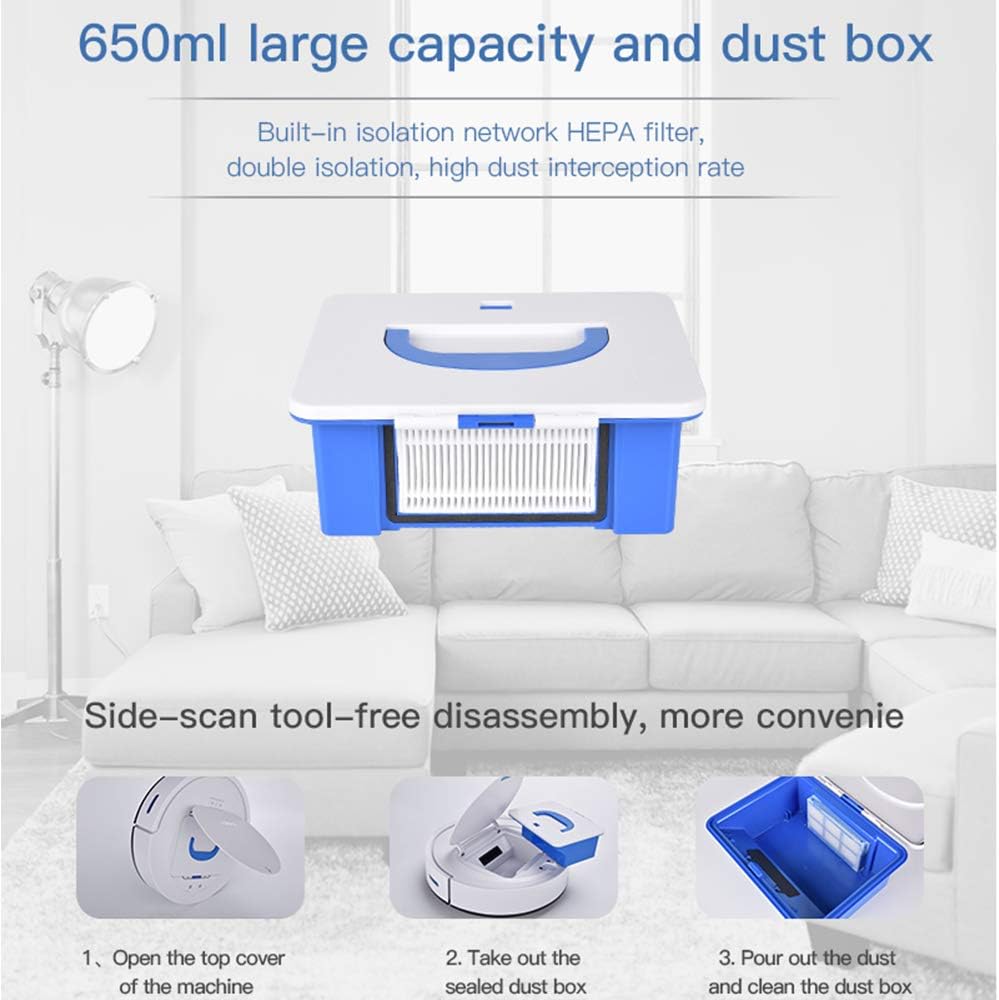
Image: The robot vacuum's 650ml dust box with a built-in HEPA filter, designed for easy removal and cleaning.


Image: Step-by-step guide for cleaning the dust box.
6.2. ทำความสะอาดแปรงข้าง
Periodically check the side brushes for tangled hair or debris. Remove them by gently pulling upwards and clean any obstructions. Reinstall them firmly.
6.3. การทำความสะอาดเซ็นเซอร์
Wipe the cliff sensors (located on the bottom of the robot) and the anti-collision sensors (on the front bumper) with a clean, dry cloth to ensure they function correctly.
6.4. การทำความสะอาดแผ่นถูพื้น
After each mopping session, remove the mopping pad, rinse it thoroughly with water, and allow it to air dry before reattaching.
7 การแก้ไขปัญหา
If you encounter issues with your robot vacuum, please refer to the following common problems and solutions:
| ปัญหา | สาเหตุที่เป็นไปได้ | สารละลาย |
|---|---|---|
| หุ่นยนต์ไม่เปิดเครื่อง | แบตเตอรี่อ่อน; กดปุ่มเปิด/ปิดไม่ถูกต้อง | Charge the robot fully; Press and hold the power button for a few seconds. |
| หุ่นยนต์ไม่ชาร์จเงิน | Charging dock not powered; Contacts are dirty; Robot not properly docked. | Ensure charging dock is plugged in; Clean charging contacts on robot and dock; Re-dock the robot. |
| ประสิทธิภาพการทำความสะอาดไม่ดี | Dust box full; Filter clogged; Side brushes worn or tangled. | Empty and clean dust box; Clean or replace filter; Clean or replace side brushes. |
| หุ่นยนต์ติดขัดบ่อยครั้ง | Obstacles on the floor; Robot stuck on high thresholds. | Clear obstacles from cleaning path; Use virtual barriers if available; Manually move the robot. |
| หุ่นยนต์ตกบันได | เซ็นเซอร์ตรวจจับหน้าผาอาจสกปรกหรือมีสิ่งกีดขวาง | ทำความสะอาดเซ็นเซอร์ตรวจจับหน้าผาด้วยผ้าแห้ง |
หากปัญหายังคงอยู่หลังจากลองวิธีแก้ปัญหาเหล่านี้แล้ว โปรดติดต่อฝ่ายบริการลูกค้าเพื่อขอความช่วยเหลือเพิ่มเติม
8. ข้อมูลจำเพาะ
| คุณสมบัติ | ข้อมูลจำเพาะ |
|---|---|
| ยี่ห้อ | คอนก้า |
| แบบอย่าง | หุ่นยนต์ดูดฝุ่นและไม้ถูพื้น |
| ASIN | B083K7CZDM |
| พลังดูด | 1800ปาสคาล |
| คำแนะนำด้านพื้นผิว | พรมปูพื้นแข็ง |
| คุณสมบัติพิเศษ | HEPA Filter, Wheels |
| สี | สีขาว |
| ประเภทตัวควบคุม | รีโมทคอนโทรล |
| ประเภทตัวกรอง | Disk (HEPA) |
| อายุการใช้งานแบตเตอรี่ | 90 นาที |
| ประเภทแบตเตอรี่ | แบตเตอรี่ลิเธียมไอออน (4400 mAh) |
| ความจุกล่องเก็บฝุ่น | 0.65 ลิตร |
| แหล่งพลังงาน | ใช้พลังงานจากแบตเตอรี่ |
| น้ำหนักสินค้า | 2.29 กิโลกรัม |
9. การรับประกันและการสนับสนุน
KONKA products are manufactured to high-quality standards and come with a standard manufacturer's warranty. For specific warranty details, including coverage period and terms, please refer to the warranty card included in your product packaging or visit the official KONKA webเว็บไซต์.
For technical support, troubleshooting assistance, or to inquire about replacement parts, please contact KONKA customer service through the contact information provided on the official website or your purchase platform. Please have your product model and ASIN (B083K7CZDM) ready when contacting support.