
1. บทนำ
This user manual provides detailed instructions for the installation, operation, and maintenance of your BAFANG C965 LCD Display. This display is designed for use with Bafang Mid Drive motors that utilize the UART communication protocol. Please read this manual thoroughly before using the product to ensure safe and correct operation.
The BAFANG C965 LCD Display offers essential information for your electric bicycle, including speed, battery level, assistance level (PAS), and trip data, enhancing your riding experience.
2. ข้อมูลด้านความปลอดภัย
- Always ensure the display is securely mounted and all cables are properly connected before riding.
- ห้ามเปิดหรือดัดแปลงหน้าจอแสดงผล การกระทำดังกล่าวอาจทำให้การรับประกันเป็นโมฆะและก่อให้เกิดความเสียหายได้
- Keep the display screen clean and free from obstructions to ensure clear visibility of information.
- Avoid exposing the display to extreme temperatures or direct sunlight for prolonged periods.
- In case of malfunction, refer to the troubleshooting section or contact Bafang support.
3. เนื้อหาบรรจุภัณฑ์
ตรวจสอบว่ามีรายการทั้งหมดอยู่ในแพ็คเกจของคุณ:
- จอแสดงผล LCD BAFANG C965
- ขายึดแฮนด์
- Control Button Unit
- คู่มือการใช้งาน (เอกสารนี้)
4. การตั้งค่าและการติดตั้ง
Follow these steps to install your BAFANG C965 LCD Display:
- การติดตั้งจอแสดงผล: Attach the handlebar mounting bracket to your bicycle's handlebar. The bracket is compatible with handlebar diameters of 22.2mm, 25.4mm, and 31.8mm. Secure the C965 display unit into the bracket.
- สายเชื่อมต่อ: Connect the 5-pin female connector from the display unit to the corresponding male connector on your Bafang Mid Drive motor system. Ensure the connection is firm and secure.
- Mounting Control Buttons: Position the external control button unit on your handlebar within easy reach. Connect its cable to the display unit.

Figure 1: Bafang C965 LCD display unit with cables and mounting bracket.
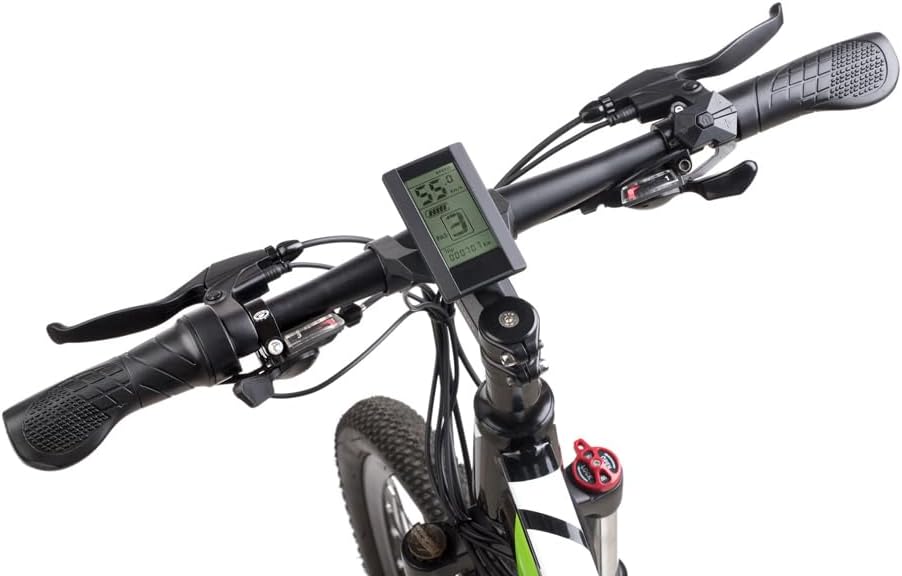
Figure 2: Bafang C965 LCD display mounted on an e-bike handlebar.
5. คู่มือการใช้งาน
Once installed, operate your BAFANG C965 LCD Display as follows:
- เปิด/ปิดเครื่อง: Press and hold the power button on the external control unit to turn the display on or off.
- Adjusting PAS Level: Use the '+' and '-' buttons on the control unit to increase or decrease the Pedal Assist System (PAS) level.
- จอแสดงข้อมูล: The display cycles through various information screens. Use the 'M' (Mode) button to switch between different data views such as trip distance, total distance, average speed, max speed, and time.
- การควบคุมไฟหน้า: If your e-bike system supports it, a dedicated button or a long press of a specific button (refer to your motor's manual) may control the headlights.

Figure 3: Bafang C965 LCD display showing active riding data.
6. Display Functions and Indicators
The C965 display provides various indicators and data points:
- จอแสดงความเร็ว: Shows current speed, average speed (AVG), and maximum speed (MAX).
- ไฟแสดงสถานะแบตเตอรี่: แสดงระดับประจุแบตเตอรี่ที่เหลืออยู่
- ระดับ PAS: Indicates the current pedal assist level (0-9 or 0-3, depending on configuration).
- Mileage Indicator: Shows trip distance and total odometer reading.
- ไฟแสดงสถานะพลังงาน: Displays real-time motor power output.
- เวลา: Current time or trip duration.
- Brake Indicator: Illuminates when brakes are applied.
- ตัวบ่งชี้ข้อผิดพลาด: Displays error codes if a system fault occurs.
- Headlight Power On: Indicates when the e-bike's headlights are active.

Figure 4: Bafang C965 LCD display icons and basic specifications.
7. การบำรุงรักษา
To ensure the longevity and optimal performance of your C965 display:
- การทำความสะอาด: เช็ดหน้าจอแสดงผลและตัวเครื่องด้วยผ้านุ่มๆamp ผ้า ห้ามใช้สารทำความสะอาดที่มีฤทธิ์กัดกร่อนหรือตัวทำละลาย
- ความต้านทานน้ำ: The display has an IP65 waterproof rating, meaning it is protected against dust and low-pressure water jets. Avoid submerging the unit in water.
- อุณหภูมิ: Operate the display within its specified temperature range of -20°C to 60°C.
- การตรวจสอบสายเคเบิล: ตรวจสอบสายเคเบิลและขั้วต่อทั้งหมดเป็นระยะๆ เพื่อดูว่ามีร่องรอยการสึกหรอหรือความเสียหายหรือไม่
8 การแก้ไขปัญหา
If you encounter issues with your BAFANG C965 LCD Display, consider the following:
- จอแสดงผลไม่เปิด:
- ตรวจสอบให้แน่ใจว่าแบตเตอรี่ e-bike ได้รับการชาร์จและเชื่อมต่ออย่างถูกต้อง
- Check all cable connections between the display, control unit, and motor for looseness or damage.
- ตรวจสอบว่ากดปุ่มเปิด/ปิดเครื่องถูกต้องแล้ว
- การอ่านค่าความเร็ว/ระยะทางไม่ถูกต้อง:
- Check the speed sensor and magnet on your wheel for proper alignment and cleanliness.
- Ensure the wheel circumference setting in the display's advanced settings (if accessible) is correct.
- รหัสข้อผิดพลาดที่แสดง:
- Refer to your Bafang motor's specific error code list for detailed explanations and solutions. Common issues include motor, controller, or sensor faults.
- Often, turning the system off and on again can clear temporary errors.
- ปุ่มไม่ตอบสนอง:
- Check the connection of the external control button unit to the display.
- Ensure buttons are not physically stuck.
If problems persist after attempting these steps, contact Bafang customer support or your authorized dealer for assistance.
9. ข้อมูลจำเพาะ
| คุณสมบัติ | ข้อมูลจำเพาะ |
|---|---|
| หมายเลขรุ่น | ซี965 |
| ประเภทจอภาพ | จอแอลซีดี |
| เทคโนโลยีการเชื่อมต่อ | มีสาย |
| ประเภทเซนเซอร์ | Speed sensor, Voltage เซ็นเซอร์ |
| ประเภทการติดตั้ง | ที่ยึดแฮนด์บาร์ |
| อินพุตอินเทอร์เฟซมนุษย์ | ปุ่ม |
| ระดับการกันน้ำ | IP65 |
| Max Speed Limit | 70 กม/ชม. |
| ปริมาณการจ่ายแบตเตอรี่tage | 36โวลต์/48โวลต์ |
| อุณหภูมิในการทำงาน | -20°C ถึง 60°C |
| เส้นผ่านศูนย์กลางแฮนด์ที่เข้ากันได้ | 22.2mm / 25.4mm / 31.8mm |
| ประเภทขั้วต่อ | ตัวเมีย 5 พิน |
| ขนาดแพ็คเกจ | 9.65 x 9.4 x 9.4 ซม. |
| น้ำหนักแพ็คเกจ | 159 กรัม |
| UPC / GTIN | 779296258319 |
10. การรับประกันและการสนับสนุน
BAFANG products are typically covered by a manufacturer's warranty against defects in materials and workmanship. The specific terms and duration of the warranty may vary by region and retailer. Please retain your proof of purchase for any warranty claims.
For technical support, warranty inquiries, or spare parts, please contact your original retailer or visit the official BAFANG webเว็บไซต์สำหรับข้อมูลติดต่อฝ่ายบริการลูกค้า