
1. บทนำ
The WAVLINK 8-Port Fast Ethernet Switch is designed to expand your network connectivity with ease. It features 8 RJ45 ports supporting 10/100 Mbps auto-negotiation and Auto-MDI/MDIX, eliminating the need for crossover cables. This plug-and-play device is ideal for extending network connections in various environments, from home offices to conference rooms, providing a reliable and efficient solution for your networking needs. It incorporates Green IT technology for energy saving.
2. เนื้อหาบรรจุภัณฑ์
ตรวจสอบว่าแพ็คเกจของคุณมีรายการต่อไปนี้:
- WAVLINK 8-Port 10/100 Mbps Fast Ethernet Switch (Model RC-N081M2-EU)
- อะแดปเตอร์แปลงไฟ
- คู่มือการใช้งาน
3. คุณสมบัติของผลิตภัณฑ์
- 8 RJ45 10/100 Mbps ports with auto-negotiation and Auto-MDI/MDIX.
- Green IT technology for up to 75% energy savings.
- IEEE802.3x flow control ensures reliable data transfer.
- Durable ABS plastic housing for desktop mounting.
- Plug and Play: No configuration or software required.
- Layer 2 switch functions including IGMP Snooping, Port Mirroring, and Spanning Tree.
4. ฮาร์ดแวร์โอเวอร์view
The WAVLINK Fast Ethernet Switch features a compact design with essential ports and indicators for easy monitoring and connectivity.
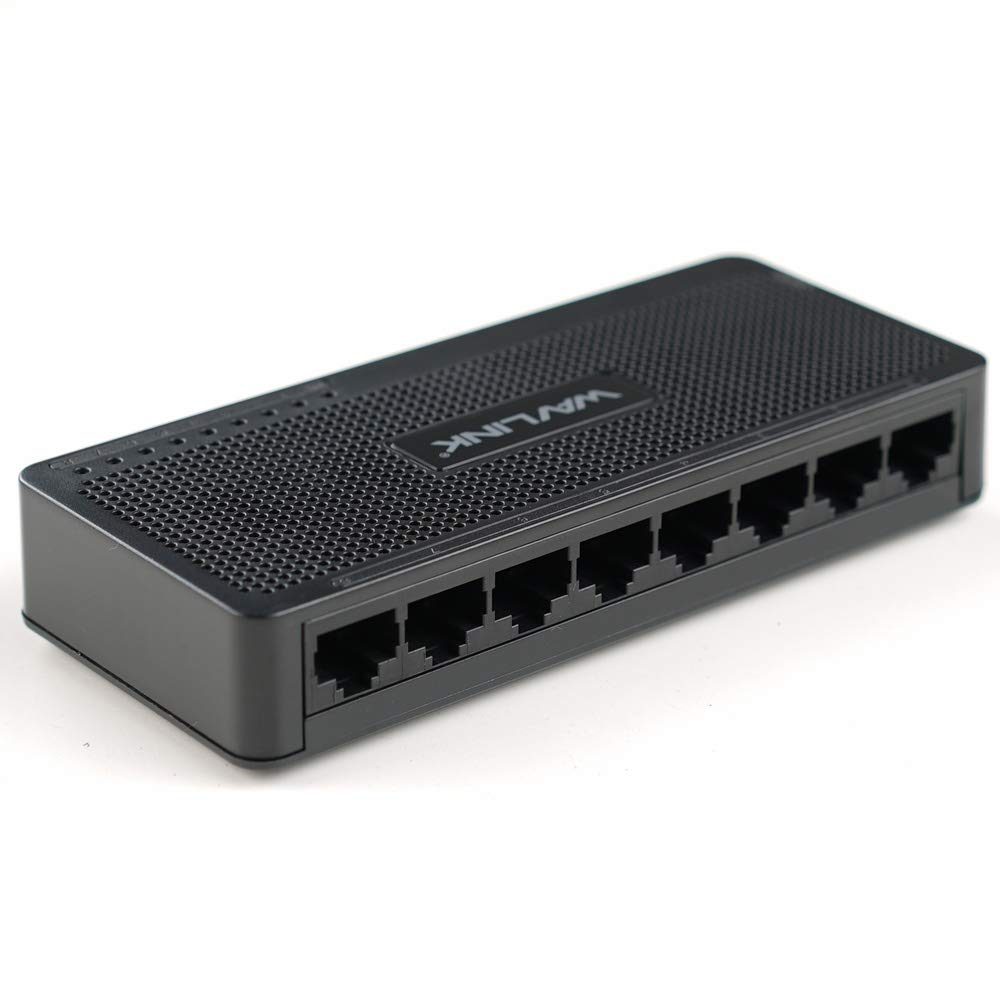
รูปที่ 4.1: ด้านบน view of the WAVLINK 8-Port Fast Ethernet Switch, showing the brand logo and ventilation holes.
แผงด้านหน้า
The front panel includes the 8 RJ45 Ethernet ports and LED indicators for status monitoring.

รูปที่ 4.2 : ด้านหน้า view of the switch, displaying the eight RJ45 Ethernet ports.
- พอร์ต RJ45 (1-8): Connect your network devices (computers, printers, gaming consoles, etc.) using standard Ethernet cables.
- ไฟ LED แสดงสถานะ: Each port has an associated LED that indicates connection status and activity.
แผงด้านหลัง
โดยทั่วไปแล้ว แผงด้านหลังจะมีพอร์ตสำหรับเสียบสายไฟ

รูปที่ 4.3: ด้านข้าง view of the switch, illustrating its compact dimensions (13cm x 5.5cm x 2.1cm) and the power input port.
- กำลังไฟเข้า: เชื่อมต่ออะแดปเตอร์ไฟฟ้าที่ให้มาที่นี่
5. คู่มือการติดตั้ง
The WAVLINK Fast Ethernet Switch is designed for simple plug-and-play installation. No complex configuration is required.
5.1 การเชื่อมต่อสวิตช์
- การจัดวาง: Choose a stable, flat surface for the switch, such as a desktop. Ensure adequate ventilation around the device.
- เชื่อมต่อพลังงาน: Plug the provided power adapter into the switch's power input port, then plug the other end into a standard electrical outlet. The power LED on the switch should illuminate.
- เชื่อมต่อกับเราเตอร์/โมเด็ม: Use an Ethernet cable to connect one of the switch's RJ45 ports to a LAN port on your router or modem.
- เชื่อมต่ออุปกรณ์เครือข่าย: Connect your computers, printers, network-attached storage (NAS), gaming consoles, or other network devices to the remaining RJ45 ports on the switch using Ethernet cables.

Figure 5.1: Connection diagram illustrating how the switch integrates into a network, connecting to a router and multiple end devices like computers, printers, and gaming consoles.

Figure 5.2: Visual representation of the plug-and-play setup, showing Ethernet cables ready for connection to the switch's ports.
Once all connections are made, the switch will automatically detect and configure the connected devices. The corresponding port LEDs will light up to indicate an active connection.
6. การใช้งานสวิตช์
The WAVLINK Fast Ethernet Switch operates automatically once powered on and connected. It functions as a central connection point for your wired network devices.
- การถ่ายโอนข้อมูล: The switch intelligently forwards data packets between connected devices at 10/100 Mbps speeds.
- Auto-MDI/MDIX: This feature automatically detects the type of Ethernet cable (straight-through or crossover) and adjusts accordingly, simplifying connections.
- ไฟ LED แสดงสถานะ:
- สีเขียวทึบ: แสดงว่าการเชื่อมต่อลิงก์มีความเสถียร
- ไฟกระพริบสีเขียว: ระบุกิจกรรมข้อมูลบนพอร์ต
- ปิด: No device connected or device is powered off.

Figure 6.1: The Ethernet switch acting as a splitter, providing additional wired connections for multiple devices such as laptops, gaming consoles, and printers.
7. การบำรุงรักษา
To ensure optimal performance and longevity of your WAVLINK Fast Ethernet Switch, follow these simple maintenance guidelines:
- รักษาความสะอาด: Regularly wipe the exterior of the switch with a soft, dry cloth. Avoid using liquid cleaners or aerosols.
- การระบายอากาศ : ตรวจสอบให้แน่ใจว่าช่องระบายอากาศไม่ถูกปิดกั้นเพื่อป้องกันความร้อนสูงเกินไป
- ปิดเครื่องอย่างปลอดภัย: If you need to power off the device, disconnect the power adapter from the electrical outlet.
- สภาพแวดล้อม : Operate the switch within the recommended temperature range of 0°C to 40°C (32°F to 104°F). Avoid extreme humidity.
8 การแก้ไขปัญหา
If you encounter issues with your WAVLINK Fast Ethernet Switch, refer to the following common problems and solutions:
8.1 ไม่มีไฟฟ้า
- ตรวจสอบให้แน่ใจว่าได้เสียบอะแดปเตอร์แปลงไฟเข้ากับสวิตช์และเต้ารับไฟฟ้าที่ใช้งานได้สนิทแล้ว
- ตรวจสอบว่าเต้ารับไฟฟ้าใช้งานได้โดยเสียบอุปกรณ์อื่น
8.2 No Link/Activity LED
- ตรวจสอบให้แน่ใจว่าสายอีเธอร์เน็ตเชื่อมต่อกับพอร์ตของสวิตช์และอุปกรณ์เครือข่ายอย่างแน่นหนาแล้ว
- ลองใช้สายเคเบิลอีเทอร์เน็ตอื่นเพื่อตัดสายเคเบิลที่ผิดปกติออกไป
- ตรวจสอบให้แน่ใจว่าอุปกรณ์เครือข่ายที่เชื่อมต่อเปิดอยู่และทำงานถูกต้อง
- ลองเชื่อมต่ออุปกรณ์เข้ากับพอร์ตอื่นบนสวิตช์
8.3 ความเร็วเครือข่ายช้า
- Ensure all connected devices and cables support 10/100 Mbps speeds.
- ตรวจสอบปริมาณการรับส่งข้อมูลเครือข่ายที่มากเกินไป หรือแอปพลิเคชันที่ใช้แบนด์วิธสูงบนอุปกรณ์ที่เชื่อมต่ออยู่
- Verify that your router/modem is providing adequate internet speed.
9. ข้อมูลจำเพาะ
| คุณสมบัติ | คำอธิบาย |
|---|---|
| ยี่ห้อ | วาฟลิงค์ |
| หมายเลขรุ่น | RC-N081M2-EU |
| จำนวนพอร์ต | 8 |
| ประเภทพอร์ต | RJ45 |
| อัตราการถ่ายโอนข้อมูล | 10/100 Mbps (อีเธอร์เน็ตความเร็วสูง) |
| การเจรจาอัตโนมัติ | รองรับ |
| อัตโนมัติ MDI/MDIX | รองรับ |
| การควบคุมการไหล | IEEE802.3x |
| วัสดุที่ใช้ทำตัวเรือน | พลาสติก ABS |
| การติดตั้ง | เดสก์ท็อป |
| อุณหภูมิในการทำงาน | 0°C ~ 40°C (32°F ~ 104°F) |
| ขนาด (โดยประมาณ) | 13 ซม. x 5.5 ซม. x 2.1 ซม. (5.1 นิ้ว x 2.2 นิ้ว x 0.8 นิ้ว) |
10. ข้อกำหนดของระบบ
The WAVLINK Fast Ethernet Switch is compatible with any operating system that supports standard Ethernet connectivity. No specific drivers are required for the switch itself.
- Microsoft Windows (10/8/2012/7/2008/Vista/2003/XP/2000/Me/NT/98/95/3.11)
- แมคโอเอส
- เน็ตแวร์
- ยูนิกซ์
- ลินุกซ์
11. การรับประกันและการสนับสนุน
ผลิตภัณฑ์ WAVLINK ออกแบบมาเพื่อความน่าเชื่อถือและประสิทธิภาพการทำงาน สำหรับข้อมูลการรับประกันและการสนับสนุนทางเทคนิค โปรดดูบัตรรับประกันที่ให้มาพร้อมกับผลิตภัณฑ์ของคุณ หรือเยี่ยมชมเว็บไซต์ WAVLINK อย่างเป็นทางการ webไซต์นี้ โปรดเก็บใบเสร็จรับเงินที่ซื้อไว้เพื่อใช้เรียกร้องการรับประกัน
For further assistance, you may contact WAVLINK customer support through their official channels.