
Weiser SmartCode 5 Lever Electronic Lock
รุ่น: 9GED14550-005
1. บทนำ
This manual provides comprehensive instructions for the Weiser 9GED14550-005 SmartCode 5 Lever Electronic Lock with Z-Wave technology. This electronic lever lock offers keyless entry, enhanced security, and smart home integration capabilities. Please read this guide thoroughly before installation and operation to ensure proper function and longevity of your lock.
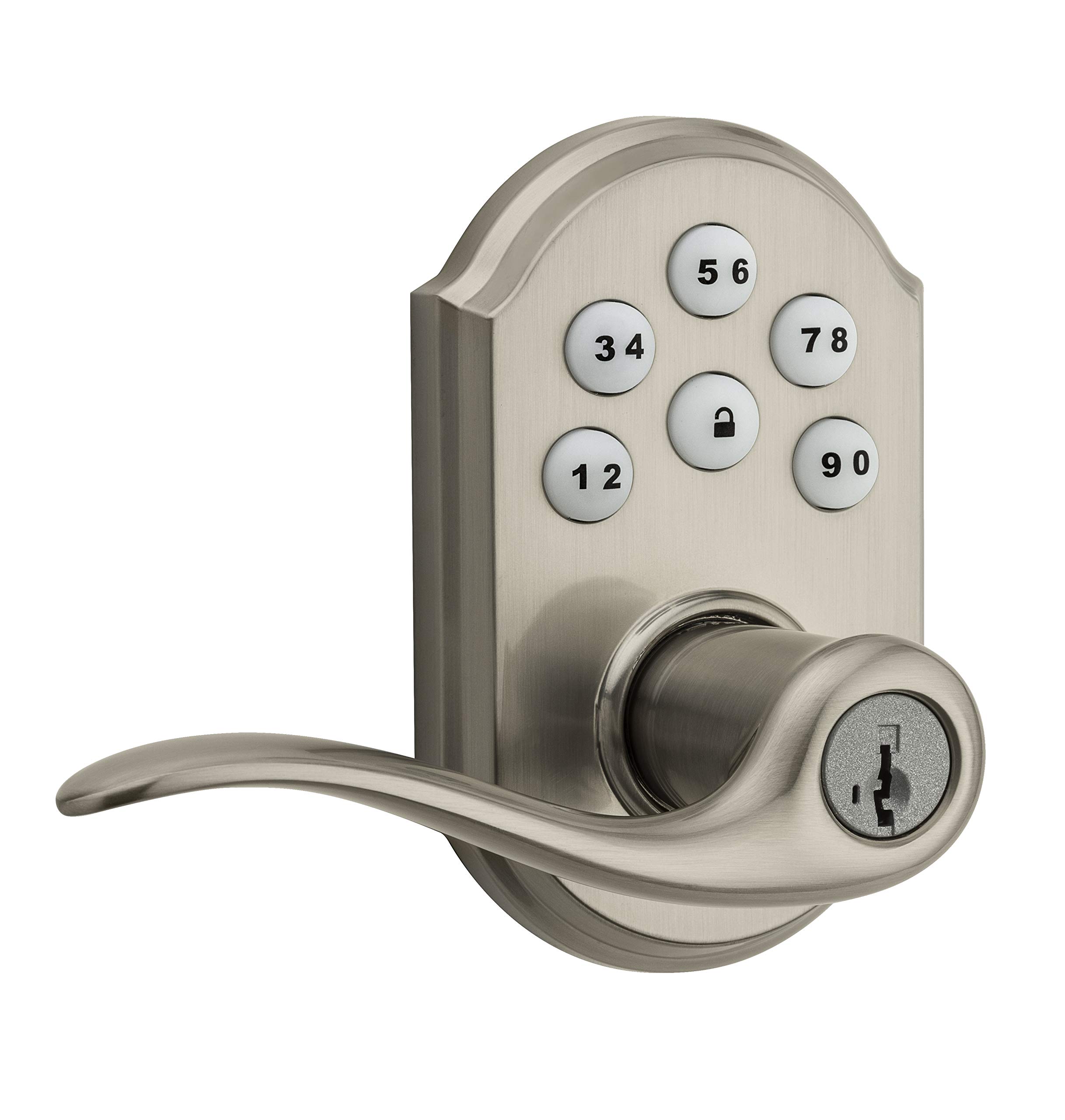
Image 1: Weiser SmartCode 5 Lever Electronic Lock in Satin Nickel finish. This image displays the complete lock assembly, including the exterior keypad and interior lever components.
2. คุณสมบัติของผลิตภัณฑ์
- ระบบเข้าแบบไร้กุญแจ: Backlit keypad for convenient code access.
- Z-Wave 500 Home Connect Technology: Enables wireless communication with other smart home devices.
- การเข้าถึงระยะไกล: Remotely check lock status, lock/unlock, and receive notifications via web-enabled devices.
- ความเข้ากันได้ของสมาร์ทโฮม: Works with Z-Wave certified controllers, including Samsung SmartThings and Wink for Amazon Alexa integration.
- เทคโนโลยีการเปลี่ยนกุญแจ SmartKey: Allows re-keying the lock to a new key in seconds.
- การล็อคด้วยปุ่มเดียว: Motorized locking with a single touch.
- การล็อคอัตโนมัติ: Customizable automatic re-locking after 30 seconds for added security.
- รหัสผู้ใช้: Supports up to 30 unique user access codes and 1 master code.
- ความทนทาน: ANSI/BHMA Grade 2 certified.
- ติดตั้งง่าย: Designed to fit most standard residential door preparations (1-3/8" to 1-3/4" door thickness, adjustable 2-3/8" or 2-3/4" backset, 2-1/8" cross bore).
- ความปลอดภัย: Full 128-bit encryption.
3. เนื้อหาบรรจุภัณฑ์
Before beginning installation, verify that all components are present. The package typically includes:
- ชุดแผงปุ่มกดภายนอก
- ชุดคันโยกภายใน
- สลัก
- จานตี
- ฮาร์ดแวร์สำหรับติดตั้ง
- คู่มือการติดตั้ง / แม่แบบเจาะรู
Note: 4 AA alkaline batteries are required and sold separately.
4. คู่มือการติดตั้ง
Installation of the SmartCode 5 Lever lock is designed to be straightforward, typically requiring only a Phillips head screwdriver. Ensure your door meets the following specifications:
- ความหนาของประตู: 1-3/8" to 1-3/4" (35 mm - 44 mm)
- เจาะข้าม: 2-1/8 นิ้ว (54 มม.)
- ระยะห่างระหว่างกลอนประตูกับตัวล็อค: Adjustable 2-3/8" or 2-3/4" (60 mm or 70 mm)
- การส่งประตู: Universal (can be installed on left or right-handed doors)
ขั้นตอนการติดตั้ง:
- เตรียมประตู: If necessary, use the provided template to drill holes. Ensure the door is properly aligned and the existing latch bore is clear.
- ติดตั้งสลัก: Insert the latch into the door edge and secure it with screws. Ensure the latch bolt faces the door frame.
- ติดตั้งชุดแผงปุ่มกดภายนอก: Route the cable through the cross bore and position the exterior keypad assembly on the door.
- ติดตั้งชุดประกอบภายใน: Connect the cable from the exterior assembly to the interior assembly. Secure the interior assembly to the door using the provided mounting screws.
- ติดตั้งคันโยก: Attach the interior and exterior levers according to the instructions, ensuring they operate smoothly.
- ติดตั้งแบตเตอรี่: Insert 4 new AA alkaline batteries into the battery pack.
- ดำเนินการขั้นตอนการรับส่งประตู: This step is crucial for the lock to learn the orientation of your door. Follow the specific instructions in your physical installation guide to ensure correct operation.
5. Initial Setup & Programming
After installation, the lock requires initial setup, including setting the Master Code and User Codes.
รหัสหลัก:
The Master Code is a critical security feature. It is used to add, delete, and modify User Codes and other lock settings. It does not unlock the door. It is highly recommended to create a Master Code immediately after installation.
รหัสผู้ใช้:
The lock supports up to 30 unique 4-8 digit User Codes for family members, guests, or service personnel.
Programming Steps (General):
- ตั้งรหัสหลัก: Refer to your specific programming guide for the sequence to establish your Master Code.
- เพิ่มรหัสผู้ใช้:
- ป้อนรหัสหลักของคุณ
- Press the Program button (usually located on the interior assembly).
- ป้อนรหัสผู้ใช้ใหม่ 4-8 หลัก
- กดปุ่มล็อค
- Test the new User Code to ensure it unlocks the door.
- ลบรหัสผู้ใช้: Follow the specific instructions in your programming guide, typically involving the Master Code and the User Code to be deleted.
6. Z-Wave Integration
The SmartCode 5 Lever lock features Z-Wave 500 Home Connect Technology, allowing it to integrate with compatible smart home systems.
Enrollment (Adding to Z-Wave Network):
To add the lock to your Z-Wave network, initiate the 'Add Device' or 'Inclusion' process on your Z-Wave controller/hub. Then, follow the lock's specific instructions to put it into inclusion mode (often by pressing the Program button once). The lock will communicate with the controller to join the network.
Exclusion (Removing from Z-Wave Network):
To remove the lock from a Z-Wave network, initiate the 'Remove Device' or 'Exclusion' process on your Z-Wave controller/hub. Then, follow the lock's specific instructions to put it into exclusion mode.
Functionality with Z-Wave:
- Remotely lock and unlock the door.
- Check the current lock status (locked/unlocked).
- Receive notifications for lock activity (e.g., door locked/unlocked, low battery).
The lock is compatible with Z-Wave certified controllers, including those that support Amazon Alexa integration via Samsung SmartThings and Wink.
7. การดำเนินการ
Operating your SmartCode 5 Lever lock is simple and intuitive.
ล็อคประตู:
- จากภายนอก: Press the Lock button on the keypad. The motorized deadbolt will extend.
- จากภายใน: Rotate the interior thumb turn to the locked position.
การปลดล็อคประตู:
- จากภายนอก: Enter a valid 4-8 digit User Code on the keypad. The motorized deadbolt will retract.
- จากภายใน: Rotate the interior thumb turn to the unlocked position.
การล็อคอัตโนมัติ:
If enabled, the lock will automatically re-lock approximately 30 seconds after being unlocked from the exterior. This feature provides peace of mind, ensuring your door is always secured.
8. การบำรุงรักษา
Proper maintenance ensures the longevity and reliable operation of your electronic lock.
การเปลี่ยนแบตเตอรี่:
The lock requires 4 AA alkaline batteries. When the batteries are low, the lock will typically provide an audible and/or visual low battery warning. Replace all four batteries simultaneously with new, high-quality alkaline batteries. Avoid using rechargeable batteries, as they may not provide sufficient voltage.
การทำความสะอาด:
ทำความสะอาดแป้นพิมพ์และตัวล็อคด้วยผ้าเนื้อนุ่มและแห้งamp cloth. Avoid using abrasive cleaners, solvents, or chemical sprays, as these can damage the finish and electronic components.
การเปลี่ยนรหัสกุญแจ SmartKey:
If you need to re-key your lock to a new key, follow the specific instructions provided with your SmartKey tool. This process allows you to re-key the lock yourself in seconds without removing it from the door.
9 การแก้ไขปัญหา
If you encounter issues with your lock, refer to the following common troubleshooting steps:
- ล็อคไม่ตอบสนอง: Check that the batteries are correctly installed and fully charged. Replace batteries if necessary. Ensure all cables are securely connected inside the interior assembly.
- รหัสไม่ทำงาน: Verify that the Master Code is set. Ensure User Codes are entered correctly and are active. Try deleting and re-adding the User Code.
- Z-Wave Connectivity Issues: Ensure your Z-Wave controller/hub is powered on and within range of the lock. Try performing a Z-Wave exclusion and then re-inclusion process.
- Grinding Noise / Latch Not Extending: This can indicate door misalignment or an obstruction. Check that the door frame and strike plate are properly aligned with the latch. Ensure the latch operates freely without resistance.
- แป้นพิมพ์ไม่ติดไฟ: Check battery power. If batteries are new, ensure they are inserted with correct polarity.
For more detailed troubleshooting, consult the full product manual or contact Weiser customer support.
10. ข้อมูลจำเพาะ
| หมายเลขรุ่น | 9GED14550-005 |
| ยี่ห้อ | ไวเซอร์ |
| วัสดุ | นิกเกิล |
| เสร็จ | ขัดเงา |
| สี | นิกเกิลซาติน |
| สไตล์ | ทันสมัย |
| ประเภทล็อค | แป้นพิมพ์ตัวเลข |
| คุณสมบัติพิเศษ | ไร้กุญแจ |
| ความหนาของประตู | 1-3/8" to 1-3/4" (35 mm - 44 mm) |
| ตัวล็อคด้านหลัง | Adjustable 2-3/8" or 2-3/4" (60 mm or 70 mm) |
| รูขวาง | 2-1/8 นิ้ว (54 มม.) |
| แหล่งพลังงาน | แบตเตอรี่อัลคาไลน์ขนาด AA 4 ก้อน (ไม่รวม) |
| การรับรอง | ANSI / BHMA เกรด 2 |
| น้ำหนักสินค้า | 1.51 กก. |
| Approximate Dimensions (Parcel) | 25.3 x 14.1 x 9.2 ซม. |
| ความเข้ากันได้ของคอนโทรลเลอร์ | Amazon Alexa, SmartThings, Wink (via Z-Wave hub) |
11. การรับประกันและการสนับสนุน
Weiser stands behind the quality of its products.
ข้อมูลการรับประกัน:
- Mechanical & Finish Warranty: ตลอดอายุการใช้งาน
- การรับประกันอุปกรณ์อิเล็กทรอนิกส์: หนึ่งปี
These warranties apply to the original residential user of the product. Please retain your proof of purchase for warranty claims.
การสนับสนุนลูกค้า:
For detailed warranty terms, technical assistance, or further support, please visit the official Weiser website or contact their customer service department. Contact information can typically be found on the Weiser webไซต์หรือในวัสดุบรรจุภัณฑ์