
1. บทนำ
Thank you for choosing the Silvergear Lollipop Kids Camera. This digital camera is designed for children, featuring a durable silicone case, 5.0-megapixel photo resolution, and video recording capabilities. It also includes built-in games for entertainment. This manual provides essential information for the safe and effective use of your camera.
2. สินค้าหมดview
Familiarize yourself with the components of your Silvergear Lollipop Kids Camera.
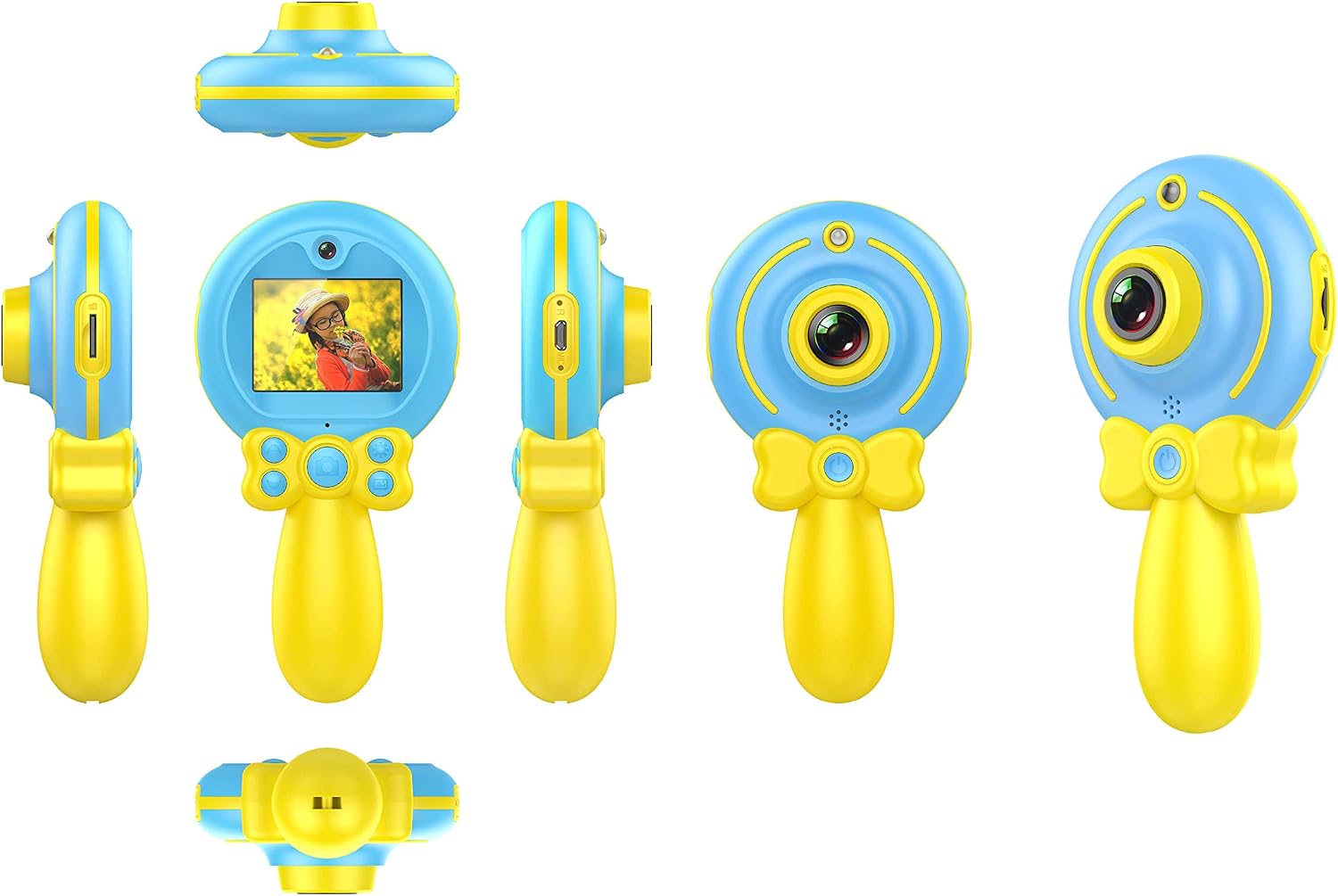
ภาพที่ 2.1: หลากหลาย views of the Silvergear Lollipop Kids Camera, illustrating its compact design, front and rear lenses, 2-inch display, and control buttons. The camera features a yellow handle and blue body with a silicone protective case.
- เลนส์ด้านหน้า: สำหรับถ่ายภาพและวีดีโอ
- เลนส์ด้านหลัง: For selfies.
- หน้าจอแสดงผลขนาด 2 นิ้ว: สำหรับ viewการดูรูปภาพ วิดีโอ และการใช้งานเมนูต่างๆ
- ปุ่มควบคุม: For power, navigation, and selection.
- พอร์ตไมโครยูเอสบี: สำหรับการชาร์จและถ่ายโอนข้อมูล
- ช่องเสียบการ์ด Micro SD: สำหรับพื้นที่เก็บข้อมูลที่ขยายได้
- จุดยึดสายรัดข้อมือ: สำหรับยึดกล้องให้แน่น
3. การตั้งค่า
3.1 การชาร์จแบตเตอรี่
The camera is equipped with a built-in rechargeable Lithium-polymer battery. Before first use, fully charge the camera.
- Connect the included Micro USB cable to the camera's Micro USB port.
- เชื่อมต่อปลายสายอีกด้านหนึ่งเข้ากับอะแดปเตอร์ไฟ USB (ไม่รวมอยู่ด้วย) หรือพอร์ต USB ของคอมพิวเตอร์
- ไฟแสดงสถานะการชาร์จจะสว่างขึ้น เมื่อชาร์จเต็มแล้ว ไฟอาจเปลี่ยนสีหรือดับลง
3.2 การใส่การ์ด Micro SD
A Micro SD card (not included) is required to save photos and videos. The camera supports cards up to 32GB.
- ค้นหาช่องเสียบการ์ด Micro SD บนกล้อง
- Gently insert the Micro SD card into the slot with the metal contacts facing down until it clicks into place.
- ในการถอด ให้ดันการ์ดเข้าไปเล็กน้อยจนกระทั่งการ์ดเด้งออกมา
3.3 การเปิด/ปิดเครื่อง
- การเปิดเครื่อง: กดปุ่มเปิด/ปิดค้างไว้สองสามวินาทีจนกระทั่งหน้าจอสว่างขึ้น
- วิธีปิดเครื่อง: กดปุ่มเปิด/ปิดค้างไว้สักสองสามวินาทีจนกว่าหน้าจอจะดับลง
4. คู่มือการใช้งาน
4.1 การถ่ายภาพ
The camera features a 5.0-megapixel resolution for still images.

ภาพที่ 4.1: A child demonstrating the use of the Silvergear Lollipop Kids Camera for taking photographs.
- Ensure the camera is powered on and in photo mode. Use the navigation buttons to select photo mode if necessary.
- Frame your shot using the 2-inch display screen.
- Press the Shutter button to capture the photo. The camera has autofocus for clear images.
4.2 การบันทึกวิดีโอ
The camera can record videos at 640 x 480 pixels resolution at 30 frames per second in MP4 format.
- Switch the camera to video recording mode using the mode selection button.
- Press the Record button to start recording. A timer or indicator will appear on the screen.
- กดปุ่มบันทึกอีกครั้งเพื่อหยุดการบันทึก
4.3 การเล่นเกม
The camera includes three built-in games for entertainment.

ภาพที่ 4.2: A child interacting with the Silvergear Lollipop Kids Camera, viewing content on its screen.
- Navigate to the 'Games' menu option using the navigation buttons.
- Select one of the three available games.
- Use the camera's control buttons to play the game.
4.4 การโอนย้าย Files
วิธีโอนรูปภาพและวิดีโอไปยังคอมพิวเตอร์:
- Connect the camera to a computer using the Micro USB cable.
- กล้องควรปรากฏเป็นไดรฟ์แบบถอดได้บนคอมพิวเตอร์ของคุณ
- Open the camera's folder to access and copy your files.
5. การบำรุงรักษา
- การทำความสะอาด: ใช้ผ้าแห้งเนื้อนุ่มเช็ดทำความสะอาดตัวกล้องและหน้าจอ ห้ามใช้น้ำยาทำความสะอาดหรือวัสดุที่มีฤทธิ์กัดกร่อน
- พื้นที่จัดเก็บ: เก็บกล้องไว้ในที่แห้งและเย็น หลีกเลี่ยงแสงแดดโดยตรงและอุณหภูมิที่สูงหรือต่ำเกินไป
- การดูแลแบตเตอรี่ เพื่อให้แบตเตอรี่ใช้งานได้นานที่สุด ควรหลีกเลี่ยงการปล่อยให้แบตเตอรี่หมดจนเกลี้ยงบ่อยๆ ชาร์จกล้องเป็นประจำ แม้ว่าจะไม่ได้ใช้งานเป็นเวลานานก็ตาม
- ความต้านทานน้ำ: กล้องนี้คือ ไม่กันน้ำ. หลีกเลี่ยงการโดนน้ำหรือความชื้นสูง
6 การแก้ไขปัญหา
- กล้องไม่เปิด: ตรวจสอบให้แน่ใจว่าแบตเตอรี่ชาร์จเต็มแล้ว เชื่อมต่อกล้องเข้ากับแหล่งจ่ายไฟแล้วลองใหม่อีกครั้ง
- ห้ามถ่ายรูป/วิดีโอ: Check if a Micro SD card is inserted correctly and has sufficient free space.
- คุณภาพของภาพไม่ดี: ตรวจสอบให้แน่ใจว่าเลนส์สะอาดและปราศจากรอยเปื้อน ตรวจสอบสภาพแสงด้วย
- กล้องหยุดนิ่ง: Press and hold the Power button to force a shutdown, then restart the camera.
- คอมพิวเตอร์ไม่รู้จักกล้อง: ตรวจสอบให้แน่ใจว่าเสียบสาย USB อย่างถูกต้องแล้ว ลองใช้พอร์ต USB หรือสายอื่นดู
7. ข้อมูลจำเพาะ
| คุณสมบัติ | ข้อมูลจำเพาะ |
|---|---|
| หมายเลขรุ่น | 1087-ข |
| ยี่ห้อ | ซิลเวอร์เกียร์ |
| ขนาด (กว้าง x ยาว x สูง) | 9 x 5 x 15 ซม. |
| น้ำหนัก | 140 กรัม |
| ความละเอียดภาพนิ่ง | 5 ล้านพิกเซล |
| ความละเอียดวิดีโอ | 640 x 480 pixels (30 FPS) |
| รูปแบบวิดีโอ | เอ็มพี 4 |
| รูปแบบภาพ | เจพีเจ |
| ขนาดหน้าจอ | 2 นิ้ว |
| พื้นที่จัดเก็บ | Micro SD card support up to 32 GB |
| แบตเตอรี่ | 1. แบตเตอรี่ลิเธียมโพลิเมอร์ (รวมอยู่ในชุด) |
| การเชื่อมต่อ | ยูเอสบี |
| ออโต้โฟกัส | ใช่ |
| ความต้านทานต่อน้ำ | ไม่กันน้ำ |
| คุณสมบัติพิเศษ | Video recording, filters, 3 built-in games |
8. เนื้อหาในกล่อง
- Silvergear Lollipop Kids Camera (Blue)
- เคสซิลิโคนป้องกัน
- สายชาร์จไมโคร USB
- สายรัดข้อมือ
9. การรับประกันและการสนับสนุน
ข้อมูลเกี่ยวกับเงื่อนไขการรับประกันสินค้าและการบริการลูกค้าไม่มีอยู่ในข้อมูลผลิตภัณฑ์ที่ให้มา โปรดดูที่บรรจุภัณฑ์ของผลิตภัณฑ์หรือเอกสารอย่างเป็นทางการจากผู้ผลิต webดูรายละเอียดเกี่ยวกับการรับประกันและวิธีการติดต่อฝ่ายบริการลูกค้าได้ที่เว็บไซต์นี้