
SVS PC-2000PRO-PIANOGLOSS
คู่มือการใช้งานซับวูฟเฟอร์ SVS PC-2000 Pro
Model: PC-2000PRO-PIANOGLOSS
1. บทนำ
Welcome to the SVS PC-2000 Pro Subwoofer User Manual. This document provides essential information for the proper setup, operation, and maintenance of your SVS PC-2000 Pro 12-inch Ported Cylinder Subwoofer. Please read this manual thoroughly before using your subwoofer to ensure optimal performance and safety.
The SVS PC-2000 Pro is engineered to deliver deep, accurate, and powerful bass, enhancing your home audio experience for both music and movies. Its unique cylindrical design allows for a smaller footprint while maintaining impressive acoustic output.

รูปที่ 1.1 : ด้านหน้า view of the SVS PC-2000 Pro Subwoofer, showcasing its cylindrical design and black finish.
2. ข้อมูลด้านความปลอดภัย
For your safety and to prevent damage to your subwoofer, please observe the following precautions:
- แหล่งพลังงาน: Connect the subwoofer only to a power outlet of the voltage ระบุไว้ที่แผงด้านหลัง
- การระบายอากาศ : ตรวจสอบให้แน่ใจว่ามีการระบายอากาศที่เพียงพอรอบๆ ซับวูฟเฟอร์ อย่าปิดกั้นช่องระบายอากาศใดๆ
- น้ำและความชื้น: Do not expose the subwoofer to water, rain, or excessive moisture.
- ความร้อน: ควรวางซับวูฟเฟอร์ให้ห่างจากแหล่งความร้อน เช่น เครื่องทำความร้อน ช่องระบายความร้อน เตา หรืออุปกรณ์อื่นๆ ที่ก่อให้เกิดความร้อน
- การทำความสะอาด: Unplug the subwoofer from the wall outlet before cleaning. Use a dry cloth for cleaning.
- การบริการ: Do not attempt to service the subwoofer yourself. Refer all servicing to qualified service personnel.
3. คุณสมบัติและเทคโนโลยี
The SVS PC-2000 Pro incorporates advanced technology to deliver exceptional bass performance:
- ไดรเวอร์: Features a 12-inch high-excursion driver with a dual ferrite magnet motor assembly, ensuring powerful and controlled bass output. The lightweight and rigid aluminum vented cone with composite fiber dustcap maintains control even at high drive levels.
- Ampเครื่องฟอก: Equipped with a Sledge STA-550D amplifier, providing 550 Watts RMS and 1,500+ Watts Peak Power.
- Ported Design: The ported cylinder design allows for deeper bass extension and higher output compared to sealed designs of similar size.
- SVS App Control: Full control over volume, DSP functions, custom presets, and parametric EQ via the SVS mobile app (Bluetooth connectivity).

รูปที่ 3.1: ภายใน view of the SVS PC-2000 Pro, illustrating the driver, port, and amplifier module placement within the cylindrical enclosure.

Figure 3.2: Close-up of the SVS PC-2000 Pro's driver basket, highlighting the robust construction and ventilation for optimal performance.
4. การตั้งค่า
4.1 การแกะกล่อง
Carefully remove the subwoofer from its packaging. Retain all packing materials for future transport or servicing. Inspect the subwoofer for any signs of damage. If damage is present, contact your dealer or SVS customer support immediately.
4.2 การจัดวาง
Subwoofer placement significantly impacts performance. Consider the following:
- ตำแหน่งมุม: โดยทั่วไปแล้วจะให้เสียงเบสที่ดังที่สุดและลึกที่สุด แต่บางครั้งอาจทำให้เสียงเบสบวมหรือดังเกินไปได้
- ตำแหน่งจัดวางด้านหน้าห้อง: Placing the subwoofer near the front speakers can create a more seamless soundstage.
- การติดตั้งบริเวณกลางผนัง: สามารถให้ผลลัพธ์ที่สมดุลระหว่างปริมาณงานและความแม่นยำได้ดี
- ซับวูฟเฟอร์หลายตัว: If using more than one subwoofer, strategic placement can smooth out the bass response across the listening area.
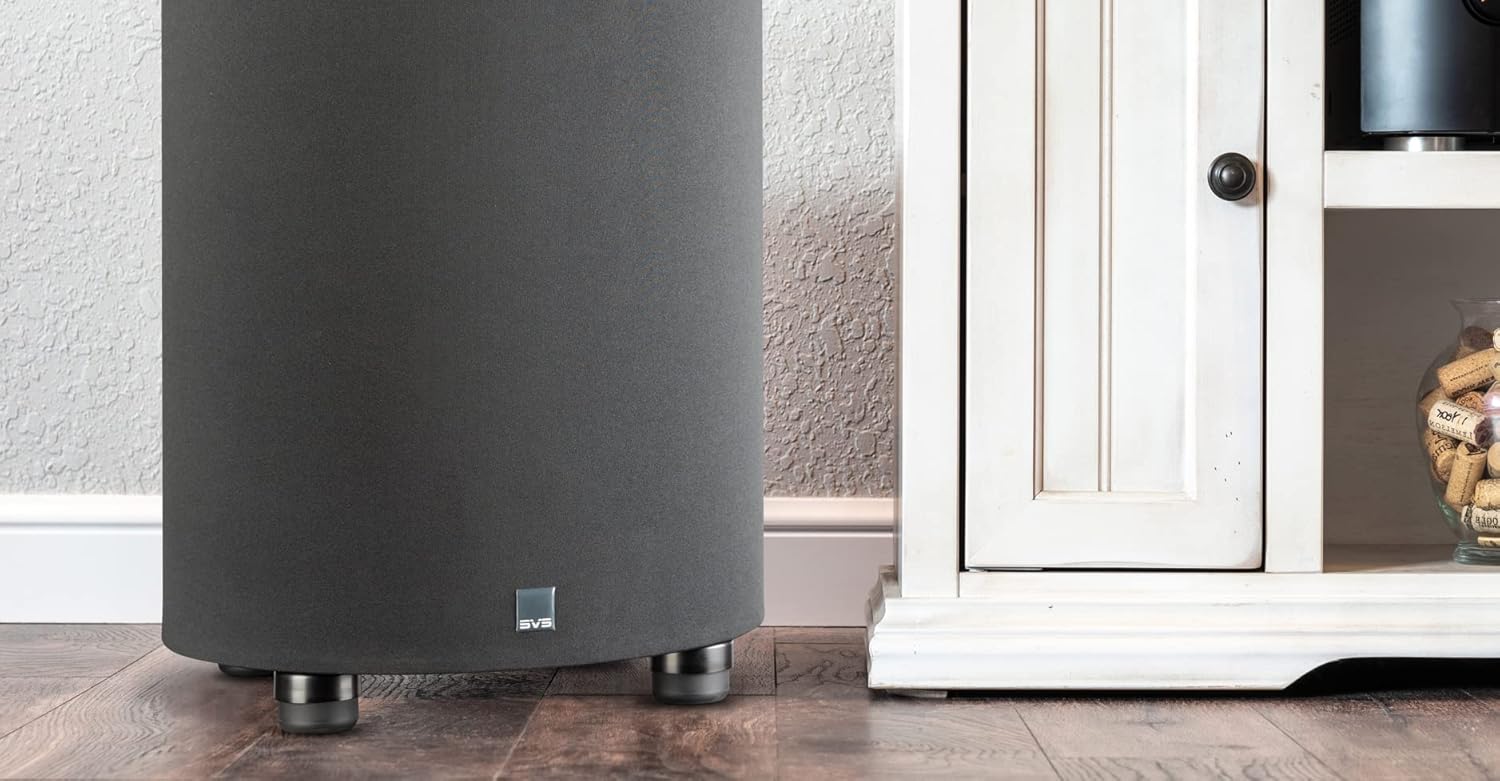
Figure 4.1: The SVS PC-2000 Pro Subwoofer positioned in a typical room environment, demonstrating its compact footprint.
4.3 การเชื่อมต่อ
The PC-2000 Pro offers various connection options. Ensure your AV receiver or processor is turned off before making any connections.
- อินพุต LFE: For most home theater setups, connect a single RCA cable from the LFE output of your AV receiver to the LFE input on the subwoofer.
- ช่องรับสัญญาณสเตอริโอ RCA: For 2-channel stereo systems, connect RCA cables from the stereo pre-outs of your pre-amplifier or receiver to the Left and Right RCA inputs on the subwoofer.
- อินพุตระดับลำโพง: If your receiver does not have RCA outputs, you can use the speaker level inputs. Connect speaker wires from your receiver's main speaker outputs to the subwoofer's speaker level inputs.
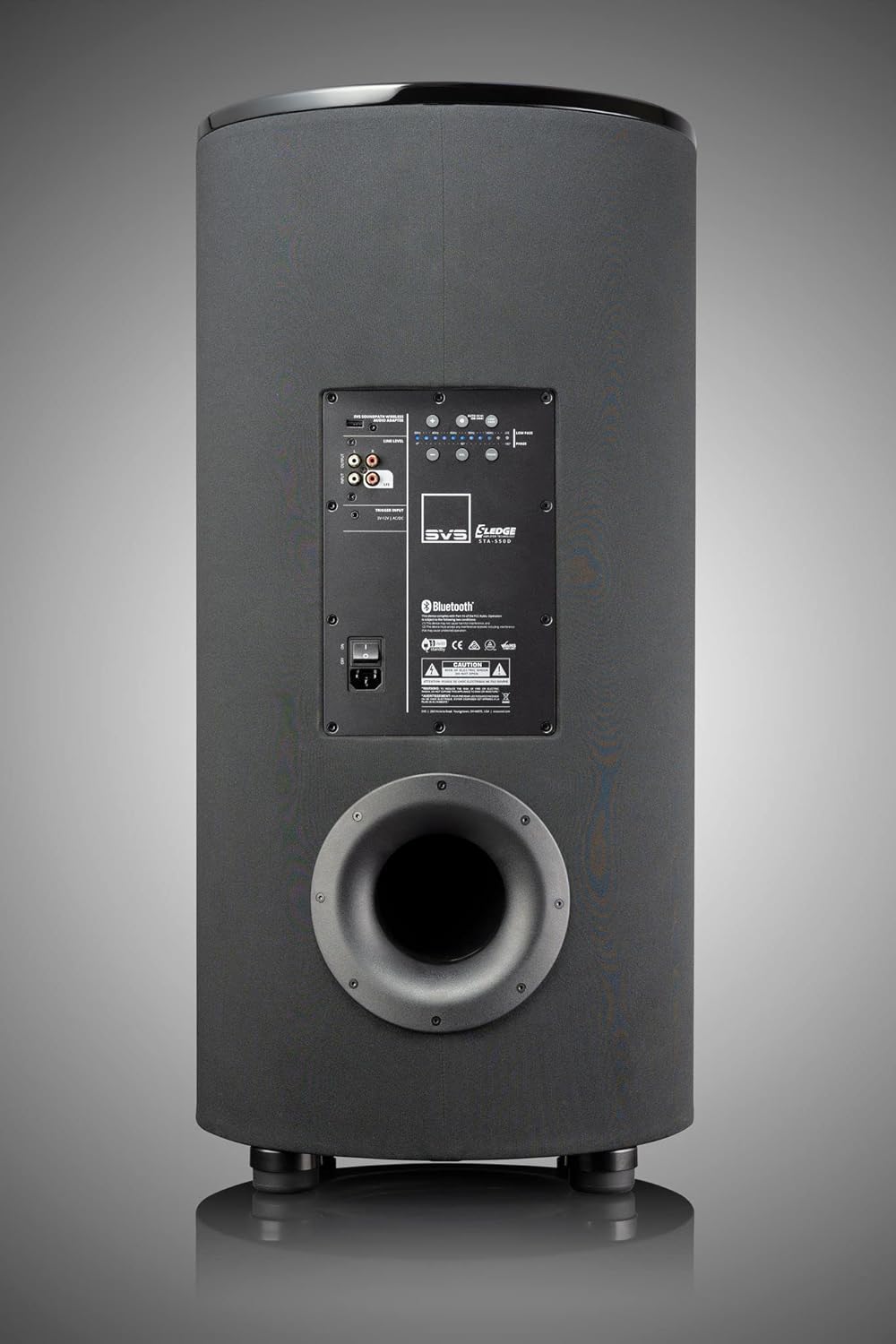
Figure 4.2: Rear panel of the SVS PC-2000 Pro Subwoofer, showing the various input and control options, including RCA inputs, speaker level inputs, and the power switch.
4.4 การเปิดเครื่องครั้งแรก
Once connections are made, plug the power cord into a wall outlet. Flip the main power switch on the rear panel to the 'ON' position. The subwoofer will enter standby mode if no audio signal is present, and automatically wake up when a signal is detected.
5. การใช้งานซับวูฟเฟอร์
5.1 SVS App Control
The SVS PC-2000 Pro can be fully controlled via the SVS mobile app, available for iOS and Android devices. Download the app and connect to your subwoofer via Bluetooth. The app provides access to all DSP functions and settings.
5.2 การตั้งค่าพื้นฐาน
- ปริมาณ: Adjust the overall output level of the subwoofer. Start with a moderate level and fine-tune to blend with your main speakers.
- ตัวกรองความถี่ต่ำ (ครอสโอเวอร์): Sets the upper frequency limit for the subwoofer. This should typically be set slightly above the lowest frequency your main speakers can reproduce. If using an AV receiver with bass management, set the subwoofer's low pass filter to LFE or bypass.
- เฟส: Adjusts the timing of the subwoofer's output relative to your main speakers. This can be critical for seamless blending. Experiment with 0 and 180 degrees.
- ขั้ว: Inverts the electrical polarity of the subwoofer's output. This is different from phase and is rarely needed for adjustment.
5.3 Advanced Settings (SVS App)
- อีควอไลเซอร์แบบพาราเมตริก (PEQ): Allows for precise room correction by applying filters at specific frequencies to address room modes or peaks.
- ค่าชดเชยกำไรจากห้องพัก: Reduces excessive bass output in smaller rooms where room gain can cause an unnatural boost in low frequencies.
- การปรับแต่งพอร์ต: The PC-2000 Pro is a ported design. The app may offer options related to port tuning, such as sealing ports with foam bungs for a sealed subwoofer response.
6. การบำรุงรักษา
Proper care will ensure the longevity and performance of your SVS PC-2000 Pro Subwoofer.
- การทำความสะอาด: Use a soft, dry cloth to wipe down the cabinet. For piano gloss finishes, use a microfiber cloth to avoid scratches. Do not use liquid cleaners or abrasive chemicals.
- ฝุ่น: Regularly dust the subwoofer, especially the driver and port areas, to prevent buildup.
- การจัดวาง: Avoid placing the subwoofer in direct sunlight or near heat sources, which can damage the finish and internal components.
- พื้นที่จัดเก็บ: If storing the subwoofer for an extended period, use the original packaging to protect it from dust and physical damage. Store in a cool, dry place.
7 การแก้ไขปัญหา
If you encounter issues with your SVS PC-2000 Pro, refer to the following common problems and solutions:
| ปัญหา | สาเหตุที่เป็นไปได้ | สารละลาย |
|---|---|---|
| ไม่มีเสียงจากซับวูฟเฟอร์ | Power off; loose cables; low volume; incorrect settings. | Check power switch and outlet; ensure all cables are securely connected; increase subwoofer volume; verify LFE/subwoofer output is enabled on receiver. |
| Distorted or 'boomy' sound | Incorrect crossover/phase; room modes; excessive volume. | Adjust crossover and phase settings; use SVS App's PEQ to address room modes; reduce subwoofer volume. |
| Subwoofer not turning on/off automatically | Low input signal; auto-standby sensitivity. | Increase LFE/subwoofer output level from receiver; check SVS App settings for auto-standby sensitivity. |
| เสียงฮัมหรือเสียงหวีด | Ground loop; faulty cable; nearby interference. | Try plugging subwoofer into a different outlet; use a ground loop isolator; try a different RCA cable; move away from other electronics. |
If the problem persists after trying these solutions, please contact SVS customer support for further assistance.
8. ข้อมูลจำเพาะ
Key technical specifications for the SVS PC-2000 Pro 12" Ported Cylinder Subwoofer:
| คุณสมบัติ | ข้อมูลจำเพาะ |
|---|---|
| ชื่อรุ่น | PC-PARENT |
| ประเภทลำโพง | ซับวูฟเฟอร์ |
| เส้นผ่านศูนย์กลางซับวูฟเฟอร์ | 12 นิ้ว |
| ประเภทตัวควบคุม | การควบคุมแอพ |
| การกำหนดค่าช่องเสียงรอบทิศทาง | 5.1, 7.1 |
| สี | Piano Gloss Black |
| ขนาดสินค้า (ลึก x กว้าง x สูง) | ลึก 16.75 นิ้ว x กว้าง 16.5 นิ้ว x สูง 34.5 นิ้ว |
| น้ำหนักสินค้า | 47.4 ปอนด์ |
| แหล่งพลังงาน | สายไฟ |
| กำลังขับสูงสุดของลำโพง | 1500 วัตต์ (พีค) |
| เทคโนโลยีการเชื่อมต่อ | อาร์ซีเอ, บลูทูธ |
| ประเภทการติดตั้ง | ชั้นยืน |
| หมายเลขรุ่นสินค้า | PC-2000PRO-PIANOGLOSS |
| ยูพีซี | 856677007763 |

Figure 8.1: Dimensional drawing of the SVS PC-2000 Pro Subwoofer, indicating its height, width, and depth.
9. การรับประกันและการสนับสนุน
The SVS PC-2000 Pro Subwoofer is backed by a 5-Year Unconditional Warrantyเพื่อให้คุณอุ่นใจเกี่ยวกับการลงทุนของคุณ การรับประกันนี้ครอบคลุมถึงข้อบกพร่องในวัสดุและฝีมือการผลิตภายใต้การใช้งานปกติ
For technical support, troubleshooting assistance, or warranty claims, please contact SVS customer support. You can typically find contact information on the official SVS webไซต์หรือผ่านตัวแทนจำหน่ายที่ได้รับอนุญาตของคุณ
When contacting support, please have your product model number (PC-2000PRO-PIANOGLOSS) and purchase information readily available.
Ask a question about this manual
Ask about setup, troubleshooting, compatibility, parts, safety, or missing instructions. Manuals+ will review the question and use this page’s manual context to help answer it.