
1. สินค้าหมดview
The Walfront Single Phase Voltage Protector and Energy Meter is a multi-functional device designed to protect electrical circuits from overvoltage, อันเดอร์โวลtage, and overcurrent conditions. It features an auto-recovery function, automatically restoring power once fault conditions return to normal. The integrated display provides real-time voltagการอ่านค่ากระแสไฟฟ้าและกำลังไฟฟ้า
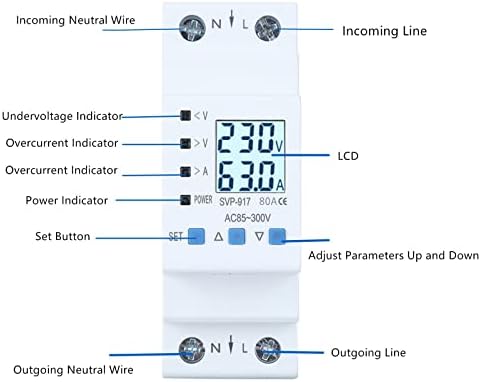
รูปที่ 1 : ด้านหน้า view of the Walfront Voltage Protector, highlighting the LCD display, undervoltage, ล้นเกินtage, and overcurrent indicators, as well as the 'SET' and adjustment buttons.
คุณสมบัติหลัก:
- Auto-Recovery Function: Automatically restores power after undervoltage or overcurrent faults are resolved.
- จอแสดงผลที่ชัดเจน: LCD shows real-time voltage กระแสและกำลัง
- การป้องกันหลายระดับ: รวมถึงโอเวอร์โวลด้วยtage, อันเดอร์โวลtage และการป้องกันกระแสเกิน
- Anti-Thunder Protection: Enhances device stability and safety.
- โครงสร้างทนทาน: Made from high-quality, flame-retardant materials for extended service life.
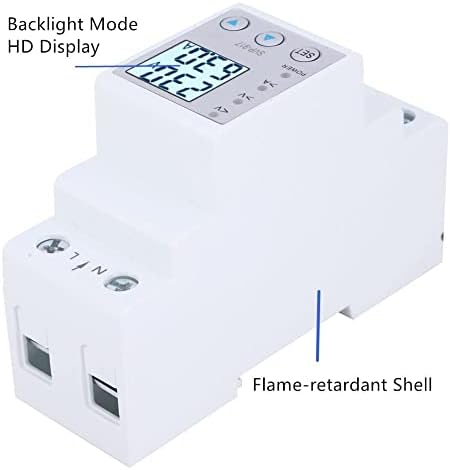
รูปที่ 2: ด้านข้าง view illustrating the flame-retardant shell of the device, contributing to its durability and safety.
2. การตั้งค่าและการติดตั้ง
This device is designed for DIN rail mounting in an electrical panel. Proper installation by a qualified electrician is recommended to ensure safety and correct functionality.
2.1 แผนผังการเดินสายไฟ
Connect the incoming neutral wire to the 'N' terminal and the incoming live wire to the 'L' terminal on the top of the device. Connect the outgoing neutral wire to the 'N' terminal and the outgoing live wire to the 'L' terminal on the bottom of the device. Ensure all connections are secure.
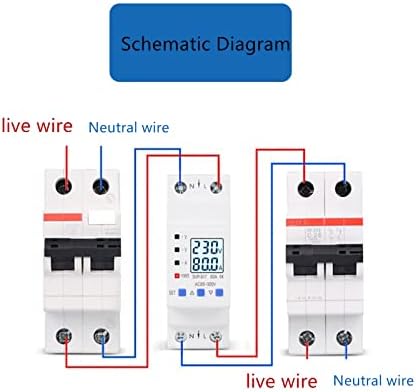
Figure 3: Wiring schematic. The device is installed between an incoming circuit breaker and an outgoing circuit breaker, with live and neutral wires connected to the respective 'L' and 'N' terminals.
2.2 การติดตั้ง
The device is designed for standard 35mm DIN rail mounting. Snap the device onto the DIN rail securely within your electrical enclosure.

Figure 4: The device mounted on a DIN rail within an electrical panel, demonstrating a typical installation scenario.
3. คู่มือการใช้งาน
Upon successful installation and power-up, the LCD will display real-time voltage and current. Use the 'SET' button and the up/down arrow buttons to navigate and adjust settings.
3.1 ตัวบ่งชี้การแสดงผล
- <V: อันเดอร์โวลtagตัวบ่งชี้อี
- >V: โอเวอร์โวลtagตัวบ่งชี้อี
- >A: Overcurrent indicator.
- พลัง: ไฟแสดงสถานะพลังงาน
- จอแอลซีดี: แสดง voltage (V), กระแส (A) และกำลัง (W)
3.2 Menu Settings and Parameters
Press the 'SET' button to enter the menu. Use the up (▲) and down (▼) arrow buttons to navigate through the settings and adjust values. Press 'SET' again to confirm a selection or value.
- DE (Device Mode): Controls the operational mode of the device.
- DE1: โอเวอร์โวลtage, อันเดอร์โวลtage, and overcurrent protection with automatic switch off/on.
- DE2: โอเวอร์โวลtage, อันเดอร์โวลtage, and overcurrent protection with automatic switch off/manual switch on.
- DE3: โอเวอร์โวลtage, อันเดอร์โวลtage, and overcurrent protection disabled; output load switch remains off.
- DE4: โอเวอร์โวลtage, อันเดอร์โวลtage, and overcurrent protection disabled; output load switch remains on.
- DE5: โอเวอร์โวลtage, อันเดอร์โวลtage, and overcurrent protection disabled; output load switch cycles on/off (unit: seconds).
- Bg (Backlight Mode):
- โหมด 1: Backlight always on.
- โหมด 2: Backlight illuminates for 30 seconds after a button is pressed.
- SS (Start-up Delay): Delay time for load switch-on after input power is applied.
- Uo (Overvoltage Protection Value): Sets the upper voltagอี จำกัด
- UoH (Overvoltage Recovery Value): ตั้งค่าปริมาตรtage at which the device recovers after an overvoltagอีเหตุการณ์
- UL (Undervoltage Protection Value): Sets the lower voltagอี จำกัด
- ULH (Undervoltage Recovery Value): ตั้งค่าปริมาตรtage at which the device recovers after an undervoltagอีเหตุการณ์
- SU (Voltage Fault Judgment Time): Time duration for judging overvoltage/อันเดอร์โวลtagความผิดพลาด
- Io (Overcurrent Protection Value): Sets the upper current limit.
- Ic (Malignant Load Protection Value): Pure Resistive Load limit.
- SI (Overcurrent Fault Judgment Time): Time duration for judging overcurrent faults.
- SH (Recovery Delay): Delay time setting for load recovery after an output load switch-off protection event.
- Op (Cycle Switch Off Delay): Delay time set for cycle switch off under function mode 5.
- CL (Cycle Switch On Delay): Delay time set for cycle switch on under function mode 5.
- Er1 (Error Records): Displays the last five records of protection reasons.
4. การบำรุงรักษา
The Walfront Voltage Protector is designed for minimal maintenance. However, regular checks can ensure optimal performance and longevity.
- การทำความสะอาด: รักษาอุปกรณ์ให้สะอาดและปราศจากฝุ่น ใช้ผ้าแห้งนุ่มเช็ดทำความสะอาด ห้ามใช้น้ำยาทำความสะอาด
- การตรวจสอบการเชื่อมต่อ: Periodically inspect wiring connections to ensure they remain tight and free from corrosion. Loose connections can lead to overheating or intermittent operation.
- สภาพแวดล้อม : โปรดตรวจสอบให้แน่ใจว่าได้ใช้งานอุปกรณ์ภายในสภาพแวดล้อมที่กำหนด (อุณหภูมิ ความชื้น) เพื่อป้องกันความเสียหาย
5 การแก้ไขปัญหา
If you encounter issues with your Walfront Voltage Protector, refer to the following common troubleshooting steps:
- อุปกรณ์ไม่ได้เปิดเครื่อง:
- Check the incoming power supply.
- ตรวจสอบให้แน่ใจว่าการเชื่อมต่อสายไฟทั้งหมดถูกต้องและแน่นหนา
- Ensure the main circuit breaker supplying the device is ON.
- ไม่มีกำลังขับ:
- Check the display for active protection indicators (<V, >V, >A). If active, resolve the underlying voltage or current issue.
- Review the 'DE' (Device Mode) setting. Ensure it is not set to DE3 (output off) or DE5 (cycling).
- If in DE2 mode, a manual reset might be required after a fault.
- Check 'Er1' for recent protection reasons.
- การอ่านไม่ถูกต้อง:
- Ensure the device is correctly wired and that the load is within its specified limits.
- Verify the device is the correct amperage (e.g., 80A model).
- การตั้งค่าไม่บันทึก:
- Ensure you press the 'SET' button to confirm changes after adjusting a parameter.
6. ข้อมูลจำเพาะ
| ข้อมูลจำเพาะ | ค่า |
|---|---|
| ยี่ห้อ | Walfront |
| แบบอย่าง | me791gt8nu-12 |
| คะแนนปัจจุบัน | 80 Amps |
| ประเภทเบรกเกอร์ | มาตรฐาน |
| ประเภทการติดตั้ง | ราง DIN |
| จำนวนขั้ว | 1 |
| เล่มที่tage | ไฟฟ้ากระแสสลับ 85-300 โวลต์ |
6.1 มิติ

Figure 5: Device dimensions, including front and side views with measurements in centimeters.
6.2 รุ่นที่มีจำหน่าย
The Walfront Voltage Protector is available in different current ratings.

Figure 6: Optional styles available, including 63A and 80A versions of the device.
7. ข้อมูลการรับประกัน
Walfront products are manufactured to high-quality standards. For specific warranty details, please refer to the product packaging or contact Walfront customer support. Typically, a limited warranty covers defects in materials and workmanship under normal use.
8. การสนับสนุนลูกค้า
For technical assistance, troubleshooting, or inquiries regarding your Walfront Voltage Protector, please visit the Walfront store on Amazon or contact their customer service directly. Contact information can usually be found on the product packaging or the official Walfront brand page.
Walfront Store Link: Visit the Walfront Store on Amazon