
1. สินค้าหมดview
The ORIA Bluetooth Hygrometer Thermometer (Model WA64) is a compact, wireless device designed for real-time monitoring of temperature and humidity. Equipped with a high-precision MEMS sensor and Bluetooth 5.0 connectivity, it provides accurate environmental data that can be accessed and managed via a dedicated smartphone application. This device is suitable for various indoor environments, including living rooms, baby rooms, bedrooms, greenhouses, wine cellars, and offices, helping users maintain optimal conditions.
2. คุณสมบัติหลัก
- เซ็นเซอร์ความแม่นยำสูง: Integrated upgraded MEMS sensor refreshes once per second for timely and accurate data.
- การเชื่อมต่อบลูทูธ 5.0: Provides real-time wireless monitoring for temperature (-20-60 ℃) and humidity (0-100 % RH) with a connection distance of up to 50m (164 feet) in open areas.
- Wireless App Control: Uploads data to the app via Bluetooth, allowing users to check maximum and minimum temperature and humidity values. Supports connecting up to 100 sensors simultaneously on Android 4.3 or above.
- Smart Alert Reminder: The app notifies users with red data and mobile notifications when temperature and humidity exceed preset values. Ideal for monitoring homes, pets, refrigerators, freezers, wine cellars, and greenhouses.
- การจัดเก็บและส่งออกข้อมูล: Records data every 10 minutes in the app, storing up to 100 days of historical data. Data can be downloaded in CSV format for free after account registration.
- ดีไซน์ขนาดเล็กและพกพาสะดวก: Compact sensor with an integrated CR2477 battery and a hanging hole for flexible placement.

Image: The ORIA Bluetooth Hygrometer Thermometer, showcasing its compact design and key features such as temperature and humidity monitoring, 1-second refresh rate, Celsius/Fahrenheit switch, app monitoring, and CR2477 battery.
3. คู่มือการติดตั้ง
Follow these simple steps to set up your ORIA Bluetooth Hygrometer Thermometer:
- ดาวน์โหลดแอป: Scan the QR code provided in the manual or on the product packaging to download the "Sensor Blue" app from the App Store or Google Play.
- เปิดใช้งานอุปกรณ์: Gently pull out the battery insulation sheet from the device. This activates the CR2477 battery.
- เปิดใช้งานบลูทูธ: ตรวจสอบให้แน่ใจว่าได้เปิดใช้งาน Bluetooth บนสมาร์ทโฟนของคุณแล้ว
- เชื่อมต่อกับแอพ: Open the "Sensor Blue" app. Press the button on the center of the device once to initiate pairing. The app should detect and connect to the product.

Image: An infographic detailing the four easy steps to connect the ORIA Bluetooth Thermometer: scan QR code for app, pull out battery insulation, turn on Bluetooth and app, then press the device button to connect.
Video: A demonstration of the easy setup process for the ORIA Mini Bluetooth Humidity Thermometer, showing how to download the app, activate the device by removing the battery insulation, and connect via Bluetooth.
4. คู่มือการใช้งาน
4.1 การตรวจสอบตามเวลาจริง
Once connected, the Sensor Blue app will display real-time temperature and humidity readings. The data refreshes every second, providing up-to-date information about your environment.

Image: A smartphone screen showing the Sensor Blue app interface with real-time temperature and humidity readings, indicating the device's ability to monitor environmental conditions.
4.2 Customizing Sensor Settings
- Naming Your Sensor: In the app, you can assign a custom name to each sensor (e.g., "Living Room," "Baby Room," "Greenhouse") for easy identification, especially if you have multiple devices.
- การตั้งค่าการแจ้งเตือน: Configure custom high and low temperature/humidity thresholds. If readings exceed these preset values, the app will display red data and send a notification to your phone.
- สวิตช์หน่วยอุณหภูมิ: Switch between Celsius (℃) and Fahrenheit (℉) directly within the app.
4.3 การบันทึกและส่งออกข้อมูล
The device automatically records data every 10 minutes and stores up to 100 days of historical data within the app. To ensure continuous data logging, keep your smartphone within Bluetooth range of the device at least once a day to sync the data.
- Viewข้อมูลประวัติศาสตร์: Access graphs and charts within the app to visualize temperature and humidity trends over time.
- การส่งออกข้อมูล: You can export the stored data in CSV format for further analysis. This feature is available for free after registering your account in the app.

Image: The Sensor Blue app interface displaying historical temperature and humidity trends, along with options for data export, demonstrating the device's data logging capabilities.
5. การบำรุงรักษา
5.1 การทำความสะอาด
To maintain optimal performance, clean the device regularly. Use a soft, dry cloth to wipe the exterior. Do not use abrasive cleaners or immerse the device in water.
5.2 การเปลี่ยนแบตเตอรี่
The ORIA Bluetooth Hygrometer Thermometer uses a CR2477 lithium metal battery, which typically lasts for approximately one year. When the battery needs replacement:
- เปิดอุปกรณ์อย่างระมัดระวังasing.
- ถอดแบตเตอรี่ CR2477 เก่าออก
- ใส่แบตเตอรี่ CR2477 ใหม่ โดยตรวจสอบให้แน่ใจว่าใส่ขั้วถูกต้อง
- ปิดอุปกรณ์ casinก. อย่างปลอดภัย
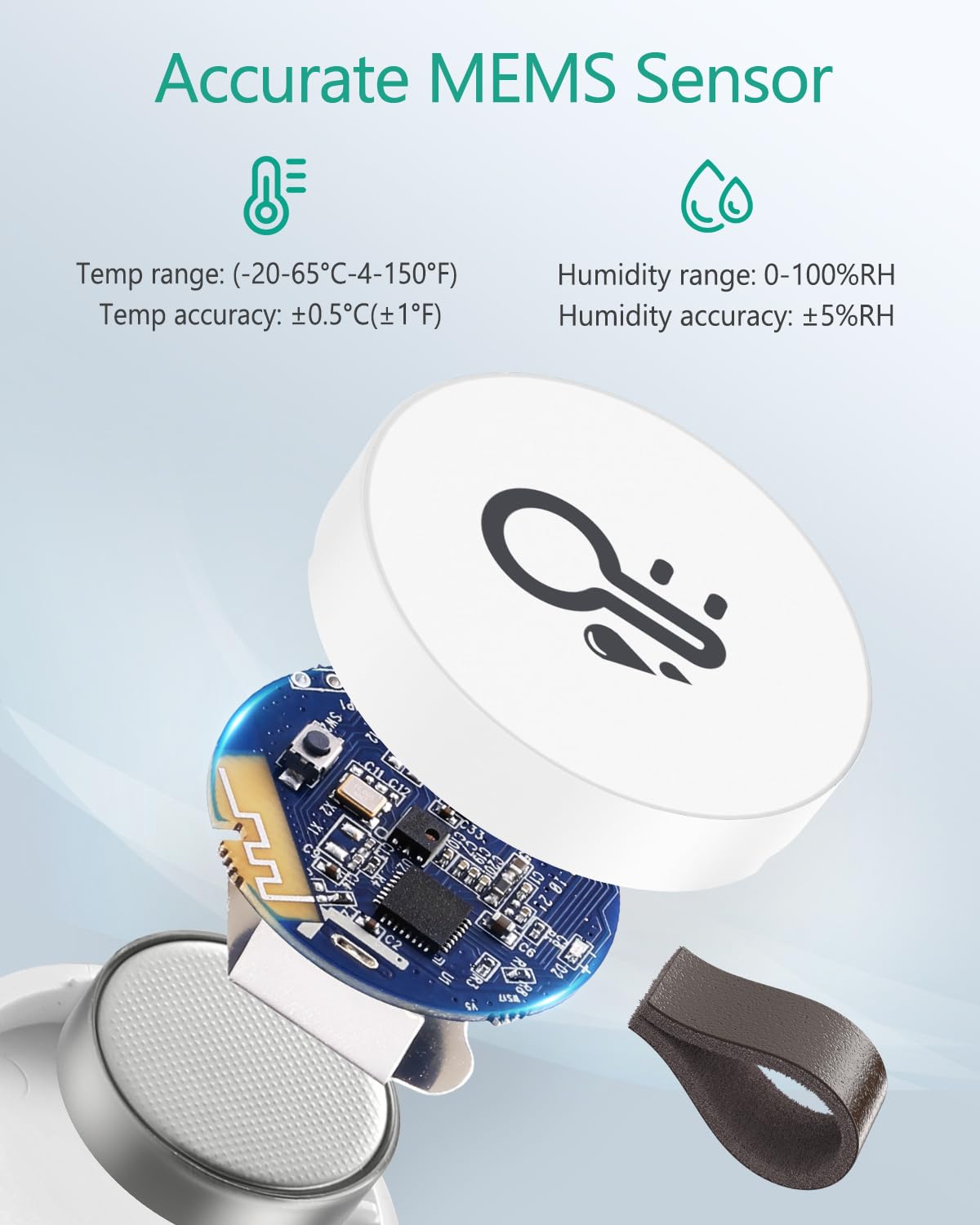
ภาพ: ระเบิด view of the ORIA Bluetooth Thermometer, illustrating the internal components and the CR2477 battery compartment for easy replacement.
6 การแก้ไขปัญหา
| ปัญหา | สาเหตุที่เป็นไปได้ | สารละลาย |
|---|---|---|
| อุปกรณ์ไม่เชื่อมต่อกับแอป | Bluetooth is off; device battery is low/dead; device not activated; too far from phone. | Ensure Bluetooth is on. Check battery insulation sheet is removed. Replace battery if needed. Move phone closer to the device (within 50m/164ft in open areas, less indoors). Press the device button to initiate pairing. |
| Data not updating or showing gaps | Phone not within Bluetooth range for data sync; app not running in background. | Ensure your phone is within Bluetooth range of the device at least once a day to sync recorded data. Keep the app running in the background or open it periodically. |
| Slow data download/sync | Large amount of historical data to sync; Bluetooth interference. | Connect to the device more frequently to avoid large data backlogs. Minimize other Bluetooth devices nearby. Ensure a clear line of sight between the device and your phone. |
| การอ่านที่ไม่ถูกต้อง | สิ่งกีดขวางเซ็นเซอร์; อุปกรณ์ถูกวางไว้ในสภาพแวดล้อมที่ไม่ปกติ; จำเป็นต้องปรับเทียบ | Ensure the sensor is not covered. Avoid placing the device in direct sunlight, near heat sources, or in areas with rapid temperature/humidity changes. Use the app's calibration feature if you have a reference thermometer/hygrometer. |
7. ข้อมูลจำเพาะผลิตภัณฑ์
- ยี่ห้อ: ออเรีย
- หมายเลขรุ่น: WA64
- ASIN: B08238DFWL
- ขนาดสินค้า (กว้าง x ยาว x สูง) : 3.3 x 3.3 x 1.19 ซม.
- น้ำหนักสินค้า: 30 กรัม
- สี: สีขาว
- วัสดุภายนอก: พลาสติก
- แหล่งพลังงาน: ใช้แบตเตอรี่
- ประเภทแบตเตอรี่: 1 Lithium metal (CR2477) - included
- เทคโนโลยีการเชื่อมต่อ: บลูทูธ 5.0
- ประเภทจอภาพ: ดิจิตอล
- คุณสมบัติพิเศษ: ความแม่นยำสูง
- ช่วงอุณหภูมิ: -20 ถึง 60 ℃ (-4 ถึง 140 ℉)
- ช่วงความชื้น: ความชื้นสัมพัทธ์ 0 ถึง 100%
- ความละเอียดอุณหภูมิ: 0.1 องศาเซลเซียส
- เวลาตอบสนอง: 10 วินาที
- การจัดเก็บข้อมูล: Up to 100 days (recorded every 10 minutes)
- การใช้งาน: ในร่ม
- ข้อกำหนดที่สอดคล้อง: CE
- ประเทศต้นกำเนิด: จีน
- คำแนะนำในการดูแล: ทำความสะอาดด้วยผ้านุ่มแห้ง
8. การรับประกันและการสนับสนุน
ORIA is committed to providing excellent customer service and product quality. Your ORIA Bluetooth Hygrometer Thermometer comes with the following:
- 30-Day Refund/Return Policy: Enjoy a 30-day no-reason refund or return period.
- รับประกัน 1 ปี: The product is covered by a 1-year warranty, including replacement within 365 days for manufacturing defects.
- บริการหลังการขายตลอดอายุการใช้งาน: ORIA provides dedicated after-sales support for every customer.
- ตอบสนองภายใน 24 ชั่วโมง: Expect quick responses and timely resolution to any issues you may encounter.
For any inquiries, technical support, or warranty claims, please contact ORIA customer service through the contact information provided with your purchase or on the official ORIA webเว็บไซต์.

Image: ORIA's commitment to customer service, highlighting 24-hour response, 30-day returns, 365-day warranty, and lifetime after-sales support.