
HUAWEI GT
HUAWEI Watch GT Smartwatch User Manual
Model: GT | Brand: HUAWEI
การแนะนำ
This manual provides comprehensive instructions for the HUAWEI Watch GT smartwatch. It features a 1.39-inch AMOLED touchscreen, integrated GPS, and a heart rate monitor. This guide will assist you with initial setup, daily operation, maintenance, and understanding the device's capabilities.
The HUAWEI Watch GT is designed for users seeking a blend of style and advanced health and fitness tracking. Its robust build, including a ceramic case and silicone band, ensures durability for various activities.

ภาพ: ด้านหน้า view of the HUAWEI Watch GT smartwatch with an orange silicone band.
คุณสมบัติหลัก
- หน้าจอสัมผัส AMOLED ขนาด 1.39 นิ้ว: Provides vibrant colors and clear visibility.
- GPS ในตัว: Accurate tracking for outdoor activities like running, cycling, and climbing.
- เครื่องวัดอัตราการเต้นของหัวใจ: Continuously tracks heart rate for health insights.
- การติดตามการนอนหลับ: Analyzes sleep patterns to help improve sleep quality.
- ความต้านทานน้ำ: Rated for 50 meters, suitable for swimming.
- อายุการใช้งานแบตเตอรี่ยาวนาน: Designed for extended use between charges.
- โหมดกีฬาหลากหลายรูปแบบ: Supports various activities including triathlon, running, walking, cycling, swimming, and climbing.
- โครงสร้างทนทาน: Features a ceramic case and silicone band.
การตั้งค่า
1. การแกะกล่องและการตรวจสอบเบื้องต้น
Carefully remove all components from the packaging. Verify that all items are present: the HUAWEI Watch GT, charging cable, and documentation.

Image: The HUAWEI Watch GT smartwatch as it appears when first unboxed.
2. การชาร์จอุปกรณ์
Before first use, fully charge your HUAWEI Watch GT. Connect the charging cable to the watch's charging port and plug the other end into a USB power adapter (not included) or a computer's USB port. The watch display will indicate charging status.

ภาพ: ด้านหลัง view of the HUAWEI Watch GT, highlighting the heart rate sensor and charging contacts.
3. การจับคู่กับสมาร์ทโฟนของคุณ
- Download the HUAWEI Health app from your smartphone's app store (compatible with iOS and Android devices).
- เปิดแอปและทำตามคำแนะนำบนหน้าจอเพื่อสร้างบัญชีหรือเข้าสู่ระบบ
- ตรวจสอบให้แน่ใจว่าได้เปิดใช้งาน Bluetooth บนสมาร์ทโฟนของคุณแล้ว
- In the HUAWEI Health app, navigate to 'Devices' and select 'Add device'. Choose your HUAWEI Watch GT from the list of available devices.
- ยืนยันคำขอจับคู่บนนาฬิกาและสมาร์ทโฟนของคุณทั้งสอง
คำแนะนำการใช้งาน
การนำทางพื้นฐาน
- ปัดขึ้น/ลง: Scroll through notifications and quick settings.
- ปัดไปทางซ้าย/ขวา: Access different widgets like heart rate, weather, and activity data.
- แตะ: เลือกรายการหรือเปิดแอปพลิเคชัน
- กดปุ่มด้านบน: เข้าถึงรายการแอปหรือกลับไปยังหน้าจอหลัก
- กดปุ่มด้านล่าง: ปุ่มลัดที่สามารถปรับแต่งได้ โดยทั่วไปใช้สำหรับโหมดการออกกำลังกาย

Image: The HUAWEI Watch GT displaying a watch face with time and date.
การตรวจวัดอัตราการเต้นของหัวใจ
The HUAWEI Watch GT continuously monitors your heart rate. You can view your current heart rate and historical data through the heart rate widget or the HUAWEI Health app. Ensure the watch is snug on your wrist for accurate readings.

Image: A user wearing the HUAWEI Watch GT, which displays heart rate information on its screen.
ระบบติดตาม GPS
The built-in GPS provides precise location tracking for outdoor workouts. Start an outdoor activity mode (e.g., Outdoor Run, Cycling) to activate GPS. The watch will record your route, distance, and pace.

Image: The HUAWEI Watch GT showing GPS signal acquisition, indicating readiness for outdoor tracking.
โหมดการออกกำลังกาย
Select from various pre-installed workout modes to track your activities. Each mode is optimized to provide relevant metrics for that specific exercise. Examples include running, cycling, swimming, and triathlon.

Image: The HUAWEI Watch GT displaying a selection of workout icons, indicating different sport modes.
การติดตามการนอนหลับ
Wear your watch to bed to automatically track your sleep. The HUAWEI Health app will provide detailed analysis of your sleep stages (deep, light, REM) and offer suggestions for improvement.

Image: The HUAWEI Watch GT displaying sleep duration and quality metrics.
การซ่อมบำรุง
- การทำความสะอาด: ทำความสะอาดนาฬิกาและสายนาฬิกาด้วยผ้านุ่มๆ เป็นประจำamp ผ้า. หลีกเลี่ยงสารเคมีที่รุนแรง
- ความต้านทานน้ำ: The watch is water resistant up to 50 meters. It is suitable for shallow-water activities like swimming in a pool or ocean. Do not use it for diving, hot showers, or saunas, as steam and hot water can compromise the seals.
- พื้นที่จัดเก็บ: ควรเก็บนาฬิกาไว้ในที่แห้งและเย็นเมื่อไม่ได้ใช้งาน
- หน้าสัมผัสการชาร์จ: รักษาความสะอาดและแห้งของขั้วชาร์จด้านหลังนาฬิกาเพื่อให้การชาร์จเป็นไปอย่างถูกต้อง
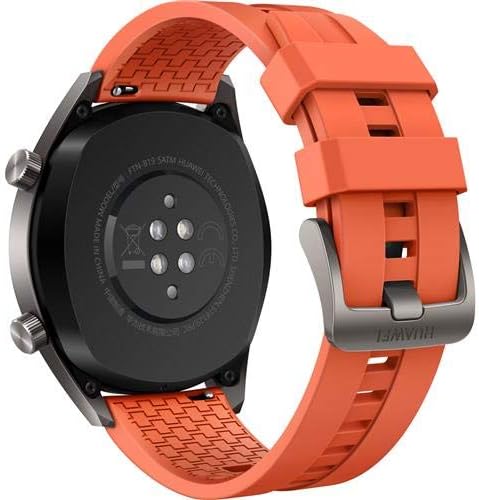
ภาพ: ด้านหลัง view of the HUAWEI Watch GT smartwatch, showing the heart rate sensor and charging pins, important for maintenance.
การแก้ไขปัญหา
- นาฬิกาไม่เปิด: ตรวจสอบให้แน่ใจว่านาฬิกาชาร์จเต็มแล้ว เสียบนาฬิกาเข้ากับเครื่องชาร์จและรอสักครู่ก่อนลองเปิดเครื่อง
- ไม่สามารถจับคู่กับสมาร์ทโฟนได้:
- ตรวจสอบให้แน่ใจว่าเปิดใช้งาน Bluetooth บนโทรศัพท์ของคุณแล้ว
- ตรวจสอบให้แน่ใจว่าแอป HUAWEI Health ได้รับการอัปเดตเป็นเวอร์ชันล่าสุด
- รีสตาร์ททั้งนาฬิกาและสมาร์ทโฟนของคุณ
- ลองยกเลิกการจับคู่แล้วจับคู่อุปกรณ์ใหม่ผ่านแอป
- Inaccurate heart rate/GPS data: Ensure the watch is worn snugly on your wrist, not too loose or too tight. For GPS, ensure you are in an open area with a clear view ของท้องฟ้า
- อายุการใช้งานแบตเตอรี่สั้น: Check if features like always-on display or continuous heart rate monitoring are enabled, as these can consume more power. Adjust settings in the HUAWEI Health app to optimize battery life.
ข้อมูลจำเพาะ
| คุณสมบัติ | รายละเอียด |
|---|---|
| ยี่ห้อ | หัวเว่ย |
| ชื่อรุ่น | GT |
| ขนาดหน้าจอ | 1.39 นิ้ว |
| ประเภทจอภาพ | อโมเลด |
| ปณิธาน | 454 x 454 |
| เทคโนโลยีการเชื่อมต่อ | บลูทู ธ Wi-Fi |
| จีพีเอส | Built-in GPS (Galileo, Glonass, GPS) |
| คุณสมบัติพิเศษ | GPS, Heart Rate Monitor |
| ระบบปฏิบัติการ | Android (Compatible with iOS and Android devices) |
| ความลึกของการต้านทานน้ำ | 50 Meters (IP68) |
| ประเภทวัสดุของสาย | ซิลิโคน |
| ประเภทวัสดุตัวเรือน | เซรามิค |
| อินพุตอินเทอร์เฟซมนุษย์ | หน้าจอสัมผัส |
| เมตริกที่วัด | เซ็นเซอร์วัดอัตราการเต้นของหัวใจแบบออปติคัล |
การรับประกันและการสนับสนุน
This HUAWEI Watch GT includes a Canadian Warranty. For specific warranty terms and conditions, please refer to the warranty card included in your product packaging or visit the official HUAWEI support webเว็บไซต์.
For technical support, troubleshooting assistance, or service inquiries, please contact HUAWEI customer support. Manufacturer contact information: Plano, TX 75024, US.
วิดีโอสินค้า
MayuFit Fitness Tracker Overview
วิดีโอ: วิดีโอนี้ให้ข้อมูลโดยรวมview of the MayuFit Fitness Tracker, demonstrating its features and functionality. While not specifically the HUAWEI Watch GT, it illustrates general fitness tracker capabilities.