
SNOOKER commercial ice maker
เครื่องทำน้ำแข็งก้อนครึ่งทรงลูกบาศก์สำหรับเล่นสนุกเกอร์ พร้อมถังเก็บน้ำแข็ง - ความจุ 280 ปอนด์
Model: commercial ice maker
1. บทนำ
This manual provides essential information for the safe and efficient operation, installation, and maintenance of your Snooker Half Cube Commercial Ice Machine. This air-cooled commercial ice maker is designed to produce 280 lbs of half cube ice per day and features an integrated storage bin with an 80 lbs capacity. It is suitable for mid-sized commercial kitchens, bars, or restaurants. The unit includes a digital control panel for status monitoring and ice thickness adjustment, and an in-line water filter for improved ice quality.

รูปที่ 1.1: ด้านหน้า view of the Snooker Half Cube Commercial Ice Machine. This image shows the overall design of the ice machine, including the front panel with ventilation grilles and the top lid for the ice storage bin.
2. คำแนะนำด้านความปลอดภัยที่สำคัญ
Please read all instructions carefully before operating the appliance to prevent injury or damage. Keep this manual for future reference.
- ความปลอดภัยทางไฟฟ้า: Ensure the power supply matches the machine's requirements (115V/60Hz/1-Phase, 6.3 Amps). Do not use extension cords. Always unplug the unit before cleaning or servicing.
- การต่อน้ำ: ต่อเข้ากับแหล่งจ่ายน้ำดื่มเท่านั้น ตรวจสอบให้แน่ใจว่าการเชื่อมต่อท่อน้ำทั้งหมดแน่นหนาเพื่อป้องกันการรั่วซึม
- การระบายอากาศ : This is an air-cooled unit. Maintain adequate clearance around the machine for proper airflow (minimum 6 inches on sides and rear). Do not block air vents.
- การจัดวาง: Install on a level, stable surface capable of supporting the machine's weight when full of ice. Avoid direct sunlight or heat sources.
- การทำความสะอาด: Use only food-grade cleaning solutions. Always wear appropriate personal protective equipment (PPE) during cleaning.
- เด็กและสัตว์เลี้ยง: เก็บเด็กและสัตว์เลี้ยงให้ห่างจากเครื่อง
- บริการ: การบริการทั้งหมดควรดำเนินการโดยบุคลากรที่ผ่านการรับรอง
3. อะไรอยู่ในกล่อง
เมื่อแกะกล่อง ตรวจสอบว่าส่วนประกอบทั้งหมดอยู่ครบและไม่ได้รับความเสียหาย:
- Snooker Half Cube Commercial Ice Machine Unit
- Integrated Ice Storage Bin
- In-line Water Filter
- Ice Scoop (typically included, though not explicitly listed in "whats_in_the_box", it's mentioned in description)
- คู่มือการใช้งาน (เอกสารนี้)
4. ข้อมูลจำเพาะผลิตภัณฑ์
Detailed technical specifications for the Snooker Half Cube Commercial Ice Machine:
| คุณสมบัติ | ข้อมูลจำเพาะ |
|---|---|
| ชื่อรุ่น | เครื่องทำน้ำแข็งเชิงพาณิชย์ |
| ขนาด (กว้าง x ลึก x สูง) | กว้าง 26 นิ้ว x ลึก 27.8 นิ้ว x สูง 38.6 นิ้ว |
| น้ำหนัก | 204 ปอนด์ |
| 24 hr Production Capacity | 280 ปอนด์ |
| ความจุถังเก็บ | 80 ปอนด์ |
| เล่มที่tage | 115V / 60Hz / 1 เฟส |
| Ampอีเรจ | 6.3 Amps |
| ประเภทการทำความเย็น | ระบายความร้อนด้วยอากาศ |
| Water Connection Required | ใช่ |
| จำเป็นต้องระบายน้ำ | Yes (floor drain recommended) |

Figure 4.1: Dimensional drawing of the Snooker Half Cube Commercial Ice Machine, showing width (26"), depth (27.8"), and height (38.6").
5. การตั้งค่าและการติดตั้ง
Proper installation is crucial for optimal performance and longevity of your ice machine. It is recommended that installation be performed by a qualified technician.
5.1. การแกะกล่องและการจัดวาง
- แกะวัสดุบรรจุภัณฑ์ออกอย่างระมัดระวัง ตรวจสอบตัวเครื่องว่ามีรอยเสียหายจากการขนส่งหรือไม่
- Place the ice machine on a firm, level surface capable of supporting its weight (204 lbs empty, plus ice).
- Ensure adequate ventilation. As an air-cooled unit, it requires a minimum of 6 inches of clear space on the sides and rear for proper airflow. Do not install in an enclosed cabinet without proper ventilation.
- Avoid locations near heat-generating appliances or in direct sunlight. The ambient temperature should be between 50°F (10°C) and 90°F (32°C).
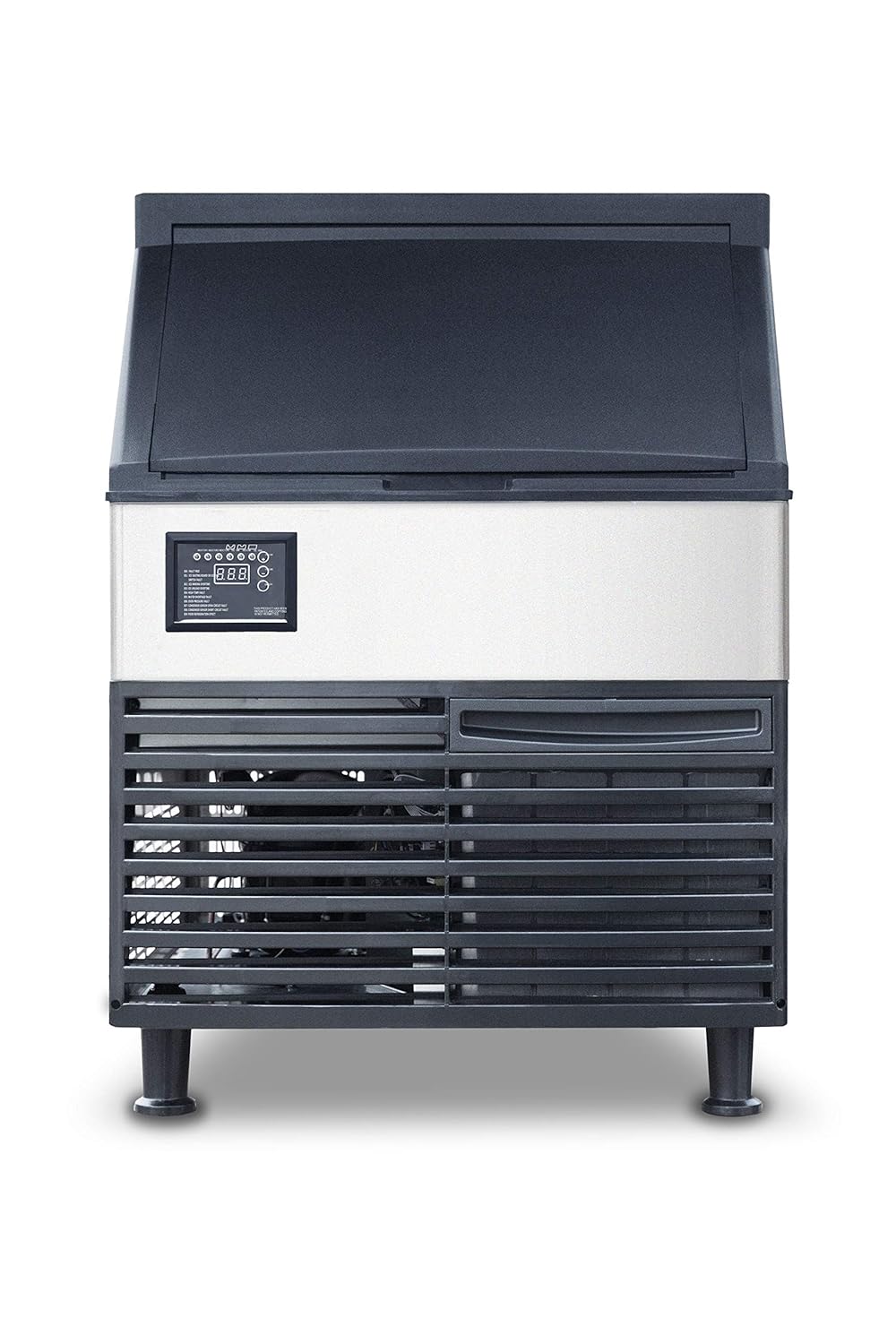
รูปที่ 5.1 : ด้านหน้า view of the ice machine, highlighting the ventilation grilles and control panel. Ensure these areas are not obstructed.
5.2. การต่อน้ำ
- Connect the ice machine to a cold, potable water supply with a pressure between 20 PSI and 80 PSI.
- Install the included in-line water filter according to its instructions to ensure clean water for ice production and to protect the machine.
- Use new water supply hoses; do not reuse old hoses.
5.3. การเชื่อมต่อท่อระบายน้ำ
- The unit requires a floor drain or a drain pump (not included) for proper water drainage.
- Ensure the drain hose has a continuous downward slope to prevent standing water and blockages.
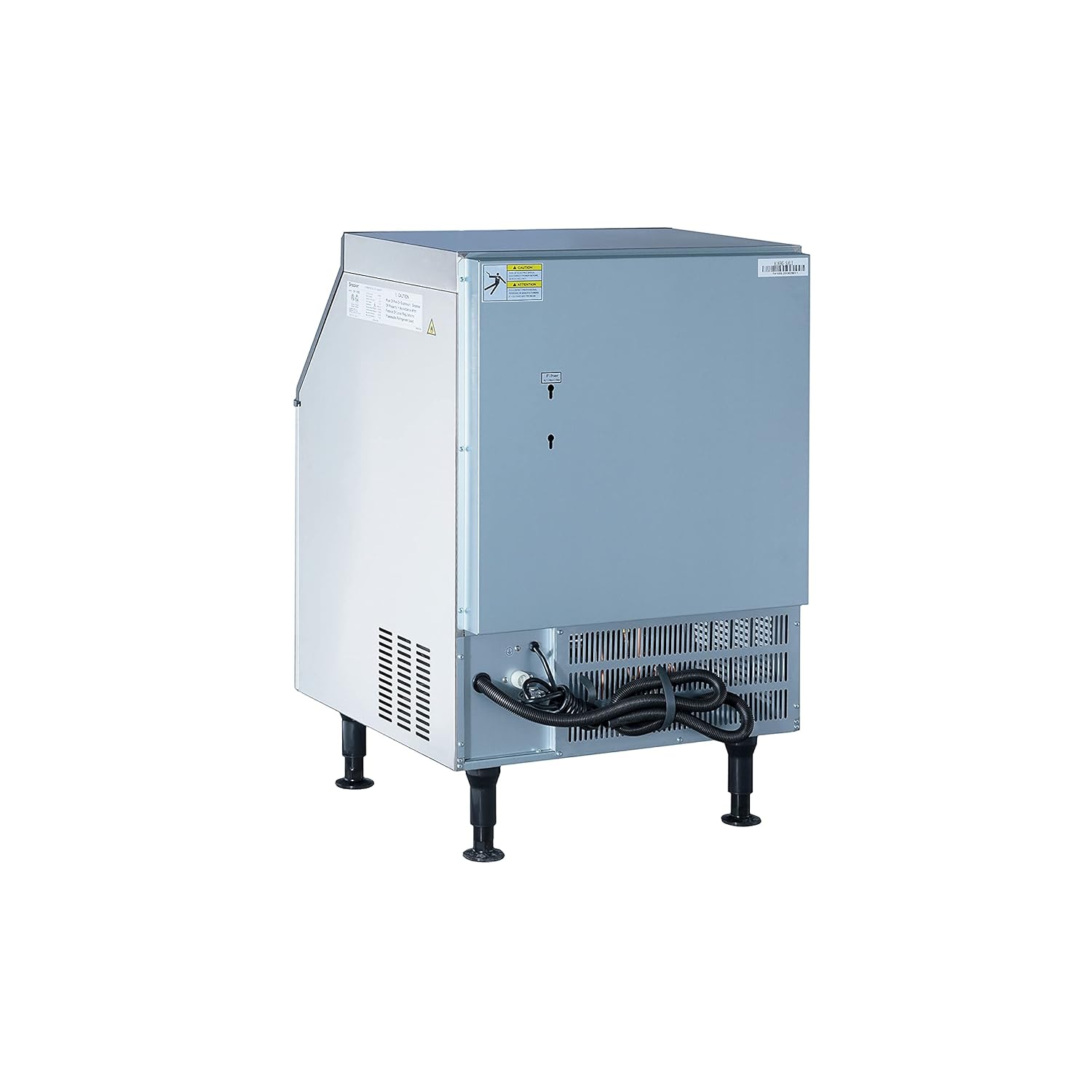
รูปที่ 5.2: ด้านหลัง view of the ice machine, illustrating the location of water inlet and drain connections, and the power cord.
5.4. การเชื่อมต่อไฟฟ้า
- Plug the ice machine into a dedicated, grounded 115V/60Hz/1-Phase electrical outlet.
- อย่าใช้ปลั๊กอะแดปเตอร์หรือสายต่อพ่วง
- Ensure the circuit is protected by a properly sized fuse or circuit breaker (rated for 6.3 Amps or higher).
5.5. การทำความสะอาดเบื้องต้น
- Before first use, clean the ice storage bin and all surfaces that come into contact with water or ice. Refer to the "Maintenance" section for detailed cleaning instructions.
6. คู่มือการใช้งาน
This section details the basic operation of your Snooker ice machine.
6.1. แผงควบคุมด้านบนview
The digital control panel provides status indicators and allows for basic adjustments.

Figure 6.1: Digital control panel showing status indicators (INIT, PREP, MAKE, DROP, INLET, E FAULT), a digital display, and buttons for thickness adjustment, clean cycle, and power (ON/OFF).
- อินไอที: Initialization phase.
- PREP: Preparation phase before ice making.
- ทำ: Ice making cycle in progress.
- หยด: Ice harvesting/dropping cycle.
- ทางเข้า: Water inlet status.
- E FAULT: Error indicator. Refer to the display for specific error codes (E01-E08).
- ปุ่ม +/-: Adjust ice thickness.
- ปุ่มทำความสะอาด: เริ่มรอบการทำความสะอาด
- ปุ่มเปิด/ปิด: เปิดหรือปิดเครื่อง
6.2. Starting the Ice Machine
- Ensure the unit is properly installed and connected to water and power.
- กดปุ่ม เปิด/ปิด button on the control panel. The machine will begin its initialization sequence.
- The unit will automatically proceed through the PREP, MAKE, and DROP cycles to produce ice.
6.3. Adjusting Ice Thickness
- During the MAKE cycle, use the + or - buttons on the control panel to adjust the ice thickness. Increasing the value typically results in thicker ice, and decreasing it results in thinner ice.
- Allow several cycles for the adjustment to take full effect.
6.4. Ice Storage
- Ice is automatically dropped into the integrated 80 lb storage bin.
- The machine will stop producing ice when the bin is full (indicated by E01: ICE FULL). Production will resume automatically when ice is removed.
- Use the provided ice scoop to retrieve ice from the bin. The lift and slide lid stays open for convenience.

รูปที่ 6.2 : ภายใน view of the ice storage bin, showing the ice-making components and the blue LED light, which illuminates the bin for visibility.
7. การบำรุงรักษาและการทำความสะอาด
Regular cleaning and maintenance are essential for hygienic ice production and extending the lifespan of your machine.
7.1. การบำรุงรักษาประจำวัน
- เช็ดทำความสะอาดพื้นผิวภายนอกด้วยผ้าสะอาดamp ผ้า.
- ตรวจสอบให้แน่ใจว่าที่ตักน้ำแข็งสะอาดและจัดเก็บอย่างถูกสุขอนามัย
7.2. การบำรุงรักษารายสัปดาห์
- Empty and clean the ice storage bin. Use a mild, food-grade detergent and rinse thoroughly.
- Check for any obstructions in the air vents and clean if necessary.
7.3. Monthly / Bi-Monthly Cleaning (or as needed)
Perform a thorough cleaning of the ice-making system and water circuit.
- เตรียม: Ensure the ice bin is empty. Turn off the machine and unplug it from the power outlet.
- วงจรการทำความสะอาด: Plug the machine back in. Press and hold the ทำความสะอาด button for 3 seconds to initiate the automatic cleaning cycle. Follow the instructions on the display. This cycle typically circulates a cleaning solution through the system.
- การทำความสะอาดด้วยตนเอง: For deeper cleaning, you may need to manually clean components like the evaporator, water pump, and water tray. Consult a qualified technician if unsure.
- การขจัดตะกรัน: Use a commercial ice machine descaling solution to remove mineral buildup. Follow the descaler manufacturer's instructions carefully.
- ล้าง: After cleaning/descaling, run several rinse cycles (often part of the automatic clean cycle or by running ice cycles and discarding the first few batches of ice) to ensure all cleaning solution is flushed out.
7.4. การเปลี่ยนไส้กรองน้ำ
- The in-line water filter should be replaced every 3-6 months, or more frequently depending on water quality and usage.
- Refer to the water filter's specific instructions for replacement procedures.
8 การแก้ไขปัญหา
This section provides solutions to common issues. For problems not listed or if issues persist, contact qualified service personnel.
8.1. Error Codes (E FAULT)
The digital display will show specific error codes if a fault occurs:
| รหัส | คำอธิบาย | สาเหตุที่เป็นไปได้ / วิธีแก้ไข |
|---|---|---|
| E01 | ICE SKATING BOARD OR ICE FULL | Ice bin is full, or ice is stuck on the evaporator. Remove ice from bin. Check for ice buildup and clear. |
| E02 | ชอร์TAGE ความผิดพลาด | Likely a refrigerant shortage. Contact qualified service personnel. |
| E03 | ICE UNLOAD OVERTIME | Ice is not dropping from the evaporator. Check water pump, harvest assist, or for excessive scale buildup. |
| E04 | HIGH TEMP FAULT | High ambient temperature or poor ventilation. Ensure adequate clearance around the machine and room temperature is within limits. Clean condenser coils. |
| E05 | ชายฝั่งน้ำTAGE ความผิดพลาด | No water supply or low water pressure. Check water inlet valve, water filter, and water supply. |
| E06 | OVER-PRESSURE FAULT | High refrigerant pressure. Could be due to dirty condenser, poor ventilation, or overcharge. Contact qualified service personnel. |
| E07 | เซ็นเซอร์คอนเดนเซอร์เปิดวงจรผิดปกติ | Condenser temperature sensor issue. Contact qualified service personnel. |
| E08 | เซ็นเซอร์คอนเดนเซอร์ลัดวงจรผิดปกติ | Condenser temperature sensor issue. Contact qualified service personnel. |
8.2. การแก้ไขปัญหาทั่วไป
- ไม่มีไฟฟ้า: ตรวจสอบการเชื่อมต่อสายไฟ ปลั๊กไฟ และเบรกเกอร์วงจร
- ไม่มีการผลิตน้ำแข็ง: Ensure water supply is on, water filter is not clogged, and the unit is not in an error state. Check ambient temperature.
- Small or Soft Ice: Adjust ice thickness setting (increase). Check water pressure and temperature. Clean condenser coils.
- น้ำรั่ว: Check all water connections for tightness. Inspect drain hose for kinks or blockages.
- เสียงผิดปกติ: Could indicate a fan issue, pump issue, or loose component. Turn off the unit and inspect. If noise persists, contact service.
9. การรับประกันและการสนับสนุน
For warranty information, please refer to the documentation provided at the time of purchase or contact the seller directly. This product is sold by Iron Mountain Refrigeration & Equipment LLC.
For technical support or service inquiries, please contact the manufacturer, Snooker, or the seller, Iron Mountain Refrigeration & Equipment LLC. Keep your purchase receipt and product model number (commercial ice maker) and ASIN (B0821TMBRM) ready when contacting support.
ข้อมูลผู้ขาย:
- Name: Iron Mountain Refrigeration & Equipment LLC
- ลิงก์ผู้ขายบน Amazon: View ผู้ขายโปรfile บน Amazon
Ask a question about this manual
Ask about setup, troubleshooting, compatibility, parts, safety, or missing instructions. Manuals+ will review the question and use this page’s manual context to help answer it.