
1. บทนำ
The Lowell UPS8-1100 is a high-efficiency line interactive uninterruptible power supply (UPS) designed to provide advanced power protection for sensitive electronic equipment such as AV electronics, servers, and network devices. This manual provides essential information for the safe and efficient installation, operation, and maintenance of your UPS unit.
2. ข้อมูลด้านความปลอดภัย
Please read all instructions carefully before installing or operating the UPS. Retain this manual for future reference.
- ความปลอดภัยทางไฟฟ้า: Connect the UPS to a grounded AC power outlet. Do not remove the grounding prong. Do not open the UPS casing; ไม่มีชิ้นส่วนใดที่ผู้ใช้สามารถซ่อมบำรุงเองได้ภายใน
- ความปลอดภัยของแบตเตอรี่: The UPS contains sealed lead-acid batteries. Do not dispose of batteries in a fire as they may explode. Do not open or mutilate batteries. Battery servicing should be performed or supervised by personnel knowledgeable of batteries and the required precautions.
- สิ่งแวดล้อม: Install the UPS in a controlled environment, free from excessive dust, humidity, and extreme temperatures. Ensure adequate ventilation around the unit.
- น้ำหนัก: The UPS unit is heavy (approximately 31 pounds). Use caution when lifting and installing to prevent injury.
3. เนื้อหาบรรจุภัณฑ์
ตรวจสอบว่ามีสิ่งของทั้งหมดอยู่ครบเมื่อแกะกล่อง:
- Lowell UPS8-1100 Line Interactive UPS Unit
- 4-Point Steel Rail Kit for Rack Installation
- คู่มือการใช้งาน (เอกสารนี้)
- สายไฟ
4. สินค้าหมดview
The Lowell UPS8-1100 features a robust design for reliable power delivery and protection. Below are images illustrating the main unit and its included accessories.
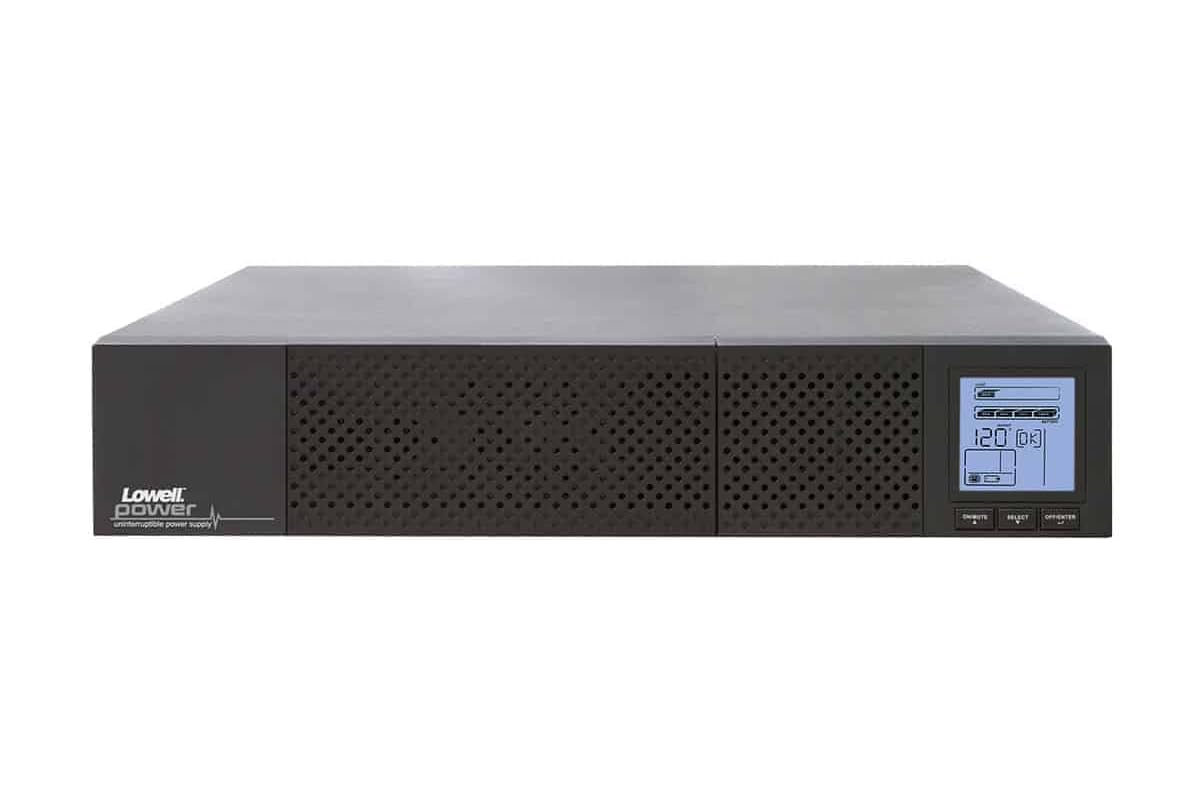
รูปที่ 4.1 : ด้านหน้า view of the Lowell UPS8-1100 UPS unit, showing the ventilation grille and the integrated LCD display panel with control buttons.
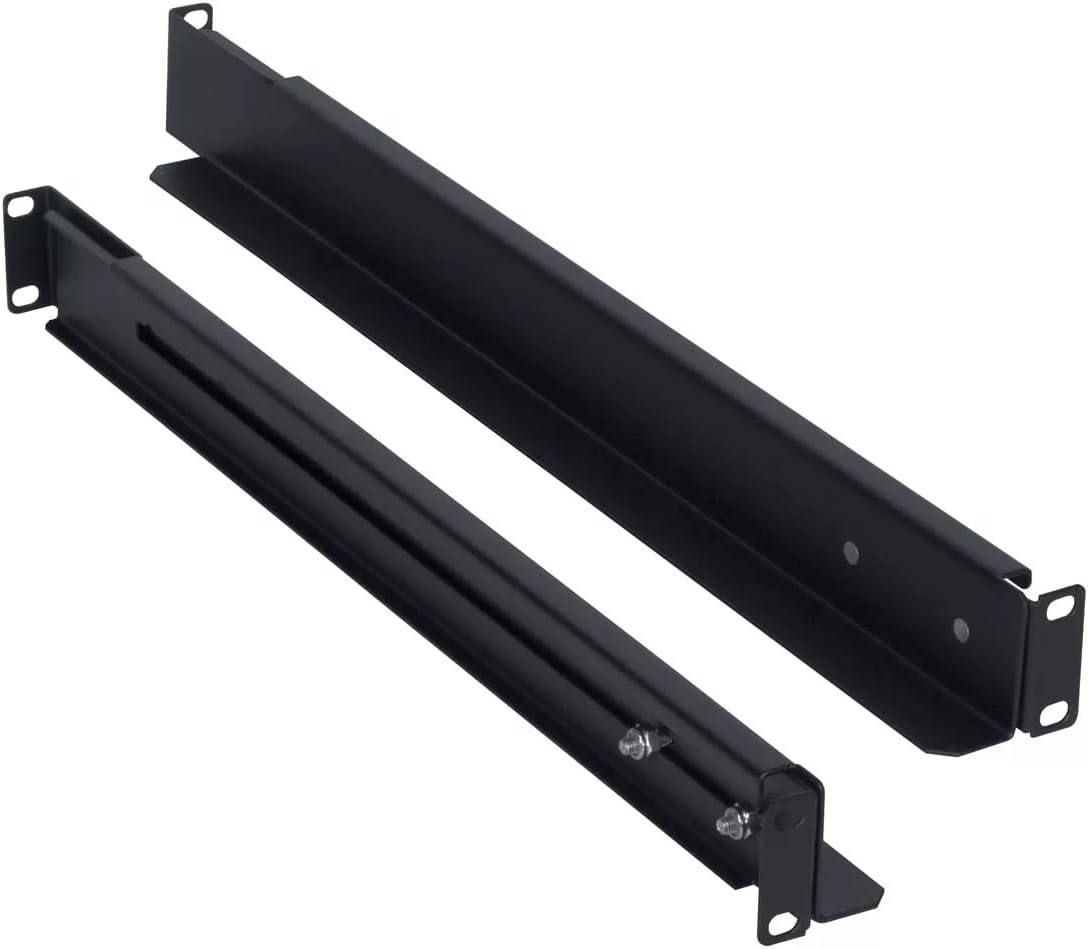
Figure 4.2: The included 4-point steel rail kit, designed for secure rack installation of the UPS unit.
คุณสมบัติแผงด้านหน้า:
- จอแสดงผล LCD: Provides real-time status information including input/output voltage, battery level, load capacity, and operational mode.
- ปุ่มควบคุม: Typically include Power On/Off, Select, and Enter for navigating the LCD menu and controlling the unit.
คุณสมบัติแผงด้านหลัง:
- อินพุตไฟฟ้ากระแสสลับ: For connecting the UPS to the utility power outlet.
- เต้ารับขาออก: จัดหาแบตเตอรี่สำรองและระบบป้องกันไฟกระชากสำหรับอุปกรณ์ที่เชื่อมต่อ
- พอร์ตสื่อสาร: May include USB, RS-232, or network ports for monitoring and management.
- ขั้วต่อแบตเตอรี่ภายนอก (ถ้ามี): สำหรับเชื่อมต่อชุดแบตเตอรี่ภายนอก (อุปกรณ์เสริม)
5. การตั้งค่า
5.1 การแกะบรรจุภัณฑ์และการตรวจสอบ
Carefully unpack the UPS and inspect it for any shipping damage. If damage is found, do not operate the unit and contact your dealer.
5.2 การติดตั้งแร็ค
The UPS8-1100 is designed for rack installation using the included 4-point steel rail kit. Follow these general steps:
- Attach the inner rails to the sides of the UPS unit using the provided screws.
- Mount the outer rails to the front and rear posts of your server rack at the desired height.
- Carefully slide the UPS unit, with its attached inner rails, into the mounted outer rails until it locks securely into place.
- Secure the front of the UPS to the rack posts with additional screws if required by the rail kit design.
5.3 การเชื่อมต่อกับแหล่งจ่ายไฟ
- Ensure the UPS is turned off.
- Connect the UPS power cord to the AC input on the rear panel of the UPS.
- Plug the other end of the UPS power cord into a grounded wall outlet.
- Allow the UPS to charge for at least 8 hours before initial use to ensure optimal battery runtime.
5.4 อุปกรณ์เชื่อมต่อ
Plug your critical electronic devices into the output receptacles on the rear panel of the UPS. Ensure that the total load does not exceed the UPS's capacity (990W).
6. คู่มือการใช้งาน
6.1 การเปิดใช้งานเครื่องสำรองไฟ (UPS)
Press and hold the Power On/Off button on the front panel for approximately 2-3 seconds until you hear a beep and the LCD display illuminates. The UPS will perform a self-test and then enter Line Mode, providing power to connected equipment.
6.2 การปิดเครื่องสำรองไฟ (UPS)
To turn off the UPS, press and hold the Power On/Off button for approximately 2-3 seconds until you hear a beep and the LCD display turns off. This will remove power from all connected equipment.
6.3 จอแสดงผล LCD และปุ่มควบคุม
Use the Select and Enter buttons to navigate through the LCD menu. The display provides information on:
- อินพุต/เอาต์พุต Voltagอีและความถี่
- ระดับประจุแบตเตอรี่และระยะเวลาการใช้งานโดยประมาณ
- โหลดเปอร์เซ็นต์tage
- Operational Mode (Line Mode, Battery Mode, Bypass Mode)
- Event Logs and Warnings
7. การบำรุงรักษา
7.1 การดูแลแบตเตอรี่
The UPS batteries are designed for a specific lifespan. To maximize battery life:
- Keep the UPS connected to AC power to keep batteries charged.
- Avoid operating the UPS in extreme temperatures.
- Perform a battery self-test periodically (if available via LCD menu or software).
- Replace batteries when their capacity significantly diminishes. Refer to Lowell support for replacement battery information.
7.2 การทำความสะอาด
เช็ดทำความสะอาดภายนอกเครื่องสำรองไฟ (UPS) ด้วยผ้าแห้งเนื้อนุ่ม ห้ามใช้น้ำยาทำความสะอาดชนิดเหลวหรือสเปรย์ ตรวจสอบให้แน่ใจว่าช่องระบายอากาศไม่มีฝุ่นหรือสิ่งกีดขวาง
8 การแก้ไขปัญหา
This section addresses common issues you might encounter with your UPS. For more complex problems, contact Lowell technical support.
| ปัญหา | สาเหตุที่เป็นไปได้ | สารละลาย |
|---|---|---|
| เครื่องสำรองไฟ (UPS) ไม่ทำงาน | ไม่มีไฟ AC เข้า; แบตเตอรี่หมดเกลี้ยง | ตรวจสอบการเชื่อมต่อสายไฟและเต้ารับที่ผนัง ปล่อยให้เครื่องสำรองไฟ (UPS) ชาร์จไฟเป็นเวลาหลายชั่วโมง |
| เครื่องสำรองไฟ (UPS) ส่งเสียงบี๊บอย่างต่อเนื่อง | Overload; On battery power; Low battery | Reduce connected load; Save work and shut down equipment; Allow UPS to recharge. |
| แบตเตอรี่ใช้งานได้สั้น | แบตเตอรี่ชาร์จไม่เต็ม; แบตเตอรี่ใกล้หมดอายุการใช้งาน | Allow UPS to charge for 8+ hours; Consider battery replacement. |
| จอ LCD ปิดอยู่ | UPS is off; Power saving mode | Press power button to turn on; Press any button to wake display. |
9. ข้อมูลจำเพาะ
The following table details the technical specifications for the Lowell UPS8-1100:
| คุณสมบัติ | รายละเอียด |
|---|---|
| ยี่ห้อ | โลเวลล์ |
| แบบอย่าง | ยูพีเอส8-1100 |
| ความจุ | 1100VA (990W) |
| พิมพ์ | UPS แบบไลน์อินเทอร์แอคทีฟ |
| ฟอร์มแฟกเตอร์ | Tower (Rack-mountable with included kit) |
| น้ำหนักสินค้า | 31 ปอนด์ |
| เล่มที่tage | 12 Volts (Internal Battery System) |
| ASIN | B0821SPK48 |
| ยูพีซี | 811859034975 |
| วันที่พร้อมใช้งานครั้งแรก | 25 พฤศจิกายน 2019 |
10. การรับประกันและการสนับสนุน
For warranty information, technical support, or service inquiries, please contact Lowell customer service. Refer to the official Lowell webโปรดตรวจสอบเว็บไซต์หรือเอกสารการซื้อของคุณเพื่อดูรายละเอียดการติดต่อและเงื่อนไขการรับประกันล่าสุด
แหล่งข้อมูลออนไลน์: Visit the Lowell official website for product updates, FAQs, and additional support materials.