
1. บทนำ
Thank you for choosing the Amcrest 1080P WiFi Pan/Tilt Indoor Security Camera (Model: ASH21-W). This manual provides essential information for setting up, operating, and maintaining your device. This camera offers advanced features such as 1080P Full-HD video, pan/tilt functionality, human and pet detection, motion tracking, two-way audio, and various storage options to ensure comprehensive monitoring of your indoor spaces.
2. อะไรอยู่ในกล่อง
- Amcrest ASH21-W 1080P WiFi Pan/Tilt Camera
- อะแดปเตอร์แปลงไฟ
- สายไฟ USB
- แผ่นยึด
- สกรูยึดและตัวล็อค
- คู่มือเริ่มต้นอย่างรวดเร็ว
บันทึก: A MicroSD card (up to 256GB) for local storage is not included and must be purchased separately.
3. การตั้งค่า
3.1 การเปิดเครื่อง
- เสียบสายไฟ USB เข้ากับพอร์ตจ่ายไฟของกล้อง
- เสียบอะแดปเตอร์จ่ายไฟเข้ากับเต้ารับไฟฟ้ามาตรฐาน
- The camera will power on, and the indicator light will begin to flash.
3.2 การดาวน์โหลดแอปและการลงทะเบียนบัญชี
- ดาวน์โหลด Amcrest SmartHome ดาวน์โหลดแอปจาก App Store (iOS) หรือ Google Play Store (Android)
- เปิดแอปและลงทะเบียนบัญชีใหม่หรือเข้าสู่ระบบหากคุณมีบัญชีอยู่แล้ว
3.3 การจับคู่อุปกรณ์
- In the Amcrest SmartHome app, tap the "Add Device" icon (usually a '+' symbol).
- Select your camera model or choose to scan the QR code.
- สแกนรหัส QR ที่ด้านล่างของกล้อง
- Follow the on-screen prompts to connect the camera to your 2.4GHz Wi-Fi network and set a device password.
- Name your device (e.g., "Living Room Camera", "Baby's Room").
3.4 ตัวเลือกการติดตั้ง
The camera can be placed on a tabletop or mounted on a wall or ceiling. Use the provided mounting plate, screws, and anchors for secure installation if mounting is desired.

ภาพที่ 1: Amcrest ASH21-W camera on a table, showcasing การออกแบบที่กะทัดรัด
4. คู่มือการใช้งาน
4.1 สด View และการควบคุมการแพน/เอียง
Once connected, access the live video feed through the Amcrest SmartHome app. Use the on-screen controls to remotely pan (355°) and tilt (80°) the camera lens to view พื้นที่ต่างๆ ในห้องของคุณ

ภาพที่ 2: Amcrest ASH21-W camera demonstrating pan and tilt motion with blue arrows, indicating its auto-tracking capability.
4.2 เสียงสองทาง
The camera features a built-in microphone and speaker, enabling two-way communication. Tap the "Talk" button in the app to speak through the camera, and tap "Listen" to hear audio from the camera's location.

ภาพที่ 3: A person using a smartphone to engage in two-way talk through the Amcrest camera, showing the live feed on the phone screen.
4.3 Baby Monitor Mode
Activate Baby Monitor Mode in the app to receive notifications based on adjustable sound thresholds (VOX alarm). This feature is ideal for monitoring infants or pets, alerting you to sounds like crying or barking without requiring constant visual monitoring.
ภาพที่ 4: Amcrest ASH21-W camera with a smartphone displaying the baby monitor interface, showing a baby in a crib and audio level graphs.
4.4 Motion Detection & Smart Tracking
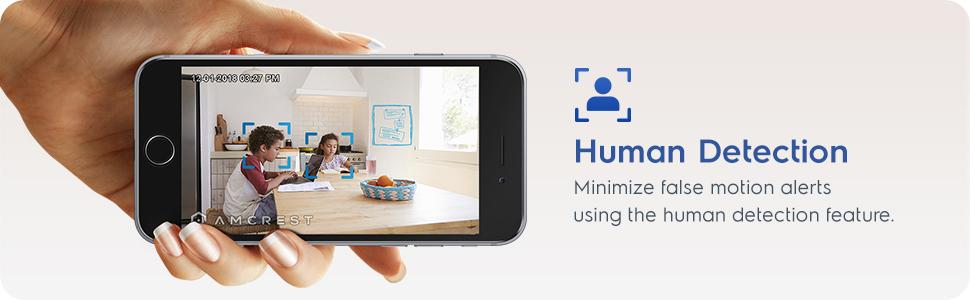
Enable motion detection to receive alerts and record footage when movement is detected. Utilize the human detection filter to reduce false alarms. With Smart Tracking enabled, the camera will automatically pan and tilt to follow detected human movement across the room.

ภาพที่ 5: Amcrest ASH21-W camera on a table, with a smartphone showing a human detection alert and a 93-degree viewing angle graphic.
4.5 การมองเห็นตอนกลางคืน
The camera provides clear night vision up to 33 feet in absolute darkness, ensuring continuous monitoring even in low-light conditions.
4.6 การบันทึกและจัดเก็บข้อมูล
สามารถจัดเก็บไฟล์บันทึกเสียงได้หลายวิธี:
- การ์ด MicroSD: ใส่การ์ด MicroSD (สูงสุด 256GB ไม่รวมอยู่ในชุด) ลงในช่องเสียบของกล้องเพื่อบันทึกข้อมูลลงในเครื่อง
- Amcrest Cloud: Utilize optional cloud storage services for remote access to recordings.
- ซอฟต์แวร์ของบุคคลที่สาม: Compatible with Amcrest NVRs and third-party surveillance software like Blue Iris, Synology, QNAP NAS, Zoneminder, and RTSP.

ภาพที่ 6: Amcrest ASH21-W camera highlighting the MicroSD card slot and showing icons for Amcrest Smart Home Cloud and MicroSD Card storage options.
4.7 Alerts & Notifications
Receive instant notifications on your smartphone when motion or human detection events occur. Review event playback directly from the app.
1 วิดีโอ: Official Amcrest video demonstrating the Smart Home WiFi Pan/Tilt Baby Monitor Camera's features, including setup, app interface, baby monitor mode, human detection, smart tracking, night vision, and storage options.
5. การบำรุงรักษา
- การทำความสะอาด: ใช้ผ้าแห้งเนื้อนุ่มเช็ดทำความสะอาดเลนส์และตัวกล้อง หลีกเลี่ยงสารเคมีรุนแรงหรือวัสดุที่มีฤทธิ์กัดกร่อน
- อัพเดตเฟิร์มแวร์: Regularly check the Amcrest SmartHome app for firmware updates to ensure optimal performance and security.
- การจัดวาง: Ensure the camera is placed in a location with good Wi-Fi signal strength and away from direct heat sources or extreme temperatures.
6 การแก้ไขปัญหา
- ปัญหาการเชื่อมต่อ: Ensure your Wi-Fi network is 2.4GHz. Check your router's signal strength and try restarting both the camera and your router.
- ไม่มีสด View: Verify the camera is powered on and connected to Wi-Fi. Check the app for any error messages.
- สัญญาณเตือนที่ผิดพลาด: Adjust motion detection sensitivity settings in the app. Utilize human detection filters to minimize alerts from non-human movement.
- คุณภาพของภาพต่ำ: ตรวจสอบให้แน่ใจว่าเลนส์กล้องสะอาด และตรวจสอบความเร็วการเชื่อมต่ออินเทอร์เน็ตของคุณ
- ปัญหาเกี่ยวกับระบบเสียงสองทาง: Check volume settings on your phone and in the app. Ensure there is no obstruction to the camera's microphone or speaker.
7. ข้อมูลจำเพาะ
| คุณสมบัติ | รายละเอียด |
|---|---|
| ความละเอียดในการจับภาพวิดีโอ | 1080p |
| ช่วงแพน/เอียง | แพน 355° เอียง 80° |
| Viewอิงแองเกิล | 93 องศา |
| ช่วงการมองเห็นตอนกลางคืน | สูงถึง 33 ฟุต |
| ตัวเลือกการจัดเก็บข้อมูล | MicroSD (up to 256GB), Amcrest Cloud, NVR/3rd Party Software |
| การเชื่อมต่อ | ไวไฟ (2.4GHz) |
| ระบบเสียงสองทาง | Yes (Built-in Mic & Speaker) |
| การตรวจจับการเคลื่อนไหว | Yes (Human & Pet Detection, Motion-Tracking) |
| อุปกรณ์ที่รองรับ | อเมซอนอเล็กซา |
| แหล่งพลังงาน | ใช้ไฟฟ้าแบบมีสาย (5V DC, 5W) |
| ขนาด (กว้าง x ยาว x สูง) | 4.17 x 3.04 x 3.04 นิ้ว |
| น้ำหนักสินค้า | 0.53 ปอนด์ (8.4 ออนซ์) |
| วัสดุ | พลาสติก |
| การใช้งานภายใน/ภายนอกอาคาร | ในร่ม |
8. การรับประกันและการสนับสนุน
The Amcrest ASH21-W camera comes with a full การรับประกัน 1 ปีในสหรัฐอเมริกา. For any technical assistance or support, please contact Amcrest directly. Lifetime technical support is provided by Amcrest, a United States-based company headquartered in Houston, TX.
For further assistance, please refer to the Amcrest SmartHome app's support section or visit the official Amcrest webเว็บไซต์.