
1. บทนำ
This manual provides essential information for the proper installation, operation, and maintenance of the COMMANDER WS4/WSS4 Track Adaptor Kit, Model 374107. This kit is designed to facilitate the integration of track systems onto compatible Can-am UTV vehicles. Adherence to these instructions is crucial for ensuring the safety, performance, and longevity of the adaptor kit and your vehicle.
2. ข้อมูลด้านความปลอดภัย
Always prioritize safety during installation and use. Failure to follow safety guidelines can result in serious injury or damage to property.
- อ่านคู่มือทั้งหมด: Before beginning any installation or maintenance, thoroughly read and understand all instructions in this manual.
- การติดตั้งโดยมืออาชีพ: Installation of this track adaptor kit may require specialized tools and expertise. Professional installation by a qualified technician is highly recommended.
- สวมอุปกรณ์ป้องกัน: Always wear appropriate personal protective equipment, including safety glasses, gloves, and sturdy footwear, during installation.
- ความเสถียรของยานพาหนะ: Ensure the vehicle is securely supported on a level surface using jack stands before working underneath it. Never rely solely on a jack.
- ความสมบูรณ์ของส่วนประกอบ: Inspect all components for damage or defects before installation. Do not install damaged parts.
- ข้อมูลจำเพาะแรงบิด: Adhere strictly to all torque specifications provided in the detailed installation manual for fasteners. Improper torque can lead to component failure.
3. เนื้อหาบรรจุภัณฑ์
The COMMANDER WS4/WSS4 Track Adaptor Kit is comprised of several components. Please note that a complete adaptor kit requires ordering BOM1, BOM2, and BOM3. The following components are typically included:
- Kit Component 1: 375890
- Kit Component 2: 375950
- Kit Component 3: 375960
- Adaptor Number: 374107
- All necessary hardware for installation.
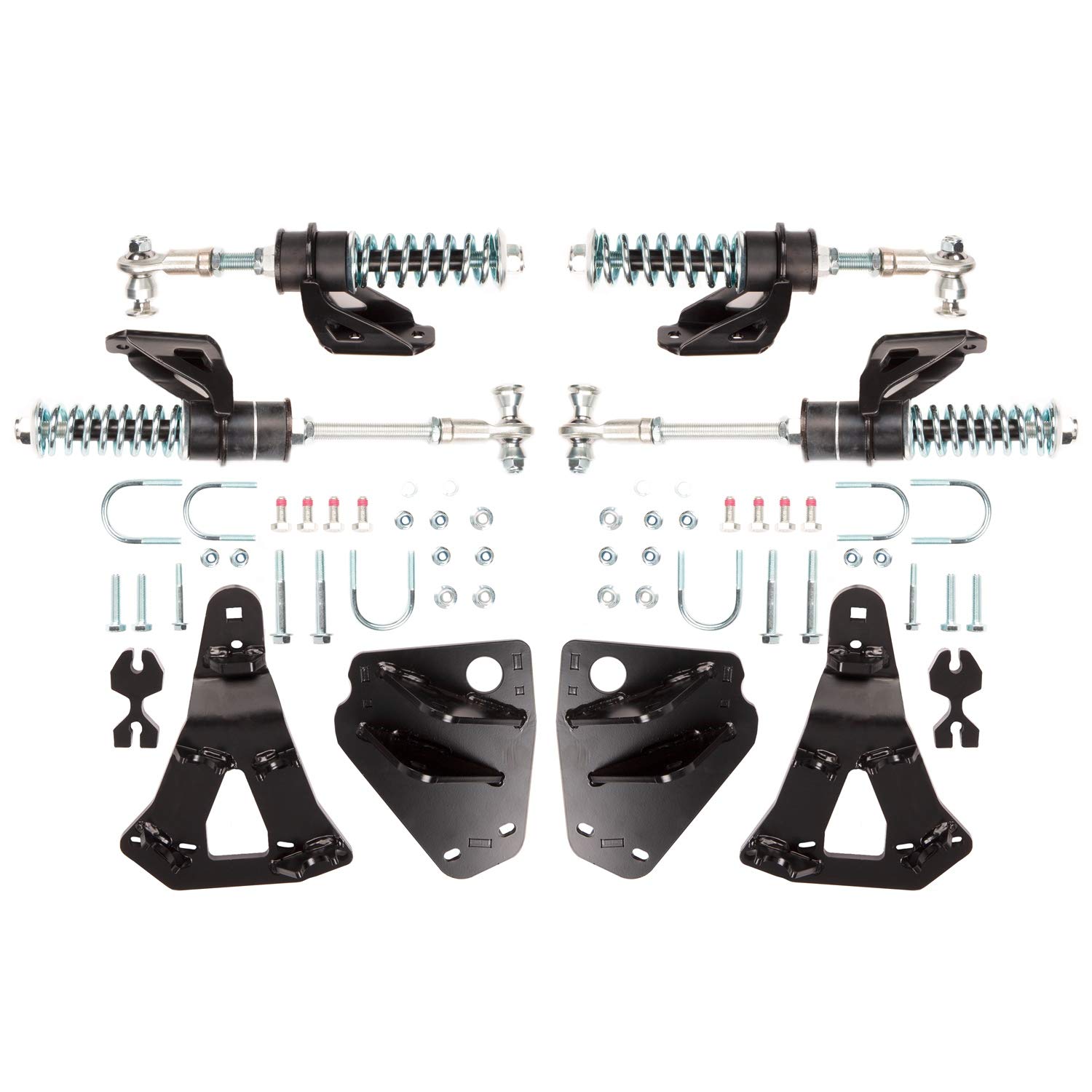
รูปที่ 1: อดีตample of COMMANDER WS4/WSS4 Track Adaptor Kit components. The actual appearance may vary slightly.
4. การตั้งค่าและการติดตั้ง
This section provides general guidance for the installation process. For detailed, step-by-step instructions, always refer to the comprehensive installation manual provided with your specific track system and adaptor kit. Only one set of adapters is needed per vehicle.
- เตรียมยานพาหนะ: Park the UTV on a level, stable surface. Engage the parking brake and block the wheels. Lift the vehicle using a suitable jack and secure it with jack stands.
- ถอดล้อ: Carefully remove the existing wheels from the UTV.
- Install Adaptors: Follow the specific instructions in your detailed installation manual to mount the track adaptors (components 375890, 375950, 375960, 374107) to the vehicle's hubs. Ensure all fasteners are tightened to the manufacturer's specified torque values.
- Mount Track System: Once the adaptors are securely installed, mount the track system according to its manufacturer's instructions.
- การตรวจสอบขั้นสุดท้าย: Before lowering the vehicle, perform a thorough inspection to ensure all components are correctly installed, fasteners are tight, and there is no interference with other vehicle parts.
5. การดำเนินการ
The COMMANDER WS4/WSS4 Track Adaptor Kit itself does not have operational controls. Its function is to provide a secure and compatible interface between your Can-am UTV and a track system. Proper operation of the track system relies on correct installation of this adaptor kit and adherence to the track system manufacturer's operating guidelines.
- Ensure the track system is properly engaged and disengaged according to its manual.
- Always operate the UTV with tracks within the manufacturer's recommended speed and load limits.
- Be aware that vehicle handling characteristics will change significantly with tracks installed.
6. การบำรุงรักษา
Regular maintenance of the track adaptor kit is essential to ensure its continued performance and safety.
- การตรวจสอบตามปกติ: Periodically inspect the adaptors for any signs of wear, damage, or corrosion. Check for loose fasteners, cracks, or deformation.
- แรงบิดของตัวยึด: Re-check the torque of all mounting fasteners at recommended intervals, especially after the first few hours of operation, and then regularly thereafter.
- การทำความสะอาด: Keep the adaptors clean from dirt, mud, and debris. Use mild soap and water, and avoid harsh chemicals that could damage finishes.
- พื้นที่จัดเก็บ: If the track system and adaptors are removed for storage, clean them thoroughly and store them in a dry, protected environment.
7 การแก้ไขปัญหา
If you encounter issues with the track adaptor kit, consider the following troubleshooting steps:
- ส่วนประกอบที่หลวม: Check all fasteners to ensure they are tightened to the correct torque specifications.
- เสียง/การสั่นสะเทือนที่ผิดปกติ: Re-inspect the installation for any misaligned components or parts making contact. Ensure the track system itself is properly adjusted.
- ปัญหาการติดตั้ง: Verify that the correct adaptor kit (Model 374107) is being used for your specific Can-am UTV and WSS4 track system. Refer to the compatibility chart if available.
- ความเสียหาย: If any part of the adaptor kit appears damaged, discontinue use immediately and replace the affected components.
If problems persist after performing these checks, contact COMMANDER customer support or a certified service technician.
8. ข้อมูลจำเพาะ
| คุณลักษณะ | ข้อมูลจำเพาะ |
|---|---|
| ยี่ห้อ | ผู้บัญชาการ |
| ชื่อรุ่น | WSS4 Track Adaptator Kit |
| หมายเลขรุ่นสินค้า | 374107 |
| หมายเลขชิ้นส่วนของผู้ผลิต | 374107 |
| ยี่ห้อที่เข้ากันได้ | Fits Can-am |
| Compatible Vehicle Category | ยูทีวี |
| เข้ากันได้กับ | WSS4 |
| ส่วนประกอบของชุด | 375890, 375950, 375960 |
9. ข้อมูลการรับประกัน
For detailed warranty information regarding the COMMANDER WS4/WSS4 Track Adaptor Kit, please refer to the official warranty statement provided by COMMANDER at the time of purchase or visit the manufacturer's official website. Warranty terms and conditions may vary and typically cover manufacturing defects under normal use.
10. การสนับสนุนและการติดต่อ
If you require further assistance, have questions not covered in this manual, or need to report an issue, please contact COMMANDER customer service. Have your product model number (374107) and purchase information ready when contacting support.
Contact information for COMMANDER can typically be found on their official webบรรจุภัณฑ์ไซต์หรือผลิตภัณฑ์