
1. บทนำ
This manual provides comprehensive instructions for the IMILAB CMSXJ16A Smart Home Security Camera, a product of XIAOMI. It covers setup, operation, maintenance, and troubleshooting to ensure optimal performance and security monitoring. Please read this manual carefully before using the product and retain it for future reference.
2. สินค้าหมดview
2.1 เนื้อหาบรรจุภัณฑ์
ตรวจสอบว่ามีรายการทั้งหมดอยู่ในแพ็คเกจ:
- IMILAB Home Security Camera Basic x 1
- คู่มือการใช้งาน x 1
- สายไฟ x 1
- Power Adapter (UK/EU/US) x 1
- Wall Mounting Package x 1 (includes screws and wall plugs)
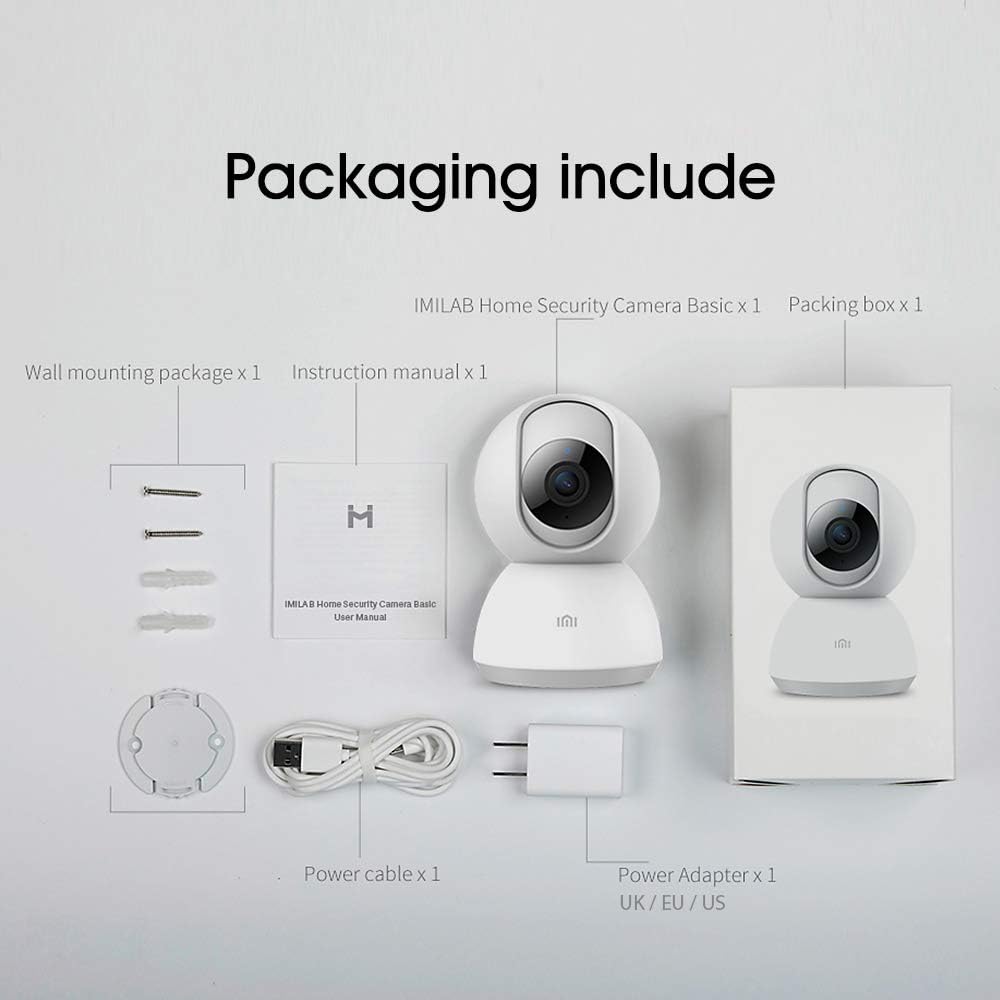
Image: Contents of the IMILAB CMSXJ16A camera package.
2.2 ส่วนประกอบของกล้อง
The IMILAB CMSXJ16A camera features a compact, spherical design with a rotating base for 360-degree coverage. Key components include the lens, microphone, speaker, status indicator light, and power port.

ภาพ: ด้านหน้า view of the IMILAB CMSXJ16A camera.
2.3 คุณสมบัติหลัก
- FHD (1080P) Resolution: Provides clear and detailed image quality.
- การหมุน 360°: นำเสนอทัศนียภาพอันงดงาม viewing for comprehensive area coverage.
- Glare-Free Night Vision: Equipped with F2.1 aperture and 8x 940mm infrared LEDs for a visible distance of 10m.
- True Color Night Vision: Maintains full color in low light conditions, even at 100 lumens.
- AI การตรวจจับมนุษย์: Advanced AI reduces unnecessary alerts by 70% for more accurate notifications.
- Crying Baby Notification: Alerts you to the sound of a crying baby.
- ตัวเลือกการจัดเก็บข้อมูลหลากหลาย: Supports cloud storage, up to 64GB Micro TF card, and NAS storage.
- การเข้ารหัสวิดีโอ H.265: Efficiently compresses video, saving storage space while maintaining quality.
3. การตั้งค่า
3.1 การเปิดเครื่อง
- ต่อสายไฟเข้ากับพอร์ตจ่ายไฟของกล้อง
- เสียบอะแดปเตอร์จ่ายไฟเข้ากับเต้ารับไฟฟ้ามาตรฐาน
- The camera will power on, and the status indicator light will begin to flash, indicating it is ready for connection.
3.2 การติดตั้งแอพ
Download the official IMILAB Home Security app from your smartphone's app store. The app is compatible with Android 4.4 and above, and iOS 8.0 and above.
- ค้นหา "IMILAB Home Security" in the Google Play Store (for Android) or Apple App Store (for iOS).
- ดาวน์โหลดและติดตั้งแอปพลิเคชัน
- เปิดแอปและทำตามคำแนะนำบนหน้าจอเพื่อสร้างบัญชีหรือเข้าสู่ระบบ
3.3 การเชื่อมต่อกับ Wi-Fi
Follow the in-app instructions to connect your camera to your home Wi-Fi network. This typically involves scanning a QR code generated by the app with the camera's lens.
3.4 การติดตั้งกล้อง
The camera supports wall mounting. Use the provided wall mounting package for secure installation.
- เลือกตำแหน่งที่เหมาะสมสำหรับการติดตั้ง โดยต้องแน่ใจว่ามีพื้นที่โล่งกว้าง view และสามารถเข้าถึงเต้าเสียบปลั๊กไฟ
- Use the mounting base as a template to mark drill holes on the wall.
- เจาะรูและเสียบพุกยึดผนัง
- Secure the mounting base to the wall with screws.
- ติดตั้งกล้องเข้ากับฐานยึด
4. คู่มือการใช้งาน
4.1 สด View และการควบคุมระยะไกล
Once connected, open the IMILAB Home Security app to access the live video feed from your camera. You can remotely control the camera's 360-degree rotation to view different areas of your space.

ภาพ: สด view of the camera feed on mobile devices, demonstrating H.265 encoding efficiency.
4.2 การมองเห็นตอนกลางคืน
The camera automatically switches to night vision mode in low light conditions. It features glare-free infrared night vision and true color night vision for clear visibility even in very dim environments.

Image: Demonstration of glare-free and true color night vision capabilities.
4.3 AI Human Detection and Notifications
The camera utilizes AI to detect human movement, significantly reducing false alarms from pets or other non-human movements. You will receive precise notifications on your smartphone when human activity is detected.

Image: AI movement notification interface in the mobile application.
4.4 Crying Baby Detection
Enable the crying baby detection feature in the app to receive alerts if the camera detects the sound of a baby crying, providing an additional layer of monitoring for nurseries.
4.5 การบันทึกและบันทึกวิดีโอ
The camera supports real-time video recording with multiple storage options:
- การเก็บข้อมูลบนคลาวด์: Subscribe to cloud services for secure off-site storage of your recordings.
- การ์ด Micro TF: Insert a Micro TF card (up to 64GB, not included) into the camera for local storage.
- พื้นที่จัดเก็บข้อมูล NAS: Connect the camera to a Network Attached Storage (NAS) device for expanded local storage capabilities.
4.6 การเข้ารหัสวิดีโอ H.265
The camera uses H.265 video encoding, which allows for more efficient compression of video files. This means you can save the same quality video with approximately 50% less file size compared to H.264, optimizing storage and bandwidth usage.
5. การบำรุงรักษา
To ensure the longevity and optimal performance of your camera, follow these maintenance guidelines:
- การทำความสะอาด: เช็ดเลนส์และตัวกล้องเบาๆ ด้วยผ้าแห้งเนื้อนุ่ม ห้ามใช้สารเคมีรุนแรงหรือน้ำยาทำความสะอาดที่มีฤทธิ์กัดกร่อน
- การจัดวาง: ตรวจสอบให้แน่ใจว่าได้วางกล้องไว้ในสภาพแวดล้อมที่มั่นคง หลีกเลี่ยงแสงแดดโดยตรง อุณหภูมิที่สูงหรือต่ำเกินไป และความชื้นสูง
- อัพเดตเฟิร์มแวร์: ตรวจสอบแอปเป็นประจำเพื่อดูการอัปเดตเฟิร์มแวร์ที่มีให้ใช้งาน เพื่อให้แน่ใจว่ากล้องของคุณมีคุณสมบัติและการปรับปรุงด้านความปลอดภัยล่าสุดอยู่เสมอ
6 การแก้ไขปัญหา
If you encounter issues with your IMILAB CMSXJ16A camera, refer to the following common solutions:
- กล้องเชื่อมต่อไม่ได้: Ensure your Wi-Fi network is 2.4GHz (5GHz is not supported). Check Wi-Fi signal strength. Restart the camera and your router.
- คุณภาพของภาพต่ำ: Clean the camera lens. Ensure adequate lighting in the environment. Check your internet connection speed.
- ไม่มีการแจ้งเตือน: Verify that notifications are enabled in both the camera app settings and your smartphone's system settings. Check network connectivity.
- กล้องออฟไลน์: Check the power connection. Ensure your Wi-Fi network is active and the camera is within range. Restart the camera.
- Micro TF Card Not Detected: Ensure the card is inserted correctly. Format the card through the app if it's new or has issues. Use a compatible Micro TF card (up to 64GB).
7. ข้อมูลจำเพาะ
| คุณสมบัติ | ข้อมูลจำเพาะ |
|---|---|
| หมายเลขรุ่น | CMSXJ16A |
| ขนาด (กว้าง x ยาว x สูง) | 10.8 x 7.6 x 7.6 ซม. |
| น้ำหนัก | 211 กรัม |
| ความละเอียดวิดีโอ | 1080p (FHD) |
| ทุ่งแห่ง View / Angle of View | 360 องศา |
| ระยะการมองเห็นกลางคืน | 10 เมตร |
| หลอดอินฟราเรด LED | 8 x 940มม. |
| รูรับแสง | เอฟ2.1 |
| เทคโนโลยีการเชื่อมต่อ | Wired, Wireless (Wi-Fi 2.4GHz) |
| แหล่งพลังงาน | Mains Powered (via 5V, 5W adapter) |
| อุปกรณ์ที่รองรับ | สมาร์ทโฟน (Android 4.4 ขึ้นไป, iOS 8.0 ขึ้นไป) |
| ตัวเลือกการจัดเก็บข้อมูล | Cloud, Micro TF Card (max 64GB), NAS |
| รูปแบบการจับภาพวิดีโอ | MP4 (การเข้ารหัส H.265) |
| การใช้งานในร่ม/กลางแจ้ง | ในร่ม |
| ประเภทการติดตั้ง | ติดผนัง |
8. การรับประกันและการสนับสนุน
For warranty information and technical support, please refer to the official IMILAB webหรือติดต่อฝ่ายบริการลูกค้า เก็บใบเสร็จรับเงินไว้เป็นหลักฐานการซื้อสำหรับการเรียกร้องการรับประกัน