
การแนะนำ
Thank you for choosing the NUARL N6 Pro True Wireless Stereo Earphones. These earphones are designed to deliver high-quality audio with advanced features for an exceptional listening experience. The N6 Pro features the unique NUARL DRIVER [N6] v5 with an SWCNT composite vibrating plate, combined with HDSS technology for clear sound and a wide soundstage. Equipped with Qualcomm's Bluetooth SoC QCC3020, they offer stable connectivity and support Qualcomm aptX audio for superior sound quality with compatible devices. Enjoy up to 11 hours of continuous playback, extended to 55 hours with the included USB Type-C charging case. The earphones are also IPX4 water-resistant, making them suitable for various activities.
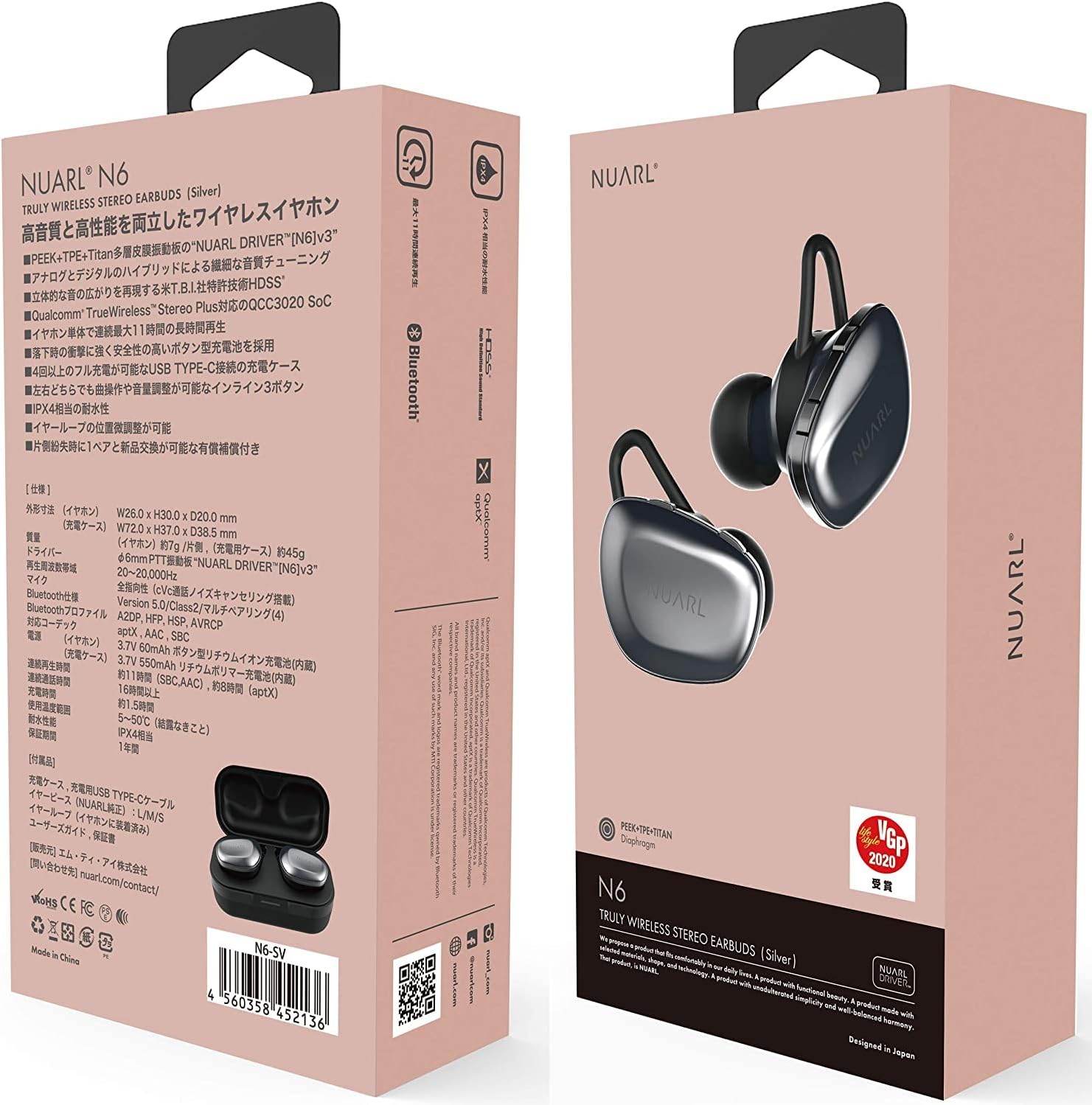
Image: NUARL N6 Pro Earphones packaging.
1. การตั้งค่า
1.1 เนื้อหาบรรจุภัณฑ์
- NUARL N6 Pro True Wireless Earphones (Left and Right)
- เคสชาร์จไฟ
- สายชาร์จแบบ USB Type-C
- SpinFit CP360 Eartips (S/M/L sizes)
- คู่มือการใช้งาน (เอกสารนี้)
1.2 การชาร์จหูฟังและเคส
ก่อนใช้งานครั้งแรก ควรชาร์จหูฟังและเคสชาร์จให้เต็ม
- Place the earphones into their respective slots in the charging case. The magnetic contacts will secure them in place.
- Connect the USB Type-C charging cable to the charging port on the case and to a USB power source.
- The front LED on the charging case will indicate the charging status. Once fully charged, the LED indicator will change or turn off depending on the model.

Image: NUARL N6 Pro Earphones inside the charging case.
The charging case can fully recharge the earphones approximately 4 times, providing up to 55 hours of total music playback.
1.3 การจับคู่บลูทูธเบื้องต้น
To pair your NUARL N6 Pro earphones with your device:
- ตรวจสอบให้แน่ใจว่าหูฟังได้รับการชาร์จและวางไว้ในกล่องชาร์จ
- เปิดฝาเคสชาร์จ หูฟังจะเปิดโดยอัตโนมัติและเข้าสู่โหมดจับคู่
- บนสมาร์ทโฟนหรืออุปกรณ์ที่รองรับบลูทูธ ให้ไปที่การตั้งค่าบลูทูธและเปิดใช้งานบลูทูธ
- ค้นหา available devices and select "NUARL N6 Pro" from the list.
- Once connected, you will hear an audible confirmation, and the LED indicator on the earphones may change.
For subsequent use, the earphones will automatically reconnect to the last paired device when removed from the case.
2. การใช้งานหูฟัง
2.1 การสวมหูฟัง
For optimal sound quality and comfort, ensure the earphones are properly seated in your ears. The N6 Pro features an asymmetric design to help distinguish the left and right earphones.
- ระบุหูฟังด้านซ้าย (L) และด้านขวา (R)
- Gently insert each earphone into your ear canal and twist slightly to secure a snug fit.
- Experiment with the included SpinFit CP360 eartips to find the size that provides the best seal and comfort for your ears.

Image: Proper handling of an earphone before wearing.
2.2 การควบคุมหูฟัง
The N6 Pro earphones feature three physical buttons on each earbud for easy control of music playback and calls. Both sides have the same functions.
- เล่น/หยุดชั่วคราว: กดปุ่มหลักเพียงครั้งเดียว
- เพลงถัดไป: กดปุ่มหลักสองครั้ง
- แทร็กก่อนหน้า: Triple press the main button.
- เพิ่ม/ลดระดับเสียง: ใช้ปุ่มปรับระดับเสียงที่กำหนดไว้
- รับ/วางสาย: Single press the main button during an incoming call or active call.
- ปฏิเสธสาย: Press and hold the main button during an incoming call.
- เปิดใช้งาน Voice Assistant: Press and hold a specific button (refer to quick start guide for exact button).
2.3 Automatic Reconnection and Sleep Mode
The earphones are designed for convenience:
- การเชื่อมต่อใหม่อัตโนมัติ: When the earphones are placed in the charging case and the lid is opened, they will automatically power on and attempt to reconnect to the last paired device.
- โหมดสลีป: When the earphones are placed in the charging case and fully recharged, they will automatically enter sleep mode to conserve the charging case's battery.
3. การบำรุงรักษา
3.1 การทำความสะอาด
การทำความสะอาดเป็นประจำช่วยรักษาคุณภาพเสียงและสุขอนามัย:
- เช็ดหูฟังและกล่องชาร์จด้วยผ้าแห้งนุ่มที่ไม่เป็นขุย
- ถอดปลายหูออกแล้วทำความสะอาดด้วยสบู่ชนิดอ่อนและน้ำ จากนั้นเช็ดให้แห้งสนิทก่อนใส่กลับเข้าไปอีกครั้ง
- Gently clean any debris from the earphone nozzles using a small, soft brush or cotton swab.
3.2 การเปลี่ยนจุกหูฟัง
The NUARL N6 Pro comes with SpinFit CP360 eartips in multiple sizes (S/M/L). These eartips are made from medical-grade silicone for comfort and hygiene. Replace them if they become worn or if you prefer a different size for a better fit.
- Gently pull off the existing ear tip from the earphone nozzle.
- Select a new ear tip of the desired size.
- ค่อยๆ ดันจุกหูฟังอันใหม่เข้าไปในท่อหูฟังจนกระทั่งติดแน่นสนิท

Image: Earphone with a silicone ear tip.
4 การแก้ไขปัญหา
If you encounter issues with your NUARL N6 Pro earphones, try the following solutions:
- ไม่มีเสียง:
- โปรดตรวจสอบให้แน่ใจว่าหูฟังได้รับการชาร์จและเชื่อมต่อกับอุปกรณ์ของคุณแล้ว
- ตรวจสอบระดับเสียงทั้งบนหูฟังและอุปกรณ์ที่เชื่อมต่อของคุณ
- Try restarting your device and re-pairing the earphones.
- การจับคู่ล้มเหลว:
- ตรวจสอบให้แน่ใจว่าอุปกรณ์ของคุณเปิดใช้งานบลูทูธแล้วและหูฟังอยู่ในโหมดจับคู่
- Ensure the earphones are not connected to another device. Turn off Bluetooth on other nearby devices.
- Try resetting the earphones (refer to the quick start guide for specific reset instructions if available).
- การเชื่อมต่อไม่ต่อเนื่อง/เสียงขาดหายเป็นช่วงๆ:
- ขยับเข้าใกล้อุปกรณ์ที่เชื่อมต่อของคุณเพื่อลดการรบกวน
- Avoid physical obstructions between the earphones and your device.
- ตรวจสอบให้แน่ใจว่าไม่มีสัญญาณไร้สายแรงๆ อื่นมารบกวน
- ปัญหาการชาร์จ:
- ตรวจสอบว่าสายชาร์จเชื่อมต่อกับเคสและแหล่งจ่ายไฟอย่างแน่นหนาแล้ว
- Check if the charging contacts on the earphones and inside the case are clean and free of debris.
- ลองใช้สาย USB หรืออะแดปเตอร์จ่ายไฟอื่น
5. ข้อมูลจำเพาะ
| คุณสมบัติ | รายละเอียด |
|---|---|
| ยี่ห้อ | NURL |
| หมายเลขรุ่น | N6PRO-MB |
| การวางตำแหน่งหู | ในหู |
| การควบคุมเสียงรบกวน | ระบบตัดเสียงรบกวนแบบแอคทีฟ |
| เทคโนโลยีการเชื่อมต่อ | ไร้สาย (Bluetooth) |
| เวอร์ชันบลูทูธ | 5 |
| ประเภทไดร์เวอร์เสียง | Dynamic Driver (NUARL DRIVER [N6] v5) |
| ตัวแปลงสัญญาณที่รองรับ | เอพเท็กเอ็กซ์ |
| เวลาการเล่น | Up to 11 hours (8 hours with aptX audio) |
| เวลาเล่นทั้งหมด (รวมเคส) | นานถึง 55 ชั่วโมง |
| พอร์ตชาร์จ | ยูเอสบี ไทป์ ซี |
| ระดับความต้านทานต่อน้ำ | IPX4 |
| น้ำหนักสินค้า | 7 Grams (per earphone) |
| คุณสมบัติพิเศษ | HDSS, TrueWireless Stereo Plus, Button-type battery, SpinFit CP360 eartips |
6. ข้อมูลการรับประกัน
NUARL products are manufactured to the highest quality standards. This product is covered by a limited warranty against defects in materials and workmanship. Please refer to the warranty card included in your package or visit the official NUARL webเว็บไซต์สำหรับข้อกำหนดและเงื่อนไขการรับประกันโดยละเอียด
7. การสนับสนุนลูกค้า
For further assistance, technical support, or inquiries regarding your NUARL N6 Pro earphones, please contact NUARL customer service. Contact information can typically be found on the official NUARL webเว็บไซต์หรือในบรรจุภัณฑ์ของผลิตภัณฑ์
เป็นทางการ Webเว็บไซต์: nurl.com