
1. บทนำ
Thank you for choosing the Newrixing NR-2017 Bluetooth Hi-Fi Wireless Speaker. This manual provides essential information for the safe and efficient use of your new soundbar. Please read these instructions carefully before operating the device and retain them for future reference.
2. สินค้าหมดview และคุณสมบัติที่สำคัญ
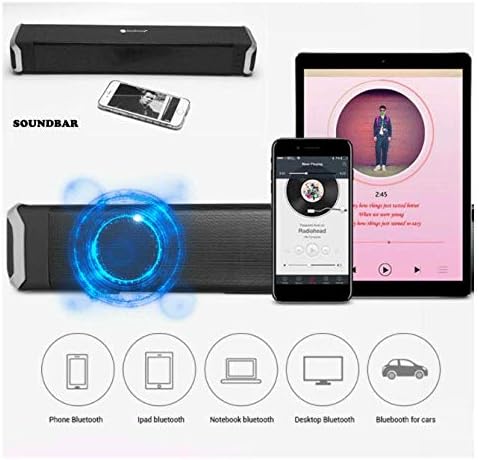
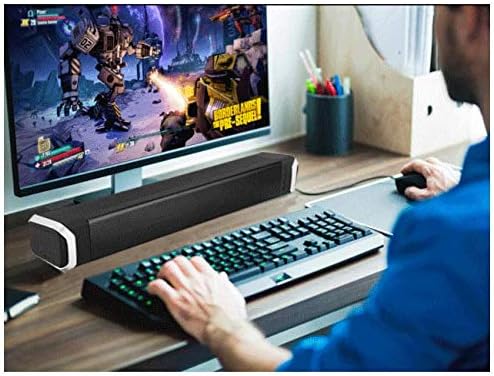
The Newrixing NR-2017 is a versatile soundbar designed to enhance your audio experience. It features high-quality DSP sound for an immersive listening experience and live sound restoration. Its compact and stylish design allows it to fit seamlessly into various environments.
คุณสมบัติหลัก:
- การเชื่อมต่อไร้สาย: Bluetooth V4.2 for fast and convenient pairing.
- คุณภาพเสียง: High-quality DSP sound, 360-degree dual-channel stereo for fuller sound.
- มัลติฟังก์ชัน: Supports Bluetooth connection, USB playback, Radio function, and Call function.
- ความทนทาน: ดีไซน์กันน้ำและกันฝุ่น
- ความสามารถในการพกพา: Built-in 1800 mAh lithium battery for up to 6 hours of operating time.
- ความเข้ากันได้: Compatible with smartphones, tablets, laptops, personal computers, and televisions.
- รูปแบบการเล่น: Supports MP3, WMA, WAV audio files.

3. เนื้อหาบรรจุภัณฑ์
กรุณาทำเครื่องหมายในช่องสำหรับรายการต่อไปนี้:
- Newrixing NR-2017 Bluetooth Hi-Fi Wireless Speaker
- สายสัญญาณเสียง
- Data Cable (USB charging cable)
- คู่มือการใช้งาน (เอกสารนี้)
4. การตั้งค่า
4.1 การชาร์จลำโพง
Before first use, fully charge the speaker. Connect the provided data cable to the speaker's USB port and the other end to a USB power adapter (not included) or a computer's USB port. The charging indicator light will illuminate during charging and turn off when fully charged.
4.2 การเปิด/ปิดเครื่อง
Press and hold the power button for a few seconds to turn the speaker on or off. A voice prompt will indicate the power status.
4.3 การจับคู่บลูทูธ
- เปิดลำโพง ลำโพงจะเข้าสู่โหมดจับคู่บลูทูธโดยอัตโนมัติ โดยจะมีไฟ LED กระพริบและมีเสียงแจ้งเตือน
- บนอุปกรณ์ของคุณ (สมาร์ทโฟน แท็บเล็ต แล็ปท็อป) เปิดใช้งาน Bluetooth และค้นหาอุปกรณ์ที่มีอยู่
- Select "NR-2017" from the list of devices.
- Once paired, the LED light will stop flashing, and a voice prompt will confirm the connection.
4.4 การเชื่อมต่อแบบใช้สาย (AUX)
To connect via the audio cable:
- Connect one end of the provided audio cable to the AUX port on the speaker.
- Connect the other end to the audio output (headphone jack) of your device.
- The speaker will automatically switch to AUX mode, or you may need to press the 'M' (Mode) button to select AUX input.
5. คู่มือการใช้งาน
5.1 ฟังก์ชันปุ่ม
The speaker is operated using physical buttons. Refer to the diagram below for button layout (if available on product) or the following descriptions:
- ปุ่มเปิด/ปิด: กดค้างไว้เพื่อเปิด/ปิด
- ปุ่มโหมด (M): Short press to switch between Bluetooth, AUX, USB, TF Card (if available), and FM Radio modes.
- ปุ่มเล่น/หยุดชั่วคราว: กดสั้น ๆ เพื่อเล่นหรือหยุดเพลงชั่วคราว
- เพิ่มระดับเสียง (+): กดสั้นเพื่อเพิ่มระดับเสียง กดยาวเพื่อเล่นเพลงถัดไป
- ลดเสียงลง (-): กดสั้นเพื่อลดระดับเสียง กดยาวเพื่อเล่นเพลงก่อนหน้า
5.2 ฟังก์ชั่นการโทร
เมื่อเชื่อมต่อกับสมาร์ทโฟนผ่านบลูทูธ:
- รับสาย: กดปุ่มเล่น/หยุดชั่วคราว
- วางสาย: กดปุ่มเล่น/หยุดชั่วคราวสั้นๆ ในระหว่างการโทร
- ปฏิเสธสาย: กดปุ่มเล่น/หยุดชั่วคราวค้างไว้
การใช้งานวิทยุ FM 5.3
In FM Radio mode (selected via the Mode button):
- สแกนอัตโนมัติ: กดปุ่มเล่น/หยุดชั่วคราวค้างไว้เพื่อสแกนและบันทึกสถานีวิทยุ FM ที่ใช้งานได้โดยอัตโนมัติ
- สถานีเปลี่ยนถ่าย: กดปุ่มเพิ่มเสียง (+) หรือปุ่มลดเสียง (-) สั้นๆ เพื่อสลับระหว่างสถานีที่บันทึกไว้
การเล่นการ์ด USB/TF ขนาด 5.4 นิ้ว
Insert a USB drive or TF (Micro SD) card into the respective port. The speaker will automatically switch to USB/TF card mode and begin playing supported audio files (MP3, WMA, WAV).
6. การบำรุงรักษา
- การทำความสะอาด: ใช้ผ้านุ่มและแห้งเช็ดทำความสะอาดลำโพง ห้ามใช้น้ำยาทำความสะอาดหรือสารละลายที่มีฤทธิ์กัดกร่อน
- การสัมผัสน้ำ: While the speaker is waterproof, avoid submerging it in water for extended periods. Ensure all port covers are securely closed before exposure to water.
- พื้นที่จัดเก็บ: เก็บลำโพงไว้ในที่แห้งและเย็น หลีกเลี่ยงแสงแดดโดยตรงและอุณหภูมิที่สูงหรือต่ำเกินไป
- การดูแลแบตเตอรี่ To prolong battery life, charge the speaker regularly, even if not in use for long periods. Avoid fully discharging the battery frequently.
7 การแก้ไขปัญหา
| ปัญหา | สาเหตุที่เป็นไปได้ | สารละลาย |
|---|---|---|
| ลําโพงไม่เปิดขึ้น | แบตเตอรี่อ่อน | ชาร์จลำโพงให้เต็ม |
| ไม่สามารถจับคู่ผ่านบลูทูธได้ | ลำโพงไม่อยู่ในโหมดจับคู่; บลูทูธถูกปิดใช้งานบนอุปกรณ์; อุปกรณ์อยู่ไกลเกินไป | Ensure speaker is in pairing mode. Enable Bluetooth on your device. Move device closer to speaker (within 10 meters). |
| ไม่มีเสียงในโหมด AUX | Incorrect mode selected; cable not fully inserted; device volume too low. | Press 'M' button to select AUX mode. Ensure audio cable is securely connected. Increase volume on both speaker and connected device. |
| การรับสัญญาณวิทยุ FM ไม่ดี | สัญญาณอ่อน. | ย้ายลำโพงไปยังตำแหน่งที่รับสัญญาณได้ดีกว่า |
8. ข้อมูลจำเพาะ
| คุณสมบัติ | ข้อมูลจำเพาะ |
|---|---|
| หมายเลขรุ่น | NR-2017 |
| ยี่ห้อ | Newrixing |
| เทคโนโลยีการเชื่อมต่อ | ไร้สาย (บลูทูธ V4.2) |
| ประเภทลำโพง | ซาวด์บาร์ |
| โหมดเอาต์พุตเสียง | สเตอริโอ (2 ช่องสัญญาณ) |
| กำลังขับที่กำหนด | 2 x 5 Watts (Total 10 Watts) |
| การตอบสนองความถี่ | 100 เฮิรตซ์ - 20 กิโลเฮิรตซ์ |
| อัตราส่วนสัญญาณต่อเสียงรบกวน | ≥75เดซิเบล |
| ระยะทางบลูทูธที่มีประสิทธิภาพ | 10 เมตร |
| แหล่งพลังงาน | แบตเตอรี่ลิเธียมในตัว 1800 mAh |
| เวลาดำเนินการ | นานถึง 6 ชั่วโมง |
| พอร์ตชาร์จ | ยูเอสบี |
| รูปแบบการเล่นที่รองรับ | MP3, WMA, WAV |
| คุณสมบัติพิเศษ | Bluetooth, Wireless, Waterproof, Dustproof, Radio, Call Function, Audio Guide (Voice Prompts) |
| วิธีการควบคุม | Button, Voice (for prompts) |
| ขนาด (กว้าง x ยาว x สูง) | 44.2 x 8.5 x 7.5 ซม. |
| น้ำหนักสินค้า | 1.2 กก. |
| สี | สีดำ |
9. การรับประกันและการสนับสนุน
สำหรับข้อมูลการรับประกันและการสนับสนุนลูกค้า โปรดดูเอกสารประกอบที่ให้มา ณ เวลาที่ซื้อ หรือติดต่อตัวแทนจำหน่ายของคุณ โปรดเก็บหลักฐานการซื้อไว้เพื่อใช้ในกรณีที่ต้องการเคลมประกัน