
การแนะนำ
Thank you for choosing the A4tech G3-200NS Silent Wireless Mouse. This manual provides detailed instructions for setting up, operating, and maintaining your new wireless mouse. Designed for comfort and efficiency, this optical mouse offers silent clicks and reliable wireless connectivity for both PC and laptop use.
เนื้อหาแพ็คเกจ
กรุณาตรวจสอบเนื้อหาในแพ็คเกจเพื่อให้แน่ใจว่ามีสินค้าครบทั้งหมด:
- A4tech G3-200NS Silent Wireless Mouse
- ตัวรับสัญญาณ USB
- คู่มือการใช้งาน (เอกสารนี้)
- (Note: 1 AA battery required, not included)
การตั้งค่า
1. การติดตั้งแบตเตอรี่
- ค้นหาช่องใส่แบตเตอรี่ที่ด้านล่างของเมาส์
- เปิดฝาช่องใส่แบตเตอรี่
- ใส่แบตเตอรี่ AA หนึ่งก้อน โดยตรวจสอบให้แน่ใจว่าขั้วถูกต้อง (+/-)
- ปิดฝาช่องใส่แบตเตอรี่ให้แน่น
รูปที่ 1: ด้านล่างของเมาส์พร้อมช่องใส่แบตเตอรี่
2. การเชื่อมต่อตัวรับสัญญาณ USB
- Locate the USB receiver, typically stored within the mouse's battery compartment or packaged separately.
- เสียบตัวรับสัญญาณ USB เข้ากับพอร์ต USB ที่มีอยู่ในคอมพิวเตอร์หรือแล็ปท็อปของคุณ
- ระบบปฏิบัติการจะตรวจจับและติดตั้งไดรเวอร์ที่จำเป็นโดยอัตโนมัติ ซึ่งอาจใช้เวลาสักครู่
- เมื่อติดตั้งเสร็จแล้ว เมาส์ก็พร้อมใช้งานได้ทันที
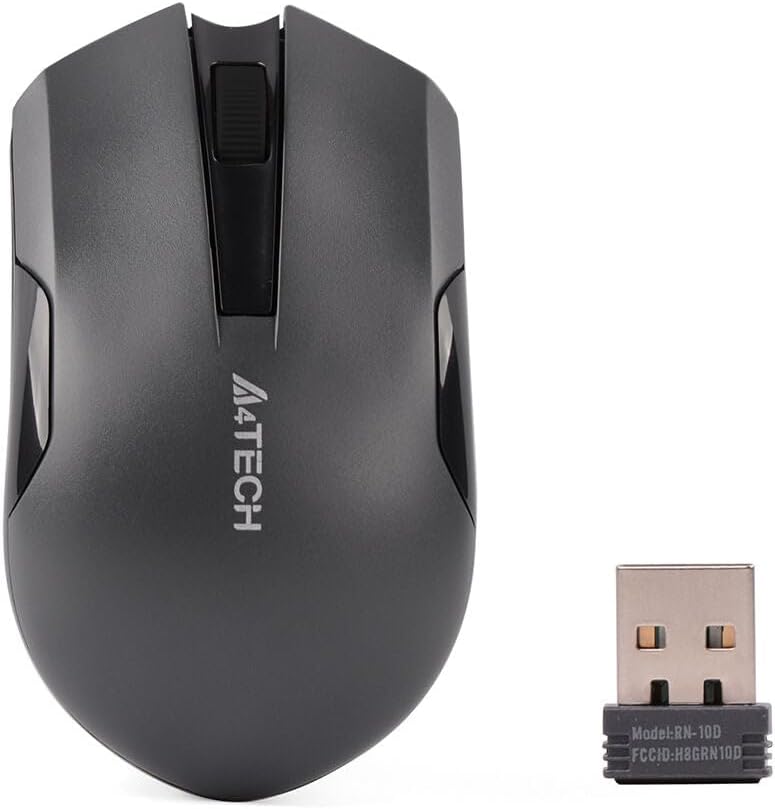
Figure 2: A4tech G3-200NS mouse and its USB receiver.
การใช้งานเมาส์
ฟังก์ชั่นพื้นฐาน
- คลิกซ้าย: การดำเนินการหลัก การเลือก การเปิดรายการ
- คลิกขวา: เปิดเมนูบริบท
- ล้อเลื่อน: เลื่อนเอกสารและ web เลื่อนหน้าในแนวตั้ง วงล้อเลื่อนยังทำหน้าที่เป็นปุ่มคลิกกลางด้วย
เทคโนโลยีการคลิกเงียบ
The A4tech G3-200NS features silent click technology, significantly reducing click noise for a quieter working environment.
ช่วงสาย
The mouse operates within a wireless range of approximately 10 to 15 meters from the USB receiver, depending on environmental conditions and obstacles.
การซ่อมบำรุง
การเปลี่ยนแบตเตอรี่
When the mouse performance degrades or stops responding, it is likely time to replace the AA battery. Follow the battery installation steps outlined in the "Setup" section.
การทำความสะอาด
ในการทำความสะอาดเมาส์ ให้ใช้ผ้านุ่มและแห้ง สำหรับสิ่งสกปรกฝังแน่น ให้เช็ดเบาๆamp cloth can be used, ensuring no moisture enters the internal components. Avoid using harsh chemicals or abrasive cleaners.
การแก้ไขปัญหา
| ปัญหา | สารละลาย |
|---|---|
| เมาส์ไม่ตอบสนอง |
|
| การเคลื่อนไหวของเคอร์เซอร์ที่ผิดปกติ |
|
| ช่วงไร้สายสั้น |
|
ข้อมูลจำเพาะ
- ยี่ห้อ: เอ4เทค
- แบบอย่าง: G3-200NS
- ประเภทเมาส์: เมาส์ออปติคอล
- การเชื่อมต่อ: ไร้สาย (2.4 GHz)
- สี: สีดำ
- เข้ากันได้กับ: พีซีและโน๊ตบุ๊ค
- ระบบปฏิบัติการ: Linux, Windows XP (and newer versions)
- แหล่งพลังงาน: แบตเตอรี่ AA 1 ก้อน (ไม่รวม)
- อายุการใช้งานแบตเตอรี่โดยเฉลี่ย: Approximately 6 months (may vary with usage)
- ระยะสัญญาณไร้สาย: 10-15 เมตร
- คุณสมบัติพิเศษ: เทคโนโลยีการคลิกเงียบ
การรับประกันและการสนับสนุน
For warranty information or technical support, please refer to the warranty card included with your purchase or visit the official A4tech webไซต์นี้ โปรดเก็บหลักฐานการซื้อไว้เพื่อใช้ยืนยันการรับประกัน