
1. สินค้าหมดview
The Walfront STC-100A is a versatile digital temperature controller designed for precise temperature management in various applications, including refrigerating and heating systems. It features a clear digital display, intuitive controls, and robust functionality for maintaining desired temperature ranges.
คุณสมบัติหลัก:
- Refrigerating & Heating Mode: Supports both cooling and heating operations, offering flexibility for different environmental control needs.
- การใช้งานที่เป็นมิตรกับผู้ใช้: Simple and convenient temperature setting with a limited range for ease of use.
- ฟังก์ชั่นขั้นสูง: Includes temperature correction, sensor failure alarm, and control output delay for enhanced reliability and precision.
- การควบคุมอุณหภูมิที่แม่นยำ: Maintains temperature based on set value and return difference, ensuring stable conditions.
- โครงสร้างทนทาน: Manufactured from high-quality ABS material for long-term durability and performance.

รูปที่ 1.1 : ด้านหน้า view of the Walfront STC-100A Digital Temperature Controller, showing the digital display and control buttons.
2. ข้อมูลด้านความปลอดภัยที่สำคัญ
Please read and understand all safety instructions before installing or operating the STC-100A temperature controller. Failure to follow these instructions may result in electric shock, fire, or serious injury.
- อันตรายจากไฟฟ้า: This device operates on 220VAC. All wiring and installation should be performed by a qualified electrician or knowledgeable individual.
- การเดินสายไฟที่ถูกต้อง: Carefully distinguish between the relay interface, sensor wiring, and power supply wiring. Incorrect connections can damage the device or connected equipment.
- Wire Separation: Maintain a proper distance between the sensor wire and the power supply wire to prevent interference and ensure accurate readings.
- ตรวจสอบฉบับที่tage: ตรวจสอบเสมอว่าปริมาณการจ่ายtage is correct (220VAC) before electrifying the unit.
- สภาพแวดล้อม : Do not expose the controller to excessive moisture, dust, or extreme temperatures outside its specified operating range (0℃-60℃, Relative Humidity: No more than 85% non-condensing).
- การตัดการเชื่อมต่อ: ตัดการเชื่อมต่อไฟฟ้าก่อนดำเนินการบำรุงรักษาหรือเปลี่ยนสายไฟใดๆ

รูปที่ 2.1: ด้านหลัง view of the controller with the wiring diagram and important caution notes regarding installation.
3. เนื้อหาบรรจุภัณฑ์
เมื่อเปิดบรรจุภัณฑ์ โปรดตรวจสอบว่าส่วนประกอบทั้งหมดอยู่ครบและไม่ได้รับความเสียหาย:
- 1 x Walfront STC-100A Temperature Controller
- สายเคเบิลเซ็นเซอร์อุณหภูมิ 1 เส้น
- 1 x คู่มือการใช้งาน (เอกสารนี้)
4. ข้อมูลจำเพาะทางเทคนิค
| พารามิเตอร์ | ค่า |
|---|---|
| แบบอย่าง | เอสทีซี-100เอ |
| วัสดุ | เอบีเอส |
| พาวเวอร์ซัพพลายฉบับที่tage | 220VAC ±10%, 50/60Hz |
| การใช้พลังงาน | น้อยกว่า 3W |
| ช่วงการวัดอุณหภูมิ | -50℃ ถึง 99℃ |
| ปณิธาน | 1℃ |
| ความแม่นยำ | ±1℃ |
| ความจุรีเลย์เอาต์พุต | 10A/220VAC |
| อุณหภูมิสภาพแวดล้อมการทำงาน | 0℃ ถึง 60℃ |
| ความชื้นสัมพัทธ์ | No more than 85% (non-condensing) |
| ขนาดรูยึด | Approx. 71 x 29 mm / 2.8 x 1.1 in |
| ขนาดสินค้า | 2.76 x 2.36 x 1.38 นิ้ว |
| น้ำหนักสินค้า | 7 ออนซ์ (0.2 กิโลกรัม) |
5. การติดตั้งและเดินสายไฟ
The STC-100A is designed for panel mounting. Ensure proper ventilation around the unit.
5.1 การติดตั้ง
- Cut a rectangular opening in your panel with dimensions of approximately 71mm x 29mm (2.8 x 1.1 inches).
- เสียบตัวควบคุมเข้าไปในช่องเปิดจากด้านหน้า
- Secure the controller using the orange mounting clips on the sides. Push them inwards to lock the controller in place.

รูปที่ 5.1: ด้านข้าง view ภาพประกอบแสดงคลิปยึดสำหรับติดตั้งแผงควบคุม
5.2 คำแนะนำในการเดินสายไฟ
Refer to the wiring diagram on the back of the unit and Figure 5.2 below. Ensure all connections are secure and insulated.
- Power Supply (220VAC): Connect your 220VAC power source to terminals 6 and 7. Ensure correct polarity if applicable, though AC typically does not have strict polarity for power input.
- เซ็นเซอร์อุณหภูมิ: Connect the temperature sensor cable to terminals 4 and 5. The sensor is non-polar, so connection order does not matter. Keep this wire separate from power wires.
- Output Relay (10A/220VAC):
- Terminal 1: Common (COM) for the relay output.
- ขั้วต่อที่ 2: หน้าสัมผัสแบบปกติปิด (NC)
- ขั้วต่อที่ 3: หน้าสัมผัสแบบปกติเปิด (NO)
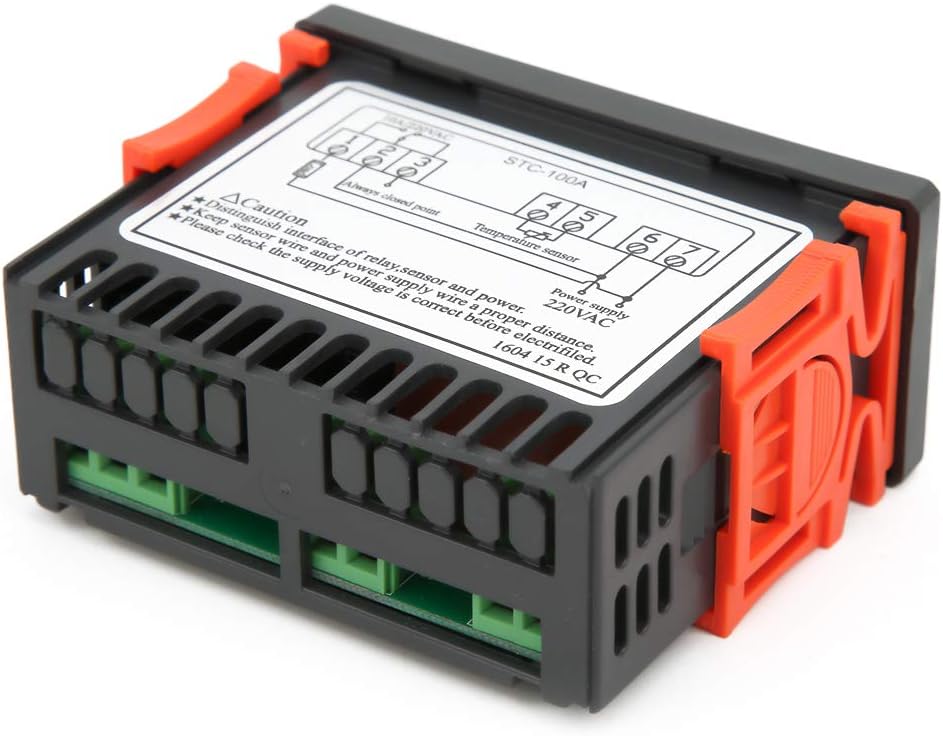
รูปที่ 5.2: ด้านหลัง view showing the terminal block for power, sensor, and relay connections.
6. คู่มือการใช้งาน
The STC-100A features a digital display and three buttons: Up (↑), Down (↓), and Set (SET).
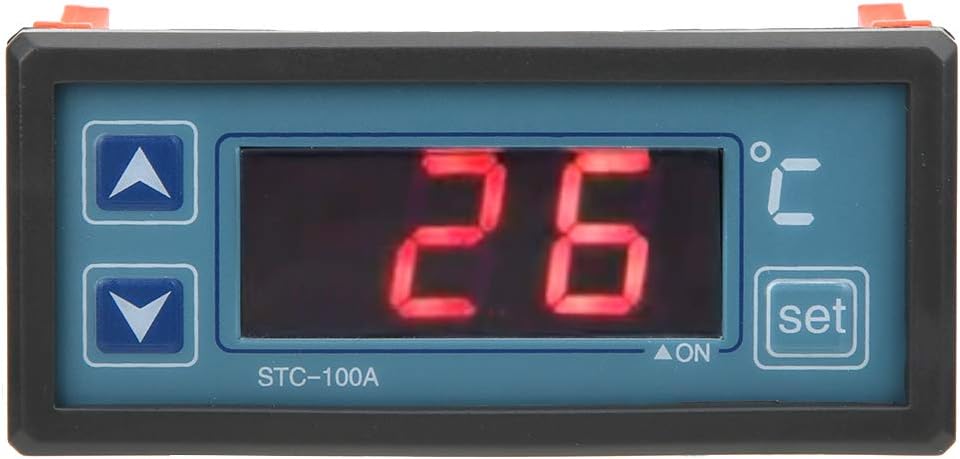
Figure 6.1: Close-up of the control panel showing the display and buttons.
6.1 การตั้งอุณหภูมิ
- กดปุ่ม ชุด button once. The display will flash, indicating that you are in temperature setting mode.
- ใช้ ↑ (ขึ้น) และ ↓ (Down) buttons to adjust the desired temperature set point.
- กดปุ่ม ชุด button again to confirm the setting and exit the setting mode. The display will return to showing the current temperature.
6.2 Understanding Control Modes (Refrigerating/Heating)
The STC-100A automatically switches between refrigerating and heating modes based on the set temperature and the current temperature, in conjunction with a configurable "return difference" (hysteresis). This ensures stable temperature control without rapid cycling.
เช่นample, if set to 25°C with a 2°C return difference:
- โหมดการให้ความร้อน: If the current temperature drops below 23°C (25°C - 2°C), the heating output will activate. It will deactivate when the temperature reaches 25°C.
- Refrigerating Mode: If the current temperature rises above 27°C (25°C + 2°C), the refrigerating output will activate. It will deactivate when the temperature drops to 25°C.
Note: The specific parameter for setting the return difference (hysteresis) is typically accessed through a hidden menu or a combination of button presses. Refer to the detailed wiring diagram on the unit for advanced parameter settings if available.
6.3 ฟังก์ชั่นขั้นสูง
- การแก้ไขอุณหภูมิ: Allows for fine-tuning the temperature reading to match a known accurate thermometer. This compensates for any sensor inaccuracies.
- สัญญาณเตือนเซ็นเซอร์ทำงานผิดปกติ: The unit will display an error code or alarm if the temperature sensor is disconnected or faulty.
- Control Output Delay: This feature prevents rapid cycling of the compressor or heating element, extending the lifespan of connected equipment. It introduces a delay before the output activates after a temperature change.
Detailed instructions for accessing and adjusting these advanced parameters are usually found in the full technical manual or by consulting the manufacturer's support resources.
7. การบำรุงรักษา
The Walfront STC-100A is designed for minimal maintenance. Follow these guidelines to ensure its longevity and proper operation:
- การทำความสะอาด: ควรเช็ดทำความสะอาดหน้าจอเป็นระยะ และ...asing with a soft, dry cloth. Do not use abrasive cleaners or solvents. Ensure no liquid enters the unit.
- การระบายอากาศ : Ensure that the ventilation slots on the sides of the unit are not obstructed to prevent overheating.
- การตรวจสอบสายไฟ: ควรตรวจสอบการเชื่อมต่อสายไฟทั้งหมดเป็นประจำทุกปี เพื่อดูว่าแน่นหนาดีหรือไม่ และมีร่องรอยการสึกหรอหรือการกัดกร่อนหรือไม่
- การดูแลเซ็นเซอร์: Keep the temperature sensor clean and free from debris. Ensure it is properly positioned in the area where temperature needs to be measured.
8 การแก้ไขปัญหา
This section provides solutions to common issues you might encounter with your STC-100A temperature controller.
| ปัญหา | สาเหตุที่เป็นไปได้ | สารละลาย |
|---|---|---|
| Display is blank / Unit not powering on | No power supply; Incorrect wiring; Blown fuse (external) | Check power connections (terminals 6 & 7). Verify supply voltage. Check external fuse or circuit breaker. |
| "EE" or "HH" error on display | Temperature sensor fault (open circuit, short circuit, or out of range) | Check sensor wiring (terminals 4 & 5) for loose connections or damage. Replace sensor if faulty. Ensure temperature is within -50℃ to 99℃. |
| การอ่านอุณหภูมิไม่แม่นยำ | Sensor not properly placed; Need for temperature correction | Relocate sensor to a representative area. Use the temperature correction function (refer to advanced settings). |
| Output (heater/cooler) not activating | Incorrect temperature set point; Hysteresis setting too wide; Output relay wiring issue; Control output delay active | Verify set temperature. Check relay connections (terminals 1, 2, 3). Wait for delay period to expire. Consult advanced settings for hysteresis. |
| Output cycles too frequently | Hysteresis (return difference) set too narrow | Increase the hysteresis value in the advanced settings to prevent rapid cycling. |
If the problem persists after attempting these solutions, please contact Walfront customer support or a qualified technician.
9. การรับประกันและการสนับสนุน
For specific warranty terms and conditions, please refer to the documentation provided at the time of purchase or contact your retailer. Walfront products are typically covered by a manufacturer's warranty against defects in materials and workmanship.
For technical support, troubleshooting assistance beyond this manual, or inquiries about replacement parts, please visit the official Walfront webหรือติดต่อฝ่ายบริการลูกค้าผ่านข้อมูลการติดต่อที่ให้ไว้พร้อมกับการสั่งซื้อของคุณ
You can also visit the Walfront store on Amazon for more information: Walfront Amazon Store