
การแนะนำ
The Perel EDIN305N is a 230V 16A 3600W DIN-rail mount digital weekly timer designed for indoor use. This device allows for precise, programmable control of electrical circuits, enabling automatic switching ON and OFF of connected appliances or lighting systems over a weekly cycle. It features a clear digital display and multiple programming options to suit various scheduling needs.
ข้อควรระวังเพื่อความปลอดภัย
คำเตือน: Electrical installation should only be performed by a qualified electrician. Incorrect wiring can lead to electric shock, fire, or damage to the device and connected equipment. Always disconnect power at the main circuit breaker before installation or maintenance.
- Ensure the power supply matches the device's specifications (230V~50Hz).
- ห้ามใช้เกินกำลังรับโหลดสูงสุด 16A / 3600W
- This device is designed for indoor use only. Avoid exposure to moisture, dust, or extreme temperatures.
- อย่าพยายามเปิดหรือซ่อมแซมอุปกรณ์ด้วยตนเอง แนะนำให้ส่งช่างผู้ชำนาญเข้ารับบริการทั้งหมด
- เก็บให้พ้นจากมือเด็ก
สินค้าเกินview
The Perel EDIN305N digital timer consists of a main body with a digital display, control buttons, and terminal blocks for electrical connections. A transparent cover protects the display and buttons.
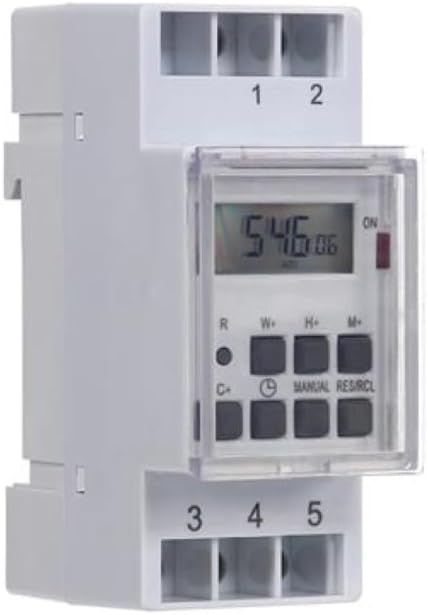
รูปที่ 1: ด้านหน้า view of the Perel EDIN305N Digital Weekly Timer. The image displays the LCD screen, control buttons (R, W+, H+, M+, C+, Clock, Manual, RES/RCL), and numbered terminal blocks (1, 2 at the top, 3, 4, 5 at the bottom).
ปุ่มควบคุม:
- R: Reset button (recessed).
- ส+: Weekday setting.
- เอช+: การตั้งค่าชั่วโมง
- เอ็ม+: Minute setting.
- C+: Clear program.
- ไอคอนนาฬิกา: Used to set current time and day, and to exit programming mode.
- คู่มือ: Manual override for ON/AUTO/OFF modes.
- RES/RCL: Reset/Recall program.
บล็อกเทอร์มินัล:
- 1 ก.ค. 2: Power supply input (N, L).
- พ.ศ. 3, 4, 5: Output terminals for controlled circuit (Common, Normally Open, Normally Closed).
ข้อมูลจำเพาะทางเทคนิค
| พารามิเตอร์ | ค่า |
|---|---|
| หมายเลขรุ่น | EDIN305N |
| เล่มที่tage | 230V~50Hz |
| กระแสไฟสูงสุด | 16เอ |
| พลังสูงสุด | 3600วัตต์ |
| จำนวนการตั้งค่า | 7 (โปรแกรมเปิด/ปิด) |
| ประเภทการติดตั้ง | ราง DIN |
| ขนาด (กว้าง x ยาว x สูง) | 2.36 x 3.54 x 1.57 นิ้ว (60 x 90 x 40 มม.) |
| น้ำหนัก | 0.12 กก. (4.2 ออนซ์) |
| วัสดุ | พลาสติก |
| สี | สีขาว |
| แบตเตอรี่ที่จำเป็น | No (internal battery for memory backup) |
การติดตั้ง
1. การติดตั้ง
The Perel EDIN305N is designed for DIN-rail mounting. Securely attach the timer to a standard 35mm DIN-rail within an electrical enclosure. Ensure sufficient space for wiring and ventilation.
2. การเดินสาย
สำคัญ: Ensure power is disconnected at the main circuit breaker before proceeding with wiring. Follow local electrical codes and regulations.
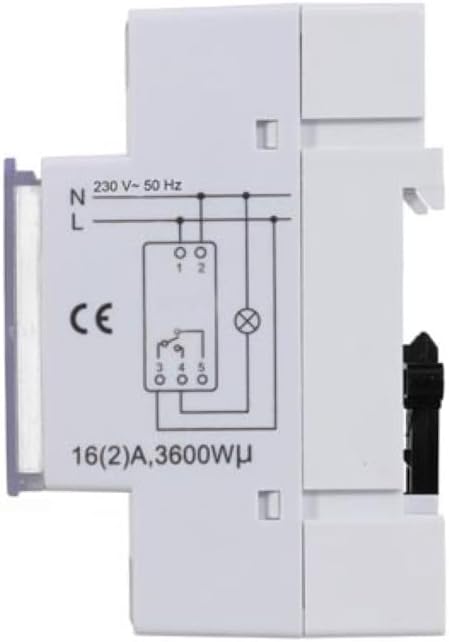
รูปที่ 2: ด้านข้าง view of the Perel EDIN305N Digital Weekly Timer showing the electrical wiring diagram. It illustrates connections for Neutral (N), Live (L), and the output contacts (1, 2, 3, 4, 5) for controlling a load.
Refer to the wiring diagram (Figure 2) and the terminal block labels on the device:
- Connect the Neutral (N) wire of your 230V AC supply to terminal 1.
- Connect the Live (L) wire of your 230V AC supply to terminal 2.
- For the controlled circuit:
- Terminal 3: Common contact for the relay output.
- Terminal 4: Normally Open (NO) contact. The circuit connected here will be ON when the timer is active.
- Terminal 5: Normally Closed (NC) contact. The circuit connected here will be OFF when the timer is active.
- Connect the load (e.g., light, appliance) between the Live (L) supply and either terminal 4 (for NO operation) or terminal 5 (for NC operation), with terminal 3 connected to the Live (L) supply. Alternatively, connect the load between terminal 4 or 5 and the Neutral (N) supply, with terminal 3 connected to the Live (L) supply. Consult a qualified electrician for specific load wiring configurations.
การตั้งค่าและการทำงานเบื้องต้น
1. Power On and Reset
After wiring and restoring power, the display will illuminate. If the display is blank or shows erratic characters, press the recessed R (Reset) button using a pointed non-metallic object (e.g., a pen tip). This will clear all settings and restore default values.
2 การตั้งเวลาและวันปัจจุบัน
- กดปุ่มค้างไว้ ไอคอนนาฬิกา ปุ่ม.
- ขณะที่ถือ ไอคอนนาฬิกา กดปุ่ม W+ to set the current day of the week (1=Monday, 7=Sunday).
- ขณะที่ถือ ไอคอนนาฬิกา กดปุ่ม H+ เพื่อตั้งค่าชั่วโมงปัจจุบัน (0-23)
- ขณะที่ถือ ไอคอนนาฬิกา กดปุ่ม M+ เพื่อตั้งค่านาทีปัจจุบัน (0-59)
- ปล่อยตัว ไอคอนนาฬิกา กดปุ่ม เวลาและวันถูกตั้งค่าเรียบร้อยแล้ว
3. การตั้งโปรแกรมรอบการเปิด/ปิด
ตัวตั้งเวลาสามารถตั้งโปรแกรมเปิด/ปิดได้สูงสุด 7 โปรแกรม แต่ละโปรแกรมประกอบด้วยเวลาเปิดและเวลาปิด
- กดปุ่ม ไอคอนนาฬิกา button once to enter programming mode. The display will show "1 ON".
- กด W+ to select the day(s) for this program. You can choose a single day, a block of days (e.g., Mon-Fri), or all days.
- กด H+ to set the ON hour for program 1.
- กด M+ to set the ON minute for program 1.
- กดปุ่ม ไอคอนนาฬิกา กดปุ่มอีกครั้ง หน้าจอจะแสดง "1 OFF"
- Repeat steps 2-4 to set the OFF day(s), hour, and minute for program 1.
- To set additional programs (2-7), press the ไอคอนนาฬิกา button to cycle through "2 ON", "2 OFF", etc., and repeat the setting process.
- หลังจากตั้งค่าโปรแกรมที่ต้องการทั้งหมดแล้ว ให้กดปุ่ม คู่มือ กดปุ่มเพื่อออกจากโหมดตั้งโปรแกรมและกลับไปยังหน้าจอแสดงเวลาปัจจุบัน
4. คู่มือการแทนที่
กดปุ่ม คู่มือ button repeatedly to cycle through the operating modes:
- บน: เอาต์พุตจะเปิดอยู่ตลอดเวลาและจะแทนที่โปรแกรมทั้งหมด
- อัตโนมัติ: The timer operates according to the programmed ON/OFF cycles.
- ปิด: เอาต์พุตจะปิดอยู่ตลอดเวลา ซึ่งจะแทนที่โปรแกรมทั้งหมด
ตรวจสอบให้แน่ใจว่าได้ตั้งเวลาไว้แล้ว ออโต้ สำหรับการดำเนินการตามโปรแกรม
5. Clearing Programs
To clear a specific program:
- Enter programming mode by pressing the ไอคอนนาฬิกา button until the desired program number (e.g., "3 ON") is displayed.
- กดปุ่ม C+ button. This will clear both the ON and OFF times for that specific program.
- Repeat for other programs as needed.
- กด คู่มือ เพื่อออกจากโหมดการเขียนโปรแกรม
To clear all programs and reset the device, use the recessed R ปุ่ม (รีเซ็ต)
การซ่อมบำรุง
- ทำความสะอาดอุปกรณ์ด้วยผ้านุ่มและแห้ง ห้ามใช้น้ำยาทำความสะอาดหรือสารละลายที่มีฤทธิ์กัดกร่อน
- Ensure the transparent cover is closed to protect the display and buttons from dust and splashes.
- Regularly check electrical connections for tightness, especially in high-vibration environments.
การแก้ไขปัญหา
| ปัญหา | สาเหตุที่เป็นไปได้ | สารละลาย |
|---|---|---|
| จอแสดงผลว่างเปล่า | ไม่มีแหล่งจ่ายไฟ แบตเตอรี่ภายในหมดแล้ว | Check power connections (terminals 1 & 2). Ensure main power is ON. If power is present, press the R (Reset) button. The internal battery recharges when connected to power. |
| ตัวตั้งเวลาไม่เปิด/ปิดตามที่ตั้งโปรแกรมไว้ | Incorrect program settings; timer in manual ON/OFF mode. | Verify program settings (time, day, ON/OFF). Ensure the timer is in ออโต้ โหมดโดยการกดปุ่ม คู่มือ ปุ่ม. |
| Connected appliance not receiving power. | Incorrect wiring; appliance fault; timer fault. | Check wiring according to Figure 2. Test the appliance directly. If wiring and appliance are fine, the timer may be faulty. |
| Buttons unresponsive or display erratic. | Software glitch; low internal battery. | Press the recessed R (Reset) button. Ensure the timer has been connected to power for at least 24 hours to fully charge the internal battery. |
การกำจัด
Do not dispose of this product with general household waste. This electronic device contains materials that can be recycled. Please dispose of it at a designated collection point for electrical and electronic equipment waste, in accordance with local regulations.
การรับประกันและการสนับสนุน
Perel products are manufactured to high quality standards. For warranty information, technical support, or service inquiries, please refer to the documentation provided with your purchase or contact your local Perel distributor or retailer. Please have your model number (EDIN305N) and purchase details ready when contacting support.