
1. บทนำ
The Walfront UT219DS is a professional digital clamp meter designed for accurate and reliable electrical measurements. It is an essential tool for electrical maintenance personnel, HVAC technicians, and anyone requiring precise measurements of AC/DC current, AC/DC voltage, resistance, capacitance, frequency, temperature, and diode testing. This manual provides detailed instructions for the safe and effective use of your UT219DS clamp เมตร.
2. ข้อมูลด้านความปลอดภัย
คำเตือน: เพื่อหลีกเลี่ยงอันตรายจากไฟฟ้าช็อต ไฟไหม้ หรือการบาดเจ็บ โปรดอ่านข้อมูลด้านความปลอดภัยทั้งหมดก่อนใช้งานผลิตภัณฑ์
- ปฏิบัติตามรหัสความปลอดภัยระดับท้องถิ่นและระดับประเทศเสมอ
- ห้ามใช้มิเตอร์หากพบว่าชำรุด หรือสายวัดชำรุด
- ตรวจสอบการทำงานของมิเตอร์กับปริมาตรที่ทราบค่าtagตรวจสอบแหล่งข้อมูลก่อนใช้งาน
- ห้ามใช้เกินปริมาณที่กำหนดtagจ ตามที่ทำเครื่องหมายไว้บนมาตร ระหว่างขั้วต่อหรือระหว่างขั้วต่อใดๆ กับสายดิน
- ใช้ความระมัดระวังด้วย voltages สูงกว่า 30V AC RMS, 42V peak หรือ 60V DC ปริมาตรเหล่านี้tagอาจทำให้เกิดอันตรายจากการช็อตได้
- เก็บนิ้วไว้ด้านหลังตัวป้องกันนิ้วบนหัววัดทดสอบในระหว่างการใช้งาน
- เปลี่ยนแบตเตอรี่เมื่อตัวแสดงสถานะแบตเตอรี่อ่อนปรากฏขึ้นเพื่อให้แน่ใจว่าการอ่านค่าถูกต้อง
- ห้ามใช้งานมิเตอร์ในบริเวณที่มีแก๊สระเบิด ไอระเหย หรือสภาพแวดล้อมที่มีฝุ่นละออง
- ตรวจสอบให้แน่ใจว่าสวิตช์แบบหมุนอยู่ในตำแหน่งที่ถูกต้องสำหรับการวัดที่ต้องการก่อนเชื่อมต่อเข้ากับวงจร
- When measuring current, ensure the circuit is de-energized before clamping the jaw around the conductor.
3. สินค้าหมดview
The Walfront UT219DS Digital Clamp Meter is designed for robust performance and ease of use. It features a large LCD display, a durable clamp jaw, and a rotary dial for function selection.
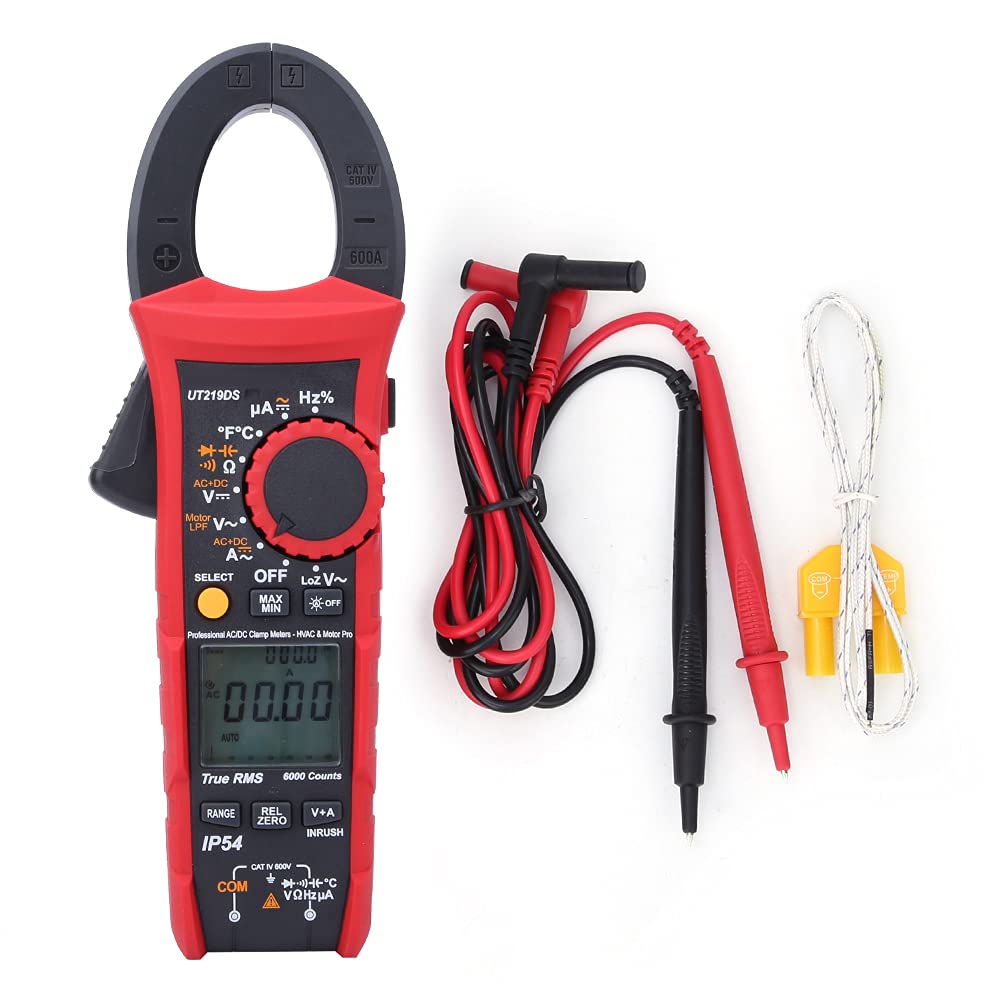
Figure 3.1: The Walfront UT219DS Digital Clamp Meter, including the main unit, red and black test leads, and a K-type temperature probe.
คุณสมบัติหลัก:
- 6000 Counts LCD Display: ให้ผลการอ่านที่ชัดเจนและแม่นยำ
- การวัด True RMS: Ensures accurate readings for non-sinusoidal waveforms.
- ช่องเปิดปากกราม 33 มม. Allows for easy clamping around conductors without interrupting the circuit.
- ระดับ IP54: ช่วยป้องกันฝุ่นละอองและน้ำกระเด็น
- 2-Meter Drop Test: Designed for durability in demanding environments.
- แสงพื้นหลังอัตโนมัติ: ช่วยเพิ่มทัศนวิสัยในสภาพแสงน้อย
- ปิดเครื่องอัตโนมัติ: ช่วยประหยัดอายุการใช้งานแบตเตอรี่
- ฟังก์ชั่นพิเศษ: Includes LoZ voltage, Motor Phase Sequence, Low-Pass Filter (LPF), Inrush current, Data Hold, MAX/MIN, Relative Value, and Dual Display (V+A).

Figure 3.2: The ergonomic design of the UT219DS allows for comfortable single-hand operation.
ส่วนประกอบ:
- Clamp ขากรรไกร: ใช้สำหรับวัดกระแสไฟฟ้า AC/DC แบบไม่สัมผัส
- แป้นหมุน: Selects measurement functions.
- จอแสดงผล LCD: แสดงค่าการวัด หน่วย และตัวบ่งชี้ฟังก์ชัน
- ปุ่มฟังก์ชั่น: (SELECT, MAX/MIN, REL/ZERO, V+A, INRUSH) for additional features.
- ช่องเสียบอินพุต: For connecting test leads and temperature probe.
- สิ่งกระตุ้น: เปิด clamp กราม.

รูปที่ 3.3: รายละเอียด view ของclamp jaw mechanism and the input jacks for test leads and probes.
4. การตั้งค่า
การติดตั้งแบตเตอรี่:
The UT219DS requires three (3) 1.5V AAA alkaline batteries for operation. Follow these steps to install or replace the batteries:
- Ensure the meter is powered off and disconnect all test leads from the meter and any circuit.
- ค้นหาฝาครอบช่องใส่แบตเตอรี่ที่ด้านหลังของมิเตอร์
- ใช้ไขควงคลายสกรูที่ยึดฝาครอบแบตเตอรี่ออก
- ถอดฝาครอบแบตเตอรี่ออก
- Insert three new 1.5V AAA alkaline batteries, observing the correct polarity (+ and -) as indicated inside the compartment.
- ปิดฝาครอบแบตเตอรี่และขันสกรูให้แน่นสนิท

รูปที่ 4.1: ด้านหลัง view of the meter with the battery compartment open, illustrating the placement for three AAA batteries.
5. คู่มือการใช้งาน
Before taking any measurements, ensure the meter is set to the correct function and the test leads are properly connected.
5.1 การเลือกฟังก์ชัน
Turn the rotary dial to select the desired measurement function. The meter will automatically select the appropriate range for most functions (Auto Range). Press the เลือก button to toggle between different sub-functions within a single dial position (e.g., AC/DC voltagเช่น ความต้านทาน/ความต่อเนื่อง/ไดโอด)
5.2 การวัดกระแสไฟฟ้ากระแสสลับ/กระแสตรง (Cl)amp กราม)
- หมุนแป้นหมุนไปที่ A~ (กระแสไฟฟ้าสลับ) หรือ A= ตำแหน่ง (กระแสไฟฟ้าตรง)
- กดทริกเกอร์เพื่อเปิด clamp กราม.
- ให้หุ้มตัวนำเพียงตัวเดียวของวงจรไว้ภายในตัวหุ้มamp jaw. For AC current, ensure the conductor is centered. For DC current, observe polarity.
- อ่านค่าปัจจุบันบนจอ LCD
5.3 โวลต์ AC/DCtagอีการวัด
- ใส่สายวัดทดสอบสีแดงลงใน VΩเฮิร์ตซ์ ขั้วต่อและสายทดสอบสีดำเข้า คอม เทอร์มินัล.
- หมุนแป้นหมุนไปที่ V~ (AC เล่มtagจ) หรือ V= (DC เล่มtagง) ตำแหน่ง ใช้ เลือก button to switch between AC and DC if needed.
- เชื่อมต่อโพรบวัดทดสอบเข้ากับวงจรหรือชิ้นส่วนที่ต้องการวัด
- อ่านเล่มที่tagค่า e บนจอ LCD
5.4 Resistance, Continuity, Diode, and Capacitance Measurement
- ใส่สายวัดทดสอบสีแดงลงใน VΩเฮิร์ตซ์ ขั้วต่อและสายทดสอบสีดำเข้า คอม เทอร์มินัล.
- หมุนแป้นหมุนไปที่ Ω (Resistance/Continuity/Diode/Capacitance) position.
- กดปุ่ม เลือก button to cycle through Resistance (Ω), Continuity (-), Diode (-), and Capacitance (F) ฟังก์ชั่น.
- Connect the test probes across the component to be measured. For continuity, a beep indicates a continuous circuit. For diode, forward voltage drop is displayed. For capacitance, ensure the capacitor is discharged before measurement.
- อ่านค่าบนจอ LCD
5.5 Frequency/Duty Cycle Measurement (Hz%)
- ใส่สายวัดทดสอบสีแดงลงใน VΩเฮิร์ตซ์ ขั้วต่อและสายทดสอบสีดำเข้า คอม เทอร์มินัล.
- หมุนแป้นหมุนไปที่ เฮิร์ตซ์% ตำแหน่ง.
- Connect the test probes across the circuit where frequency or duty cycle is to be measured.
- Read the frequency (Hz) or duty cycle (%) value on the LCD display.
5.6 การวัดอุณหภูมิ
- หมุนแป้นหมุนไปที่ °C°F ตำแหน่ง.
- Insert the K-type temperature probe into the input terminals, observing polarity.
- วางปลายหัววัดอุณหภูมิลงบนวัตถุหรือสภาพแวดล้อมที่ต้องการวัด
- Read the temperature value in Celsius or Fahrenheit on the LCD display. Use the เลือก ปุ่มสำหรับสลับระหว่างหน่วยต่างๆ
5.7 LoZ Voltagอีการวัด
The LoZ (Low Impedance) voltage measurement function provides a low input impedance to eliminate ghost voltages, ensuring more accurate readings in certain applications.
- ใส่สายวัดทดสอบสีแดงลงใน VΩเฮิร์ตซ์ ขั้วต่อและสายทดสอบสีดำเข้า คอม เทอร์มินัล.
- หมุนแป้นหมุนไปที่ โลซวี~ ตำแหน่ง.
- Connect the test probes across the circuit to be measured.
- Read the LoZ voltagค่า e บนจอ LCD
5.8 Motor Phase Sequence Measurement
This function helps identify the phase sequence of a three-phase motor or power supply.
- Insert the test leads into the appropriate terminals as indicated for voltagอีการวัด
- หมุนแป้นหมุนไปที่ Motor LPF V~ ตำแหน่ง.
- Follow the on-screen prompts or specific instructions for connecting the probes to the three phases.
- The display will indicate the phase sequence.
5.9 Low-Pass Filter (LPF) Measurement
The LPF function filters out high-frequency noise, providing stable and accurate voltage and frequency measurements for variable frequency drives (VFDs) and other noisy environments.
- Insert the test leads into the appropriate terminals for voltagอีการวัด
- หมุนแป้นหมุนไปที่ Motor LPF V~ ตำแหน่ง.
- Connect the test probes across the circuit.
- The meter will display the filtered voltage หรือความถี่
5.10 การวัดกระแสไฟกระชาก
This function measures the initial surge of current when a motor or other inductive load starts up.
- Turn the rotary dial to an AC Current (A~) ตำแหน่ง.
- กดปุ่ม พุ่งเข้า button. The meter will enter inrush measurement mode.
- Clamp the jaw around the single conductor of the motor or load.
- Start the motor/load. The meter will capture and display the peak inrush current.
5.11 การเก็บข้อมูล (ชั่วโมง)
กดปุ่ม H ปุ่มนี้ใช้สำหรับหยุดการแสดงค่าปัจจุบันบนหน้าจอ กดอีกครั้งเพื่อปล่อย
5.12 Maximum/Minimum (MAX/MIN)
กดปุ่ม สูงสุด/ต่ำสุด button to record the maximum and minimum readings over time. Press again to cycle between MAX, MIN, and current reading. Hold to exit.
5.13 Relative Value (REL/ZERO)
กดปุ่ม REL/ศูนย์ button to store the current reading as a reference value and display subsequent measurements as a deviation from this reference. This is useful for nulling out test lead resistance or comparing values. Hold to exit.
5.14 Dual Display (V+A)
In certain modes, the meter can display both voltage and current simultaneously. Press the V+A button to activate this feature, allowing for automatic monitoring of voltage in current mode.
6. การบำรุงรักษา
6.1 การทำความสะอาด:
เช็ดมิเตอร์asinจีกับโฆษณาamp ผ้าและผงซักฟอกอ่อนๆ ห้ามใช้สารกัดกร่อนหรือตัวทำละลาย ตรวจสอบให้แน่ใจว่ามิเตอร์แห้งสนิทก่อนใช้งาน
6.2 การเปลี่ยนแบตเตอรี่:
Refer to Section 4. Setup for detailed instructions on battery replacement. Always replace all three batteries simultaneously with new 1.5V AAA alkaline batteries.
6.3 การจัดเก็บ:
หากไม่ได้ใช้งานมิเตอร์เป็นเวลานาน ให้ถอดแบตเตอรี่ออกเพื่อป้องกันการรั่วไหลและความเสียหาย เก็บมิเตอร์ไว้ในที่แห้งและเย็น หลีกเลี่ยงแสงแดดโดยตรงและอุณหภูมิที่สูงหรือต่ำเกินไป

Figure 6.1: The included carrying case provides protection for the meter during storage and transport.
7 การแก้ไขปัญหา
| ปัญหา | สาเหตุที่เป็นไปได้ | สารละลาย |
|---|---|---|
| มิเตอร์ไม่เปิดใช้งาน | แบตเตอรี่เสียหรือติดตั้งไม่ถูกต้อง | ตรวจสอบขั้วแบตเตอรี่ เปลี่ยนแบตเตอรี่ |
| ไม่มีการแสดงค่าการอ่านหรือ 'OL' (โอเวอร์โหลด) | เลือกฟังก์ชันไม่ถูกต้อง; วงจรเปิด; การวัดเกินช่วงที่กำหนด | Select correct function; check circuit continuity; ensure measurement is within meter's range. |
| การอ่านที่ไม่ถูกต้อง | Low battery; poor test lead connection; external interference. | Replace batteries; ensure secure connections; move away from strong electromagnetic fields. |
| Display shows 'Lo Batt'. | ปริมาณแบตเตอรี่ต่ำtage. | เปลี่ยนแบตเตอรี่ทันที |
8. ข้อมูลจำเพาะ
| พารามิเตอร์ | ข้อมูลจำเพาะ |
|---|---|
| แบบอย่าง | UT219DS |
| จำนวนการแสดงผล | 6000 |
| ช่วงอัตโนมัติ/แมนนวล | ใช่ |
| ขนาดช่องเปิดขากรรไกร | 33 มม. (1.3 นิ้ว) |
| ค่า RMS ที่แท้จริง | ใช่ |
| การตอบสนองความถี่ของกระแสไฟฟ้าสลับ | 40Hz~400Hz |
| ฉบับ ACtage Frequency Response | 40เฮิรตซ์~1กิโลเฮิรตซ์ |
| Motor Phase Sequence Measurement | สูงถึง 600.0V |
| Low-Pass Filter Test | Yes (1 kHz and 3 dB attenuation) |
| การทดสอบ Diode | 3V |
| Digital Conversion Rate | 5 ครั้ง / วินาที |
| Analog Bar Conversion Rate | 20 ครั้ง / วินาที |
| กราฟแท่งอนาล็อก | 31 ส่วน |
| ประเภทจอแสดงผล LCD | HTN Dual Display Interface |
| ปิดเครื่องอัตโนมัติ | ใช่ |
| ปริมาณต่ำtagอี ดิสเพลย์ | ใช่ |
| Data Hold (H) | ใช่ |
| มูลค่าสัมพันธ์ (REL) | ใช่ |
| Maximum/Minimum (MAX/MIN) | ใช่ |
| Double Display of Voltage + Current (V+A) | ใช่ |
| Function Selection (SELECT) | ใช่ |
| แสงพื้นหลังอัตโนมัติ | ใช่ |
| คะแนนการทดสอบการตกกระแทก | 2 เมตร |
| ระดับการป้องกันน้ำและฝุ่น (IP) | IP54 |
| อิมพีแดนซ์อินพุต | ≥10เมกะโอห์ม |
| แหล่งพลังงาน | แบตเตอรี่อัลคาไลน์ AAA 3 ก้อน x 1.5V |
| ขนาดหน้าจอ LCD | 35 x 31 มม. (1.4 x 1.2 นิ้ว) |
| น้ำหนักสินค้า | 0.71 กิโลกรัม |
| การรับรอง | CE, FCC, RoHS |
9. การรับประกันและการสนับสนุน
For product support, technical assistance, or warranty inquiries, please contact Walfront customer service or visit the official Walfront store on Amazon:
โปรดเก็บใบเสร็จรับเงินของคุณไว้เพื่อวัตถุประสงค์การรับประกัน