
การแนะนำ
The Power Dynamics PDM25 is a compact and versatile 100V amplifier designed for small installations such as shops, restaurants, and offices. It offers easy operation, reliable performance, and a range of features including Bluetooth connectivity, an integrated MP3 player, USB input, AUX input, and a wireless remote control. This manual provides essential information for the safe and efficient use of your PDM25 ampชีวิต.
คำแนะนำเพื่อความปลอดภัย
- อ่านคู่มือนี้อย่างละเอียดก่อนใช้ผลิตภัณฑ์
- เก็บคู่มือนี้ไว้เพื่อใช้อ้างอิงในอนาคต
- ปฏิบัติตามคำเตือนทั้งหมดและคำแนะนำทั้งหมด
- ห้ามใช้อุปกรณ์นี้ใกล้น้ำ
- ทำความสะอาดด้วยผ้าแห้งเท่านั้น
- อย่าปิดกั้นช่องระบายอากาศใดๆ ติดตั้งตามคำแนะนำของผู้ผลิต
- ห้ามติดตั้งใกล้แหล่งความร้อน เช่น หม้อน้ำ เครื่องทำความร้อน เตา หรืออุปกรณ์อื่น ๆ (รวมถึง ampเครื่องให้ความร้อน) ที่ผลิตความร้อน
- อย่าละเลยจุดประสงค์ด้านความปลอดภัยของปลั๊กแบบมีขั้วหรือแบบมีสายดิน ปลั๊กแบบมีขั้วจะมีใบมีด 2 ใบ โดยใบหนึ่งจะกว้างกว่าอีกใบ ปลั๊กแบบมีสายดินจะมีใบมีด 2 ใบและขาต่อสายดินที่สาม ขาที่กว้างหรือขาต่อสายดินที่สามนั้นมีไว้เพื่อความปลอดภัยของคุณ หากปลั๊กที่ให้มาไม่พอดีกับเต้ารับของคุณ ให้ปรึกษาช่างไฟฟ้าเพื่อขอเปลี่ยนเต้ารับที่ล้าสมัย
- ปกป้องสายไฟไม่ให้ถูกเหยียบหรือถูกหนีบ โดยเฉพาะที่ปลั๊ก เต้ารับไฟฟ้า และจุดที่สายไฟออกจากเครื่อง
- ใช้เฉพาะอุปกรณ์เสริม/สิ่งที่แนบตามที่ผู้ผลิตกำหนดเท่านั้น
- ถอดปลั๊กอุปกรณ์นี้ในระหว่างพายุฝนฟ้าคะนองหรือเมื่อไม่ได้ใช้งานเป็นเวลานาน
- แจ้งบริการทั้งหมดให้ช่างที่ผ่านการรับรองทราบ จำเป็นต้องให้บริการเมื่ออุปกรณ์ได้รับความเสียหายในลักษณะใดก็ตาม เช่น สายไฟหรือปลั๊กชำรุด ของเหลวหกหรือมีวัตถุตกลงไปในอุปกรณ์ อุปกรณ์โดนฝนหรือความชื้น ไม่สามารถทำงานได้ตามปกติ หรือตกหล่น
- คำเตือน: เพื่อลดความเสี่ยงต่อการเกิดไฟไหม้หรือไฟฟ้าช็อต อย่าให้อุปกรณ์นี้โดนฝนหรือความชื้น
- คำเตือน: Do not open the cover. No user-serviceable parts inside. Refer servicing to qualified personnel only.
สินค้าเกินview
The PDM25 amplifier features a user-friendly front panel with controls for various audio sources and volume adjustments, along with a clear digital display. The rear panel provides all necessary connections for speakers, external audio sources, and power.

รูปที่ 1: แผงด้านหน้าด้านบนview of the PDM25 Ampชีวิต.

Figure 2: Rear Panel Connections of the PDM25 Ampชีวิต.
การตั้งค่า
1. การแกะกล่อง
นำไฟล์ amplifier from its packaging. Inspect the unit for any signs of damage during transit. Retain the original packaging for future transport or storage.
2 การวาง
วาง amplifier on a stable, flat surface. Ensure adequate ventilation around the unit to prevent overheating. Avoid placing it near heat sources or in direct sunlight.
3. การเชื่อมต่อลำโพง
The PDM25 supports both 100V line speakers and low impedance (4-16 Ohm) speakers.
- For 100V Line Speakers: Connect the positive (+) terminal of your 100V speaker system to the "100V" terminal on the amplifier's rear panel. Connect the negative (-) terminal to the "COM" terminal.
- For Low Impedance Speakers (4-16 Ohm): Connect the positive (+) terminal of your speaker to the "4-16 Ohm" terminal on the amplifier's rear panel. Connect the negative (-) terminal to the "COM" terminal.
Ensure correct polarity (+ to + and - to -) for optimal sound quality. Do not connect both 100V and low impedance speakers simultaneously to the same output.
4. การเชื่อมต่อแหล่งกำเนิดเสียง
- อินพุต AUX: Connect external audio devices (e.g., CD player, mixer) to the RCA "AUX" input jacks on the rear panel using an RCA cable.
- อินพุตไมโครโฟน: Connect a microphone to the 6.3mm jack on the front panel.
- ช่องต่อ USB: ใส่แฟลชไดรฟ์ USB ที่มี MP3 fileเข้าสู่พอร์ต USB บนแผงด้านหน้า
5. การเชื่อมต่อไฟฟ้า
เชื่อมต่อสายไฟที่ให้มากับช่องเสียบไฟ AC ที่แผงด้านหลังของเครื่อง amplifier and then to a suitable mains power outlet (230 Vac/50 Hz).
คำแนะนำการใช้งาน
1. เปิด/ปิดเครื่อง
Press the "ON/OFF" switch on the front panel to power on or off the ampชีวิต.
2. การเลือกแหล่งที่มา
Use the "MODE" button on the front panel or the remote control to cycle through available input sources: Bluetooth, USB/MP3, AUX, and Radio. The selected mode will be displayed on the digital screen.

Figure 3: Front Panel Controls and USB Input.
3. การควบคุมระดับเสียง
- ปริมาณหลัก: Adjust the main output volume using the large "VOLUME" knob on the front panel.
- Individual Source Volume: Adjust the volume for MP3, AUX, and MIC inputs using their respective smaller "VOLUME" knobs.
4. การควบคุมเสียง
Use the "TREBLE" and "BASS" knobs on the front panel to adjust the high and low frequencies of the audio output.
5. การทำงานของบลูทูธ
- Select "Bluetooth" mode using the "MODE" button. The display will show "BLUE".
- On your Bluetooth-enabled device (smartphone, tablet, etc.), search for available devices and select "PDM25".
- เมื่อจับคู่แล้ว คุณสามารถสตรีมเสียงแบบไร้สายไปยัง ampชีวิต.
6. USB/MP3 Player Operation
- Insert a USB flash drive into the USB port. The amplifier will automatically switch to USB mode and begin playing MP3 files.
- Use the play/pause, next, and previous track buttons on the front panel or remote control to manage playback.
7. การใช้งานวิทยุ
In Radio mode, use the control buttons to scan for and select radio stations.
8. รีโมทคอนโทรล
The included remote control provides convenient access to power, mode selection, volume, track control, and equalizer presets.
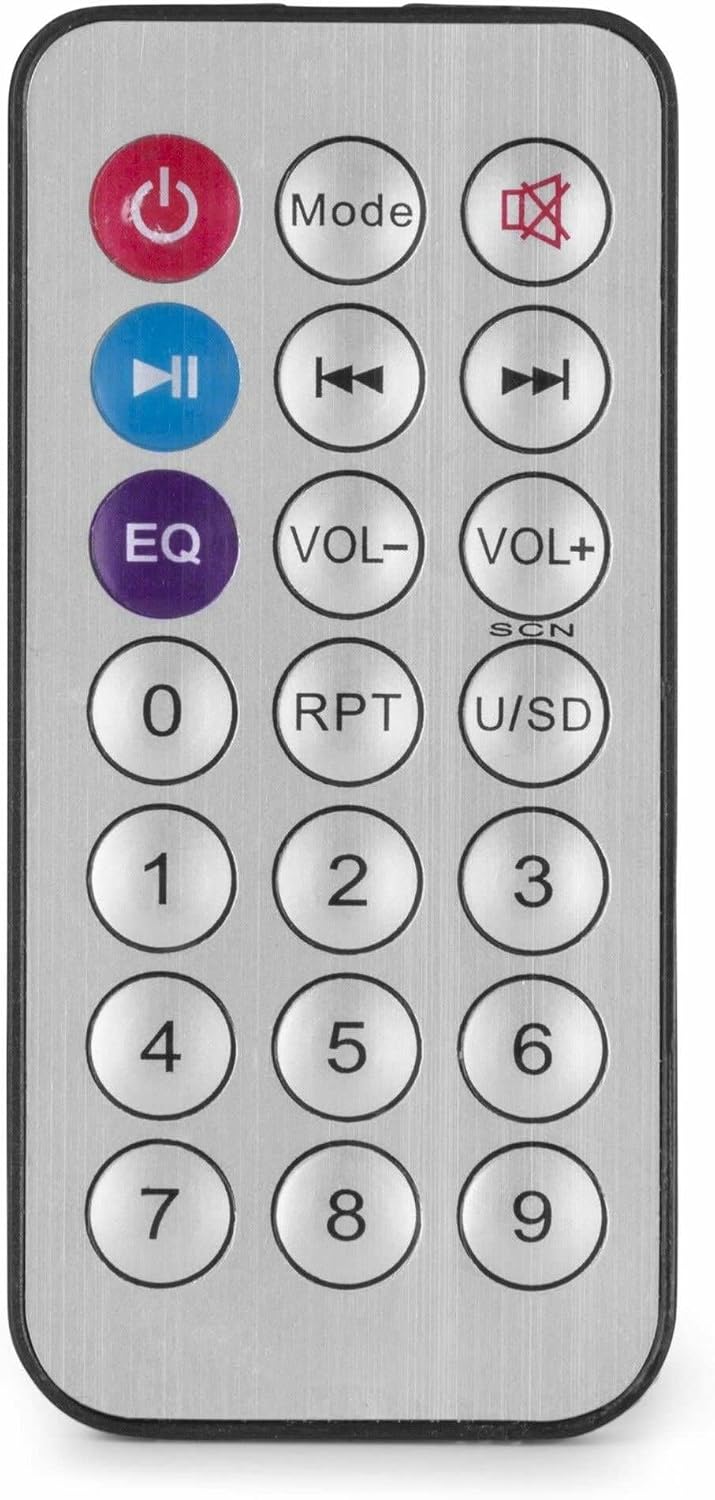
รูปที่ 4: รีโมทคอนโทรลไร้สาย
การซ่อมบำรุง
- การทำความสะอาด: ถอดปลั๊กไฟก่อนทำความสะอาด ใช้ผ้าแห้งนุ่มเช็ดทำความสะอาดภายนอกเครื่อง ampห้ามใช้น้ำยาทำความสะอาดชนิดเหลวหรือสเปรย์กระป๋อง
- การระบายอากาศ : ตรวจสอบให้แน่ใจว่าช่องระบายอากาศปราศจากฝุ่นและเศษสิ่งสกปรก เพื่อรักษาการไหลเวียนของอากาศที่เหมาะสม
- พื้นที่จัดเก็บ: หากต้องเก็บรักษาเครื่องไว้เป็นเวลานาน ควรตัดการเชื่อมต่อจากแหล่งจ่ายไฟและเก็บไว้ในที่แห้งและเย็น โดยควรเก็บไว้ในบรรจุภัณฑ์เดิม
การแก้ไขปัญหา
| ปัญหา | สาเหตุที่เป็นไปได้ | สารละลาย |
|---|---|---|
| ไม่มีไฟฟ้า | ไม่ได้เสียบสายไฟ; ปลั๊กไฟชำรุด; Ampปิดสวิตช์ลิไฟเออร์ | Check power cable connection; Test power outlet; Ensure amplifier switch is ON. |
| ไม่มีเสียงออก | Incorrect source selected; Volume too low; Speaker connections faulty; Mute activated. | Select correct input source; Increase master and source volume; Check speaker wiring; Deactivate mute function on remote. |
| บลูทูธไม่เชื่อมต่อ | Ampเครื่องขยายเสียงไม่ได้อยู่ในโหมดบลูทูธ อุปกรณ์อยู่ไกลเกินไป อุปกรณ์จับคู่กับหน่วยอื่นแล้ว | ทำให้มั่นใจ amplifier is in Bluetooth mode ("BLUE" displayed); Move device closer; Disconnect from other devices and try again. |
| ปัญหาการเล่นไฟล์ผ่าน USB | ไดรฟ์ USB ไม่ได้รับการฟอร์แมตอย่างถูกต้อง ไม่เข้ากัน file ฟอร์แมต; ไดรฟ์ USB ผิดพลาด | ตรวจสอบให้แน่ใจว่าไดรฟ์ USB ฟอร์แมตเป็น FAT32 แล้ว ใช้ไฟล์ MP3 fileลองใช้แฟลชไดรฟ์ USB ตัวอื่นดู |
| เสียงเพี้ยน | Volume too high; Incorrect impedance matching for speakers; Faulty audio source. | Reduce volume; Verify speaker impedance matches amplifier output; Test with a different audio source. |
ข้อมูลจำเพาะ
- กำลังขับ: 25 วัตต์
- เอาท์พุตลำโพง: 100V and 4-16 Ohm
- ช่วงความถี่: 50 เฮิรตซ์ - 18 กิโลเฮิรตซ์
- อัตราส่วนสัญญาณต่อเสียงรบกวน: >75 เดซิเบล
- การเชื่อมต่อฉบับที่tage: 230 Vac/50 Hz
- ขนาด (ยาว x กว้าง x สูง): 205 x 285 x 65 มม.
- น้ำหนัก: 1.5 กก.
- คุณสมบัติ: Bluetooth, USB MP3 Player, Radio, AUX Input, Microphone Input, Bass/Treble Control, Integrated Equalizer, Remote Control
- หมายเลขรุ่น: พีดีเอ็ม25
- ผู้ผลิต: Tronios BV
การรับประกันและการสนับสนุน
For warranty information and technical support, please refer to the documentation provided with your purchase or visit the official Power Dynamics webไซต์ เก็บหลักฐานการซื้อของคุณไว้เพื่อใช้ในกรณีเรียกร้องการรับประกัน
ผู้ผลิต: Tronios BV
Webเว็บไซต์: www.power-dynamics.eu