
แอปเปิ้ล ไอโฟน 11 โปร
คู่มือการใช้งาน Apple iPhone 11 Pro
รุ่น : A2160
1. Introduction to Your iPhone 11 Pro
The Apple iPhone 11 Pro is a sophisticated smartphone designed for exceptional performance and advanced multimedia capabilities. It features a Super Retina XDR display, a powerful A13 Bionic chip, and a versatile triple-camera system, making it ideal for capturing high-quality photos and videos, gaming, and augmented reality experiences.
คู่มือนี้ให้ข้อมูลที่จำเป็นสำหรับการติดตั้ง การใช้งาน การบำรุงรักษา และการแก้ไขปัญหาอุปกรณ์ของคุณ

รูปที่ 1: ด้านหน้าและด้านหลัง view of the Apple iPhone 11 Pro in Space Gray.
2. อะไรอยู่ในกล่อง
Upon unboxing your iPhone 11 Pro, please ensure all listed items are present:
- Apple iPhone 11 Pro (Space Gray, 64GB)
- สาย USB (ทั่วไป, ได้รับการรับรอง MFi)
Note: Headphones and a SIM card are not included with this renewed device.
3. ข้อมูลจำเพาะทางเทคนิค
| คุณสมบัติ | ข้อมูลจำเพาะ |
|---|---|
| ชื่อรุ่น | ไอโฟน 11 โปร |
| หมายเลขรุ่น | เอ2160 |
| ขนาด (สินค้า) | 7 x 5 x 4 นิ้ว |
| น้ำหนัก | 6.6 ออนซ์ |
| ขนาดจอแสดงผล | 5.8 Inches (Super Retina XDR OLED) |
| ความละเอียดการแสดงผล | 2436 x 1125 พิกเซล |
| โปรเซสเซอร์ | ชิป A13 Bionic |
| แรม | 4GB |
| ความจุในการเก็บข้อมูล | 64GB |
| ระบบปฏิบัติการ | ไอโอเอส |
| กล้องหลัง | Triple 12MP (Ultra Wide, Wide, Telephoto) |
| กล้องหน้า | 12MP |
| ประเภทแบตเตอรี่ | ลิเธียมไอออน (3046 mAh) |
| อายุการใช้งานแบตเตอรี่ (เวลาสนทนา) | นานถึง 18 ชั่วโมง |
| การเชื่อมต่อ | Cellular, Bluetooth, Wi-Fi, USB, NFC |
| วิธีการป้อนข้อมูล | หน้าจอสัมผัส |

รูปที่ 2: ด้านข้าง view of the iPhone 11 Pro, highlighting its sleek design and button placement.
4. คู่มือการติดตั้ง
4.1 การเปิดเครื่องครั้งแรกและการเปิดใช้งาน
- ชาร์จอุปกรณ์: Connect the provided USB cable to your iPhone and a compatible power adapter (not included). Charge until the battery icon indicates a sufficient charge.
- เปิดเครื่อง: กดปุ่มด้านข้างค้างไว้จนกระทั่งโลโก้ Apple ปรากฏขึ้น
- ตั้งค่าเริ่มต้น: ปฏิบัติตามคำแนะนำบนหน้าจอเพื่อเลือกภาษา ภูมิภาค และเชื่อมต่อกับเครือข่าย Wi-Fi
- การถ่ายโอนข้อมูล (ทางเลือก): If you have an existing iPhone, you can transfer data using Quick Start or restore from an iCloud/iTunes backup.
- การจดจำใบหน้าและรหัสผ่าน: Set up Face ID for secure unlocking and app authentication, and create a strong passcode.
- แอปเปิลไอดี: ลงชื่อเข้าใช้ด้วย Apple ID ของคุณหรือสร้างใหม่เพื่อเข้าถึง App Store, iCloud และบริการอื่นๆ ของ Apple
4.2 ความเข้ากันได้กับผู้ให้บริการเครือข่าย
This iPhone 11 Pro is unlocked and compatible with any carrier of choice on both GSM and CDMA networks (e.g., AT&T, T-Mobile, Sprint, Verizon, US Cellular, Cricket, Metro, Tracfone, Mint Mobile, etc.). Insert your nano-SIM card into the SIM tray using a SIM ejector tool (not included).
5. การใช้งาน iPhone 11 Pro ของคุณ
5.1 การนำทางและท่าทาง
- หน้าจอหลัก: ปัดขึ้นจากขอบล่างของหน้าจอเพื่อไปที่หน้าจอหลัก
- ตัวสลับแอป: ปัดขึ้นจากขอบล่างและหยุดตรงกลางหน้าจอเพื่อ view เปิดแอพ
- ศูนย์ควบคุม: Swipe down from the top-right corner of the screen to access Control Center for quick settings.
- การแจ้งเตือน: ปัดลงจากมุมซ้ายบนหรือตรงกลางหน้าจอเพื่อ view การแจ้งเตือน
5.2 คุณสมบัติกล้อง
The iPhone 11 Pro's triple-camera system allows for versatile photography and videography:
- กล้องอัลตร้าไวด์: Ideal for landscapes and group shots, capturing a wider field of view.
- กล้องมุมกว้าง: The primary camera for everyday photos and videos, excelling in various lighting conditions.
- กล้องเทเลโฟโต้: Provides 2x optical zoom for closer shots without losing detail.
- โหมดกลางคืน: Automatically activates in low-light environments to produce brighter, more detailed photos.
- การบันทึกวิดีโอ 4K: All cameras support 4K video recording at various frame rates, offering high-quality cinematic capture.

รูปที่ 3: ด้านหลัง view ของ iPhone 11 Pro แสดงasing its advanced triple-camera setup.
5.3 ประสิทธิภาพและการแสดงผล
- A13 Bionic Chip: Ensures unprecedented performance for demanding applications, gaming, and augmented reality.
- Super Retina XDR Display: The brightest iPhone display yet, offering vibrant colors, deep blacks, and incredible detail for HDR content.
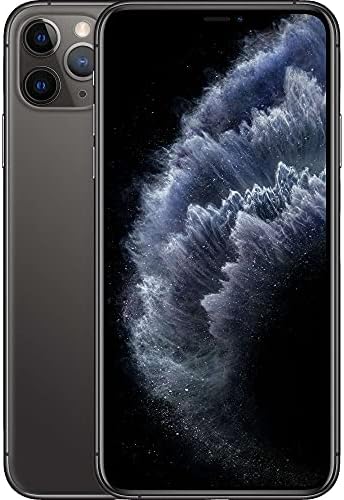
Figure 4: The iPhone 11 Pro's Super Retina XDR display in action, showing its vivid colors.
6. การดูแลรักษา
- การทำความสะอาด: ใช้ผ้านุ่มไม่เป็นขุยทำความสะอาดหน้าจอและตัวเครื่อง หลีกเลี่ยงวัสดุที่มีฤทธิ์กัดกร่อนหรือสารเคมีรุนแรง
- ความต้านทานน้ำ: The iPhone 11 Pro is splash, water, and dust resistant under controlled laboratory conditions. However, water and dust resistance are not permanent conditions and resistance might decrease as a result of normal wear. Do not attempt to charge a wet iPhone.
- สุขภาพแบตเตอรี่: To prolong battery life, avoid extreme temperatures. The device is guaranteed to have a minimum battery capacity of 80%.
- การอัปเดตซอฟต์แวร์: Regularly update iOS to ensure optimal performance, security, and access to new features.
- การป้องกันทางกายภาพ: While inspected for minimal cosmetic damage, using a protective case and screen protector is recommended to prevent future wear.
7. การแก้ไขปัญหาทั่วไป
7.1 อุปกรณ์ไม่ตอบสนอง
หาก iPhone ของคุณไม่ตอบสนอง ให้บังคับรีสตาร์ท:
- กดและปล่อยปุ่มเพิ่มระดับเสียงอย่างรวดเร็ว
- กดและปล่อยปุ่มลดระดับเสียงอย่างรวดเร็ว
- กดปุ่มด้านข้างค้างไว้จนกระทั่งโลโก้ Apple ปรากฏขึ้น
7.2 แบตเตอรี่หมดเร็ว
- Check Battery Health in Settings > Battery > Battery Health.
- ลดความสว่างหน้าจอ
- Disable Background App Refresh for apps you don't frequently use.
- Turn off Location Services for apps that don't require it.
7.3 Connectivity Issues (Wi-Fi/Bluetooth/Cellular)
- สลับเปิดและปิดโหมดเครื่องบิน
- รีสตาร์ท iPhone ของคุณ
- Reset Network Settings (Settings > General > Transfer or Reset iPhone > Reset > Reset Network Settings).
- Ensure your SIM card is properly inserted and your carrier plan is active.
8. การรับประกันและการสนับสนุน
This renewed iPhone 11 Pro has successfully passed a full diagnostic test, ensuring like-new functionality and removal of any prior-user personal information. It is inspected and guaranteed to have minimal cosmetic damage, not noticeable when held at arm's length.
For specific warranty details and support, please refer to the Amazon Renewed program terms and conditions or contact Amazon customer service directly. Protection plans may also be available for purchase.
หากต้องการความช่วยเหลือเพิ่มเติม โปรดไปที่ ร้านค้า Amazon ที่ได้รับการปรับปรุงใหม่.
Ask a question about this manual
Ask about setup, troubleshooting, compatibility, parts, safety, or missing instructions. Manuals+ will review the question and use this page’s manual context to help answer it.